1. Pengenalan
Thank you for choosing the Sharp SumoBox CP-LS100. This high-performance portable speaker is designed to deliver powerful and clear audio for various applications, from personal entertainment to small events. This manual provides essential information for setting up, operating, and maintaining your SumoBox CP-LS100 to ensure optimal performance and longevity.

Figure 1.1: Sharp SumoBox CP-LS100 Portable Speaker
2. Maklumat Keselamatan
Sila baca semua arahan keselamatan sebelum menggunakan produk ini. Simpan manual ini untuk rujukan pada masa hadapan.
- Do not expose the speaker to rain, moisture, or extreme temperatures. The CP-LS100 model is not IPX rated and is not designed for use in damp atau keadaan basah.
- Ensure proper ventilation around the speaker. Do not block any ventilation openings.
- Gunakan hanya penyesuai kuasa yang dibekalkan dengan unit.
- Jangan buka penutup pembesar suara. Rujuk semua servis kepada kakitangan servis yang berkelayakan.
- Avoid placing the speaker on unstable surfaces.
- Jauhkan pembesar suara daripada sumber haba seperti radiator, daftar haba, dapur atau peralatan lain (termasuk amppenghidup) yang menghasilkan haba.
- Lindungi kord kuasa daripada berjalan atau tersepit, terutamanya pada palam, bekas kemudahan dan tempat keluar dari radas.
3. Kandungan Pakej
Carefully unpack your SumoBox CP-LS100 and ensure all items are present and in good condition. The package should contain:
- Sharp SumoBox CP-LS100 Portable Speaker
- Kabel Kuasa
- Eight (8) Round Protective Corners
- Hex Driver and Screws for protective corners
- Manual Arahan (dokumen ini)
4. Produk Lebihview
The Sharp SumoBox CP-LS100 is a robust portable speaker designed for powerful audio output and versatile connectivity. It features a durable construction with a heavy-duty metal grill and integrated handles for easy transport.
4.1 Ciri-ciri Utama
- Output Kuasa Tinggi: Delivers 125W RMS (105dB) through 2 x 8-inch woofers and 2 x 2-inch tweeters.
- Bateri boleh tanggal: Provides up to 10 hours of playing time on a single charge. Additional batteries are available separately.
- Duo Mode (True Wireless Stereo): Pair two SumoBox speakers for a true stereo sound experience.
- 3-Channel Pro Panel: Features XLR/TRS combo inputs for microphones, instruments (keys, guitar), and other audio sources, with individual volume, treble, bass, and reverb controls.
- Amplified Speaker Link: Connect multiple SumoBox speakers via daisy chain for expanded sound coverage.
- SAM by Devialet: Utilizes Speaker Active Matching (SAM) technology for optimized speaker driver performance.
- Port Pengecasan USB: Conveniently charge mobile devices.
- Indoor/Outdoor Mode: Optimizes sound for different environments.
- Pemasangan Penyangga Pembesar Suara: Integrated 35mm mount for use with compatible speaker stands (minimum 25kg weight handling).
- Kawalan Aplikasi Smart Life: Manage settings and controls via the dedicated mobile application.
4.2 Kawalan dan Pelabuhan
The rear panel of the SumoBox CP-LS100 provides access to all controls and input/output ports.

Figure 4.1: 3-Channel Pro Panel
- CH1/CH2 XLR/TRS Combo Inputs: For connecting microphones or instruments.
- Volume, Treble, Bass, Reverb Knobs: Individual controls for each channel.
- Ducking Button: Automatically lowers music volume when a microphone input is detected.
- Butang Berpasangan Bluetooth: Memulakan mod berpasangan Bluetooth.
- Duo Mode Button: Activates True Wireless Stereo pairing with another SumoBox.
- Indoor/Outdoor Mode Selector: Melaraskan bunyi profile untuk prestasi optimum.
- AUX IN (3.5mm): For connecting external audio devices. Note: Using this port will override any active Bluetooth connection.
- Speaker Link IN/OUT: XLR ports for connecting multiple SumoBox units.
- Port Pengecasan USB: Untuk mengecas peranti luaran.
- Input DC 18V: For charging the battery when it is not in the SumoBox.
- Power Input (AC 100-240V): For main power supply and charging.
5. Persediaan
5.1 Attaching Protective Corners
The SumoBox CP-LS100 comes with eight protective corners to enhance durability and allow for stable positioning. Use the provided hex driver and screws to attach these corners to the designated points on the speaker.
5.2 Mengecas Bateri
Before first use, fully charge the speaker's battery. Connect the power cable to the speaker's power input and then to a wall outlet. The battery indicator lights will show the charging status. A full charge provides approximately 10 hours of playback.

Figure 5.1: Removable Battery
5.3 Menghidupkan/Mematikan
Press and hold the Power button on the rear panel to turn the speaker on or off.
6. Beroperasi
6.1 Berpasangan Bluetooth
- Turn on the SumoBox CP-LS100.
- Press the Bluetooth pairing button on the rear panel. The Bluetooth indicator will flash.
- On your Bluetooth-enabled device (smartphone, tablet, laptop), search for "SumoBox CP-LS100" in the Bluetooth settings.
- Select the speaker to pair. Once connected, the Bluetooth indicator will glow solid.
6.2 Duo Mode (True Wireless Stereo)
To achieve true wireless stereo sound, you can pair two SumoBox CP-LS100 speakers.

Figure 6.1: Duo Mode Setup
- Ensure both SumoBox speakers are powered on and not connected to any other Bluetooth device.
- On the first speaker (which will be the primary/left channel), press the Duo Mode button. The Duo Mode indicator will flash.
- On the second speaker (which will be the secondary/right channel), press the Duo Mode button.
- The two speakers will automatically connect. Once connected, the Duo Mode indicators on both speakers will glow solid.
- Now, connect your Bluetooth device to the primary speaker as described in Section 6.1. Audio will play in stereo across both speakers.
6.3 Menyambungkan Mikrofon dan Instrumen
Use XLR or 1/4-inch TRS cables to connect microphones or instruments to the CH1 and CH2 combo inputs. Adjust the individual Volume, Treble, Bass, and Reverb knobs for each channel to achieve the desired sound.

Figure 6.2: XLR/TRS Combo Inputs
6.4 Speaker Linking (Daisy Chain)
For larger venues or events, you can connect multiple SumoBox speakers using the Speaker Link IN/OUT XLR ports. This allows you to expand your sound system.

Rajah 6.3: Amplified Speaker Link
Connect the Speaker Link OUT of the first speaker to the Speaker Link IN of the second speaker, and so on. Note that daisy-chaining speakers via this method may introduce a slight latency (approximately 35ms per additional speaker).
6.5 Indoor/Outdoor Mode
Toggle the Indoor/Outdoor mode selector to optimize the speaker's sound profile for your environment. The outdoor mode typically enhances bass and projection for open spaces.
6.6 Aplikasi Kehidupan Pintar
Download the Smart Life app to control your SumoBox CP-LS100 from your mobile device. The app provides access to most of the rear panel controls for convenience.
7. Penyelenggaraan
- Pembersihan: Gunakan kain lembut dan kering untuk membersihkan bahagian luar pembesar suara. Jangan gunakan pembersih cecair atau aerosol.
- Penjagaan Bateri: For optimal battery life, avoid fully discharging the battery frequently. If storing the speaker for an extended period, charge the battery to about 50% and store in a cool, dry place.
- Storan: Store the speaker in a cool, dry environment away from direct sunlight and extreme temperatures.
8. Penyelesaian masalah
| Masalah | Kemungkinan Punca | Penyelesaian |
|---|---|---|
| Speaker tidak dihidupkan. | Battery is depleted or power cable is not connected. | Connect the power cable and charge the battery. Ensure the power outlet is functional. |
| Tiada keluaran bunyi. | Volume is too low, input source not connected, or incorrect input selected. | Increase volume. Check all cable connections. Ensure the correct input channel is active. |
| Isu sambungan Bluetooth. | Device is out of range, not in pairing mode, or already connected to another device. | Move device closer to speaker. Ensure speaker is in Bluetooth pairing mode. Disconnect from other devices. |
| Bunyi herot. | Volume too high, input signal too strong, or speaker placed on an unstable surface. | Reduce volume on speaker and/or input device. Check input signal level. Ensure speaker is on a stable surface. |
| Duo Mode not connecting. | Speakers are too far apart or already paired to other devices. | Ensure speakers are within close proximity. Disconnect both speakers from any other Bluetooth devices before initiating Duo Mode. |
9. Spesifikasi
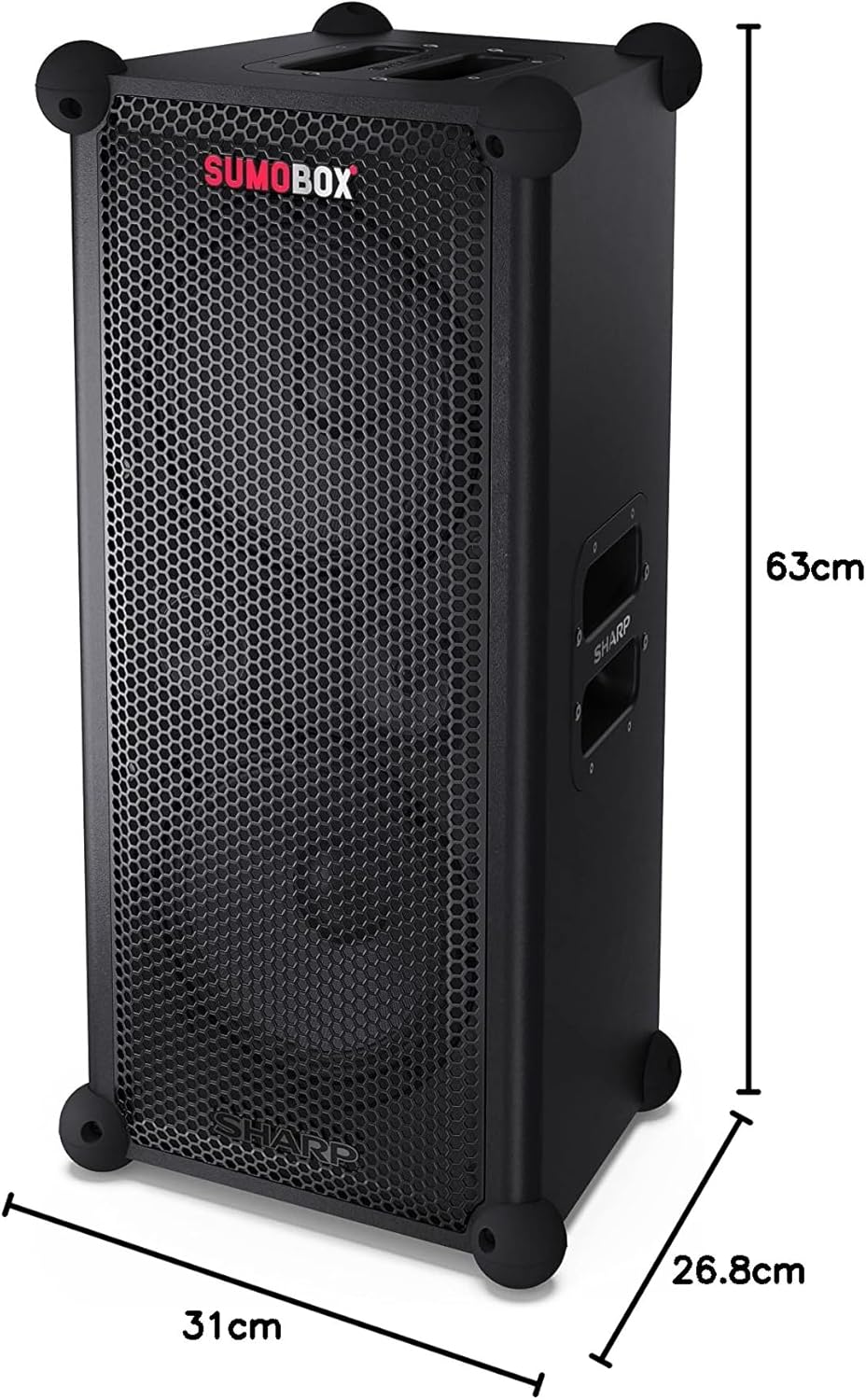
Rajah 9.1: Dimensi Produk
| Ciri | Perincian |
|---|---|
| Nama Model | SumoBox CP-LS100 |
| Jenis Pembesar Suara | Tower, Portable |
| Kuasa Keluaran Pembesar Suara | 120 Watt (RMS) |
| Tahap Tekanan Bunyi (SPL) | 105dB |
| Diameter Subwoofer | 8 Inci (x2) |
| Teknologi Ketersambungan | Bluetooth |
| Mod Keluaran Audio | Stereo (with Duo Mode) |
| Jenis Pengawal | Pro panel with advanced control and Sharp Life app |
| Hayat Bateri | Sehingga 10 Jam |
| Kapasiti Bateri | 5 Amp jam |
| Berat Barang | 9.7 Kilogram |
| Dimensi Produk (L x W x H) | 26.8 x 31 x 63 cm |
| warna | Hitam |
| Penilaian Kalis Air | Not IPX Rated (Not waterproof) |
10. Waranti dan Sokongan
For warranty information and technical support, please refer to the warranty card included with your product or visit the official Sharp website. You can also contact Sharp customer service for assistance with product registration, troubleshooting, and service inquiries.
Sharp Customer Support: www.sharp.ca


