pengenalan
Thank you for choosing the Genai True Wireless Earphones. This manual provides detailed instructions on how to set up, operate, maintain, and troubleshoot your new earphones. Please read this manual carefully before use to ensure optimal performance and longevity of your device.
Produk Selesaiview
The Genai True Wireless Earphones feature a digital intelligence LED display on the charging case, tap control for easy operation, and Bluetooth 5.0 for stable connectivity. They are designed for comfortable in-ear wear and deliver clear stereo sound.
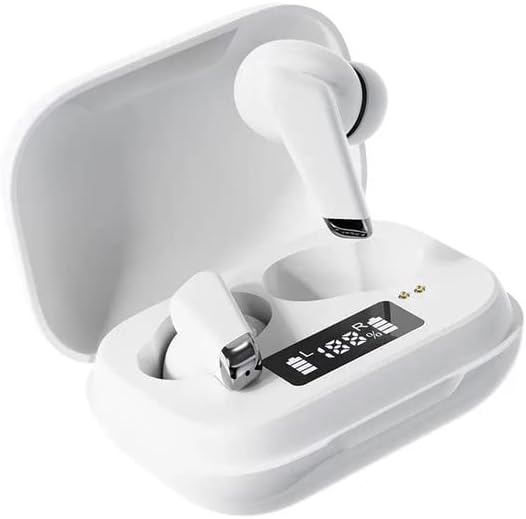
Image: Genai True Wireless Earphones in their charging case, showcasing the digital LED display indicating battery levels.
Ciri-ciri Utama:
- Stereo Tanpa Wayar Sejati (TWS): Seamless audio experience without cables.
- Ketik Kawalan: Intuitive touch-sensitive controls for music and calls.
- Digital Intelligence LED Display: Shows real-time battery status of earbuds and charging case.
- Bluetooth 5.0: Memastikan sambungan tanpa wayar yang stabil dan cekap.
- Reka Bentuk Dalam Telinga Ergonomik: Comfortable and secure fit.
Panduan Persediaan
1. Mengecas Fon Telinga dan Sarung
- Caj Permulaan: Sebelum penggunaan pertama, cas sepenuhnya sarung pengecas dan fon telinga. Letakkan fon telinga ke dalam bekas pengecasan.
- Sambungkan Pengecas: Sambungkan bekas pengecas kepada sumber kuasa menggunakan kabel USB yang serasi.
- Paparan LED Monitor: The digital LED display on the case will show the charging status and battery percentage. Ensure both earbuds and the case are fully charged before proceeding.

Image: The charging case with its digital LED display, indicating the charge level of both the case and the individual earbuds.
2. Berpasangan dengan Peranti Anda
- Hidupkan kuasa: Open the charging case. The earbuds will automatically power on and enter pairing mode. You may hear an audible prompt.
- Aktifkan Bluetooth: On your smartphone or other Bluetooth-enabled device, go to the Bluetooth settings and enable Bluetooth.
- Pilih Peranti: Look for "Genai Earphones" (or similar name) in the list of available devices and select it to connect.
- Pengesahan: Once successfully paired, you will hear a confirmation sound, and the earbuds will be ready for use.

Image: A visual representation of the Bluetooth 5.0 chipset, highlighting the stable wireless connection technology.
Arahan Operasi
The Genai True Wireless Earphones feature intuitive tap controls. The specific functions may vary slightly, but common controls are listed below:
Hidupkan/Mati Kuasa
- Hidupkan kuasa: Open the charging case, or long-press the touch area on both earbuds for a few seconds.
- Matikan: Place the earbuds back into the charging case and close the lid, or long-press the touch area on both earbuds for several seconds until they power off.
Main balik Muzik
- Main/Jeda: Ketik sekali pada salah satu fon telinga.
- Lagu Seterusnya: Ketik dua kali pada fon telinga kanan.
- Trek Sebelumnya: Ketik dua kali pada fon telinga kiri.
Pengurusan Panggilan
- Jawab/Tamatkan Panggilan: Ketik sekali pada sama ada fon telinga semasa panggilan masuk atau panggilan aktif.
- Tolak Panggilan: Tekan lama pada mana-mana fon telinga semasa panggilan masuk.
Pembantu Suara
- Aktifkan Pembantu Suara: Triple tap on either earbud (functionality may vary by device).

Image: An illustration showing an earbud comfortably and ergonomically fitted within the ear canal.
Penyelenggaraan
Pembersihan
- Gunakan kain lembut, kering dan tidak berbulu untuk membersihkan fon telinga dan bekas pengecas.
- Jangan gunakan pembersih, pelarut atau semburan aerosol yang kasar.
- Bersihkan hujung telinga dan jaring pembesar suara dengan lembut untuk membuang sebarang tahi telinga atau serpihan.
Penyimpanan
- Simpan fon telinga dalam bekas pengecasnya apabila tidak digunakan untuk melindunginya dan memastikan ia dicas.
- Avoid storing in extreme temperatures, direct sunlight, or high humidity.
Menyelesaikan masalah
- Fon telinga tidak berpasangan antara satu sama lain atau dengan peranti:
- Pastikan kedua-dua fon telinga dicas.
- Letakkan kedua-dua fon telinga kembali ke dalam bekas pengecas, tutup penutup, tunggu beberapa saat, kemudian buka penutup semula.
- On your device, forget/delete the "Genai Earphones" from the Bluetooth list and try pairing again.
- Tiada bunyi atau kelantangan rendah:
- Semak tahap kelantangan pada kedua-dua peranti anda dan fon telinga.
- Pastikan fon telinga disambungkan dengan betul ke peranti anda.
- Bersihkan sebarang serpihan daripada jaring pembesar suara fon telinga.
- Isu pengecasan:
- Pastikan kabel pengecasan disambungkan dengan selamat pada kedua-dua bekas dan sumber kuasa.
- Sahkan sumber kuasa aktif.
- Bersihkan sesentuh pengecasan pada kedua-dua fon telinga dan sarung.
Spesifikasi
| Ciri | Perincian |
|---|---|
| Model | B0BX5G53VT |
| Teknologi Ketersambungan | Wayarles (Bluetooth 5.0) |
| Jenis Earcup | Separa terbuka |
| Bilangan Pemandu | 2 |
| Kaedah Pengecasan | Kes pengecasan |
| Bahan Pad Fon Kepala | silikon |
| Diameter Pemandu | 10mm |
| Herotan Harmonik Keseluruhan | 0.02% |
| Julat Impedans | Sehingga 32 Ω |
| bahan | silikon |
| Penempatan Telinga | Di Telinga |
| Faktor Bentuk | Wayarles Benar |
Waranti dan Sokongan
The Genai True Wireless Earphones come with a Waranti 12 bulan from the date of purchase, covering manufacturing defects. For any quality problems or support inquiries, please contact the seller directly through your purchase platform.
We are committed to ensuring 100% customer satisfaction. If you encounter any issues, please do not hesitate to reach out for assistance, including full refunds or replacements as applicable.


