1. Pengenalan
Thank you for choosing the Browning Dark Ops Full HD Extreme Trail Camera. This camera is designed for capturing high-quality images and videos of wildlife with its advanced motion-activated system and invisible infrared illumination. This manual provides detailed instructions for setting up, operating, and maintaining your camera to ensure optimal performance.
2. Kandungan Pakej
Sila sahkan bahawa semua item terdapat dalam pakej anda:
- Browning Dark Ops Full HD Extreme Trail Camera (Main camera unit)
- Tali Pemasangan
- Manual Arahan (dokumen ini)
Nota: Bateri dan kad SD dijual secara berasingan.
3. Kamera Lebihview
Familiarize yourself with the key components of your Browning Dark Ops Full HD Extreme Trail Camera.
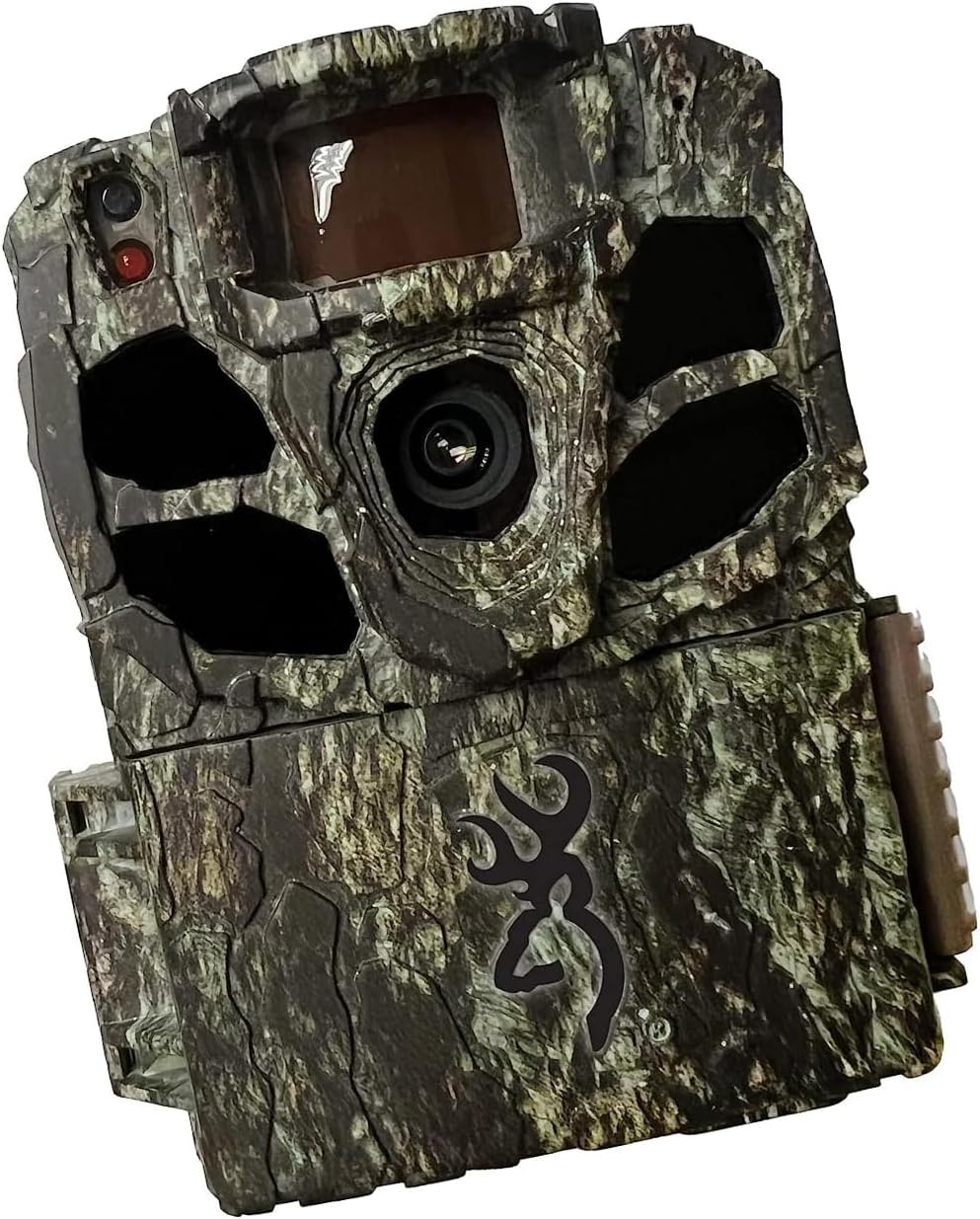
Rajah 3.1: Depan view of the Browning Dark Ops Full HD Extreme Trail Camera, showcasing its camouflage design and primary lens.

Rajah 3.2: Dalaman view of the camera with the front cover open, displaying the LCD screen, navigation buttons (E, arrows), ON/OFF switch, MODE button, SD card slot, and Eject button.
Komponen utama termasuk:
- Kanta Utama: Menangkap imej dan video.
- LED inframerah: Provide invisible illumination for night vision.
- Penderia Gerakan (PIR): Mengesan pergerakan untuk mencetuskan rakaman.
- Skrin LCD: Displays menu options and settings.
- Butang Kawalan: For navigating menus and adjusting settings.
- Suis ON / OFF: Menghidupkan atau mematikan kamera.
- Butang MOD: Switches between setup, photo, and video modes.
- Slot Kad SD: Untuk memasukkan kad memori anda.
- Petak Bateri: Memegang bateri yang diperlukan.
4. Persediaan
4.1 Pemasangan Bateri
- Buka perumah kamera dengan mencabut klip sisi.
- Cari petak bateri.
- Masukkan 8 bateri AA, pastikan kekutuban (+/-) betul seperti yang ditunjukkan di dalam petak.
- Tutup petak bateri dengan selamat.
4.2 Pemasangan Kad SD
- Dengan kamera dimatikan, cari slot kad SD.
- Insert a compatible SD card (up to 512GB, not included) into the slot until it clicks into place.
- It is recommended to format the SD card using the camera's menu system before first use and periodically thereafter. To format, navigate to the 'Format SD Card' option in the camera's setup menu and confirm.
4.3 Memasang Kamera
- Select a sturdy tree or post at the desired location.
- Masukkan tali pelekap yang disediakan melalui slot di bahagian belakang kamera.
- Securely fasten the camera to the tree or post, ensuring it is stable and pointed in the desired direction.
- Adjust the camera's angle to cover the intended area. Ensure no obstructions are directly in front of the lens or motion sensor.
5. Arahan Operasi
5.1 Menghidupkan/Mematikan
- To power on: Slide the ON/OFF switch to the 'ON' position. The LCD screen will illuminate.
- Untuk mematikan: Luncurkan suis ON/OFF ke kedudukan 'OFF'.
5.2 Menu Navigasi
Use the control buttons (up, down, left, right arrows, and 'E' for Enter) to navigate through the camera's menu options. The 'MODE' button switches between different operational modes.
5.3 Pemilihan Mod
Press the 'MODE' button to cycle through the following operational modes:
- Mod Persediaan: Access camera settings and configurations.
- Mod Foto: Camera captures still images when triggered.
- Mod Video: Camera records video clips when triggered.
- Mod Selang Masa Plus: Captures images at set intervals and also triggers on motion.
5.4 Melaraskan Tetapan
In Setup Mode, you can customize various camera settings:
- Resolusi Imej: Select from various resolutions up to 24 Megapixels for still photos.
- Resolusi Video: Choose 1080p Full HD for video recording.
- Kelajuan Pencetus: Adjust the trigger speed from 0.135 to 0.7 seconds to capture fast-moving subjects.
- Julat Denyar: Set the infrared flash range up to 90 feet for night captures.
- Julat Pengesanan: Configure the motion detection range up to 80 feet.
- Pencahayaan IR: Utilize the Radiant 4 LED system for optimal night-time visibility.
- Timelapse Plus: Configure intervals for timelapse photography.
- Video IR Pintar: Optimizes infrared recording for efficient storage.
5.5 Pengurusan Kad SD
The camera features an SD Card Management system to optimize storage. This system helps overwrite older files when the card is full, ensuring continuous operation. Refer to the camera's menu for specific settings related to SD card management.
6. Ciri-ciri Utama
- Invisible Flash: The Dark Ops Full HD Extreme camera features an invisible flash with the innovative Radiant 4 LED system, capturing high-quality night-time images and videos without disturbing wildlife.
- Bidang Luas View: Dengan bidang 55 darjah view, this camera allows for a broader coverage area, ensuring you capture more of the action.
- HDR Night Photos: The addition of HDR night photos enhances the camera's ability to capture clear and detailed images in low-light conditions.
- Adjustable Trigger Speeds: Users can customize their experience by adjusting the trigger speed to match their specific preferences, ensuring precise and timely capture of wildlife activity.
- Penyimpanan dan Organisasi: The camera includes a unique SD Card Management system and Smart IR Video setting to enhance storage efficiency and optimize infrared recording.
7. Spesifikasi
| Spesifikasi | Perincian |
|---|---|
| Resolusi Pegun Berkesan | 24 MP |
| Resolusi Tangkapan Video | 1080p HD Penuh |
| Max Shutter Speed (Trigger Speed) | 0.135 to 0.7 seconds (adjustable) |
| Julat Denyar | 90 feet (Infrared IR illumination) |
| Julat Pengesanan | 80 feet (adjustable) |
| LED IR | Radiant 4 LED System |
| Sumber Kuasa | Dikuasakan Bateri (8 bateri AA, tidak termasuk) |
| Teknologi Ketersambungan | Wireless (Wi-Fi for certain features/connectivity, though direct remote viewing is not specified) |
| Penggunaan Dalaman/Luar | Luar |
| Tahap Ketahanan Air | IP65 (Kedap habuk dan dilindungi daripada pancutan air) |
| Dimensi (L x W x H) | 3.13 x 9.13 x 4.75 inci |
| Berat Barang | 1.06 paun |
| Nombor Model | BTC-6FHDX |
8. Penyelesaian masalah
Jika anda menghadapi masalah dengan kamera anda, sila rujuk masalah dan penyelesaian biasa berikut:
- Kamera Tidak Dihidupkan:
- Pastikan bateri dimasukkan dengan betul dengan kekutuban yang betul.
- Periksa sama ada bateri telah dicas sepenuhnya atau gantikannya dengan yang baharu.
- Sahkan suis ON/OFF berada dalam kedudukan 'ON'.
- Tiada Imej/Video Dirakam:
- Confirm the SD card is properly inserted and formatted.
- Periksa sama ada kad SD mempunyai ruang kosong yang mencukupi.
- Ensure the camera is in an active recording mode (Photo, Video, or Timelapse Plus).
- Verify that the motion sensor is not obstructed and the detection range is set appropriately.
- Test the camera's motion detection by walking in front of it.
- Kualiti Imej/Video Lemah:
- Bersihkan lensa kamera dengan kain lembut dan kering.
- Adjust image/video resolution settings to a higher quality.
- Ensure the camera is stable and not subject to movement from wind or animals.
- For night images, ensure subjects are within the effective flash range.
- Hayat Bateri Pendek:
- Gunakan bateri alkali atau litium berkualiti tinggi.
- Kurangkan kekerapan tangkapan atau tempoh video dalam tetapan.
- In cold weather, battery performance can decrease; consider using lithium batteries for better cold-weather performance.
9. Penyelenggaraan
- Pembersihan: Regularly clean the camera lens and the PIR sensor window with a soft, lint-free cloth. Avoid abrasive materials or harsh chemicals.
- Penjagaan Bateri: Tanggalkan bateri jika kamera tidak akan digunakan untuk tempoh yang lama untuk mengelakkan kebocoran.
- Storan: Simpan kamera di tempat yang sejuk dan kering jauh dari cahaya matahari langsung dan suhu yang melampau.
- Kad SD: Periodically format your SD card to maintain optimal performance and prevent data corruption.
10. Waranti dan Sokongan
Browning Trail Cameras are covered by a limited warranty. For detailed warranty information, product registration, or technical support, please visit the official Browning Trail Cameras webtapak atau hubungi bahagian perkhidmatan pelanggan mereka. Simpan resit pembelian anda sebagai bukti pembelian untuk tuntutan waranti.
For further assistance, please refer to the contact information provided on the official Browning webtapak: www.browningtrailcameras.com