1. Pengenalan
This manual provides instructions for the installation, operation, and maintenance of the MokerLink 4 Port Gigabit PoE Extender, Model 4 Port 1000M. This device is designed to extend Power over Ethernet (PoE) and data transmission distances, providing a flexible solution for network deployment.
2. Produk Lebihview
2.1 Ciri-ciri Utama
- 4 Gigabit PoE Ports: Includes 1 PoE In port and 3 PoE Out ports, supporting 10/100/1000Mbps speeds. PoE transmission distance up to 100 meters per segment.
- IEEE 802.3 af/at Compliance: All ports support standard PoE, with a maximum input of 30W and a maximum output of 24W, averaging 8W per port. PoE voltage range is 44-57 Vdc. PoE pin configuration: Input 1/2 (+), 3/6 (-), 4/5(+), 7/8(-); Output 1/2 (+), 3/6 (-).
- Pasang & Main Tidak Diurus: Features automatic power detection for connected devices, requiring no configuration. Simply connect Ethernet cables.
- Pemasangan Mudah: Powered by the PoE network, eliminating the need for an additional power adapter. Supports both wall mount and DIN rail mount options for versatile placement.
- Keupayaan Lata: Supports up to 3 levels of cascading, allowing for extended PoE coverage for devices such as PoE access points, IP cameras, and VoIP phones.
2.2 Kandungan Pakej
- MokerLink 4 Port Gigabit PoE Extender (Model 4 Port 1000M)
2.3 Rajah Produk

Rajah 1: Depan view of the MokerLink 4 Port Gigabit PoE Extender, showing the four Ethernet ports and the ON/OFF switch.
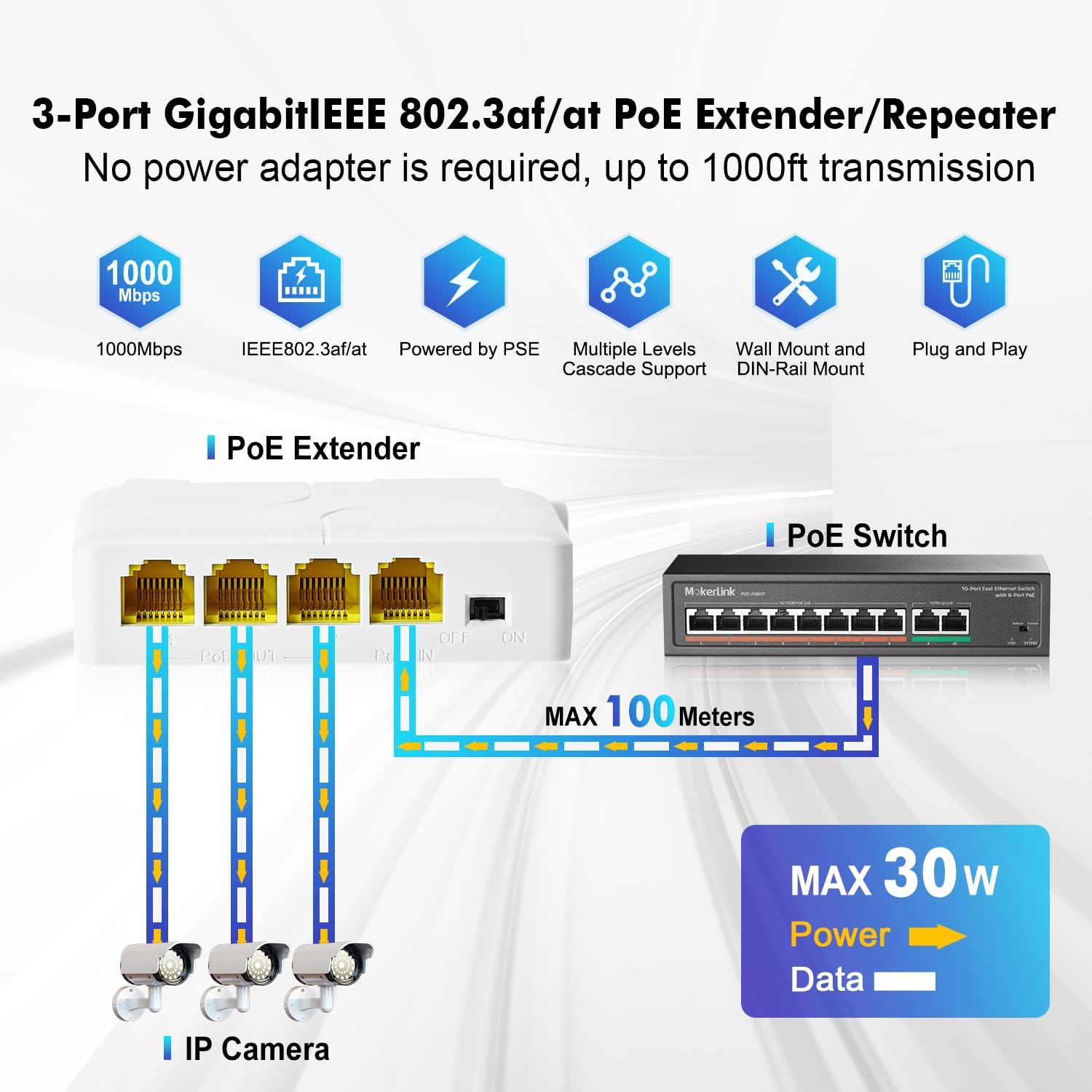
Figure 2: Diagram illustrating the 1 PoE In and 3 PoE Out port configuration, connecting to IP cameras and a PoE switch.
3. Spesifikasi
| Atribut | Nilai |
|---|---|
| Nombor Model | 4 Port 1000M |
| Bilangan Pelabuhan | 4 (1 PoE In, 3 PoE Out) |
| Kadar Pemindahan Data | 10/100/1000 Mbps (Gigabit) |
| Standard PoE | IEEE 802.3 af/at |
| Kuasa Input (Maks) | 30W |
| Kuasa Keluaran (Maks) | 24W (Average 8W per port) |
| PoE Voltage | 44-57 Vdc |
| PoE Pin Assignment (Input) | 1/2 (+), 3/6 (-), 4/5(+), 7/8(-) |
| PoE Pin Assignment (Output) | 1/2 (+), 3/6 (-) |
| Bahan Kes | plastik |
| Dimensi | 82mm (L) x 52mm (W) x 23mm (H) |
| Berat Barang | 0.08 Kilogram (2.82 auns) |
| Suhu Operasi | Sehingga 55 Darjah Celcius |
| Pilihan Pemasangan | Wall Mount, DIN Rail Mount |
4. Persediaan dan Pemasangan
4.1 Sambungan Asas
- Ensure your upstream network device (e.g., PoE switch or PoE injector) provides IEEE 802.3af/at compliant PoE power.
- Connect an Ethernet cable from your PoE source to the PoE DALAM port on the MokerLink Extender. This port will supply both power and data to the extender.
- Connect your PoE-powered devices (e.g., IP cameras, wireless access points, VoIP phones) to the PoE OUT 1, 2, or 3 ports using standard Ethernet cables.
- The extender is plug-and-play and will automatically detect and power the connected devices. No software configuration is required.

Figure 3: Illustration of PoE+ IEEE 802.3af/at support, showing the extender powering an IP camera, wireless AP, and IP phone.
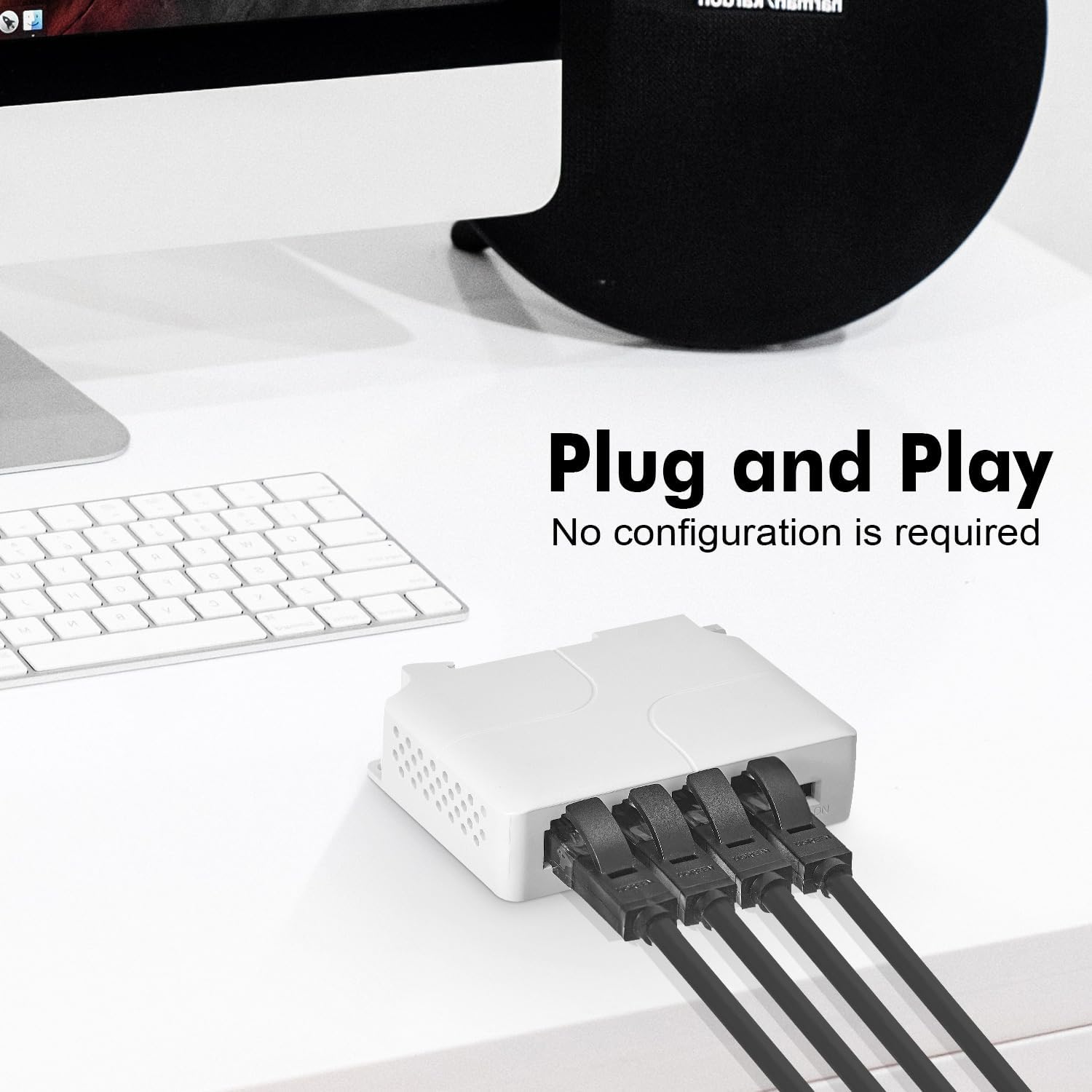
Figure 4: The extender with Ethernet cables connected, demonstrating its plug-and-play functionality.
4.2 Pilihan Pemasangan
The MokerLink PoE Extender offers flexible mounting options:
- Pemasangan Dinding: Use screws to secure the extender to a wall or flat surface.
- Pemasangan Rel DIN: Attach the extender to a standard DIN rail for industrial or organized installations.

Figure 5: Depiction of the extender mounted on a DIN rail (left) and secured to a wall (right).
5. Arahan Operasi
The MokerLink PoE Extender is designed for simple operation:
- Once connected as described in Section 4.1, the device will automatically power on and begin functioning.
- The extender will automatically detect if a connected device requires PoE power and supply it accordingly.
- Data transmission will occur at the highest supported speed (10/100/1000Mbps) negotiated with the connected devices.
6. Ciri Lanjutan
6.1 Cascading Multiple Extenders
The MokerLink PoE Extender supports cascading up to 3 levels, allowing you to extend the reach of your PoE network significantly. Each extender can extend the PoE and data signal by an additional 100 meters.

Figure 6: Diagram showing three MokerLink PoE Extenders cascaded to extend network reach up to 300 meters for IP cameras.
6.2 Port-based VLAN Feature
The extender includes a DIP switch for enabling a port-based VLAN feature. When activated, ports 2-4 can be isolated from each other. This helps prevent broadcast storms from IP cameras or other devices on one port from affecting devices on other ports, enhancing network stability.
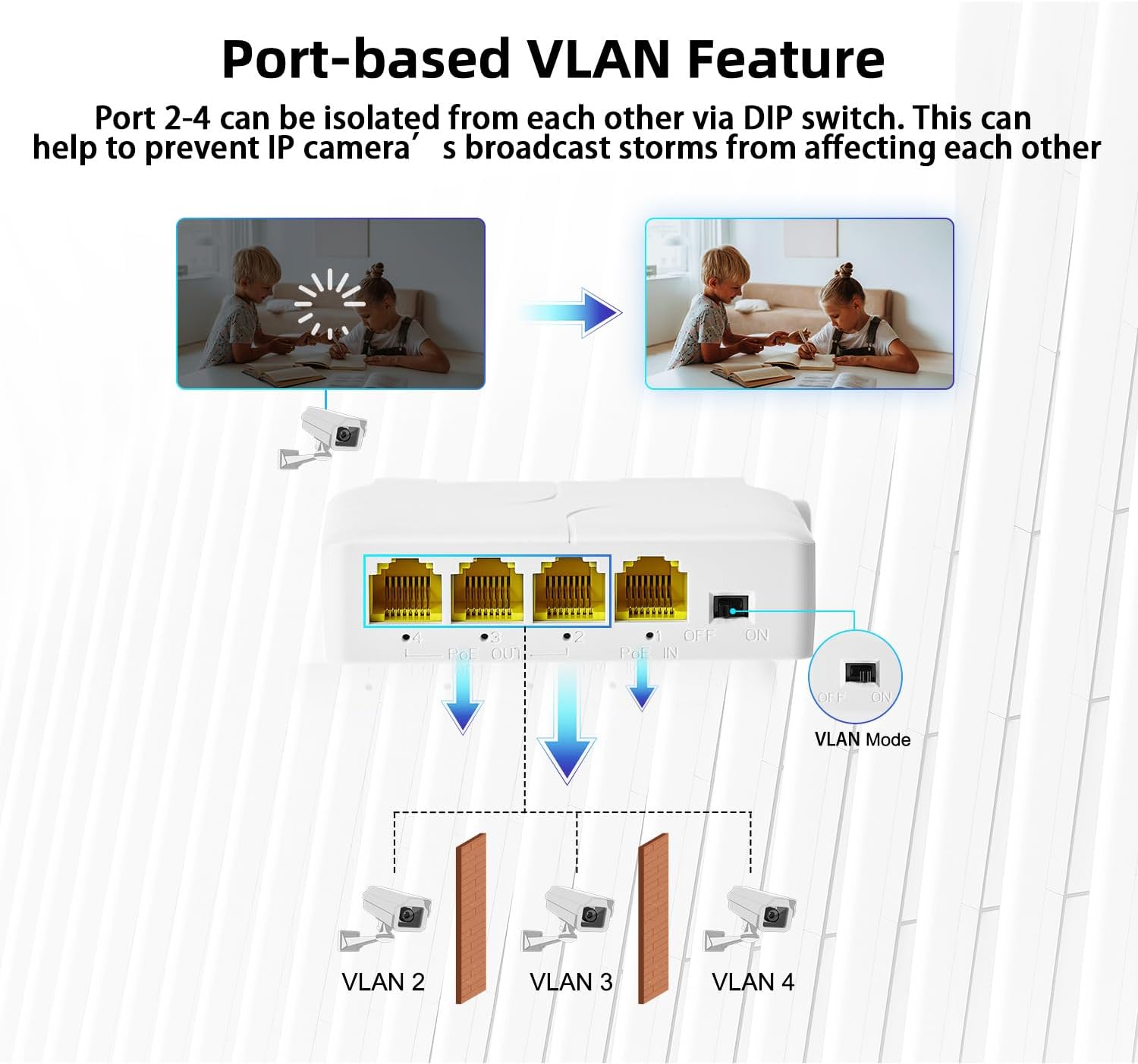
Figure 7: Illustration of the port-based VLAN feature, showing how ports 2-4 can be isolated using the DIP switch.
7. Penyelesaian masalah
- No Power to Connected Devices:
- Ensure the PoE IN port is connected to an active IEEE 802.3af/at compliant PoE source.
- Verify the PoE source is providing sufficient power for all connected devices. The extender has a maximum output of 24W.
- Check all Ethernet cable connections for proper seating and integrity.
- Tiada Sambungan Data:
- Confirm that the upstream network connection is active and functioning.
- Ensure Ethernet cables are correctly connected to the PoE IN and PoE OUT ports.
- Test with different Ethernet cables to rule out cable faults.
- Verify the connected device is operational and its network settings are correct.
- Kelajuan Rangkaian Perlahan:
- Ensure all connected devices and cables support Gigabit Ethernet (1000Mbps) for optimal performance.
- Check for excessive cable lengths. While the extender extends range, total cable length should still adhere to Ethernet standards for reliable performance.
8. Maklumat Keselamatan
- Jangan dedahkan peranti kepada air atau kelembapan berlebihan.
- Jangan buka peranti casing. Rujuk semua servis kepada kakitangan yang berkelayakan.
- Pastikan pengudaraan yang betul untuk mengelakkan terlalu panas.
- Use only with IEEE 802.3af/at compliant PoE sources.
9. Waranti dan Sokongan
For warranty information and technical support, please refer to the MokerLink official website or contact your authorized reseller. Keep your purchase receipt for warranty claims.


