1. Pengenalan
This manual provides detailed instructions for the installation, configuration, and operation of your Keenetic Runner 4G N300 Mesh Router. This device combines 4G/LTE mobile internet access with N300 Wi-Fi and Mesh capabilities, featuring a 4-port smart switch for versatile network connectivity. Please read this manual thoroughly before using the device to ensure proper setup and optimal performance.
2. Maklumat Keselamatan
- Pastikan penghala diletakkan di kawasan yang mempunyai pengudaraan yang baik, jauh daripada cahaya matahari langsung, sumber haba dan kelembapan.
- Use only the power adapter supplied with the device. Using an unauthorized adapter may damage the router and void the warranty.
- Jangan buka penghala casing. Servis hanya boleh dilakukan oleh kakitangan yang berkelayakan.
- Jauhkan peranti daripada kanak-kanak dan haiwan peliharaan.
- Elakkan meletakkan penghala berhampiran medan elektromagnet yang kuat.
3. Kandungan Pakej
Sahkan bahawa pakej anda mengandungi item berikut:
- Keenetic Runner 4G N300 Mesh Router (Model: KN-2211-01-EU)
- Penyesuai Kuasa Jenis-C
- Multilingual Installation Manual
4. Produk Lebihview
The Keenetic Runner 4G N300 is designed for reliable internet access via 4G/LTE and Wi-Fi. It features multiple ports and indicators for easy monitoring and connectivity.
4.1 Depan View

Imej: Depan view of the Keenetic Runner 4G N300 Mesh Router, showing the Keenetic logo and indicator lights.
4.2 Bahagian View dan Dimensi

Imej: Sisi view of the Keenetic Runner 4G N300 Mesh Router, illustrating its dimensions: 185 mm width, 32 mm height, and 184 mm antenna height.
4.3 Pelabuhan dan Penunjuk
- Slot SIM: For inserting a Nano SIM card for 4G/LTE connectivity.
- Port Ethernet: Four LAN ports for wired connections to devices.
- Pelabuhan Kuasa: Connects to the Type-C power adapter.
- Penyambung Antena Luaran: Two connectors for optional external 4G/LTE antennas to enhance signal reception.
- Penunjuk LED: Provide status information for power, internet, Wi-Fi, and 4G/LTE signal.
5. Persediaan
5.1 Sambungan Perkakasan
- Masukkan Kad SIM: Locate the Nano SIM slot on the router. Gently insert your Nano SIM card until it clicks into place. Ensure the card is oriented correctly as indicated on the device.

Imej: Jarak dekat view of the Nano SIM slot on the Keenetic Runner 4G N300 Mesh Router, showing a SIM card being inserted.
- Sambungkan Antena Luaran (Pilihan): If you wish to use external 4G/LTE antennas for improved signal, connect them to the two external antenna connectors on the router.
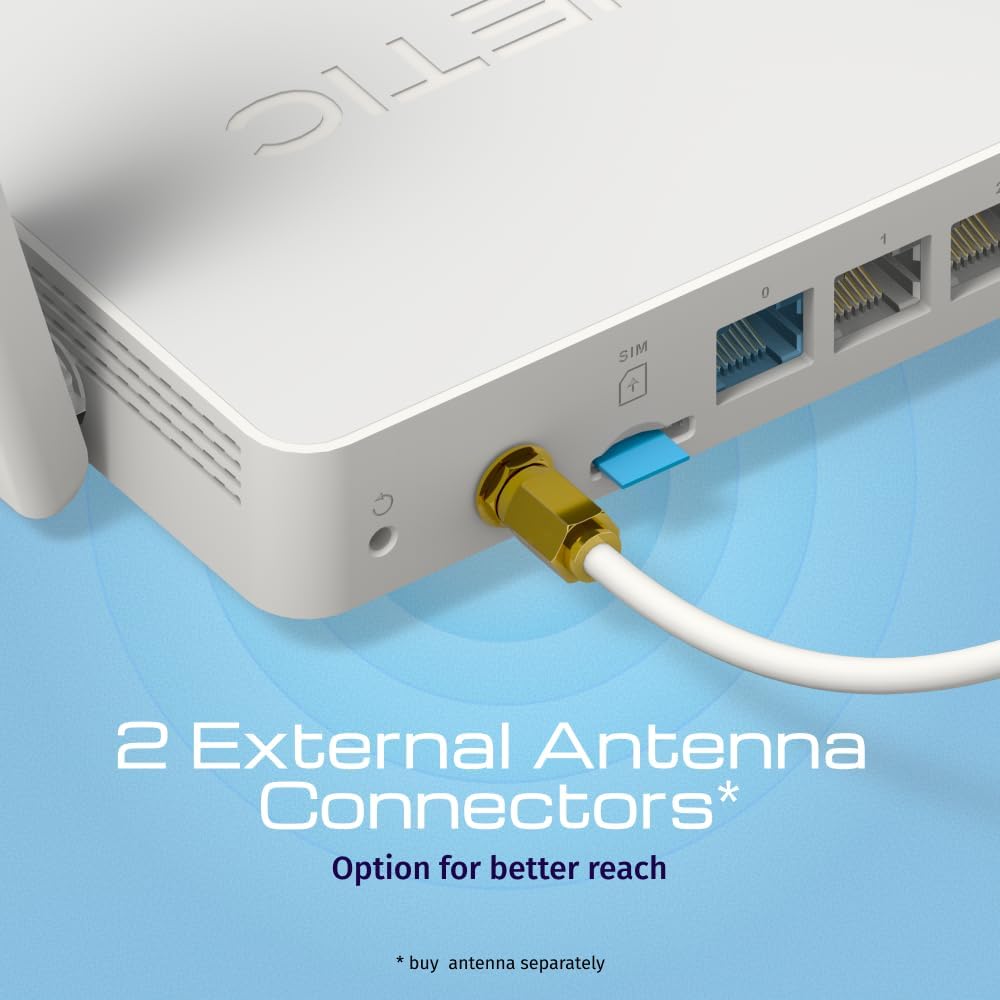
Imej: View of the two external antenna connectors on the Keenetic Runner 4G N300 Mesh Router, with an antenna cable connected to one.
- Sambungkan Kuasa: Plug the Type-C power adapter into the router's power port and then into a power outlet. The router will power on automatically.
- Sambungan Awal: Connect your computer to one of the router's Ethernet LAN ports using an Ethernet cable, or connect wirelessly to the default Wi-Fi network (SSID and password usually found on a label on the router).
5.2 Tatarajah Awal
- Akses Web Antara muka: Buka a web browser on your connected computer and enter the default IP address (e.g.,
192.168.1.1ormy.keenetic.net). - log masuk: Masukkan nama pengguna dan kata laluan lalai (biasanya
adminuntuk kedua-duanya, atau seperti yang dinyatakan pada label penghala). - Ikuti Wizard Persediaan: The KeeneticOS web interface will guide you through the initial setup process, including setting up your internet connection (4G/LTE or Ethernet WAN), Wi-Fi network name (SSID), and password.
- Kemas kini Perisian Tegar: It is recommended to check for and install the latest firmware updates for optimal performance and security.
6. Beroperasi
6.1 4G/LTE Connectivity
The Keenetic Runner 4G N300 provides mobile internet access with download speeds up to 150 Mbps and upload speeds up to 50 Mbps, depending on your mobile network provider and signal strength.

Image: Graphic illustrating the mobile internet capabilities of the Keenetic Runner 4G N300, showing download speeds up to 150 Mbps and upload speeds up to 50 Mbps.
6.2 Konfigurasi Rangkaian Wi-Fi
You can configure your Wi-Fi network settings, including SSID, security type (WPA2/WPA3 recommended), and password, through the KeeneticOS web interface or the Keenetic mobile app.
6.3 Mesh Wi-Fi Network Setup
The Keenetic Runner supports Mesh Wi-Fi technology, allowing you to expand your network coverage by adding other Keenetic Mesh-compatible devices. Refer to the KeeneticOS documentation for detailed instructions on setting up a Mesh system.
6.4 Advanced Features (KeeneticOS)
KeeneticOS, the router's operating system, offers a range of advanced features for network management and security.
6.4.1 VPN and DNS Filters
The router supports various VPN protocols and DNS filtering services for enhanced privacy and security.

Image: Graphic showcasing KeeneticOS support for over 50 VPN features (WireGuard, OpenVPN, IPSec) and DNS filters (AdGuard, Cloudflare, OpenDNS).
6.4.2 Network Management via Keenetic App
Manage your network from anywhere using the Keenetic mobile application, providing real-time control and monitoring.

Image: Screenshot of the Keenetic App interface, demonstrating features like network overview, device list, and Quality of Service (QoS) management.
6.4.3 Smart Home & IoT Readiness
The router supports network segmentation and cybersecurity features to secure and manage your smart home and IoT devices.

Image: Diagram illustrating how the Keenetic Runner supports Smart Home and IoT devices through network segmentation and cybersecurity, showing devices connected within a home environment.
6.4.4 Advanced Parental Controls
Implement parental controls to ensure safer browsing for children, including scheduling internet access, application filtering, and DNS-based content filtering.

Image: Screenshot of the KeeneticOS parental control interface, displaying options for schedules by age group, application filters, and DNS-based filters.
6.4.5 KeeneticOS Overview
KeeneticOS is a modular operating system that powers every Keenetic router, offering continuous updates, robust security, a unified platform across devices, and extensive customization options.

Image: Graphic highlighting the core aspects of KeeneticOS: always updated and safe, a unified platform across devices, customizable and modular, and providing long-term value.
7. Penyelenggaraan
7.1 Kemas Kini Perisian Tegar
Regularly check for and install firmware updates through the KeeneticOS web interface or the Keenetic App. Firmware updates provide new features, performance improvements, and security patches.
7.2 Menetapkan Semula Peranti
If you encounter persistent issues, you may perform a factory reset. Locate the reset button (often a small pinhole) on the router. With the router powered on, press and hold the reset button for approximately 10 seconds until the indicators change. This will restore the router to its factory default settings.
8. Penyelesaian masalah
- Tiada sambungan internet:
- Periksa sama ada kad SIM telah dimasukkan dan diaktifkan dengan betul.
- Verify 4G/LTE signal strength via the router's indicators or web antara muka.
- Ensure your internet service provider (ISP) account is active.
- Mulakan semula penghala dan peranti anda yang disambungkan.
- Kelajuan Perlahan:
- Check 4G/LTE signal strength; consider using external antennas if signal is weak.
- Pastikan tiada peranti lain menggunakan lebar jalur yang berlebihan.
- Lakukan ujian kelajuan untuk mengesahkan masalah tersebut.
- Isu Sambungan Wi-Fi:
- Sahkan kata laluan Wi-Fi.
- Move closer to the router to improve signal.
- Semak gangguan daripada peranti elektronik lain.
- Penghala Tidak Responsif:
- Cabut palam penyesuai kuasa, tunggu 10 saat, kemudian pasangkannya semula.
- If the issue persists, perform a factory reset (refer to Section 7.2).
9. Spesifikasi
| Ciri | Perincian |
|---|---|
| Jenama | Keenetik |
| Nama Model | Keenetic Runner 4G 2nd Gen (KN-2211-01-EU) |
| Sistem Operasi | KeeneticOS |
| Teknologi Ketersambungan | Ethernet, LTE, Wi-Fi |
| Standard Komunikasi Tanpa Wayar | 802.11b, 802.11g, 802.11n |
| Kelas Band Kekerapan | Single-band |
| Ciri Khas | Mesh networking, advanced security, parental control |
| Peranti Serasi | Game console, Personal Computer, Laptop, Smartphone, Tablet |
| Berat Barang | 500 Gram |
| Komponen yang Disertakan | Router, Type-C power adapter, multilingual installation manual |
10. Waranti dan Sokongan
Untuk maklumat jaminan dan sokongan teknikal, sila rujuk kepada Keenetic rasmi website or contact your local Keenetic distributor. Keep your purchase receipt for warranty claims.


