1. Pengenalan
The MiLESEEY DP20 Bilateral Laser Distance Meter is a professional-grade measuring tool designed for accuracy and efficiency in various applications. This device features patented coaxial optical technology, multiple measurement functions, and a durable design, making it suitable for both professional and DIY use. This manual provides comprehensive instructions for its safe and effective operation.

Figure 1: MiLESEEY DP20 Bilateral Laser Distance Meter
2. Maklumat Keselamatan
Sila baca dan fahami semua arahan keselamatan sebelum menggunakan peranti. Kegagalan untuk mengikuti arahan ini boleh mengakibatkan pendedahan sinaran laser, kejutan elektrik, kebakaran atau kecederaan serius.
2.1 Keselamatan Am
- Jauhkan peranti daripada capaian kanak-kanak.
- Do not attempt to modify or disassemble the device. Repairs should only be performed by authorized personnel.
- Avoid using the device in explosive atmospheres or near flammable materials.
- Lindungi peranti daripada suhu ekstrem, kelembapan dan getaran kuat.
2.2 Keselamatan Laser
WARNING: This product emits Class 2 laser radiation. Avoid direct eye exposure to the laser beam.
- Jangan merenung terus ke pancaran laser.
- Jangan halakan pancaran laser kepada orang atau haiwan.
- Jangan gunakan alat optik (cth, teropong, teleskop) untuk view pancaran laser.
- Pastikan laser dimatikan apabila tidak digunakan.
3. Kandungan Pakej
Sahkan bahawa semua item terdapat dalam pakej:
- MiLESEEY DP20 Bilateral Laser Distance Meter x1
- Hard Case x1
- Kabel Pengecasan Jenis-C x1
- Manual Pengguna x1
- Tali Tangan x1

Figure 2: Contents included in the DP20 package
4. Produk Lebihview
The MiLESEEY DP20 is engineered for precision and ease of use. Key features include:
- Bilateral Measurement: Allows measurement between two points from any position along the measurement line, significantly speeding up tasks.
- Patented Coaxial Optical Technology: Ensures both laser beams share a common geometric axis, eliminating measurement inaccuracies.
- Pelbagai Fungsi Pengukuran: Includes single, continuous, area, volume, automatic horizontal/vertical height, and line segment division.
- OLED Display with Big Text Mode: Provides clear readability of measurements, even in challenging lighting conditions.
- Reka Bentuk Tahan Lama dan Padat: Made from aerospace-grade magnesium-aluminum alloy, offering robustness and a comfortable grip.
- Bateri boleh dicas semula: Integrated 1000mAh lithium battery with USB-C charging for extended use.
4.1 Komponen dan Paparan
Familiarize yourself with the device's components and display interface.
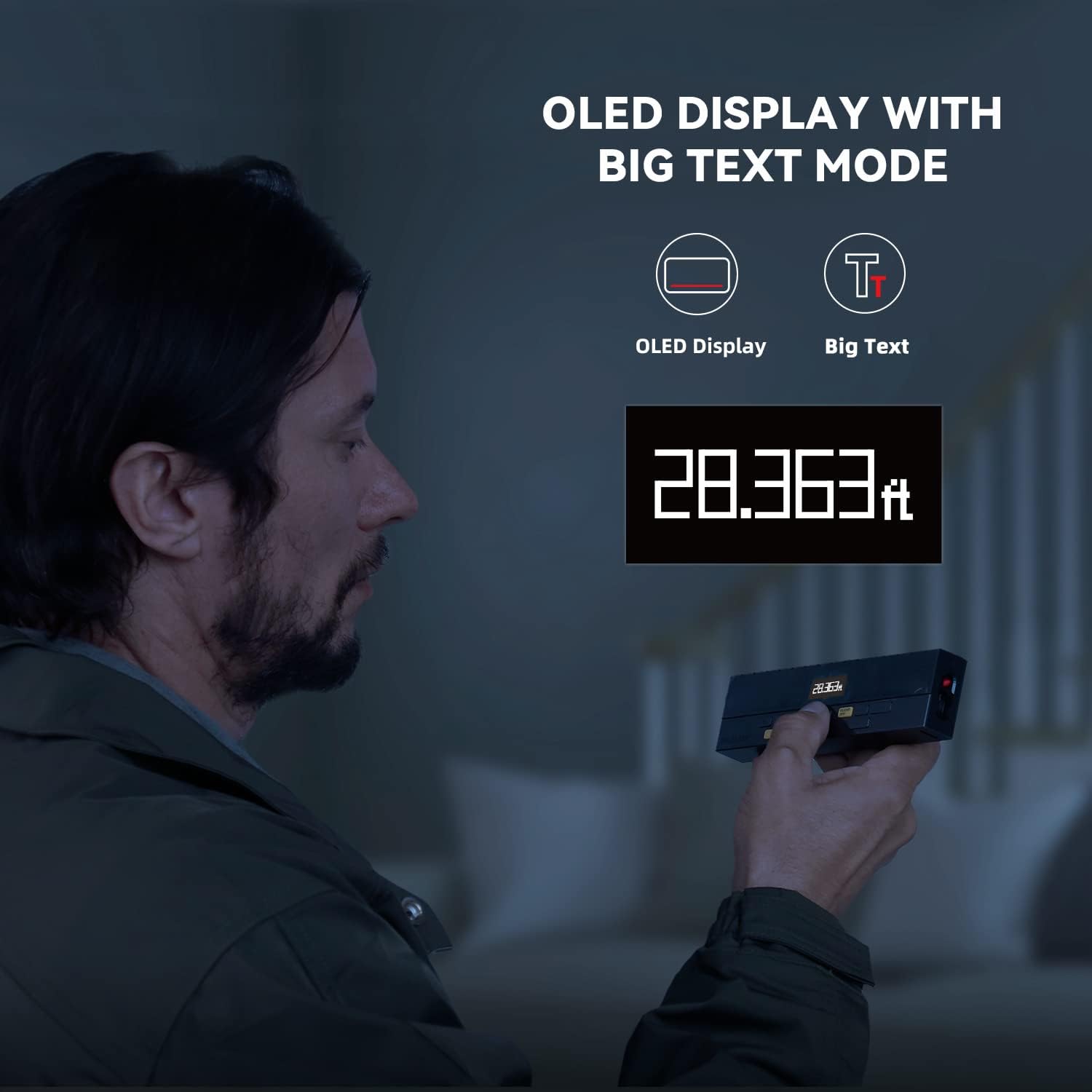
Figure 3: Clear OLED Display with Big Text Mode for enhanced readability.

Figure 4: Illustration of the patented coaxial optical design for precise measurements.
5. Persediaan
5.1 Mengecas Bateri
The DP20 comes with a built-in 1000mAh lithium battery. Before first use, fully charge the device using the provided Type-C charging cable.
- Connect the Type-C cable to the charging port on the device.
- Sambungkan hujung kabel yang satu lagi ke penyesuai kuasa USB (tidak disertakan) atau port USB komputer.
- The battery indicator on the display will show charging status. A full charge typically takes about 2 hours.

Figure 5: Charging the DP20 via USB-C port.
5.2 Hidupkan/Mati Kuasa
- Untuk menghidupkan, tekan butang MEAS butang.
- To power off, long-press the KOSONG/MATI button. The device will also automatically power off after a period of inactivity to conserve battery.
6. Mod Operasi
The DP20 offers a variety of measurement modes to suit different needs. Use the MODE button to cycle through the available functions.
6.1 Single and Continuous Measurement
For basic distance measurements.
- Tekan ke MEAS button once for a single measurement.
- Tekan lama pada MEAS button to enter continuous measurement mode, which also displays minimum and maximum distances. Press MEAS sekali lagi untuk berhenti.
6.2 Bilateral and One-Way Measurement
The DP20 allows switching between bilateral (two-way) and one-way laser measurement.
- Use the dedicated button (often labeled T/R or similar, refer to device markings) to switch between bilateral and one-way laser modes.
- Bilateral mode measures the distance between two points by positioning the device anywhere along the line.
- One-way mode measures from the device to a single target point.
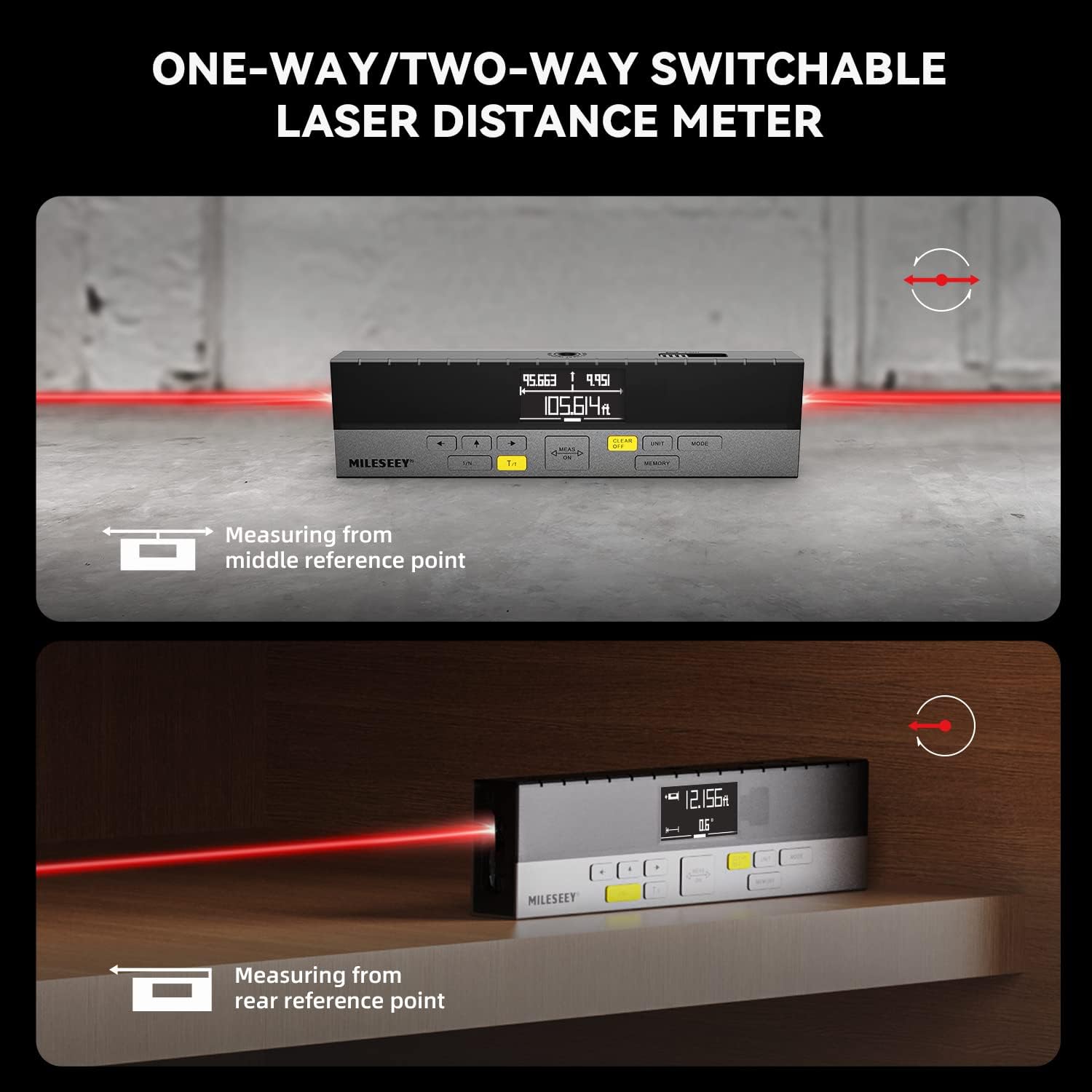
Figure 6: Demonstrating one-way and two-way measurement capabilities.
6.3 Area and Volume Measurement
To calculate area or volume:
- Select the Area or Volume mode using the MODE butang.
- Follow the on-screen prompts to take the required number of measurements (e.g., length and width for area; length, width, and height for volume).
- The device will automatically calculate and display the result.
6.4 Pengukuran Pythagoras
For indirect measurements of height or distance where direct measurement is not possible.
- Select the Pythagorean mode using the MODE butang.
- Follow the on-screen prompts to take the necessary measurements (e.g., hypotenuse and one leg for height).
- The device will calculate and display the unknown dimension.
6.5 Line Segment Division (Staking Out)
This function divides a line segment into equal smaller segments, useful for tasks like installing multiple items at consistent intervals.
- Enter the Line Segment Division mode (often labeled 1/N).
- Set the number of desired segments (N).
- Measure the total length of the line. The device will then guide you to the division points.
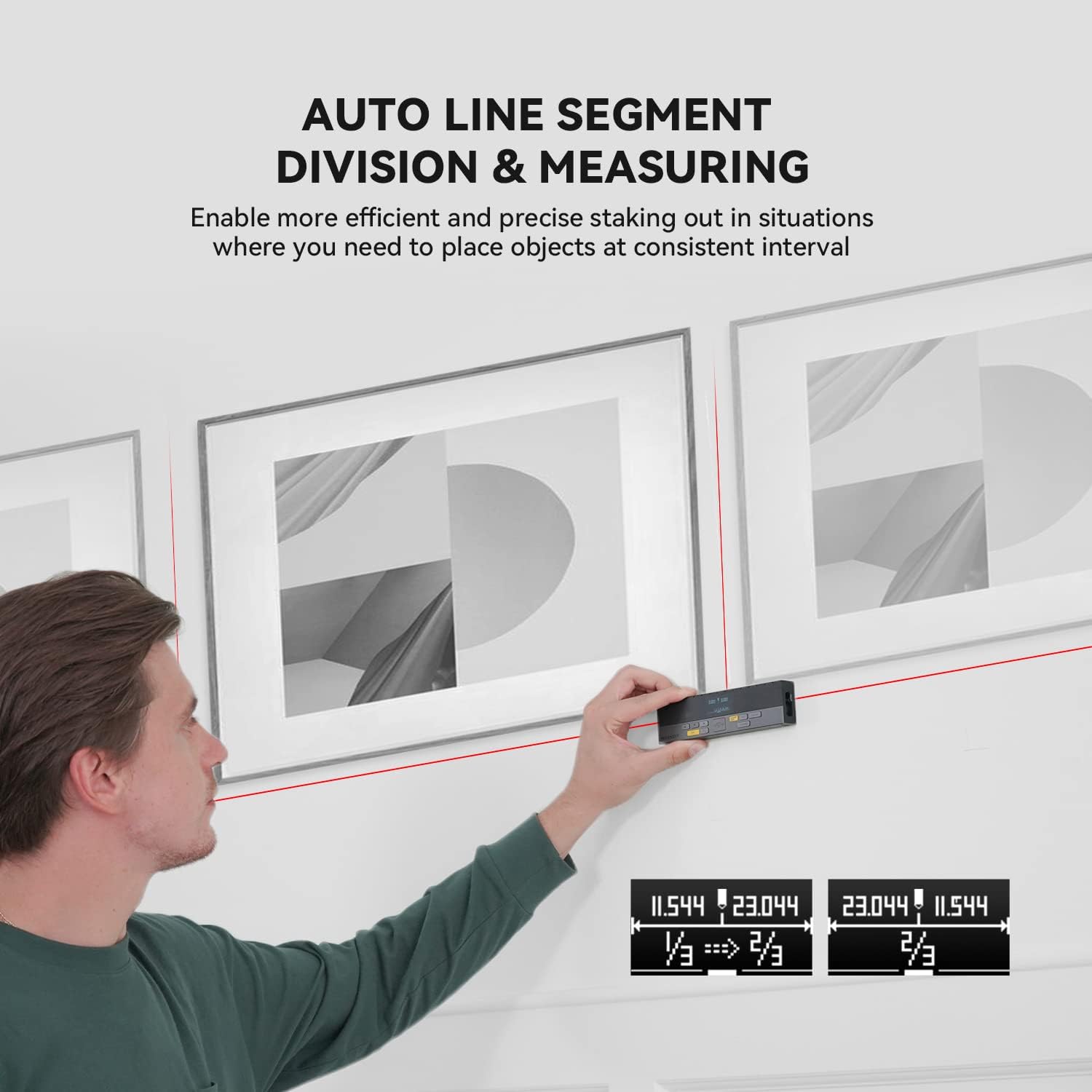
Figure 7: Using the auto line segment division feature for consistent spacing.
6.6 Digital Angle Level
The integrated digital angle level provides real-time angle measurements.
- The device automatically displays the current tilt angle.
- This feature can be used in conjunction with other measurement modes for more complex calculations.

Figure 8: The digital tilt sensor provides accurate angle readings.
7. Ciri Lanjutan
7.1 Bluetooth Connectivity and App Synchronization
The DP20 supports Bluetooth connectivity, allowing it to pair with the
Dokumen Berkaitan - DP20
 |
MILESEEY D5T Professional Laser Distance Meter User Manual User manual for the MILESEEY D5T Professional Laser Distance Meter. This guide details the device's 8 functions, including distance, area, volume, and Pythagorean measurements, along with operation, safety precautions, and specifications for professional use. |
 |
Manual Pengguna Meter Jarak Laser MileSeey S6 Manual pengguna yang komprehensif untuk Meter Jarak Laser MileSeey S6, meliputi arahan keselamatan, operasi, fungsi pengukuran (tunggal, berterusan, luas, volum, Pythagoras), sambungan Bluetooth, penyelesaian masalah dan spesifikasi teknikal. Ketahui cara menggunakan S6 untuk pengukuran jarak yang tepat. |
 |
Manual Pengguna Ukur Laser MILESEEY S6 Manual pengguna MILESEEY S6 Laser Measure menyediakan arahan terperinci untuk mengendalikan meter jarak laser S6, menyerlahkan 8 fungsinya untuk pengukuran yang dipertingkatkan dan pengalaman pengguna, termasuk ukuran jarak, keluasan, kelantangan dan Pythagoras, bersama-sama dengan penyelesaian masalah dan spesifikasi teknikal. |
 |
Panduan Mula Pantas Meter Jarak Laser Siri DP20 Mileseey Panduan permulaan cepat untuk Meter Jarak Laser Siri DP20 Mileseey, memperincikan produkview, spesifikasi teknikal dan arahan operasi untuk pelbagai mod pengukuran. |
 |
Panduan Mula Pantas Meter Jarak Laser MILESEEY S2 Panduan ringkas untuk Meter Jarak Laser MILESEEY S2, merangkumi ciri, operasi, arahan keselamatan, penyelesaian masalah dan spesifikasinya. Ketahui cara mengukur jarak, luas, isipadu dan menggunakan fungsi Pythagoras. |
 |
Manual Pengguna Meter Jarak Laser Mileseey X5 Manual pengguna yang komprehensif untuk Meter Jarak Laser Mileseey X5, merangkumi ciri-ciri, operasi, mod pengukuran dan penyelesaian masalahnya. |