pengenalan
Terima kasih kerana membeliasing the JALL Colorful Digital Alarm Clock Radio. This device combines a modern alarm clock with a mirror surface, vibrant RGB color display, FM radio, and convenient USB charging. Please read this manual carefully to ensure proper use and to fully enjoy all its features.
Maklumat Keselamatan
- Jangan dedahkan peranti kepada air atau kelembapan berlebihan.
- Elakkan suhu yang melampau.
- Jangan buka atau cuba membaiki peranti itu sendiri. Rujuk kepada kakitangan perkhidmatan yang berkelayakan.
- Gunakan hanya penyesuai kuasa yang disediakan.
- Jauhkan daripada kanak-kanak.
Kandungan Pakej
- JALL Colorful Digital Alarm Clock Radio (Model: CH-07)
- Manual Pemilik
- Penyesuai Kuasa
Produk Selesaiview
Familiarize yourself with the various parts and controls of your alarm clock radio.

Rajah 1: Depan view of the JALL Colorful Digital Alarm Clock Radio, highlighting its mirror surface and large digital time display. A smartphone is shown charging via its USB port.

Figure 2: Function introduction diagram, illustrating the main features such as RGB changing number display, FM radio, dual alarm, HD mirror surface, USB charging port, sleep timer, adjustable brightness and volume, and 9-minute snooze.
Butang dan Port Kawalan:
- Time Set / Dimmer Knob: Used to set time and adjust display brightness.
- Butang penggera 1: Set and activate Alarm 1.
- Butang penggera 2: Set and activate Alarm 2.
- Colors Button: Cycle through display color modes.
- FM Radio Button: Activate FM radio and scan stations.
- Volume / Tune Knob: Adjust radio volume and tune FM stations.
- Snooze / Sleep Timer Button: Activate snooze or set sleep timer.
- Port Pengecasan USB: Untuk mengecas peranti luaran.
- Input Kuasa: Sambungkan penyesuai kuasa.
Persediaan
1. Sambungan Kuasa
- Connect the provided power adapter to the "DC IN" port on the back of the alarm clock.
- Pasangkan penyesuai ke soket dinding standard.
- Paparan akan menyala, menunjukkan peranti telah dihidupkan.
2. Battery Backup (Not for operation)
The clock includes a battery backup feature. This function is designed to preserve your time and alarm settings during a power outage, not to operate the clock without AC power. When power is restored, the clock will display the correct time and settings.
Arahan Operasi
Menetapkan Masa dan Tarikh
- Tekan dan tahan butang Masa Ditetapkan button (often combined with Dimmer). The hour digits will start flashing.
- Putar Time Set / Dimmer Knob untuk melaraskan jam. Tekan butang Masa Ditetapkan button again to confirm and move to minutes.
- Repeat the process to set minutes, then year, month, and day.
- Tekan ke Masa Ditetapkan button one last time to save all settings.
Alarm Settings (Dual Alarms)
The clock supports two independent alarms (Alarm 1 and Alarm 2) with customizable settings.

Figure 3: Dual Alarm functionality, showing options for 8 wake-up sounds, 16 volume levels, 9-minute snooze, and flexible alarm modes (weekend/weekday/7-day).
- Tekan ke Penggera 1 or Penggera 2 butang. Masa penggera akan berkelip.
- Putar Time Set / Dimmer Knob to set the desired alarm hour, then press the alarm button again to confirm.
- Repeat to set alarm minutes.
- Next, select the alarm mode: Weekend, Weekday, or 7-day mode by rotating the knob and confirming with the alarm button.
- Choose from 8 wake-up sounds (beep, ring bell, cheerful music, piano, wind chime, bird song, insect chirping, soft music) and 16 volume levels. The volume will gradually increase.
- Press the alarm button one last time to save and activate the alarm. An alarm icon will appear on the display.
Fungsi Tunda:
Apabila penggera berbunyi, tekan Snooze / Sleep Timer button to activate snooze for an additional 9 minutes of sleep.
Mematikan Penggera:
To turn off the alarm for the day, press any other button (e.g., Penggera 1 or Penggera 2 button) except the Snooze button. To deactivate an alarm permanently, press the corresponding alarm button until the alarm icon disappears from the display.
Display Modes and Brightness
The clock offers 8 display modes and 5 levels of screen brightness.
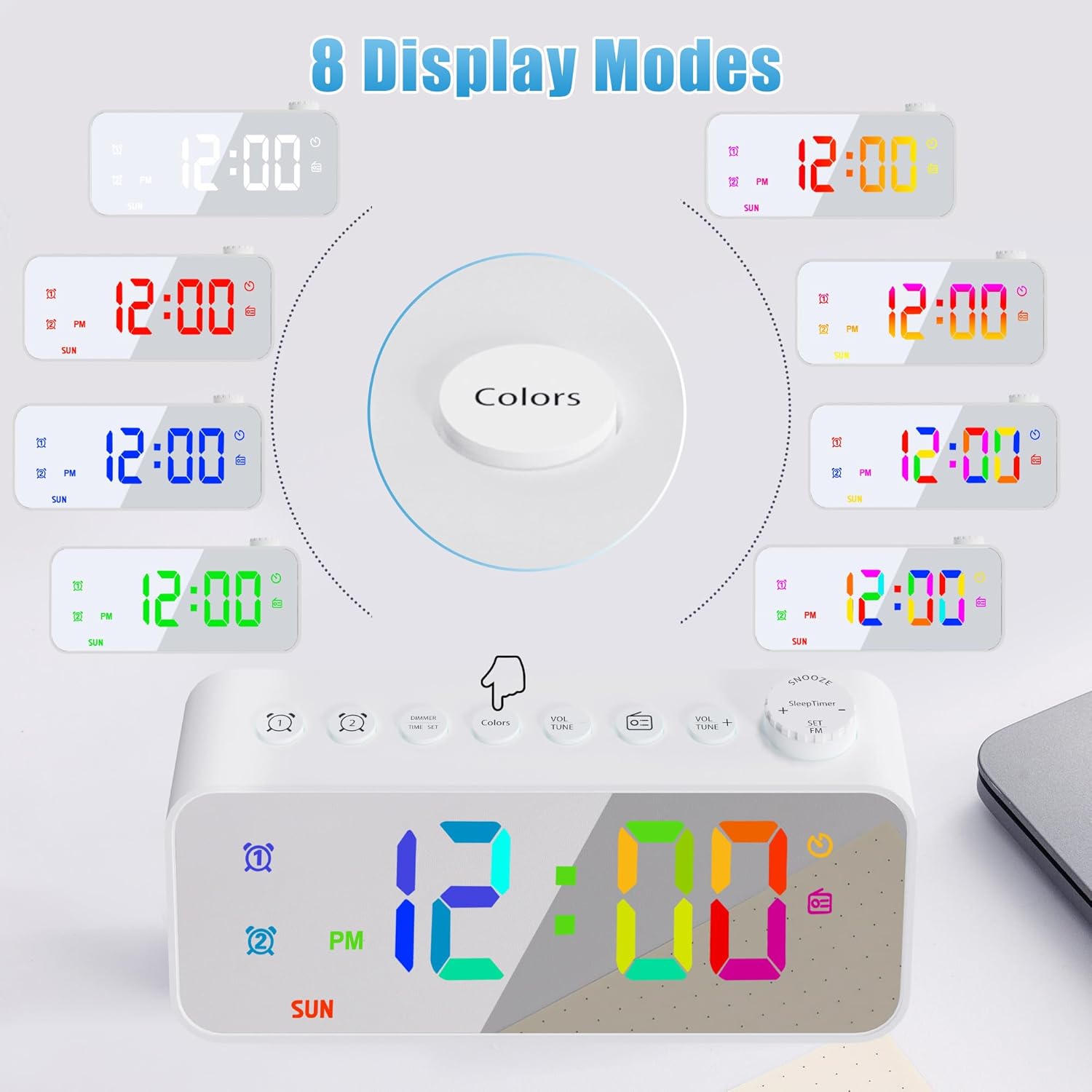
Figure 4: Eight distinct display color modes available on the JALL alarm clock, offering various aesthetic options from solid colors to dynamic gradients.

Figure 5: Brightness adjustment feature, detailing 5 levels of screen brightness from 0% (off) to 100% for optimal visibility in any lighting condition.
- Menukar Warna: Tekan ke warna button to cycle through the 8 display modes: white, red, green, blue, gradient, magic color, left and right gradient, up and down gradient.
- Melaraskan Kecerahan: Putar Time Set / Dimmer Knob to adjust the screen brightness through 5 levels. The lowest setting can completely turn off the display.
FM Radio and Sleep Timer
Enjoy your favorite radio stations with the built-in FM radio and fall asleep to music with the sleep timer.

Figure 6: FM Radio and Sleep Timer features, detailing the frequency range, volume control, auto-search function, enhanced antenna, and various sleep timer durations.
- Activating FM Radio: Tekan ke Radio FM button. The radio will turn on.
- Stesen Penalaan: Putar Volume / Tune Knob to manually tune to a specific frequency. Press and hold the Radio FM button to auto-scan and save available stations.
- Melaraskan Kelantangan: Putar Volume / Tune Knob to adjust the radio volume (0-16 levels).
- Pemasa Tidur: Semasa radio dimainkan, tekan butang Snooze / Sleep Timer button repeatedly to select a sleep timer duration (10, 120, 180, 240 minutes). The radio will automatically turn off after the selected time.
Port Pengecasan USB
The alarm clock is equipped with a USB charging port for your convenience.

Figure 7: USB Charging Port, indicating its location and function for charging various electronic devices with a 5V output.
- Locate the USB charging port on the back of the unit.
- Connect your smartphone or other USB-powered device using its charging cable.
- The clock will provide 5V output for charging.
Penyelenggaraan
- To clean the mirror surface and body, use a soft, dry cloth. For stubborn marks, a slightly damp kain boleh digunakan, diikuti dengan kain kering.
- Jangan gunakan pembersih atau pelarut yang melelas, kerana ia boleh merosakkan permukaan.
- Pastikan peranti dicabut plag sebelum dibersihkan.
Menyelesaikan masalah
| Masalah | Kemungkinan Punca | Penyelesaian |
|---|---|---|
| Paparan jam dimatikan. | No power; brightness set to 0%. | Check power connection. Rotate Dimmer knob to increase brightness. |
| Penggera tidak berbunyi. | Penggera tidak diaktifkan; kelantangan terlalu rendah; masa penggera salah. | Ensure alarm icon is displayed. Increase alarm volume. Verify alarm time and mode (weekday/weekend). |
| Penerimaan radio FM yang lemah. | Antena tidak dilanjutkan; isyarat lemah. | Fully extend the wire antenna. Try repositioning the clock for better signal. |
| Pengecasan USB tidak berfungsi. | Cable issue; device not compatible; clock not powered. | Ensure clock is powered. Try a different USB cable. Check device compatibility (5V output). |
Spesifikasi
| Ciri | Perincian |
|---|---|
| Jenama | JALL |
| Nombor Model | CH-07 |
| Jenis Paparan | digital |
| Sumber Kuasa | Elektrik Bertali |
| Ciri Khas | Adjustable Brightness, Dual Alarm, FM Radio, Sleep Timer, USB Charging Port, Mirror Surface, RGB Color Changing Numbers |
| bahan | Akrilonitril Butadiena Stirena (ABS) |
| Berat Barang | 4.8 auns (0.3 paun) |
| Dimensi | 6.18 x 3.74 x 1.89 inci (Pakej) |
| Kekerapan Radio FM | 76.0 hingga 108.0 MHz |
| Output USB | 5V |
Waranti dan Sokongan
JALL is committed to providing high-quality products. This product comes with a 365-Day warranty from the date of purchase. If you encounter any issues or have questions, please contact JALL customer support through the retailer's platform or visit the official JALL store for assistance.
Untuk maklumat lanjut, lawati JALL Store on Amazon.


