1. Pengenalan
This manual provides detailed instructions for the safe and effective use of your Technaxx TX-219 4-in-1 Multifunction Device. This versatile unit combines a jump starter, an air compressor, a power bank, and an LED light, designed for automotive and portable power needs. Please read this manual thoroughly before operation and retain it for future reference.
2. Arahan Keselamatan
Sentiasa patuhi langkah berjaga-jaga keselamatan berikut untuk mengelakkan kecederaan atau kerosakan pada peranti atau kenderaan:
- Baca semua arahan sebelum digunakan.
- Jauhkan daripada kanak-kanak.
- Wear eye protection when operating the jump starter.
- Jangan dedahkan peranti kepada hujan atau lembapan.
- Do not operate if the device or cables are damaged.
- Pastikan pengudaraan yang betul semasa digunakan.
- Sambungkan pemula lompat clamps correctly: positive to positive, negative to negative. Avoid short-circuiting.
- Jangan cuba melompat memulakan bateri beku.
- Disconnect the jump starter from the vehicle battery within 30 seconds after the engine starts.
- Do not use the air compressor continuously for more than 10 minutes to prevent overheating. Allow it to cool down.
- Simpan peranti di tempat yang sejuk dan kering apabila tidak digunakan.
3. Kandungan Pakej
Sahkan bahawa semua item terdapat dalam pakej:
- Technaxx Jump Starter TX-219 Unit
- Adapter Cable with Battery Clamps
- Penyesuai AC
- Compressed Air Hose
- Kabel USB
- Kabel Penyesuai Kereta
- Manual Pengguna

Rajah 3.1: Berakhirview of the Technaxx TX-219 package contents, showing the main unit, battery clamps, various charging cables, and the air hose.
4. Produk Lebihview
Familiarize yourself with the components of your Technaxx TX-219 device.

Rajah 4.1: bersudut view of the Technaxx TX-219 unit, showing the digital display, control buttons, USB ports, and LED light.
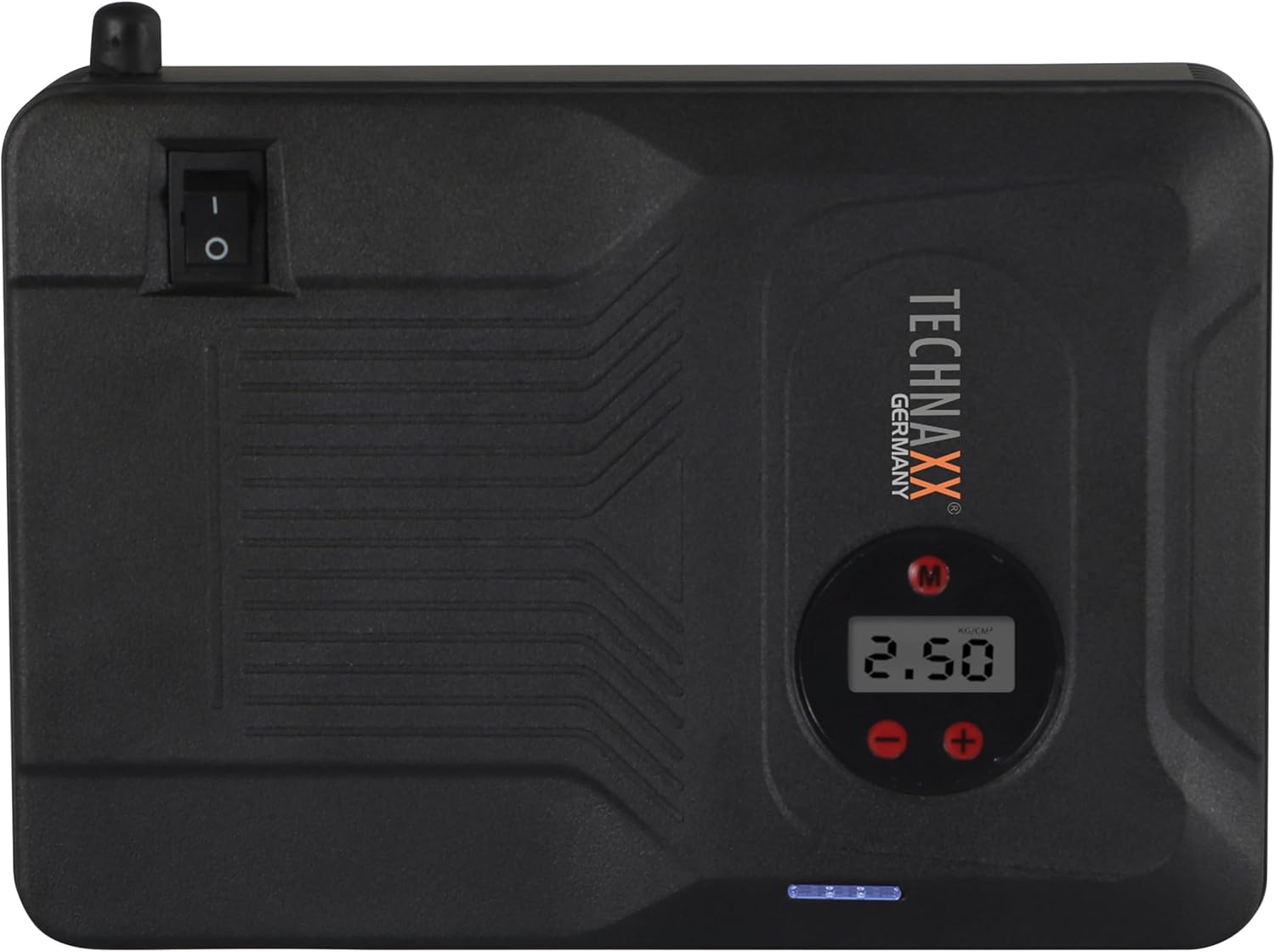
Rajah 4.2: Atas view of the device, highlighting the power switch and the digital display for pressure readings.

Rajah 4.3: Depan view of the device, showing the digital display, pressure adjustment buttons, and the power indicator lights.
Komponen Utama:
- Paparan Digital: Shows air pressure for the compressor and battery status.
- Butang Kawalan: For adjusting pressure settings and operating the device.
- USB-A Output Ports (5V/1A, 5V/2A): Untuk mengecas peranti elektronik luaran.
- 15V/0.4A Input Port: For charging the internal battery of the TX-219.
- Jump Start Output Port: Connects to the battery clamp kabel.
- Lampu LED: Menyediakan pencahayaan.
- Suis kuasa: On/Off control for the device.
- Sambungan Hos Udara: For the air compressor function.
5. Setup and Charging the Device
Before first use, fully charge the Technaxx TX-219 unit. It is recommended to recharge the device every 3 months to maintain battery health.
- Connect the AC adapter to the 15V/0.4A input port on the TX-219.
- Palamkan penyesuai AC ke salur keluar dinding standard.
- The battery indicator lights on the device will illuminate to show charging progress. All lights will be solid when fully charged.
- Alternatively, use the car adapter cable to charge the device from a vehicle's 12V accessory socket.

Rajah 5.1: The Technaxx TX-219 unit being charged or used as a power bank to charge a smartphone.
6. Arahan Operasi
6.1. Lompat Memulakan Kenderaan
The TX-219 can jump start gasoline engines up to 4.0L and diesel engines up to 3.0L.
- Ensure the TX-219 is sufficiently charged (at least 75% battery indicated).
- Matikan pencucuh kenderaan dan semua aksesori.
- Sambungkan cl merah (+).amp ke terminal positif (+) bateri kenderaan.
- Sambungkan cl hitam (-).amp to a clean, unpainted metal part of the vehicle's engine block or chassis, away from the battery. Do not connect to the negative (-) battery terminal directly unless specified by vehicle manufacturer.
- Connect the adapter cable to the jump start output port on the TX-219.
- Start the vehicle's engine. If it doesn't start immediately, wait 30 seconds before trying again. Do not crank for more than 3 seconds per attempt.
- Once the engine starts, immediately disconnect the adapter cable from the TX-219.
- Then, disconnect the black (-) clamp, diikuti oleh merah (+) clamp daripada bateri kenderaan.

Rajah 6.1: The Technaxx TX-219 connected to a vehicle battery using the provided clamps for jump starting.

Rajah 6.2: A close-up of the jump starter connected to a car battery, illustrating the process of jump starting.
6.2. Menggunakan Pemampat Udara
The integrated air compressor can inflate tires up to 3.5 Bar (approximately 50 PSI) and features an automatic shut-off.
- Connect the compressed air hose to the air hose connection port on the TX-219.
- Attach the other end of the hose to the tire valve.
- Turn on the TX-219. The digital display will show the current tire pressure.
- Use the '+' and '-' buttons to set the desired pressure. The display supports Bar, KPA, kg/cm², and PSI units.
- Press the compressor start button to begin inflation.
- Pemampat akan berhenti secara automatik apabila tekanan pratetap dicapai.
- Disconnect the air hose from the tire valve and the TX-219.

Rajah 6.3: The Technaxx TX-219 being used to inflate a car tire, demonstrating the air compressor function.

Rajah 6.4: A user inflating a tire with the TX-219, showing the digital display and the air hose connection.
6.3. Menggunakan sebagai Power Bank
The 14000 mAh battery can charge various USB-powered devices.
- Connect your device's USB charging cable to one of the USB-A output ports (5V/1A or 5V/2A) on the TX-219.
- The TX-219 will automatically begin charging your device.
- Monitor your device's charging status. Disconnect once fully charged.

Rajah 6.5: The Technaxx TX-219 connected to a smartphone via USB, illustrating its power bank functionality.

Rajah 6.6: The TX-219 acting as a portable power bank, charging a mobile device.
6.4. Menggunakan Lampu LED
Lampu LED bersepadu boleh digunakan untuk pencahayaan dalam persekitaran gelap.
- Locate the LED light button on the device.
- Tekan butang sekali untuk menghidupkan lampu LED.
- Press again to cycle through different light modes (e.g., steady, strobe, SOS, if available).
- Press and hold the button to turn off the LED light.

Rajah 6.7: The TX-219's LED light providing illumination in a vehicle's engine compartment.
7. Spesifikasi
| Ciri | Spesifikasi |
|---|---|
| Model | TX-219 |
| Jenis Bateri | Besi Lithium Fosfat |
| Kapasiti Bateri | 14000 mAh |
| Bermula Semasa | 350 A (Maks. 600 A) |
| Lompat Mula Voltage | 12 Volt |
| Keserasian Enjin (Petrol) | Sehingga 4.0 L |
| Keserasian Enjin (Diesel) | Sehingga 3.0 L |
| Keluaran USB-A 1 | 5 V, 2 A |
| Keluaran USB-A 2 | 5 V, 1 A |
| Pemampat udara | 12 V / 100 W, Max 3.5 Bar (approx. 50 PSI) |
| Input Pengecasan | 15 V, 0.4 A (Maks) |
| Lampu LED | Pelbagai fungsi |
| Dimensi (L x W x H) | 19 x 13 x 5.5 cm |
| Berat badan | 1.16 kg |
| Pensijilan | CE |
8. Penyelenggaraan
- Pembersihan: Lap peranti dengan kain lembut dan kering. Jangan gunakan bahan kimia yang keras atau pembersih yang kasar.
- Storan: Store the TX-219 in a cool, dry place, away from direct sunlight and extreme temperatures.
- Mengecas semula: Recharge the unit every three months, even if not in use, to prolong battery life.
- Pemeriksaan Kabel: Regularly inspect all cables and clampuntuk sebarang tanda kerosakan, haus atau kakisan. Gantikan jika perlu.
9. Penyelesaian masalah
| Masalah | Kemungkinan Punca | Penyelesaian |
|---|---|---|
| Peranti tidak dihidupkan. | Bateri habis. | Charge the TX-219 fully. |
| Kenderaan tidak boleh dihidupkan semula (jump start). | cl yang salahamp connection; TX-219 battery too low; vehicle battery severely damaged. | Pastikan clamps are connected correctly (+ to +, - to chassis). Recharge TX-219. Consult a mechanic if vehicle battery is faulty. |
| Pemampat udara tidak mengembang. | Hose not securely connected; desired pressure already reached; device battery low. | Check hose connections. Verify desired pressure setting. Recharge TX-219. |
| Pengecasan USB tidak berfungsi. | USB cable faulty; device not compatible; TX-219 battery low. | Try a different USB cable. Ensure your device is compatible. Recharge TX-219. |
| Lampu LED tidak berfungsi. | Battery depleted; light button not pressed correctly. | Recharge TX-219. Press the LED button firmly. |
10. Waranti dan Sokongan
For warranty information and technical support, please refer to the warranty card included with your product or visit the official Technaxx webtapak. Simpan resit pembelian anda sebagai bukti pembelian.
Pengeluar: Technaxx
Nombor Model: 5031


