pengenalan
The Vikeri 1520P 20MP Trail Camera is designed for wildlife monitoring, hunting, and property surveillance. It features high-resolution video and photo capabilities, a fast trigger speed, and a durable, waterproof design. This manual provides detailed instructions for setting up, operating, and maintaining your trail camera to ensure optimal performance.

Figure 1: Vikeri 1520P 20MP Trail Camera package contents.
Persediaan
1. Unboxing dan Komponen
Sebelum memulakan pemasangan, pastikan semua komponen tersedia:
- Vikeri 1520P 20MP Trail Camera (2 units)
- Tali Pemasangan
- 32GB Micro SD Card (2 units)
- AA Batteries (8 units)
- Kabel USB
- Manual Pengguna (dokumen ini)
2. Pemasangan Bateri
- Cari petak bateri di bahagian belakang kamera.
- Open the two latches on the side of the camera to access the interior.
- Insert 4 AA batteries into the designated slots, ensuring correct polarity (+/-).
- Tutup petak bateri dengan selamat.
3. Sisipan Kad SD
- Locate the micro SD card slot inside the camera, typically near the battery compartment.
- Insert the provided 32GB micro SD card into the slot until it clicks into place. Ensure the card is inserted in the correct orientation.
- It is recommended to format the SD card through the camera's menu before first use.
4. Memasang Kamera
The camera can be mounted to a tree or post using the included strap:
- Masukkan tali pelekap melalui slot di bahagian belakang kamera.
- Secure the camera to a tree or post at a height of 1-2 meters (approximately 3-6 feet).
- Ensure the camera is aligned parallel to the ground in the desired direction for optimal detection.
- Tighten the strap firmly to prevent movement.

Figure 2: Camera mounted on a tree, demonstrating its IP66 waterproof rating.
Mengendalikan Kamera
1. Menghidupkan/Mematikan
- To power on the camera, slide the mode switch to the 'ON' position.
- Untuk mematikan kuasa, luncurkan suis ke kedudukan 'MATI'.
2. Menavigasi Menu
The camera features a built-in 2.4-inch LCD color screen and control buttons for easy navigation and settings adjustment.
- Gunakan butang arah (Atas, Bawah, Kiri, Kanan) untuk menavigasi melalui pilihan menu.
- Press the 'OK' button to confirm selections.
- Press the 'MENU' button to access the main settings menu.
3. Photo and Video Settings
Adjust the camera settings to suit your monitoring needs:
- Resolusi: The camera supports up to 1520P video and 20MP photos, providing clear and vibrant images.
- Kelajuan Pencetus: With a lightning-fast 0.2-second trigger speed, the camera captures movements quickly, minimizing missed events.
- Sudut Pengesanan: The 120° wide-angle PIR (Passive Infrared) detection provides a broad field of view, capturing more activity.
- Penglihatan Malam: Equipped with 48pcs 940nm no-glow infrared LEDs, the camera provides clear night vision up to 65 feet without disturbing wildlife.
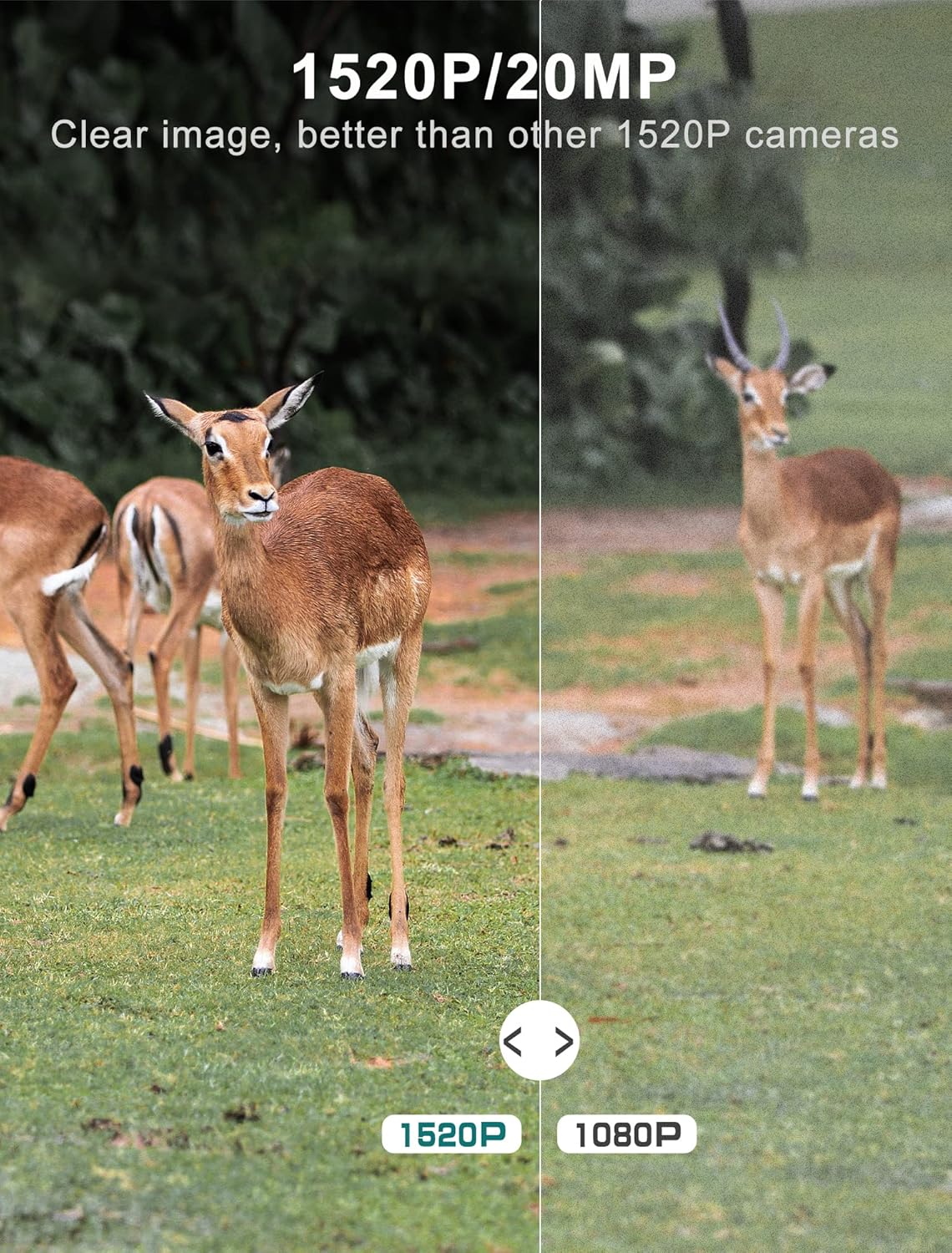
Figure 3: Image quality comparison between 1520P and 1080P resolutions.

Figure 4: Demonstration of the 0.2s trigger speed capturing fast-moving subjects.

Figure 5: The 120° wide-angle detection captures a broader area.

Figure 6: Night vision capability with 940nm no-glow IR LEDs.
4. Viewdalam Media Tangkapan
awak boleh view photos and videos directly on the camera's LCD screen:
- Switch the camera to 'PLAYBACK' mode using the mode switch.
- Use the directional buttons to browse through captured images and videos.
- Tekan 'OK' untuk view yang dipilih file.
- Untuk memindahkan files to a computer, remove the micro SD card and insert it into a card reader, or connect the camera directly via the USB cable.
Penyelenggaraan
- Pembersihan: Regularly clean the camera lens and PIR sensors with a soft, dry cloth to ensure clear images and accurate detection. Avoid abrasive materials.
- Pemeriksaan Bateri: Monitor battery levels through the LCD screen. Replace all batteries when low to prevent interruption of recording.
- Pengurusan Kad SD: Periodically format the SD card to maintain optimal performance and prevent data corruption. Back up important files sebelum memformat.
- Meterai Kalis Air: Ensure the latches are securely closed and the rubber seal around the camera housing is free from debris to maintain its IP66 waterproof rating.
- Storan: Apabila tidak digunakan untuk tempoh yang lama, keluarkan bateri dan simpan kamera di tempat yang sejuk dan kering.
Menyelesaikan masalah
| Masalah | Kemungkinan Punca | Penyelesaian |
|---|---|---|
| Kamera tidak dihidupkan | Low or dead batteries; Incorrect battery insertion | Replace all batteries with new ones; Ensure correct polarity (+/-) |
| Kualiti imej/video yang lemah | Dirty lens; Incorrect resolution settings; Insufficient lighting | Clean the lens; Adjust resolution settings in the menu; Ensure adequate light for non-night vision modes |
| Penderia gerakan tidak mencetuskan | PIR sensor obstructed; Sensitivity set too low; Subject out of range | Clear any obstructions from the sensor; Increase PIR sensitivity in settings; Ensure subject is within detection range (up to 65-80ft) |
| SD card error message | SD card not formatted; Corrupted SD card; Incompatible SD card | Format the SD card via the camera menu; Try a different, high-quality micro SD card (up to 32GB) |
| Hayat bateri pendek | Frequent triggers; Extreme temperatures; Low-quality batteries | Reduce trigger frequency if possible; Use high-quality alkaline or lithium batteries; Avoid extreme temperature exposure |
Spesifikasi Teknikal
| Ciri | Spesifikasi |
|---|---|
| Resolusi Tangkapan Video | 1520P |
| Resolusi Pegun Berkesan | 20 MP |
| Kecepatan Pencetus | 0.2 saat |
| Viewsudut | 120 Darjah |
| Julat Penglihatan Malam | 65 Kaki |
| Bilangan LED IR | 48 (940nm No Glow) |
| Penilaian Perlindungan Antarabangsa | IP66 (kalis air) |
| Sumber Kuasa | Dikuasakan Bateri (4 bateri AA diperlukan) |
| Teknologi Ketersambungan | Wireless (USB for data transfer) |
| Paparan | 2.4" LCD Color Screen |
| bahan | Akrilonitril Butadiena Stirena (ABS) |
| Dimensi Produk | 5.39 x 3.42 x 2.36 inci |
| Berat Barang | 2.79 paun (untuk 2 kamera) |
Waranti dan Sokongan
For information regarding product warranty, returns, or technical support, please refer to the official Vikeri brand store or contact Vikeri customer service directly.
Official Vikeri Brand Store: Visit the Vikeri Store on Amazon
Sila simpan resit pembelian anda untuk sebarang tuntutan waranti.


