1. Pengenalan
The FOXWELL NT624 Elite is a professional diagnostic scan tool designed for comprehensive vehicle system analysis and maintenance services. This device provides full OBD2 functions, all-system diagnostics, and various special reset functions for a wide range of vehicle makes.
2. Ciri-ciri Utama
- Semua Diagnostik Sistem: Reads and clears fault codes, views live data, and retrieves ECU information for all available vehicle systems (Engine, ABS, SRS, Transmission, etc.).
- Fungsi OBD2 Penuh: Supports all 10 OBD2 test modes, including reading/clearing codes, live data, freeze frame, I/M readiness, O2 monitor test, on-board monitor test, component test, vehicle information, and module present.
- 8 Hot Maintenance Services: Includes Oil Light Reset, SAS (Steering Angle Sensor) Calibration, EPB (Electronic Parking Brake) Service, Throttle Body Relearn, ABS Bleeding, Injector Coding, BRT (Battery Replacement) Service, and DPF (Diesel Particulate Filter) Regeneration.
- Liputan Kenderaan yang Luas: Compatible with over 90 vehicle makes.
- Imbasan VIN Auto: Mengenal pasti maklumat kenderaan secara automatik untuk diagnostik pantas.
- Paparan Data Langsung: Shows live sensor data in text and graph formats for easy analysis.
- Kemas Kini Percuma Sepanjang Hayat: Ensures the tool stays current with the latest vehicle models and diagnostic functions.
3. Kandungan Pakej
The FOXWELL NT624 Elite package typically includes the following items:
- FOXWELL NT624 Elite Main Unit
- Kabel Diagnostik (penyambung OBDII)
- USB Cable for updates
- Manual Pengguna
- Sarung Pelindung
- SD Card (pre-installed in the device)
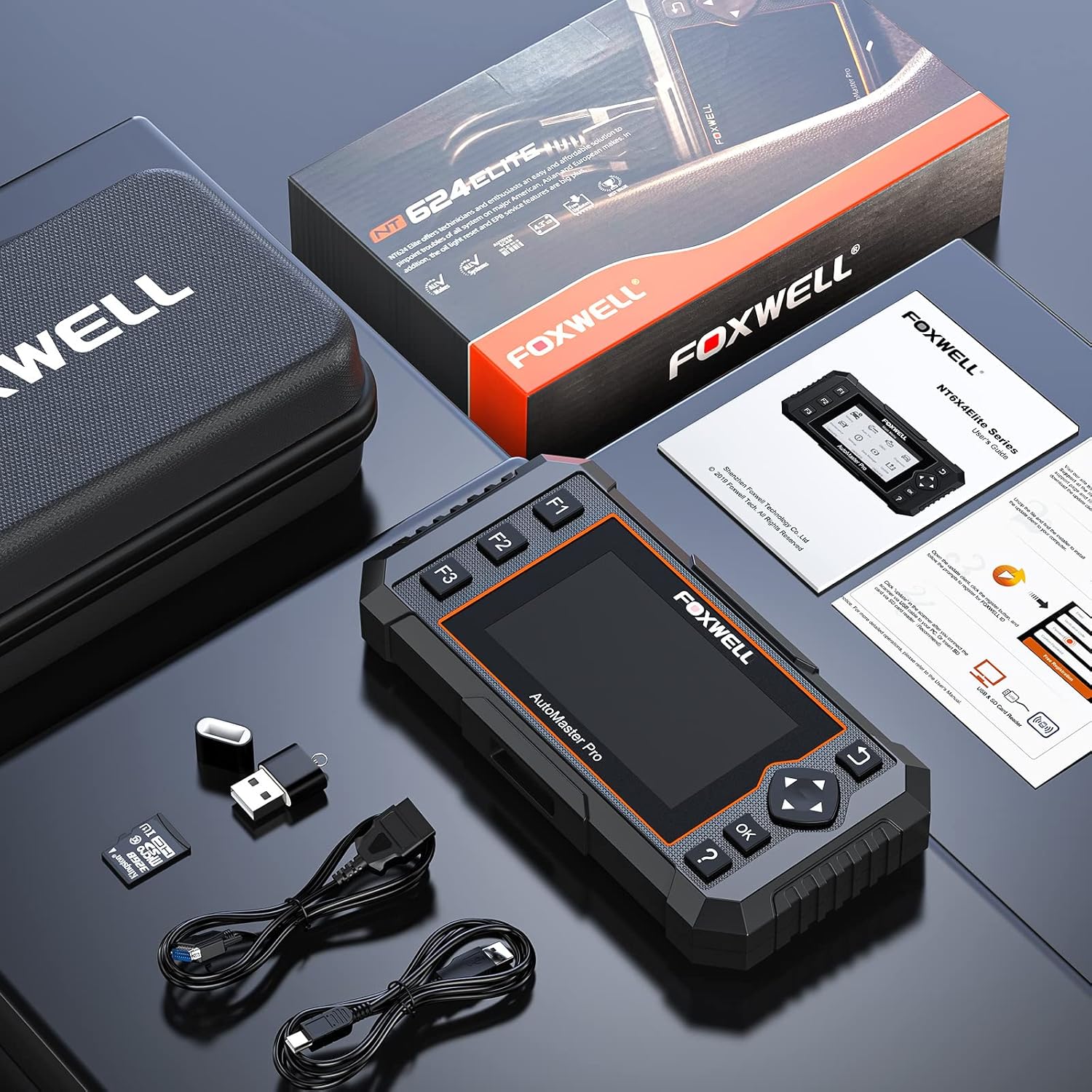
Image: Contents of the FOXWELL NT624 Elite package, showing the diagnostic tool, OBDII cable, USB cable, SD card, and carrying case.
4. Persediaan dan Penggunaan Pertama
- Hidupkan kuasa: Connect the diagnostic cable to the vehicle's OBDII port, usually located under the dashboard on the driver's side. The device will power on automatically.
- Tetapan Bahasa dan Unit: Upon first use, navigate to "Settings" from the main menu to select your preferred language and measurement units (e.g., Metric or Imperial).
- Kemas Kini Perisian: It is recommended to update the software to the latest version before first use. Connect the device to a computer via the USB cable and visit the official FOXWELL weblaman web untuk arahan kemas kini dan perisian.

Image: The FOXWELL NT624 Elite diagnostic tool connected to a vehicle's OBDII port, ready for operation.
5. Arahan Operasi
5.1. Navigasi Menu Utama
Use the directional buttons (up, down, left, right) to navigate through the menu options on the 4.3-inch screen. Press the "OK" button to confirm a selection and "Back" to return to the previous screen.

Image: The main menu of the FOXWELL NT624 Elite, showing options like History, Auto VIN, OBDII, Diagnostic, Maintenance, Settings, Data Manager, and Update.
5.2. Semua Diagnostik Sistem
- Dari Menu Utama, pilih "Diagnostik".
- Choose the vehicle make, model, and year. The Auto VIN function can often detect this automatically.
- Select "Auto Scan" to scan all available systems or choose a specific system (e.g., Engine, ABS, SRS).
- The tool will display fault codes (DTCs), live data streams, and other system information.
- To clear codes, select the "Clear Codes" option after addressing the underlying issue.

Image: The FOXWELL NT624 Elite displaying diagnostic results for various automotive systems, including ABS, SRS, Engine, and ESP.
5.3. OBD2 Functions
- From the Main Menu, select "OBDII".
- Choose the desired OBD2 function:
- Baca Kod: Displays current, pending, and permanent diagnostic trouble codes.
- Padamkan Kod: Clears diagnostic trouble codes from the vehicle's computer.
- Data Langsung: Shows real-time data from vehicle sensors.
- Bingkai pegun: Displays a snapshot of operating conditions when an emission-related fault occurred.
- Kesediaan Saya / M: Checks if the various emission-related systems are operating correctly and are ready for inspection and maintenance testing.
- Ujian Monitor O2: Mendapatkan semula keputusan ujian monitor sensor O2.
- Ujian Monitor On-Board: Retrieves results for emission-related powertrain components and systems that are continuously monitored.
- Ujian Komponen: Membenarkan permulaan ujian kebocoran untuk sistem EVAP kenderaan.
- Maklumat Kenderaan: Retrieves VIN, Cal ID, CVN, etc.
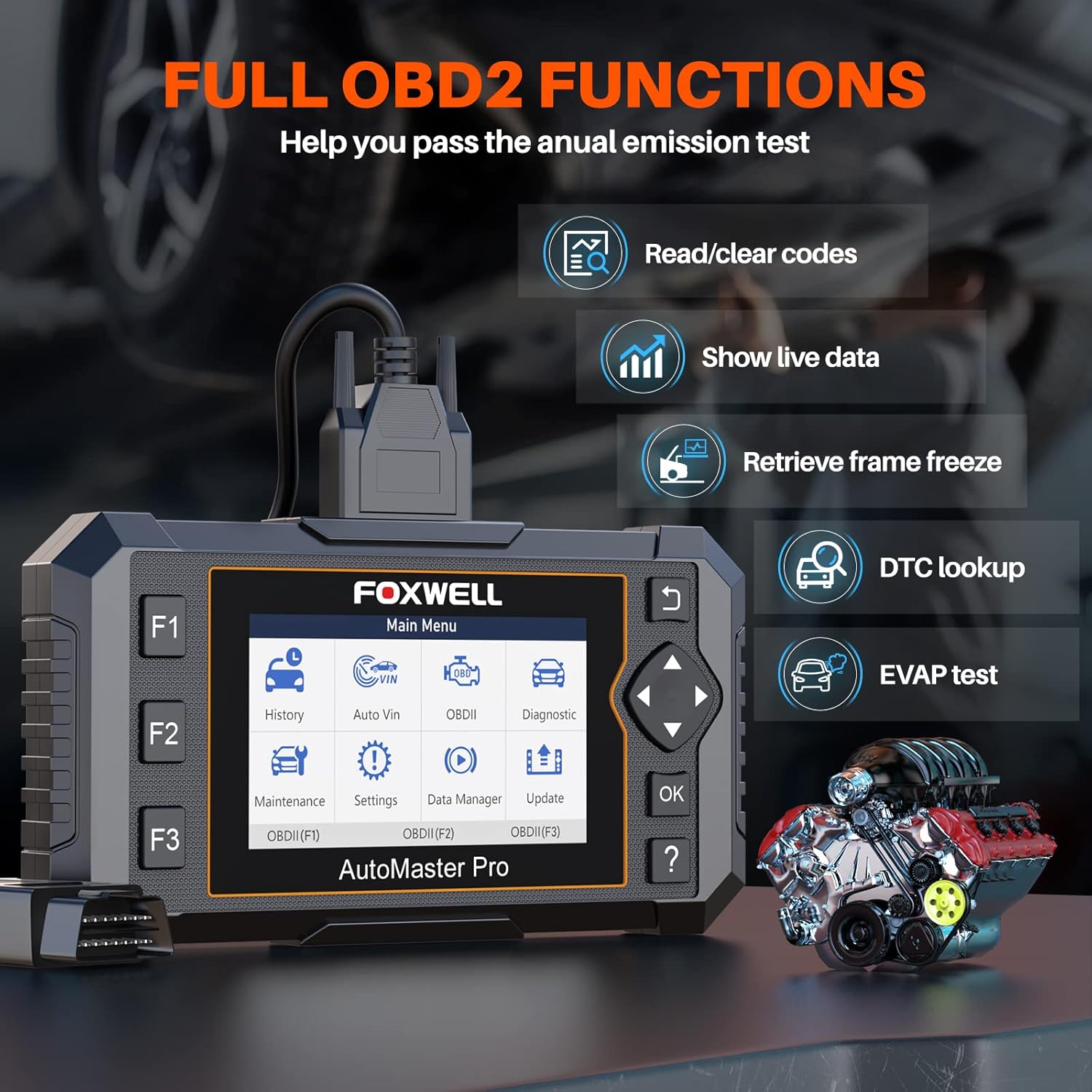
Image: The FOXWELL NT624 Elite screen showing various full OBD2 functions, including Read/Clear codes, Show live data, Retrieve frame freeze, DTC lookup, and EVAP test.
5.4. Perkhidmatan Penyelenggaraan
From the Main Menu, select "Maintenance" to access special reset functions. Follow the on-screen prompts for each service.
- Tetapan Semula Cahaya Minyak: Menetapkan semula lampu servis minyak selepas penukaran minyak.
- Penentukuran SAS: Menentukur Penderia Sudut Stereng.
- EPB Service: Deactivates and reactivates the Electronic Parking Brake system for brake pad replacement.
- Throttle Body Relearn: Mempelajari semula kedudukan badan pendikit selepas pembersihan atau penggantian.
- Pendarahan ABS: Melakukan prosedur pendarahan brek ABS.
- Pengekodan Penyuntik: Mengekod nombor penyuntik baharu ke ECU.
- BRT Service: Performs battery replacement registration.
- Penjanaan Semula DPF: Initiates Diesel Particulate Filter regeneration.

Image: The FOXWELL NT624 Elite screen highlighting the 8 hot maintenance services available, including Oil Light Reset, ABS Bleeding, Throttle, Injector, SAS, BRT, EPB, and DPF.
6. Data Management and Analysis
The NT624 Elite allows you to view and analyze live data streams, which can be displayed in both text and graphical formats. This helps in understanding vehicle performance and diagnosing intermittent issues.

Image: The FOXWELL NT624 Elite displaying live data in a graphical format on its screen, illustrating sensor readings over time for detailed analysis.
The device also stores diagnostic history, which can be reviewed later. Connect the tool to a computer to print diagnostic reports or manage saved data.
7. Penyelenggaraan dan Kemas Kini
7.1. Kemas Kini Perisian
The FOXWELL NT624 Elite offers lifetime free software updates. To update the device:
- Lawati FOXWELL rasmi webtapak (www.foxwelltech.com).
- Download and install the update client software on your computer.
- Register your device and create an account.
- Connect the NT624 Elite to your computer using the provided USB cable.
- Follow the on-screen instructions in the update client to download and install the latest software versions.
7.2. Penjagaan Peranti
- Pastikan peranti bersih dan bebas daripada habuk dan lembapan.
- Simpan peranti di dalam bekas pelindungnya apabila tidak digunakan.
- Elakkan daripada menjatuhkan peranti atau mendedahkannya kepada suhu yang melampau.
8. Penyelesaian masalah
| Masalah | Kemungkinan Punca | Penyelesaian |
|---|---|---|
| Peranti tidak dihidupkan. | Loose OBDII connection; vehicle's ignition is off; vehicle battery low. | Pastikan kabel OBDII disambungkan dengan kukuh. Putarkan penyalaan kenderaan ke kedudukan ON. Periksa volum bateri kenderaantage. |
| Ralat komunikasi dengan kenderaan. | Incorrect vehicle protocol selected; faulty OBDII port; software issue. | Verify vehicle compatibility. Check the OBDII port for damage. Update the device software. Try on another compatible vehicle. |
| Skrin membeku atau peranti tidak bertindak balas. | Gangguan perisian; kuasa rendah. | Restart the device by disconnecting and reconnecting. Ensure stable power supply from the vehicle. Perform a software update. |
| Update fails. | Unstable internet connection; incorrect update client usage; firewall issues. | Ensure a stable internet connection. Follow the update instructions carefully. Temporarily disable firewall/antivirus if necessary. |
9. Spesifikasi
- model: NT624 Elit
- paparan: Skrin Warna 4.3 inci
- Sistem pengendalian: Windows XP (for update client compatibility, device runs proprietary OS)
- Ketersambungan: OBDII, USB
- Dimensi: 8.8 x 3 x 13.1 inci (anggaran)
- Berat: 2.07 paun (anggaran)
- Kuasa: 8-18V vehicle power via OBDII
- Suhu Operasi: 0 hingga 60°C (32 hingga 140°F)
- Suhu penyimpanan: -20 hingga 70°C (-4 hingga 158°F)
10. Sokongan dan Jaminan
For technical support, product inquiries, or warranty information, please contact FOXWELL customer service through their official webtapak atau butiran hubungan yang disediakan dalam pembungkusan produk anda.
The FOXWELL NT624 Elite comes with a standard manufacturer's warranty. Please refer to the warranty card included in your package for specific terms and conditions.
Video: Tamatview of the FOXWELL NT624 Elite diagnostic tool's features and functions. This video demonstrates the user interface and capabilities of the device.


