pengenalan
Thank you for choosing the WulaWindy Digital Alarm Clock. This device combines a large mirrored LED display with practical features such as dual USB charging ports, adjustable brightness, and a convenient snooze function. This manual provides detailed instructions to help you set up, operate, and maintain your new alarm clock.
Untuk prestasi optimum, sila baca manual ini dengan teliti sebelum digunakan dan simpannya untuk rujukan pada masa hadapan.
Ciri-ciri Produk
- Operasi mudah: Features only 3 buttons for straightforward setting of time, alarm, and brightness.
- Large Mirrored LED Display: A 6.5-inch screen with large numbers for easy readability, also functions as a mirror.
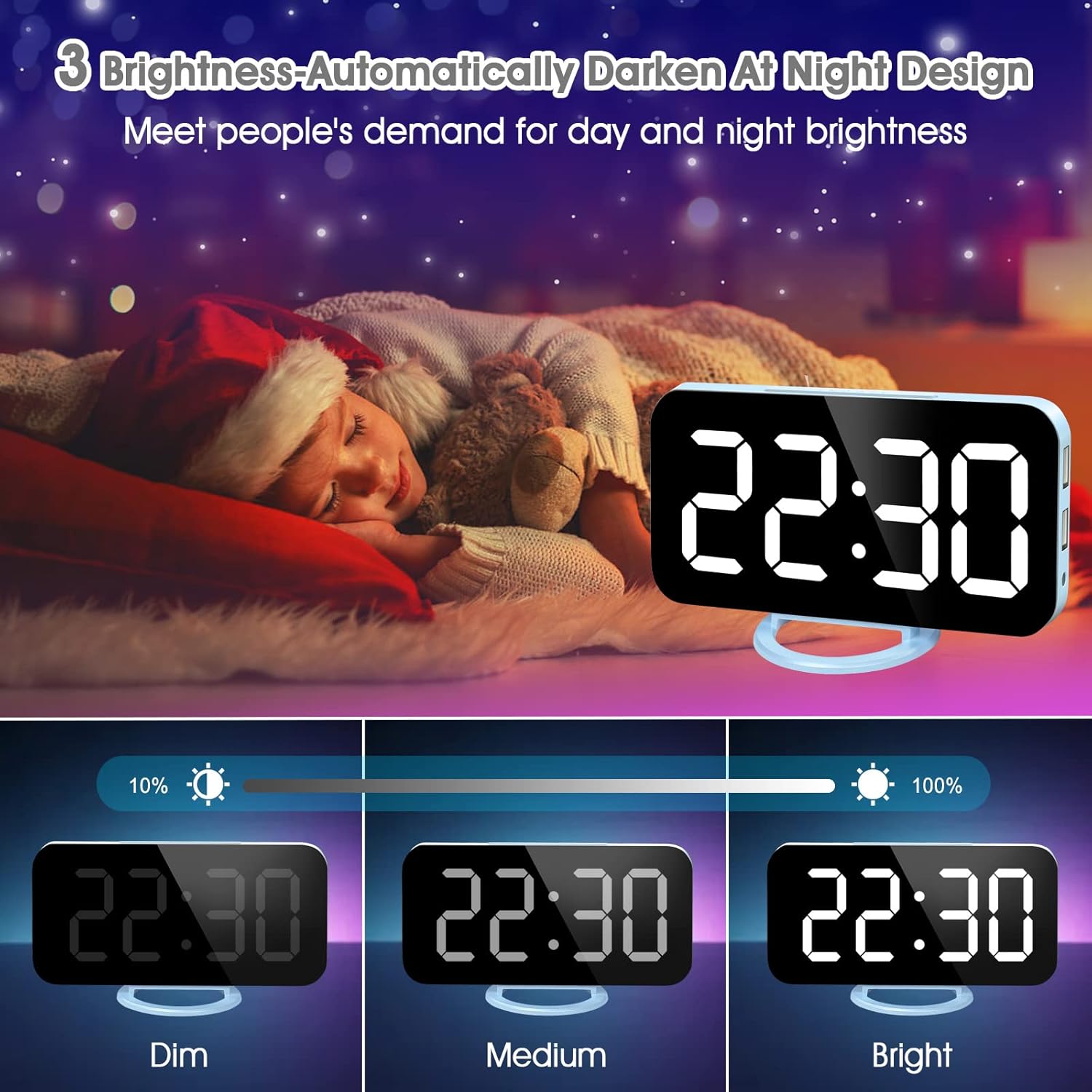
- Kecerahan boleh laras: Offers three manual brightness levels (Dim, Medium, Bright) and an automatic dimming mode for night.
- Port Pengecasan USB Dwi: Two USB ports allow simultaneous charging of two devices.
- Memory Battery Backup: Includes a backup battery (CR2016) to retain time settings during power outages. Note: The clock requires USB power to operate.
- Super Convenient Snooze Button: A large, easily accessible snooze button for 5-60 minute nap intervals.
Kandungan Pakej
- WulaWindy Digital Alarm Clock
- Kabel Kuasa USB
- Dudukan Boleh Tanggalkan
- CR2016 Backup Battery (pre-installed)
- Manual Pengguna
Persediaan
- Buka Bungkus Jam: Tanggalkan jam loceng dan semua aksesori daripada pembungkusan dengan berhati-hati.
- Keluarkan Filem Pelindung: Peel off any protective films from the mirrored display surface.
- Activate Backup Battery: Locate the battery compartment on the back of the clock. Remove the plastic insulator tab from the pre-installed CR2016 battery. This battery maintains time settings during power interruptions.
- Sambungkan Kuasa: Plug the provided USB power cable into the input port on the side of the alarm clock. Connect the other end of the USB cable to a USB power adapter (not included) or a powered USB port. The clock display will illuminate.
- Attach Stand (Optional): If using the clock on a desk or bedside table, attach the detachable stand to the bottom of the clock for stable positioning. The clock can also be wall-mounted using the keyhole slot on the back.
Arahan Operasi
Butang Lebihview
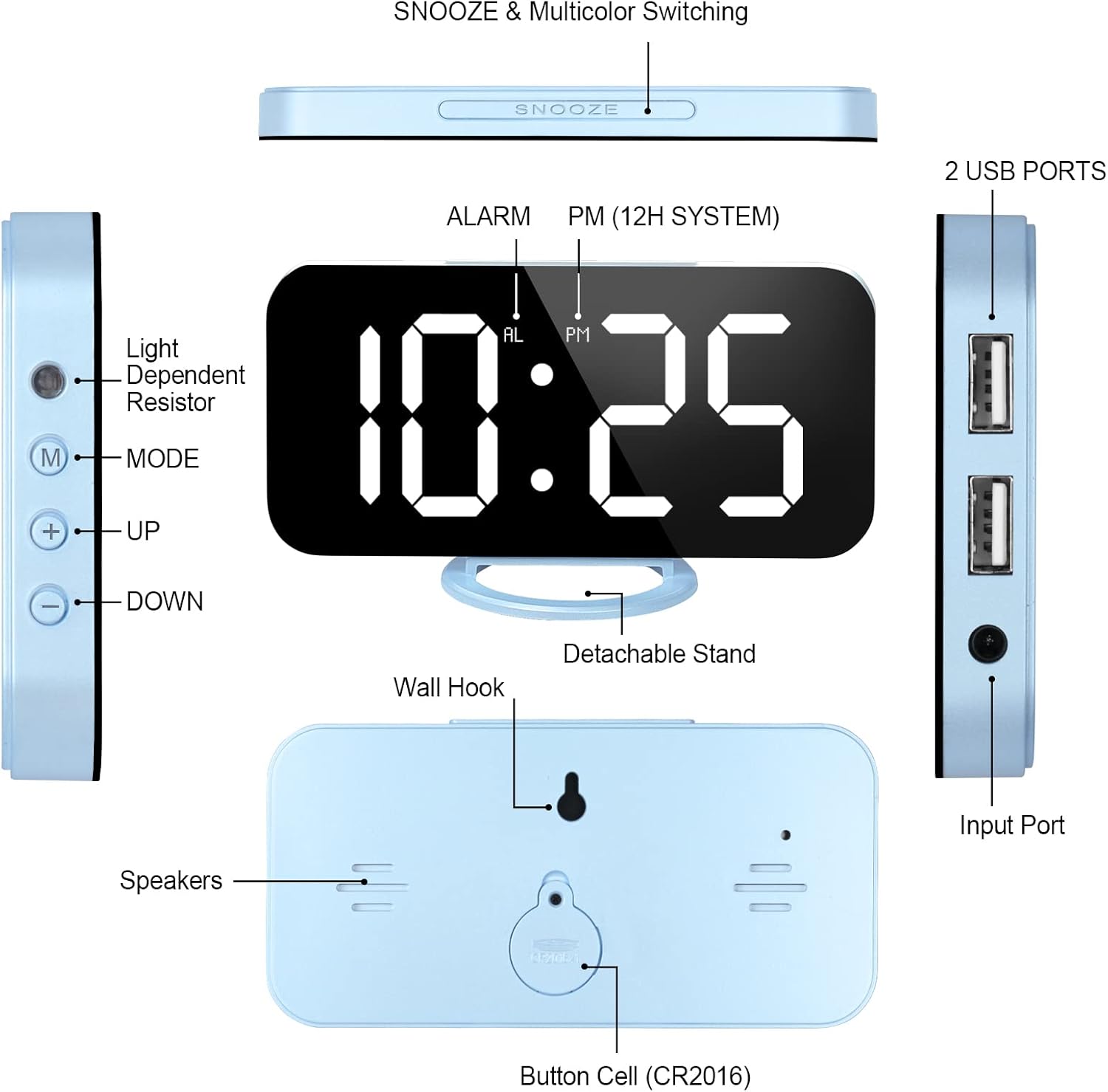
The alarm clock features three main control buttons on the side and a large snooze button on top:
- MODE Button (M): Used to switch between time, alarm, and brightness settings.
- UP Button (+): Used to increase values or navigate options.
- DOWN Button (-): Used to decrease values or navigate options.
- Butang TUNDA: Located on top, used to activate snooze or adjust display color (if applicable).

Menetapkan Masa
- Tekan ke MOD (M) button once to enter time setting mode. The hour digits will flash.
- Gunakan KE ATAS (+) or TURUN (-) butang untuk melaraskan jam.
- Tekan ke MOD (M) button again to set the minutes. The minute digits will flash.
- Gunakan KE ATAS (+) or TURUN (-) butang untuk melaraskan minit.
- Tekan ke MOD (M) butang kali ketiga untuk mengesahkan masa dan keluar dari mod tetapan masa.
- To switch between 12-hour and 24-hour format, press and hold the MOD (M) butang semasa dalam mod paparan masa biasa.
Menetapkan Penggera
- Tekan ke MOD (M) button twice to enter alarm setting mode. The alarm hour digits will flash, and an 'AL' indicator will appear.
- Gunakan KE ATAS (+) or TURUN (-) butang untuk melaraskan jam penggera.
- Tekan ke MOD (M) button again to set the alarm minutes. The alarm minute digits will flash.
- Gunakan KE ATAS (+) or TURUN (-) butang untuk melaraskan minit penggera.
- Tekan ke MOD (M) button a third time to confirm the alarm time.
- Untuk mengaktifkan atau menyahaktifkan penggera, tekan TURUN (-) button while in normal time display mode. An alarm icon will appear on the display when the alarm is active.
Pelarasan Kecerahan
The clock offers both manual and automatic brightness control:
- Kecerahan Manual: Dalam mod paparan masa biasa, tekan butang KE ATAS (+) button to cycle through three brightness levels: Dim, Medium, and Bright.
- Peredupan Automatik: The clock can automatically adjust its brightness based on ambient light. To enable this, ensure the light sensor (located on the side) is unobstructed. The display will automatically dim at night.
Fungsi Tunda
Apabila penggera berbunyi, tekan besar MENGEJUTKAN button on top of the clock to activate the snooze function. The alarm will pause and sound again after the set snooze interval (default is 5 minutes, adjustable up to 60 minutes). To turn off the alarm completely, press any other button on the side of the clock.

Port Pengecasan USB
The alarm clock is equipped with two USB charging ports on its side. These ports can be used to charge your mobile devices, smartwatches, or other USB-powered gadgets while the alarm clock is plugged into a power source.
Produk Selesaiview Video
Penyelenggaraan
- Pembersihan: Wipe the display and body of the clock with a soft, dry cloth. Avoid using abrasive cleaners or solvents.
- Penggantian Bateri: The CR2016 backup battery should last for several years. If the clock loses time settings during a power outage, replace the battery. To replace, open the battery compartment on the back, remove the old battery, and insert a new CR2016 battery with the positive (+) side facing up.
- Storan: If storing the clock for an extended period, disconnect it from power and remove the backup battery.
Menyelesaikan masalah
| Masalah | Penyelesaian |
|---|---|
| Paparan jam dimatikan. | Ensure the USB power cable is securely connected to both the clock and a working power source. The clock requires continuous USB power to display time. |
| Time settings are lost after power outage. | The CR2016 backup battery may be depleted. Replace the battery as described in the Maintenance section. |
| Penggera tidak berbunyi. | Ensure the alarm is activated (alarm icon visible on display). Verify the alarm time is set correctly. |
| Paparan terlalu malap atau terlalu terang. | Tekan ke KE ATAS (+) button to cycle through manual brightness levels. If using auto-dimming, ensure the light sensor on the side is not obstructed. |
| USB charging ports are not working. | Ensure the alarm clock is powered via its USB cable. The charging ports only function when the clock is receiving power. |
Spesifikasi
| Ciri | Perincian |
|---|---|
| Jenama | WulaWindy |
| Nombor Model | yishang |
| Jenis Paparan | Digital LED, Mirrored Surface |
| Dimensi Produk | 6.7"W x 3.7"H |
| Sumber Kuasa | Corded Electric (USB), Battery Powered (for memory backup) |
| Bateri Sandaran | 1 x CR2016 (termasuk) |
| Ciri Khas | Alarm, Snooze, Dual USB Charging, Adjustable Brightness, Auto-Dimming |
| Jenis Pemasangan | Desk Clock, Wall Mount |
| bahan | Akrilonitril Butadiena Stirena |
| Berat Barang | 6.7 auns |
Waranti dan Sokongan
WulaWindy products are designed for quality and reliability. For any questions, technical support, or warranty claims, please refer to the contact information provided with your purchase or visit the official WulaWindy store on Amazon.
We are committed to ensuring 100% user satisfaction.
