1. Pengenalan
This manual provides detailed instructions for the setup, operation, and maintenance of your VYSER F2 Projector. Please read this manual thoroughly before using the projector to ensure proper functionality and to maximize your viewing experience. The VYSER F2 Projector is a versatile device designed for various entertainment and presentation needs, offering high-definition projection with multiple connectivity options.
2. Apa yang ada di dalam Kotak
Upon unboxing your VYSER F2 Projector, please verify that all the following items are included:
- VYSER F2 Projector
- Alat Kawalan Jauh
- Manual Pengguna (dokumen ini)
- Kabel HDMI
- Kabel Kuasa
3. Produk Lebihview
Familiarize yourself with the components and ports of your VYSER F2 Projector.

Figure 3.1: VYSER F2 Projector with key features highlighted.
3.1 Depan View
- Kanta Fokus: Melaraskan kejelasan imej yang diunjurkan.
- Penerima IR: Menerima isyarat dari alat kawalan jauh.
3.2 Sisi dan Belakang Views (Ports and Controls)
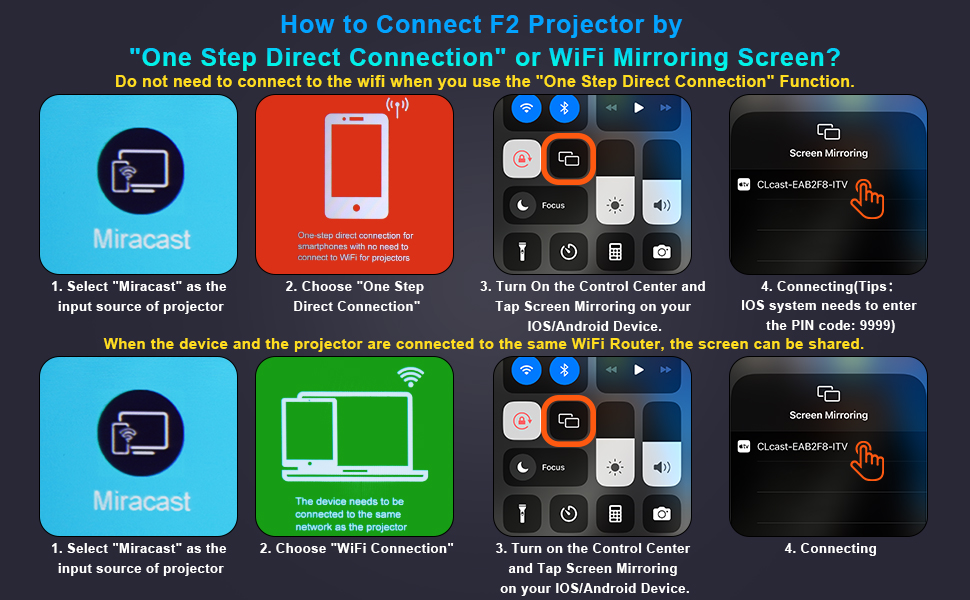
Figure 3.2: Multiple connection options on the VYSER F2 Projector.
- Port HDMI (x2): Connect to devices like laptops, TV sticks, gaming consoles (e.g., PS5/Xbox).
- Port USB (x2): Sambungkan pemacu USB untuk main balik media.
- Pelabuhan AV: Sambungkan ke peranti lama menggunakan kabel AV.
- Output Audio 3.5mm: Sambungkan pembesar suara atau fon kepala luaran.
- Input Kuasa: Sambungkan kabel kuasa.
- Cooling Windows: Pastikan pengudaraan yang betul untuk pelesapan haba.
- On-board Controls: Buttons for power, menu, input source, and navigation.
3.3 360 Degree View Projektor
Video 3.1: A comprehensive 360-degree view of the VYSER F2 Projector, showcasing its design and various ports from all angles.
4. Persediaan
Follow these steps to set up your VYSER F2 Projector for the first time.
4.1 Penempatan
Place the projector on a stable, flat surface. Ensure there is adequate ventilation around the projector to prevent overheating. The projection distance can range from 5-15 feet, allowing for an adjustable screen size of 50-300 inches.
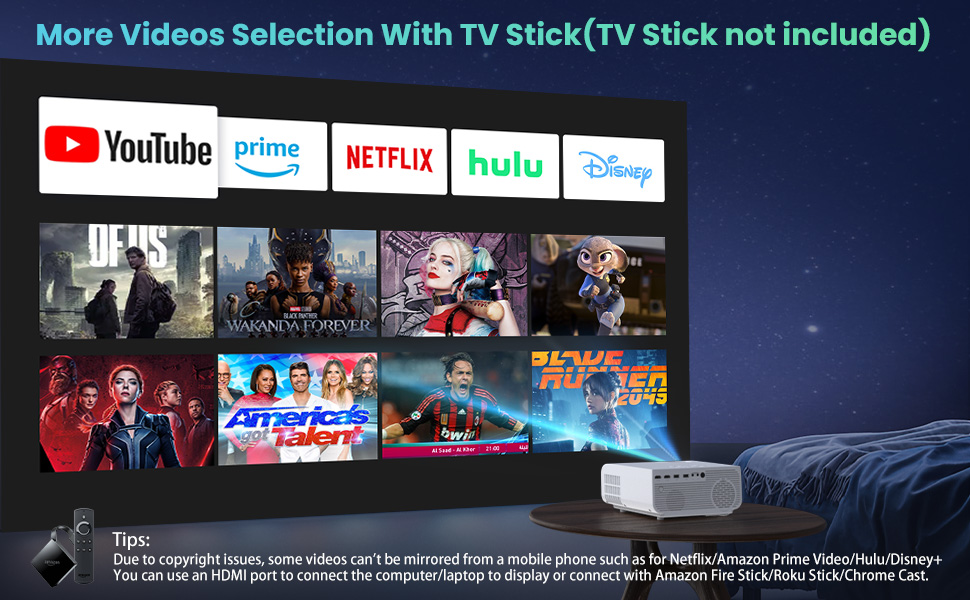
Figure 4.1: Adjustable display size from 50 to 300 inches.
The projector can be placed on a table, mounted on a tripod, or ceiling-mounted. Use the adjustable foot at the bottom of the projector to fine-tune the projection angle if needed.
4.2 Sambungan Kuasa
- Connect the power cable to the Power Input port on the projector.
- Palamkan hujung kabel kuasa yang lain ke dalam salur keluar kuasa.
- Press the Power button on the projector or remote control to turn it on.
4.3 Fokus dan Pembetulan Keystone
- Pelarasan Fokus: Rotate the focus lens ring on the front of the projector until the image appears clear and sharp.
- Pembetulan Keystone: Use the keystone correction dial (usually on top or side) to adjust the image shape if it appears trapezoidal. The projector supports ±15° keystone correction.
5. Arahan Operasi
Learn how to connect your devices and utilize the various features of your projector.
5.1 Menyambung Peranti
The VYSER F2 Projector offers multiple ways to connect your devices:
- HDMI: For high-definition video and audio from laptops, gaming consoles, TV boxes, etc.
- USB: Untuk bermain media files terus daripada pemacu denyar USB.
- DARI: For connecting older devices with AV output.
5.2 Wireless Connectivity (Screen Mirroring)
The projector supports 5G/2.4G WiFi for seamless screen mirroring from your smartphone or tablet.
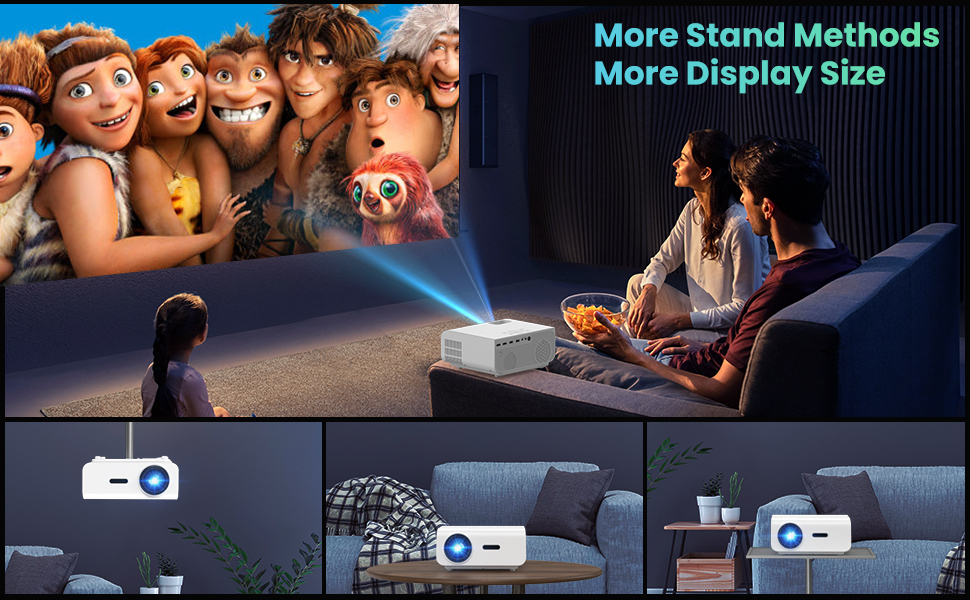
Figure 5.1: 5G/2.4G WiFi Screen Mirroring for various devices.
One-Step Direct Connection: This feature allows direct connection to your phone without needing a WiFi network. Ideal for outdoor use or when a router is unavailable.
Video 5.1: Demonstration of the F2 Projector's One-Step Direct Connection with WiFi and Bluetooth, showing quick setup for phone mirroring.
For detailed steps on screen mirroring, refer to the on-screen instructions by selecting "Miracast" from the input source menu.
Note: Due to copyright restrictions, some streaming services (e.g., Netflix, Amazon Prime Video, Hulu, Disney+) may block screen mirroring. For these services, it is recommended to use an HDMI connection with a compatible device like a Fire TV Stick, Roku Stick, or laptop.
5.3 Sambungan Bluetooth
The projector features Bluetooth 5.1 for connecting to external Bluetooth speakers or headphones, enhancing your audio experience.

Figure 5.2: Bluetooth connection for external audio devices.
To connect: Navigate to the Bluetooth settings on the projector, enable Bluetooth, and select your desired audio device from the list of available devices. (Note: The projector connects to Bluetooth speakers, not directly to smartphones/tablets via Bluetooth for audio input).
5.4 Menu Navigasi
Use the remote control or the on-board buttons to navigate the projector's menu. Options typically include input source selection, picture settings (brightness, contrast, color), sound settings, and system settings.
6. Penyelenggaraan
Penyelenggaraan yang betul memastikan jangka hayat dan prestasi optimum projektor anda.
- Pembersihan Kanta: Use a soft, lint-free cloth specifically designed for optical lenses to gently clean the projector lens. Avoid abrasive materials or harsh chemicals.
- Penyingkiran habuk: Regularly clean the cooling vents to prevent dust buildup, which can affect performance and lifespan. Use a soft brush or compressed air.
- Storan: Apabila tidak digunakan untuk tempoh yang lama, simpan projektor di tempat yang sejuk dan kering, sebaik-baiknya di dalam pembungkusan asalnya atau bekas pelindung.
- Matikan dengan betul: Always turn off the projector using the power button and allow it to cool down before unplugging or moving it.
7. Penyelesaian masalah
Jika anda menghadapi masalah dengan projektor anda, rujuk langkah penyelesaian masalah biasa berikut:
| Masalah | Kemungkinan Punca / Penyelesaian |
|---|---|
| Tiada imej atau mesej "Tiada Isyarat" |
|
| Imej kabur |
|
| Trapezoidal image |
|
| Tiada suara atau suara rendah |
|
| Screen mirroring issues (e.g., Netflix not working) |
|
| Projector overheating or shutting down |
|
8. Spesifikasi
Key technical specifications for the VYSER F2 Projector:
| Ciri | Perincian |
|---|---|
| Jenama | VYSER |
| Model | Projektor F2 |
| Resolusi Asli | 1920 x 1080 (1080P Asli) |
| Kecerahan | 12000 Lux (350 ANSI Lumens) |
| Nisbah Kontras | 10000:1 (implied from image comparison) |
| Saiz Unjuran | 50-300 inci |
| Jarak Unjuran | 5-15 kaki |
| Teknologi Ketersambungan | Wireless (5G/2.4G WiFi), Bluetooth 5.1, HDMI (x2), USB (x2), AV, 3.5mm Audio Out |
| Pembetulan Batu Kunci | Manual ±15° |
| Berat Barang | 4.11 paun |
| warna | White-White |
9. Waranti dan Sokongan
VYSER is committed to providing excellent customer service and technical support for your projector.
- Perkhidmatan Pelanggan Sepanjang Hayat: Enjoy lifetime customer service and technical support for your VYSER F2 Projector.
- For any inquiries, technical assistance, or warranty claims, please contact VYSER customer support through the platform where you purchased the product or refer to the official VYSER webtapak untuk maklumat hubungan.


