1. Pengenalan
The SONICAKE EQ Equalizer is a professional 10-band graphic equalizer pedal designed with an analog circuit. It features ten carefully selected frequency bands, allowing musicians to precisely and quickly shape their instrument's tone. This pedal is suitable for a variety of instruments and is built with a true bypass circuit to maintain signal integrity.
This manual provides detailed instructions for the setup, operation, and maintenance of your EQ Equalizer pedal to ensure you achieve the best possible sound.
2. Ciri-ciri Produk
- 100% Analog 10-Band Equalizer: Based on classic EQ effect pedal frequency bands.
- Adjustable Gain Range: ±15dB adjustable gain range for each band, suitable for various instruments.
- Precise Tone Shaping: 11 high-quality sliders for quick and accurate parameter control.
- True Bypass Circuit: Ensures a clean signal path when the effect is disengaged.
- Pembinaan Tahan Lama: Aluminium-alloy casing for lightweight yet robust performance.
3. Kawalan dan Fungsi
Familiarize yourself with the controls of your SONICAKE EQ Equalizer pedal:

Imej: Depan view of the SONICAKE EQ Equalizer pedal with numbered control labels.
- Input Jack (1/4 inch): Connect your instrument or the output of a preceding effect pedal here.
- Input Kuasa DC 9V: Connect a standard 9V DC center-negative power supply (not included).
- Output Jack (1/4 inch): Sambungkan ini kepada anda amplifier or the input of the next effect pedal in your chain.
- Frequency Band Sliders (31.25Hz to 16kHz): Ten individual sliders to boost or cut specific frequency ranges by ±15dB. Adjust these to shape your tone.
- Level Slider: Controls the overall output volume of the pedal. Use this to match the volume when the effect is engaged or disengaged.
- Suis kaki: Engages or disengages the equalizer effect. This pedal features true bypass, ensuring your signal remains unaffected when the pedal is off. The LED indicator above the footswitch illuminates when the effect is active.

Imej: Atas ke bawah view of the SONICAKE EQ Equalizer pedal, showing all sliders and the footswitch.

Image: A hand demonstrating the adjustment of the frequency sliders on the EQ Equalizer pedal.
4. Persediaan
Follow these steps to set up your EQ Equalizer pedal:
- Sambungan Kuasa: Connect a standard 9V DC center-negative power supply (not included) to the DC 9V input jack (2). Ensure the power supply meets the specified voltage dan keperluan kekutuban.
- Input Instrumen: Connect your instrument (e.g., guitar) or the output of a previous effect pedal to the Input Jack (1) on the right side of the pedal.
- Sambungan Output: Connect the Output Jack (3) on the left side of the pedal to your amplifier's input or the input of the next effect pedal in your signal chain.
- Hidupkan kuasa: Setelah semua sambungan selamat, hidupkan amppengikat dan peralatan lain.

Imej: Bersudut view of the EQ Equalizer pedal, highlighting the DC 9V power input and its central negative polarity requirement.
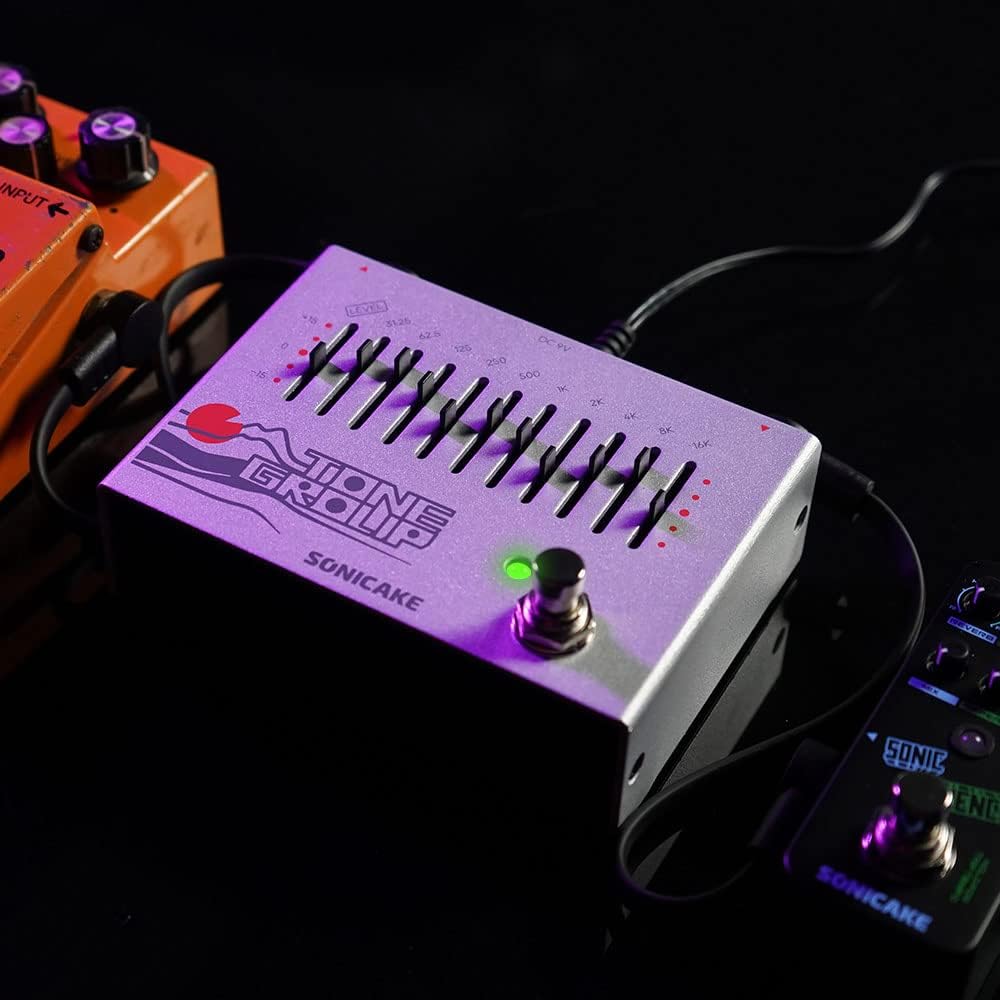
Image: The EQ Equalizer pedal integrated into a pedalboard setup, demonstrating typical connections.
5. Arahan Operasi
To operate your SONICAKE EQ Equalizer pedal:
- Engage/Disengage Effect: Press the footswitch (6) to toggle the equalizer effect on or off. The LED indicator will light up when the effect is active.
- Adjusting Frequency Bands: Use the ten frequency band sliders (4) to boost or cut specific frequencies. Moving a slider up boosts that frequency, while moving it down cuts it. Experiment with different settings to find your desired tone.
- Adjusting Overall Level: Use the Level slider (5) to control the overall output volume of the pedal. This is useful for compensating for volume changes introduced by EQ adjustments or for matching the volume with other pedals in your chain.
- Petua Pembentukan Tona:
- Low Frequencies (31.25Hz - 125Hz): Affect bass and sub-bass. Boosting can add warmth and fullness; cutting can reduce muddiness.
- Mid Frequencies (250Hz - 2kHz): Crucial for presence and clarity. Boosting around 500Hz-1kHz can add body; cutting can reduce harshness. Boosting 2kHz can add bite.
- High Frequencies (4kHz - 16kHz): Control treble and brilliance. Boosting can add sparkle and air; cutting can reduce hiss or harshness.

Imej: Jarak dekat view of the footswitch on the EQ Equalizer pedal, illustrating its true bypass functionality.
6. Penyelenggaraan
Untuk memastikan jangka hayat dan prestasi optimum pedal anda:
- Pembersihan: Gunakan kain lembut dan kering untuk membersihkan bahagian luar pedal. Elakkan pembersih atau pelarut yang kasar.
- Storan: Store the pedal in a dry environment, away from extreme temperatures, humidity, and direct sunlight.
- Bekalan Kuasa: Always use a regulated 9V DC center-negative power supply. Incorrect power can damage the unit.
- Sambungan: Periodically check all cable connections for wear and tear.
7. Penyelesaian masalah
If you encounter issues with your EQ Equalizer pedal, consider the following:
- Tiada Bunyi:
- Pastikan bekalan kuasa disambungkan dan berfungsi dengan betul.
- Check all instrument cables for proper connection and functionality.
- Sahkan bahawa amplifier dihidupkan dan kelantangannya dinaikkan.
- Ensure the pedal's Level slider is not set to minimum.
- Bunyi Lemah atau Terherot:
- Check the power supply; insufficient power can cause distortion.
- Ensure instrument cables are not faulty.
- Adjust the Level slider to prevent signal clipping.
- Bunyi/Dengungan yang Tidak Diingini:
- Use a high-quality, regulated power supply.
- Pastikan semua kabel dilindungi dan disambungkan dengan betul.
- Try isolating the pedal from other power sources or noisy equipment.
8. Spesifikasi
| Nombor Model | QDS |
| Berat Barang | 12.7 auns (0.36 Kilogram) |
| Dimensi Produk | 3.54"L x 2.16"W x 4.88"H (9 x 5.5 x 12.4 cm) |
| Sumber Kuasa | DC Power Supply (9V Center Negative, not included) |
| Voltage | 9 Volt |
| Format Isyarat | Analog |
| Jenis Penyambung | Bicu audio 1/4 inci |
| Antara Muka Perkakasan | Audio 1/4 inci |
9. Waranti dan Sokongan
For warranty information, technical support, or service inquiries regarding your SONICAKE EQ Equalizer pedal, please refer to the documentation included with your purchase or visit the official SONICAKE webtapak. Simpan bukti pembelian anda untuk sebarang tuntutan waranti.


