pengenalan
The Edifier CX7 is an active 2.1 home entertainment system designed to deliver high-quality audio for various devices, including televisions, personal computers, and notebooks. This system features Bluetooth V5.0 connectivity, an 8-inch subwoofer, and an infrared remote control for convenient operation. This manual provides essential information for setting up, operating, and maintaining your CX7 system.
Kandungan Pakej
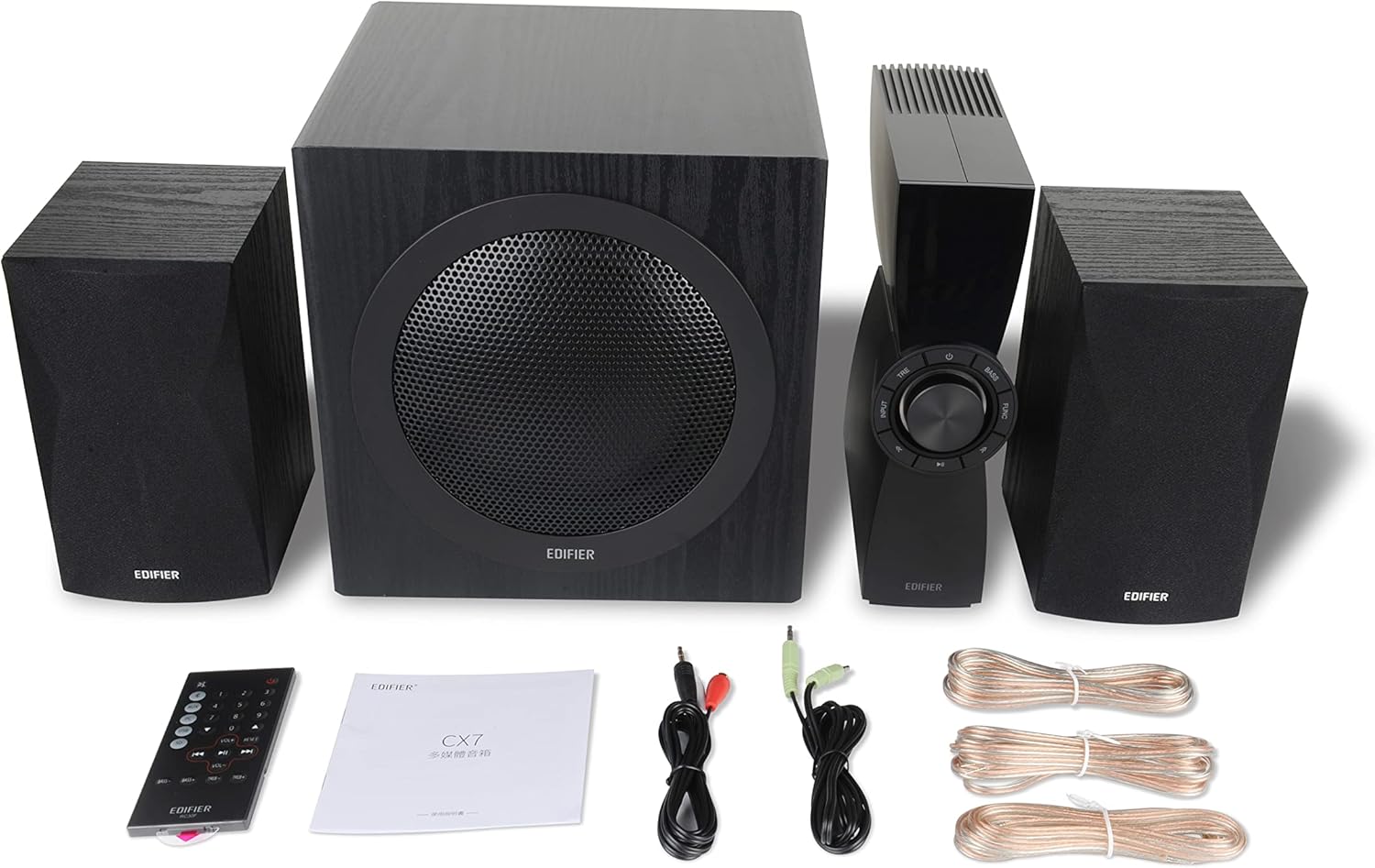
Figure 1: Edifier CX7 System Components
Sila sahkan bahawa semua item yang disenaraikan di bawah disertakan dalam pakej anda:
- Subwoofer (1)
- Satellite Speakers (2)
- Control Unit (1)
- Infrared Remote Control (1)
- 3.5mm to RCA Audio Cable (1)
- RCA to RCA Audio Cable (1)
- Speaker Connection Cables (2)
- Manual Pengguna (1)
Panduan Persediaan
1. penempatan
Position the subwoofer on the floor, preferably in a corner or near a wall for optimal bass response. Place the satellite speakers on either side of your listening area, equidistant from the listener, and at ear level if possible. Ensure the control unit is easily accessible.

Figure 2: Recommended System Placement
2. Pembesar Suara Penyambung
Connect the satellite speakers to the speaker output terminals on the rear of the control unit using the provided speaker cables. Ensure correct polarity (red to red, black to black) for each speaker.
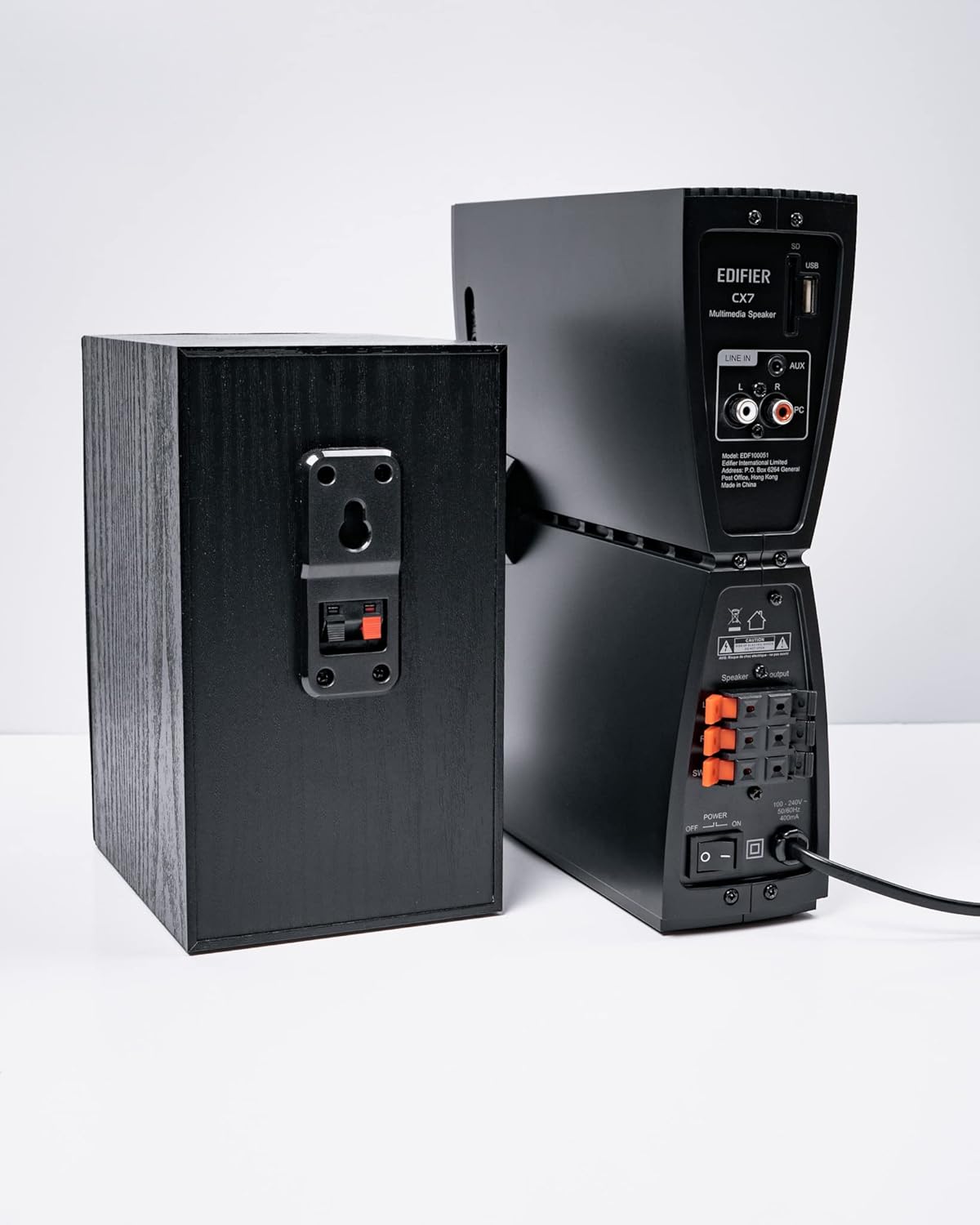
Rajah 3: Sambungan Pembesar Suara
3. Menyambung Sumber Audio
The CX7 system supports multiple audio input options:
- Input AUX: Use the 3.5mm to RCA audio cable to connect devices like smartphones, tablets, or computers to the AUX input on the control unit.
- Input PC: Use the RCA to RCA audio cable to connect your PC's audio output to the PC input on the control unit.
- Bluetooth: For wireless connection, refer to the "Bluetooth Pairing" section under Operating Instructions.
4. Sambungan Kuasa
Connect the power cable to the control unit and then plug it into a standard wall outlet. Turn on the power switch located on the rear of the control unit.
Arahan Operasi
1. Hidupkan/Mati Kuasa
After connecting the power, press the power button on the control unit or the remote control to turn the system on or off. The display on the control unit will illuminate when powered on.

Figure 4: Control Unit Display
2. Pemilihan Input
Press the "INPUT" button on the control unit or the remote control to cycle through available audio sources: AUX, PC, and Bluetooth. The selected input will be displayed on the control unit's screen.

Figure 5: Control Knob and Input Buttons
3. Kawalan Kelantangan
Rotate the large knob on the control unit clockwise to increase volume and counter-clockwise to decrease it. Alternatively, use the "VOL+" and "VOL-" buttons on the remote control.
4. Pelarasan Bes dan Treble
Press the "BASS" or "TRE" (Treble) buttons on the control unit or remote control, then rotate the main knob to adjust the respective levels. The display will show the current bass/treble setting.
5. Berpasangan Bluetooth
- Select the Bluetooth input on the CX7 system. The display will show "BT" and flash, indicating it's in pairing mode.
- Pada peranti anda (telefon pintar, tablet, dll.), dayakan Bluetooth dan cari peranti yang tersedia.
- Select "EDIFIER CX7" from the list of found devices.
- Once paired, the "BT" indicator on the CX7 display will stop flashing and remain solid.
To disconnect a Bluetooth device, press and hold the "FUNC" button on the control unit or the Bluetooth button on the remote control for a few seconds.
6. Fungsi Alat Kawalan Jauh

Figure 6: Infrared Remote Control
The remote control provides convenient access to all major functions:
- Kuasa: Menghidupkan/mematikan sistem.
- Pemilihan Input: Cycles through AUX, PC, Bluetooth.
- Kelantangan: Melaraskan kelantangan induk.
- Bes/Trebel: Melaraskan tahap bes dan treble.
- Redam: Redam/nyahredamkan audio.
- Kawalan Main Semula: Play/Pause, Previous/Next track (for Bluetooth mode).
Penyelenggaraan
- Pembersihan: Use a soft, dry cloth to clean the surfaces of the speakers and control unit. Do not use liquid cleaners or abrasive materials.
- Pengudaraan: Ensure adequate ventilation around the control unit and subwoofer to prevent overheating. Do not block ventilation openings.
- Persekitaran: Elakkan mendedahkan sistem kepada suhu, kelembapan, habuk atau cahaya matahari langsung yang melampau.
- Matikan: If the system will not be used for an extended period, disconnect it from the power outlet.
Menyelesaikan masalah
| Masalah | Kemungkinan Punca | Penyelesaian |
|---|---|---|
| Tiada bunyi |
|
|
| Sambungan Bluetooth gagal |
|
|
| Bunyi herot |
|
|
Spesifikasi
| Ciri | Perincian |
|---|---|
| Nama Model | CX7 |
| Jenis Pembesar Suara | 2.1 Sistem pembesar suara |
| Teknologi Ketersambungan | Bluetooth |
| Teknologi Komunikasi Tanpa Wayar | Bluetooth V5.0 |
| Julat Bluetooth | 10 Meter |
| Mod Keluaran Audio | Keliling |
| Kuasa Output Maksimum Pembesar Suara | 69 Watt |
| Teknologi Ketersambungan Subwufer | Tanpa wayar |
| Diameter Woofer | 8 Inci |
| bahan | Polipropilena |
| warna | Hitam |
| Dimensi Produk | 16.93"D x 17.72"W x 13.39"H |
| Berat Barang | 29 paun (13.2 Kilogram) |
| Sumber Kuasa | Elektrik Bertali |
| Jenis Pengawal | Alat Kawalan Jauh |
| Penggunaan yang Disyorkan | Untuk Televisyen, Untuk Komputer, Untuk Telefon Pintar atau Tablet |
Waranti dan Sokongan
For warranty information and technical support, please refer to the warranty card included with your product or visit the official Edifier webtapak. Simpan resit pembelian anda sebagai bukti pembelian untuk tuntutan waranti.
Edifier Official Webtapak: www.edifier.com


