1. Arahan Keselamatan Penting
Please read all instructions carefully before operating your television and retain them for future reference. Follow all warnings and instructions marked on the product.
- Do not block or cover the ventilation slots on the back cover.
- Jangan letakkan TV pada troli, dudukan, tripod, pendakap atau meja yang tidak stabil.
- Jangan gunakan TV berhampiran air.
- Bersihkan hanya dengan kain kering.
- Cabut palam TV semasa ribut petir atau apabila tidak digunakan untuk tempoh yang lama.
- Rujuk semua servis kepada kakitangan perkhidmatan yang berkelayakan.
2. Kandungan Pakej
Sahkan bahawa semua item yang disenaraikan di bawah disertakan dalam pakej anda:
- Impecca 43-inch 1080P Frameless LED TV
- Full-function Remote Control (requires 2xAAA batteries, not included)
- 2x TV Stands
- 5ft. Power Cable
- Manual Pengguna (dokumen ini)
3. Produk Lebihview
The Impecca 43-inch Frameless LED TV offers a high-quality viewing experience with its 1080p HD resolution and 60Hz refresh rate. Designed for clarity and vibrant colors, this television features enhanced stereo speakers with Dolby Audio for an immersive sound experience. Its frameless design provides a sleek aesthetic suitable for any living space.

Depan view of the Impecca 43-inch Frameless LED TV.

The Impecca 43-inch TV integrated into a modern living room setting, showcasinreka bentuk tanpa bingkainya.
Ciri-ciri Utama:
- 43-Inch Frameless LED Display: 1080p HDTV with 60Hz picture quality for high-quality entertainment.
- Dolby Audio & HQ Stereo Speakers: Integrated speakers with HQ resolution and Dolby Audio for crisp, clear sound.
- Pelbagai Pilihan Kesambungan: Includes 3xHDMI, 1xUSB, 1x A/V inputs, Earphone out, A/V Input, Component Y,Pb,Pr, and Wall Mounting Ports.
- Advanced Picture & Sound Settings: Features Adjustable Color temperature, Noise Reduction, Weak Signal Enhancement, Progressive Scan, Equalizers.
- Convenience Functions: On/Off Timer, Auto Sleep Mode, and a full-function remote control.
- Sokongan berbilang bahasa: Inggeris, Perancis, Sepanyol.
4. Persediaan
4.1 Memasang Kaki TV
- Letakkan TV menghadap ke bawah dengan berhati-hati pada permukaan yang lembut dan bersih untuk mengelakkan kerosakan skrin.
- Jajarkan setiap pendirian dengan lubang skru yang sepadan di bahagian bawah TV.
- Selamatkan dirian menggunakan skru yang disediakan. Pastikan ia dilekatkan dengan kukuh.
4.2 Pemasangan Dinding (Pilihan)
This TV is VESA compatible (M4 100 x 100). If you choose to wall mount your TV, please follow the instructions provided with your wall mount kit. Ensure the wall mount is suitable for the TV's weight and size.
4.3 Kuasa Penyambung
Connect the 5ft power cable to the TV's power input and then to a standard electrical outlet (AC 100-240V, 50/60Hz).
4.4 Kuasa Awal Hidup
After connecting the power, press the Power button on the remote control or on the TV to turn it on. Follow the on-screen prompts for initial setup, including language selection and channel scanning.
5. Ketersambungan
The Impecca TV offers a variety of ports for connecting external devices:

belakang view of the TV highlighting the available input/output ports.
- HDMI (x3): Connect Blu-ray players, gaming consoles, cable/satellite boxes, and other HDMI-enabled devices.
- USB (x1): Untuk menyambungkan peranti storan USB untuk memainkan media files.
- A/V Input: Untuk peranti lama yang menggunakan video komposit dan kabel audio stereo.
- Component Y,Pb,Pr: Untuk menyambungkan peranti menggunakan kabel video komponen.
- Keluar fon telinga: Untuk menyambungkan fon kepala atau sistem audio luaran.
- Input Antena/Kabel: Untuk menyambungkan antena atau isyarat TV kabel.
Menyambung Peranti:
- Ensure the TV and the external device are powered off.
- Connect the appropriate cable from the external device to the corresponding port on the TV.
- Power on the external device, then power on the TV.
- Press the 'SOURCE' button on the remote control to select the correct input source.
6. Alat Kawalan Jauh
The included full-function remote control allows you to operate all features of your Impecca TV.

The full-function remote control for the Impecca TV.
Pemasangan Bateri:
Open the battery compartment on the back of the remote control. Insert two AAA batteries, ensuring correct polarity (+/-). Close the compartment.
Fungsi Utama:
- Power (⑁): Menghidupkan atau mematikan TV.
- Redam (🔇): Mutes or restores sound.
- Butang Nombor (0-9): Terus pilih saluran.
- Kelantangan (+/-): Melaraskan tahap kelantangan.
- Saluran (▲/▼): Menukar saluran secara berurutan.
- Sumber: Memilih sumber input (HDMI, USB, AV, dll.).
- Menu: Mengakses menu utama untuk tetapan.
- Navigation Buttons (◄/►/▲/▼): Navigasi melalui menu dan pilihan.
- MASUK: Mengesahkan pilihan.
- KELUAR: Keluar dari menu atau fungsi semasa.
- CC: Activates/deactivates Closed Captions.
- EPG: Memaparkan Panduan Program Elektronik.
- TIDUR: Menetapkan pemasa tidur.
7. Operasi Asas
7.1 Hidupkan/Mati Kuasa
Press the Power button on the remote control or on the TV to turn the unit on or off.
7.2 Pemilihan Saluran
Use the number buttons on the remote to directly enter a channel number, or use the Channel Up/Down buttons to browse channels.
7.3 Pelarasan Kelantangan
Use the Volume Up/Down buttons on the remote to increase or decrease the sound level. Press the Mute button to temporarily silence the audio.
7.4 Pemilihan Sumber Input
Press the 'SOURCE' button on the remote control to cycle through available input sources (e.g., HDMI 1, HDMI 2, USB, AV). Select the desired source using the navigation buttons and 'ENTER'.
7.5 Menu Navigasi
Press the 'MENU' button to access the TV's main settings menu. Use the navigation arrows to move between options and 'ENTER' to select. Use 'EXIT' to close the menu.
8. Ciri Lanjutan
Your Impecca TV includes several features to enhance your viewpengalaman dalam dan mendengar:
- Suhu Warna Boleh Laras: Customize the color warmth or coolness of the display to your preference.
- Pengurangan Bunyi: Reduces visual noise in the picture for a clearer image.
- Weak Signal Enhancement: Improves picture quality when receiving a weak broadcast signal.
- Imbasan Progresif: Enhances the clarity and stability of the image.
- Penyamaan: Adjust audio frequencies to fine-tune the sound output.
- Pemasa Hidup/Mati: Set specific times for the TV to automatically turn on or off.
- Mod Auto Tidur: The TV can automatically enter standby mode after a period of inactivity.
- Audio Dolby: Provides enhanced sound quality for a more dynamic audio experience.
9. Penyelesaian masalah
Jika anda menghadapi masalah dengan TV anda, rujuk masalah dan penyelesaian biasa berikut:
| Masalah | Penyelesaian yang Mungkin |
|---|---|
| Tiada kuasa | Ensure the power cable is securely connected to the TV and a working electrical outlet. Check if the outlet has power. |
| Tiada gambar, tetapi bunyi hadir | Periksa pemilihan sumber input. Pastikan peranti luaran dihidupkan dan disambungkan dengan betul. |
| Tiada bunyi, tetapi ada gambar | Check the volume level and ensure the TV is not muted. Verify audio cables are connected properly. |
| Alat kawalan jauh tidak berfungsi | Gantikan bateri dalam alat kawalan jauh. Pastikan tiada halangan antara alat kawalan jauh dan penderia IR TV. |
| Kualiti gambar yang buruk | Check antenna/cable connections. Adjust picture settings (brightness, contrast, sharpness, color temperature). If using an external device, check its output resolution. |
10. Spesifikasi
Detailed technical specifications for the Impecca 43-inch 1080P Frameless LED TV:
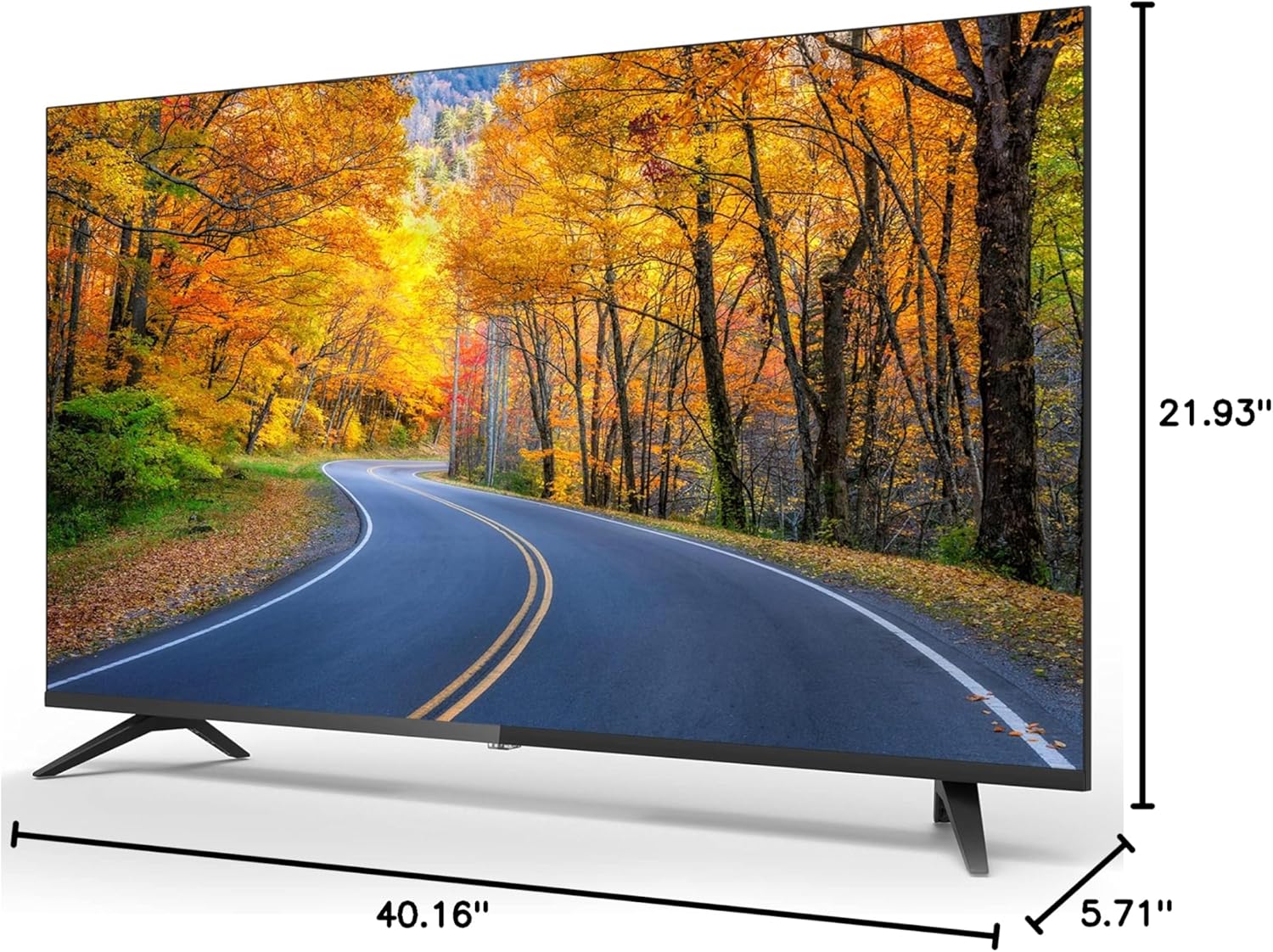
Dimensions of the Impecca 43-inch TV.
| Ciri | Spesifikasi |
|---|---|
| Saiz Skrin | 43 Inci |
| Teknologi Paparan | LED |
| Resolusi | 1080p (1920x1080) |
| Kadar Segar Semula | 60 Hz |
| Nisbah Aspek | 16:9 |
| Kecerahan | 180 cd/m² |
| Nisbah Kontras | 1000:1 |
| Viewsudut | 178° x 178° |
| Masa Tindak Balas | 5ms |
| Penala Terbina dalam | Penala ATSC |
| Penceramah | 2 x 6-Watts Stereo Speakers |
| Penggunaan Kuasa | ≤40W (operational), ≤0.5W (Standby) |
| Keperluan Kuasa | AC 100-240V, 50/60Hz |
| Dimensi Produk (D x W x H) | 5.71" x 40.16" x 21.93" |
| Berat Barang | 13.09 paun |
| Keserasian VESA | M4 100 x 100 |
11. Penyelenggaraan
11.1 Membersihkan TV
Before cleaning, unplug the power cord from the electrical outlet. Use a soft, dry cloth to wipe the screen and other surfaces. Do not use liquid cleaners, aerosol cleaners, or harsh chemicals, as they may damage the TV.
11.2 Penjagaan dan Penyimpanan
Avoid exposing the TV to direct sunlight, extreme temperatures, or high humidity. When moving the TV, handle it carefully and ensure it is properly supported to prevent damage.
12. Waranti dan Sokongan
For warranty information or technical support, please refer to the warranty card included with your product or visit the official Impecca website. You may also contact Impecca customer service directly for assistance with product registration, troubleshooting, or service requests.
Sokongan dalam talian: www.impecca.com/support
Maklumat Hubungan: Refer to your product packaging or the Impecca webtapak untuk butiran hubungan terkini.


