pengenalan
Thank you for choosing the NGS EVO RUST ICE Wireless Mouse. This manual provides essential information for setting up, operating, maintaining, and troubleshooting your device. Please read it carefully to ensure optimal performance and longevity of your mouse.

Depan view of the NGS EVO RUST ICE wireless mouse in blue, showcasinreka bentuk ergonomiknya dan penerima USB yang disertakan.

The NGS EVO RUST ICE mouse is available in various colors, including blue, gold, and black.
Panduan Persediaan
Follow these steps to set up your NGS EVO RUST ICE wireless mouse:
- Buka bungkusan Tetikus: Carefully remove the mouse and the USB receiver from the packaging.
- Cari Penerima USB: The compact USB receiver is typically stored within the mouse itself, often in a compartment on the underside.
- Masukkan Penerima USB: Plug the USB receiver into an available USB port on your computer (PC, Mac, MacBook, iPad, or Tablet). The mouse is designed for "Plug and Play" functionality, meaning it should be recognized automatically by your operating system.
- Hidupkan Tetikus: Cari suis Hidup/Mati di bahagian bawah tetikus dan luncurkannya ke kedudukan "Hidup".
- Initial Charging (if needed): Although the mouse comes with some charge, it is recommended to fully charge it before first use. Connect the supplied micro USB cable to the mouse's charging port and the other end to a USB power source (e.g., computer USB port, USB wall adapter).

The NGS EVO RUST ICE mouse shown with its micro USB charging cable and the 2.4 GHz USB receiver, demonstrating its connectivity and charging method.
Arahan Operasi
Your NGS EVO RUST ICE mouse is designed for intuitive use. Here's how to operate its key features:
- Basic Movement: Move the mouse across a flat surface. The optical sensor provides precise tracking.
- Butang Senyap: The left and right click buttons are designed to be silent, reducing click noise by over 90%.
- Roda Tatal: Use the anti-sweat rubber scroll wheel for vertical scrolling through documents and web halaman. Roda skrol juga berfungsi sebagai butang tengah yang boleh diklik.
- Pelarasan DPI: The mouse features a dedicated DPI button, typically located behind the scroll wheel. Press this button to cycle through the available resolution settings: 800 DPI (for precise control), 1200 DPI (standard use), and 1600 DPI (for faster cursor movement). Choose the DPI setting that best suits your task and preference.
- Butang Sisi: The mouse includes additional buttons on the side, designed for right-handed users. These can often be configured for forward/back navigation in web browsers or other custom functions depending on your operating system and software.
- Penjimatan Tenaga: Utilize the On/Off switch on the underside of the mouse to conserve battery life when not in use or when transporting the mouse.

The NGS EVO RUST ICE mouse in use with a laptop, demonstrating its ergonomic fit for right-handed users.
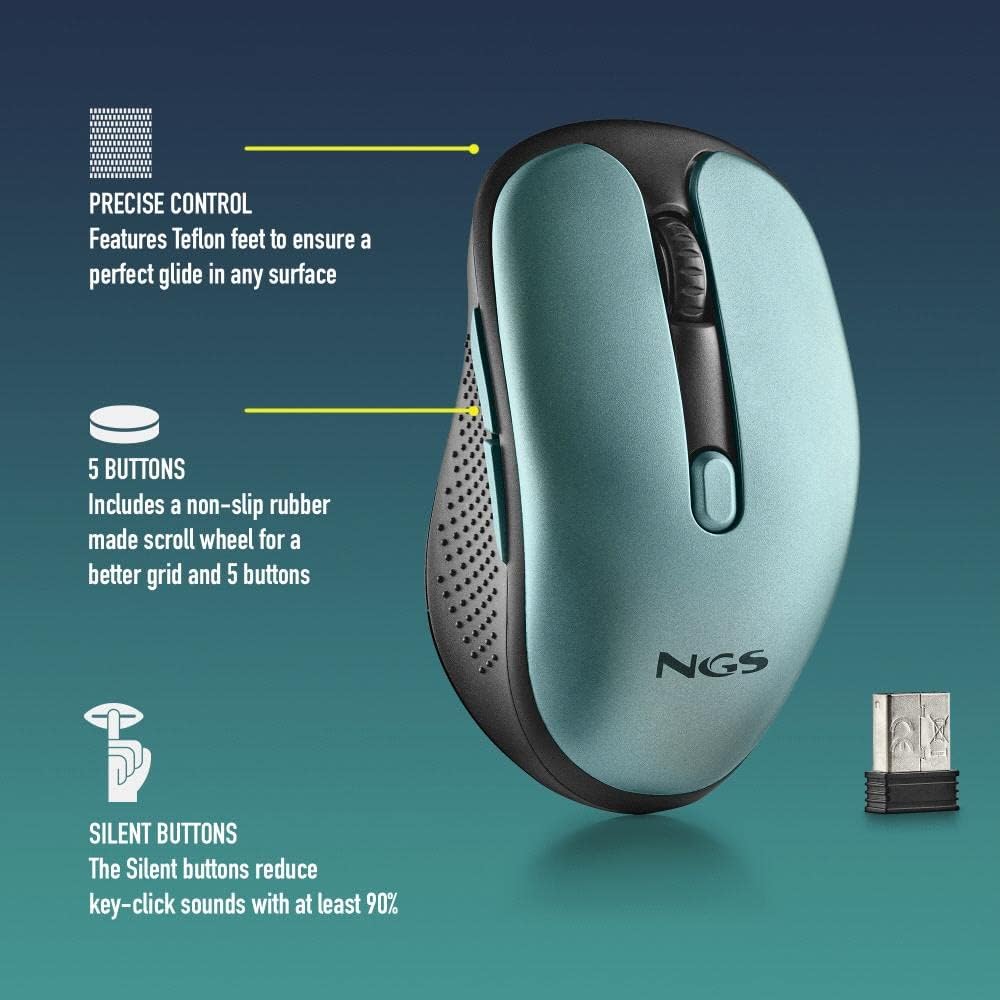
A terperinci view of the NGS EVO RUST ICE mouse highlighting its features: Teflon feet for smooth gliding, five responsive buttons, and silent click technology that reduces noise by over 90%.
Penyelenggaraan
Penyelenggaraan yang betul memastikan ketahanan dan prestasi optimum tetikus anda:
- Pembersihan: Gunakan kain lembut dan kering untuk mengelap permukaan tetikus. Untuk kotoran degil, sedikit dampen kain dengan air atau pembersih yang lembut dan tidak melelas. Elakkan menggunakan bahan kimia yang keras atau bahan yang melelas.
- Sensor Optik: Pastikan sensor optik di bahagian bawah tetikus bersih dan bebas daripada habuk atau serpihan untuk memastikan penjejakan yang tepat. Gunakan kapas atau udara termampat jika perlu.
- mengecas: Recharge the mouse when the battery indicator (if present) shows low power, or when you notice a delay in response. Use the provided micro USB cable for charging. A full charge can provide up to 50 hours of use.
- Storan: When not in use for extended periods, turn off the mouse using the On/Off switch to conserve battery life. Store it in a clean, dry place.

An illustrative image showing key features of the NGS EVO RUST ICE mouse, including its micro USB charging port and impressive battery life.
Menyelesaikan masalah
If you encounter issues with your NGS EVO RUST ICE mouse, try the following solutions:
| Masalah | Kemungkinan Punca | Penyelesaian |
|---|---|---|
| Tetikus tidak bertindak balas |
|
|
| Pergerakan kursor tidak menentu |
|
|
| Hayat bateri pendek |
|
|
Spesifikasi Teknikal
- Nama Model: NGS EVO RUST ICE
- Ketersambungan: Tanpa Wayar 2.4 GHz (Penerima USB)
- Teknologi Sensor: Optik
- Resolusi DPI: 800 / 1200 / 1600 DPI (Boleh Laras)
- Bilangan Butang: 5 (Left, Right, Scroll Wheel Click, 2 Side Buttons)
- Ciri Khas: Silent Buttons, Rechargeable Lithium Battery, Teflon Feet, On/Off Energy Saving Button, Plug & Play
- Jenis Bateri: Rechargeable Lithium Battery (600 mAh, based on image)
- Hayat Bateri: Sehingga 50 jam dengan sekali cas
- Port Pengecasan: USB mikro
- Jarak Operasi: 8-10 meter
- Orientasi tangan: Right-Handed Design
- Dimensi (L x W x H): Kira-kira 105 x 62 x 38 mm
- Berat: 66 Gram
- Keserasian: PC, Mac, MacBook, iPad, Tablet (macOS, Windows compatible)

A graphic illustrating key features of the NGS EVO RUST ICE mouse: wireless operation, rechargeable battery, 800/1200/1600 DPI settings, silent buttons, and compatibility with PC and Mac systems.
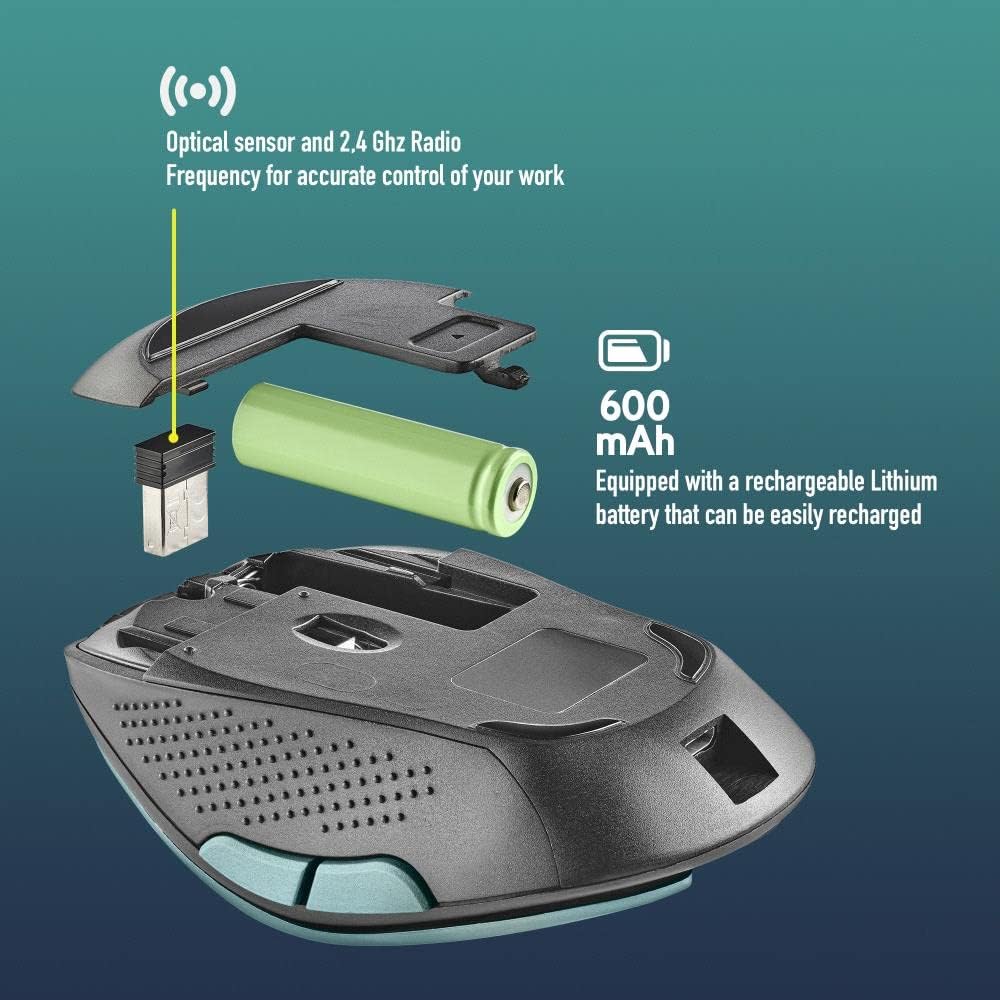
Sebuah meletup view of the NGS EVO RUST ICE mouse, illustrating its internal components including the optical sensor, 2.4 GHz radio frequency module, and the 600 mAh rechargeable Lithium battery.
Waranti dan Sokongan
The NGS EVO RUST ICE mouse comes with a manufacturer's warranty. For specific details regarding warranty coverage, duration, and terms, please refer to the documentation included with your purchase or visit the official NGS webtapak.
For technical support, product registration, or further inquiries, please contact NGS customer service through their official channels. Contact information can typically be found on the product packaging or the manufacturer's webtapak.
Pengeluar: Lurbe Grup, S.A. (NGS)


