1. Pengenalan
Thank you for choosing the DELTACO Gaming PM80 Wireless Optical Gaming Mouse. This manual provides essential information for setting up, operating, and maintaining your new gaming mouse. Please read these instructions carefully before use to ensure optimal performance and longevity of your device.
2. Kandungan Pakej
- DELTACO Gaming PM80 Wireless Optical Gaming Mouse
- Penerima Wayarles USB
- Kabel Pengecas USB
- Manual Pengguna
3. Produk Lebihview
The DELTACO Gaming PM80 is a high-performance wireless optical gaming mouse designed for precision and comfort. It features 7 programmable buttons, adjustable DPI up to 4800, and customizable illumination. The mouse is rechargeable, ensuring uninterrupted gaming sessions.
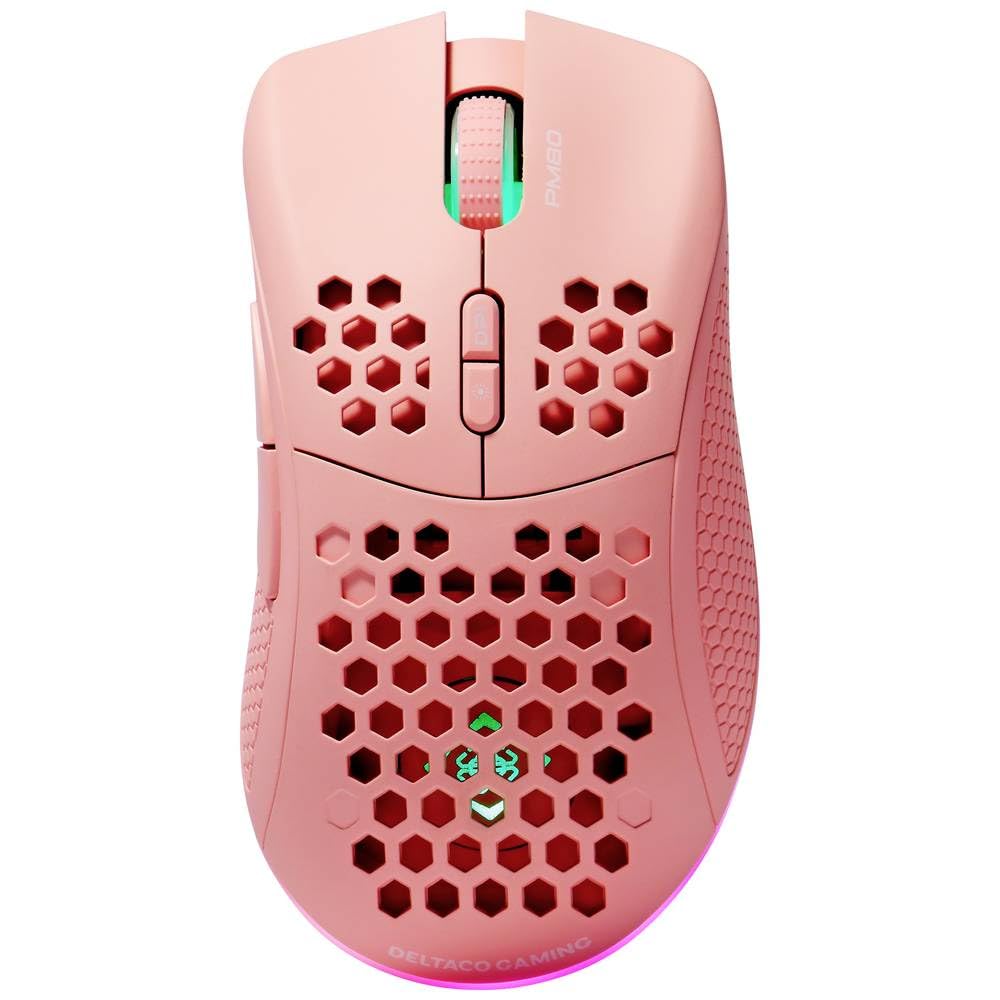
Image: DELTACO Gaming PM80 Wireless Optical Gaming Mouse. This image displays the mouse from a top-down perspective, highlighting its ergonomic design, the central scroll wheel, and the arrangement of its seven buttons.
Fungsi Butang:
- Butang Klik Kiri: Fungsi klik utama standard.
- Butang Klik Kanan: Fungsi klik sekunder standard.
- Roda Tatal: Scrolls up/down, and acts as a middle click button.
- Butang Kitaran DPI: Changes the mouse's sensitivity (DPI).
- Butang ke hadapan: Navigasi ke hadapan web pelayar atau file penjelajah.
- Butang ke belakang: Navigasi ke belakang web pelayar atau file penjelajah.
- Illumination Mode Button: Cycles through different lighting effects or turns illumination on/off.
4. Persediaan
4.1. Mengecas Tetikus
- Sambungkan hujung kecil kabel pengecas USB ke port pengecasan di bahagian hadapan tetikus.
- Connect the larger end of the USB charging cable to an available USB port on your computer or a USB wall adapter.
- The mouse's illumination will indicate charging status (e.g., breathing effect, specific color). A full charge typically takes 2-3 hours.
- Once fully charged, the illumination may change or turn off. Disconnect the charging cable.
4.2. Connecting the USB Wireless Receiver
- Cari penerima wayarles USB, biasanya disimpan dalam petak di bahagian bawah tetikus.
- Tanggalkan penerima dari slot storannya.
- Pasangkan penerima wayarles USB ke port USB yang tersedia pada komputer anda.
- Komputer anda harus secara automatik mengesan dan memasang pemacu yang diperlukan. Ini mungkin mengambil masa beberapa saat.
4.3. Menghidupkan/Mematikan
- Cari suis kuasa di bahagian bawah tetikus.
- Slide the switch to the 'ON' position to power on the mouse. The illumination will light up.
- To conserve battery life, slide the switch to the 'OFF' position when the mouse is not in use for extended periods.
5. Arahan Operasi
5.1. Penggunaan Asas
Once connected and powered on, the mouse is ready for use. Move the mouse on a flat surface to control the cursor on your screen. Use the left and right click buttons for primary and secondary actions, and the scroll wheel for navigation.
5.2. Pelarasan DPI
The DPI (Dots Per Inch) setting determines the sensitivity of your mouse. The DELTACO Gaming PM80 offers multiple DPI levels up to 4800 DPI. To adjust the DPI:
- Tekan ke Butang Kitaran DPI (typically located behind the scroll wheel).
- Each press will cycle through the available DPI settings. The mouse's illumination may change color or flash to indicate the current DPI level.
- Select the DPI setting that best suits your preference for gaming or general use.
5.3. Illumination Control
The DELTACO Gaming PM80 features customizable illumination. To change the lighting effects:
- Tekan ke Illumination Mode Button (refer to Product Overview untuk lokasi).
- Each press will cycle through different lighting modes, such as static colors, breathing effects, or off.
6. Penyelenggaraan
6.1. Pembersihan
- Ensure the mouse is powered off before cleaning.
- Gunakan kain yang lembut, kering dan tidak berbulu untuk mengelap permukaan tetikus.
- Untuk kotoran degil, sedikit dampen kain dengan air atau pembersih yang lembut dan tidak melelas. Elakkan kelembapan berlebihan.
- Do not use harsh chemicals, solvents, or abrasive materials, as these can damage the mouse's finish.
- Gunakan swab kapas atau udara termampat untuk membersihkan sekeliling roda skrol dan celah-celah butang.
6.2. Penyimpanan
When not in use for extended periods, store the mouse in a cool, dry place away from direct sunlight and extreme temperatures. Ensure the power switch is in the 'OFF' position to preserve battery life.
7. Penyelesaian masalah
- Tetikus tidak bertindak balas:
- Pastikan tetikus dihidupkan.
- Check if the USB wireless receiver is securely plugged into a working USB port.
- Verify the mouse battery is charged. Connect the charging cable and try again.
- Cuba palamkan penerima ke port USB yang berbeza.
- Mulakan semula komputer anda.
- Sambungan ketinggalan atau terputus-putus:
- Ensure the mouse is within close proximity to the USB receiver (ideally within 10 meters).
- Avoid placing the receiver near other wireless devices or sources of interference (e.g., Wi-Fi routers, cordless phones).
- Pastikan tetikus dicas sepenuhnya.
- Pergerakan kursor tidak menentu atau tidak tepat:
- Bersihkan penderia optik di bahagian bawah tetikus dengan kain lembut dan kering.
- Pastikan anda menggunakan tetikus pada permukaan yang sesuai (cth, pad tetikus). Elakkan permukaan yang sangat reflektif atau lutsinar.
- Laraskan tetapan DPI kepada sensitiviti yang lebih rendah jika kursor terlalu laju.
- Pencahayaan tidak berfungsi:
- Pastikan tetikus dihidupkan.
- Press the Illumination Mode Button to cycle through modes, ensuring it's not set to 'off'.
- Check battery level; low battery might disable illumination.
8. Spesifikasi
| Ciri | Perincian |
|---|---|
| Jenama | DELTACO GAMING |
| Nombor Model | GAM-120-P |
| Ketersambungan | Wayarles (Penerima USB) |
| Jenis Sensor | Optik |
| DPI | Sehingga 4800 DPI (Boleh Laras) |
| Bilangan Butang | 7 |
| Orientasi Tangan | Betul |
| Pencahayaan | ya |
| Boleh dicas semula | ya |
| Bateri Diperlukan | No (Internal Rechargeable) |
9. Waranti dan Sokongan
For warranty information and technical support, please refer to the warranty card included with your product or visit the official DELTACO Gaming webtapak. Simpan bukti pembelian anda untuk sebarang tuntutan waranti.


