pengenalan
Thank you for choosing the Eureka AK10 Pro Cordless Vacuum Cleaner. This manual provides essential information for the safe operation, maintenance, and troubleshooting of your new appliance. Please read it thoroughly before first use and keep it for future reference.
The Eureka AK10 Pro is a high-performance cordless stick vacuum cleaner designed for efficient cleaning. It features a powerful 450W BLDC motor, delivering up to 29000 Pa of suction power. With a runtime of up to 60 minutes, a foldable tube for hard-to-reach areas, and an intelligent LED display, it is ideal for various cleaning tasks, including pet hair removal.
Arahan Keselamatan Penting
Apabila menggunakan perkakas elektrik, langkah berjaga-jaga asas hendaklah sentiasa dipatuhi, termasuk yang berikut:
- Baca semua arahan sebelum menggunakan pembersih vakum ini.
- Jangan biarkan perkakas tanpa pengawasan apabila dipasang. Cabut plag dari saluran keluar apabila tidak digunakan dan sebelum diservis.
- Jangan gunakan di luar atau di permukaan basah.
- Jangan biarkan digunakan sebagai mainan. Perhatian yang rapi diperlukan apabila digunakan oleh atau berhampiran kanak-kanak.
- Gunakan hanya seperti yang diterangkan dalam manual ini. Gunakan hanya lampiran yang disyorkan pengilang.
- Jangan gunakan dengan kord atau palam yang rosak. Jika perkakas tidak berfungsi sebagaimana mestinya, telah terjatuh, rosak, ditinggalkan di luar rumah, atau terjatuh ke dalam air, kembalikannya ke pusat servis.
- Jangan tarik atau bawa dengan kord, gunakan kord sebagai pemegang, tutup pintu pada kord, atau tarik kord di sekeliling tepi atau sudut yang tajam. Jangan jalankan perkakas di atas kord. Jauhkan kord dari permukaan yang dipanaskan.
- Jangan cabut plag dengan menarik kord. Untuk mencabut palam, pegang palam, bukan kordnya.
- Jangan pegang palam atau perkakas dengan tangan yang basah.
- Jangan letakkan sebarang objek ke dalam bukaan. Jangan gunakan dengan mana-mana bukaan yang disekat; jauhkan daripada habuk, serabut, rambut dan apa sahaja yang boleh mengurangkan aliran udara.
- Jauhkan rambut, pakaian longgar, jari dan semua bahagian badan daripada bukaan dan bahagian yang bergerak.
- Jangan ambil apa-apa yang terbakar atau berasap, seperti rokok, mancis, atau abu panas.
- Jangan gunakan untuk mengambil cecair mudah terbakar atau mudah terbakar, seperti petrol, atau gunakan di kawasan yang mungkin terdapat.
- Jangan gunakan tanpa cawan habuk dan/atau penapis di tempatnya.
- Matikan semua kawalan sebelum mencabut plag.
- Gunakan lebih berhati-hati semasa membersihkan di tangga.
- Simpan perkakas anda di dalam rumah di tempat yang sejuk dan kering.
Kandungan Pakej
Pastikan semua item ada dan dalam keadaan baik semasa membongkar:
- Eureka AK10 Pro Main Unit
- Berus Mini Bermotor
- Alat Celah 2-dalam-1
- Lekap di dinding
- Tiub Sambungan
- Penyesuai Kuasa/Pengecas
- Manual Pengguna

Image: Eureka AK10 Pro main unit and included accessories.
Persediaan dan Perhimpunan
1. Memasang Pembersih Vakum
- Masukkan tiub sambungan ke dalam unit utama sehingga ia berbunyi klik pada tempatnya.
- Attach the floor brush head to the other end of the extension tube, ensuring it clicks securely.
- For handheld use, attach desired accessories (e.g., 2-in-1 crevice tool, mini motorized brush) directly to the main unit.
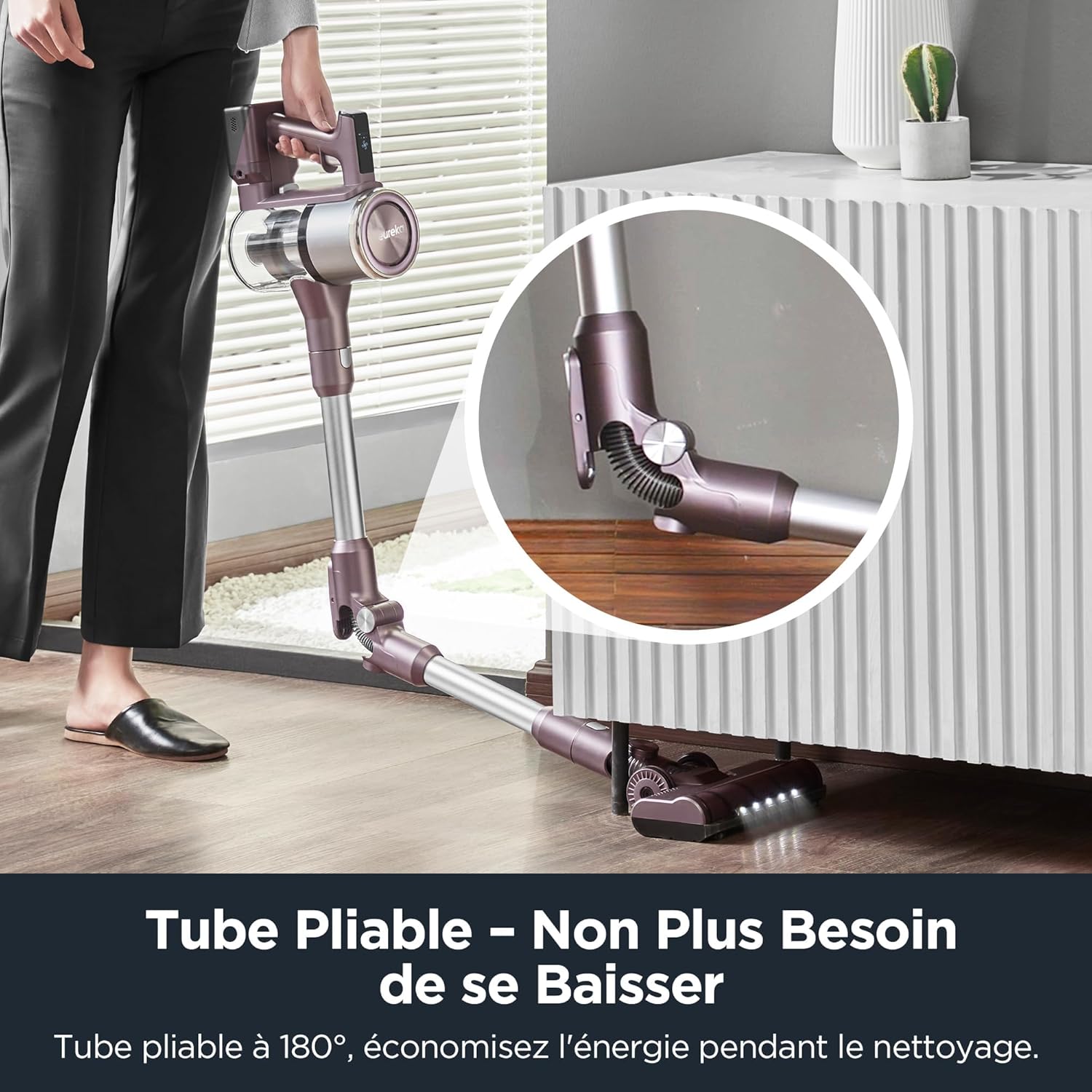
Image: Illustration of assembling the main unit, extension tube, and floor brush.
2. Mengecas Bateri
The Eureka AK10 Pro features a removable battery for convenient charging. Before first use, fully charge the battery.
- To charge the battery while attached to the vacuum: Connect the power adapter to the charging port on the main unit and plug it into a wall outlet.
- To charge the removable battery separately: Detach the battery from the main unit and connect the power adapter directly to the battery charging port. Plug into a wall outlet.
- The LED display will indicate charging status. A full charge takes approximately 3 to 3.5 hours.
Image: The removable battery being charged, both attached to the vacuum and separately.
Arahan Operasi
1. Mod Hidup/Mati dan Sedutan
- Tekan butang kuasa untuk menghidupkan atau mematikan pembersih vakum.
- The intelligent LED display shows the current suction mode and battery level.
- Touch the LED screen to cycle through the three cleaning modes:
- Mod Eko: Untuk pembersihan ringan dan masa operasi maksimum (sehingga 60 minit).
- Mod Standard: Untuk tugasan pembersihan harian.
- Mod Rangsangan: For stubborn dirt and deep cleaning, providing maximum suction power (29000 Pa).

Image: The intelligent LED display showing real-time cleaning visualization and touch control for speed adjustment.
2. Using the Foldable Tube
The unique foldable tube allows you to clean under low furniture without bending down.
- Press the hinge release button on the extension tube to fold it.
- Adjust the angle to reach under sofas, beds, and tables.
- Return the tube to its straight position until it locks for standard cleaning.
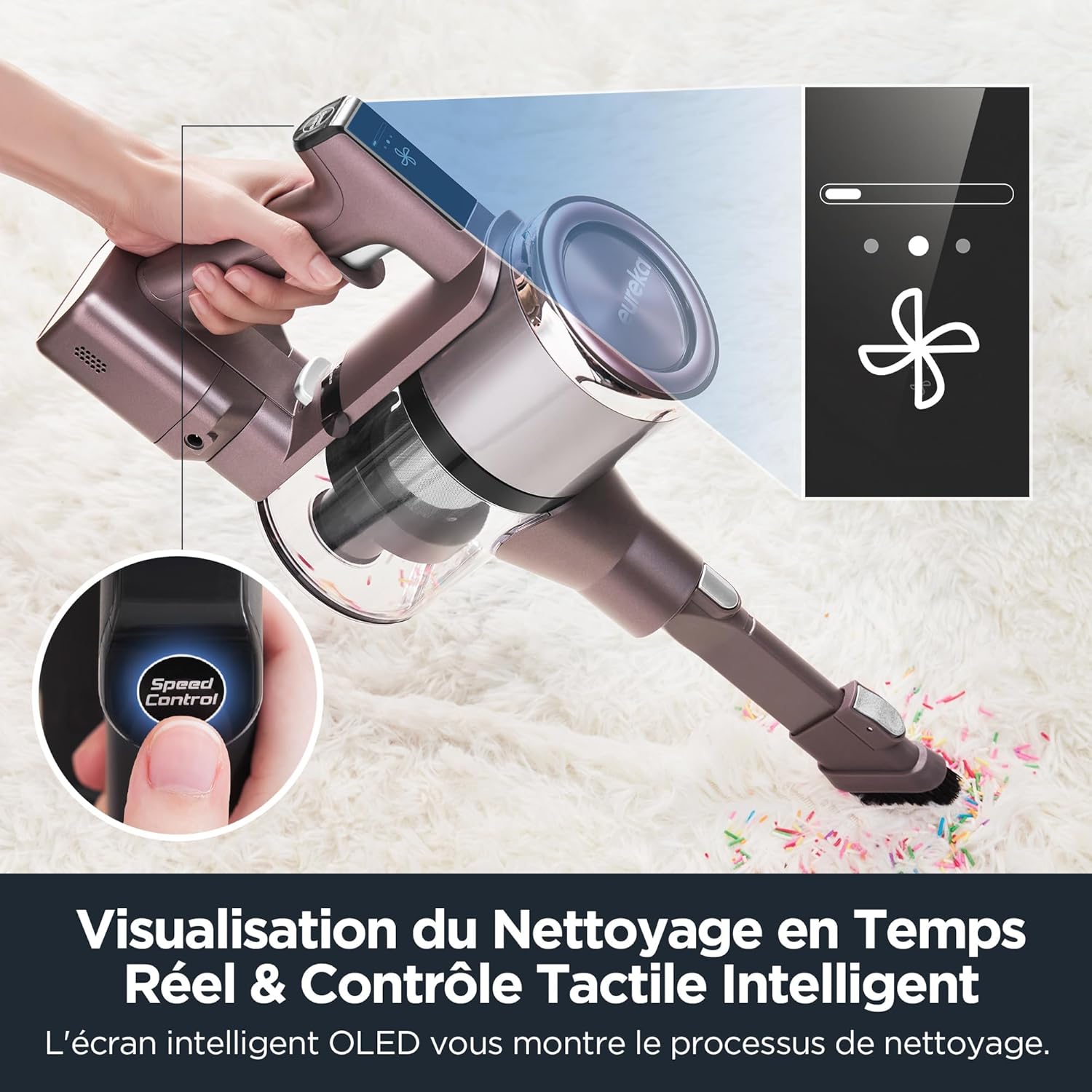
Image: The vacuum cleaner demonstrating the foldable tube feature for cleaning under furniture.
3. Menggunakan Aksesori
The Eureka AK10 Pro comes with various attachments for specialized cleaning:
- Motorized Mini Brush: Ideal for removing pet hair and dust from upholstery, stairs, and car interiors. Attach directly to the main unit.
- Alat Celah 2-dalam-1: Use the narrow end for tight spaces and corners, or slide the brush attachment down for dusting surfaces.
- Tiub Sambungan: Provides extended reach for high areas or floor cleaning.

Image: Various accessories including the 2-in-1 crevice tool and mini motorized brush, demonstrating their use for different cleaning needs.
Penyelenggaraan
Penyelenggaraan tetap memastikan prestasi optimum dan memanjangkan jangka hayat pembersih vakum anda.
1. Mengosongkan Tong Sampah
- Tekan butang pelepas tong sampah untuk menanggalkan tong sampah daripada unit utama.
- Hold the dustbin over a trash can and press the bottom release latch to empty its contents.
- Reattach the dustbin securely until it clicks.
2. Membersihkan Penapis
The Eureka AK10 Pro features a 5-stage high-efficiency filtration system, including a HEPA filter. Clean filters regularly to maintain suction power.
- Remove the dustbin and then carefully remove the filter components (pre-filter, mesh filter, HEPA filter).
- Ketuk kotoran longgar daripada penapis.
- Bilas penapis yang boleh dibasuh di bawah air sejuk yang mengalir sehingga airnya jernih. Jangan gunakan air panas atau detergen.
- Biarkan semua komponen penapis kering sepenuhnya di udara selama sekurang-kurangnya 24 jam sebelum memasang semula. Jangan gunakan vakum dengan penapis basah.
- Reassemble the filters and dustbin in reverse order.
3. Membersihkan Gulungan Berus
- Turn off the vacuum and detach the floor brush head.
- Locate the brush roll release tab or cover. Open it to access the brush roll.
- Remove any tangled hair or debris from the brush roll using scissors or a cleaning tool.
- Masukkan semula gulungan berus dan tutup penutup dengan selamat.
Menyelesaikan masalah
If you encounter issues with your Eureka AK10 Pro, refer to the following common problems and solutions:
| Masalah | Kemungkinan Punca | Penyelesaian |
|---|---|---|
| Vakum tidak dihidupkan. | Bateri tidak dicas atau tidak dipasang dengan betul. | Ensure the battery is fully charged and correctly inserted into the main unit. |
| Kuasa sedutan rendah. | Tong sampah penuh, penapis tersumbat atau terdapat penyumbatan pada tiub/kepala berus. | Empty the dustbin. Clean or replace filters. Check for and remove any blockages in the extension tube or brush head. |
| Gulung berus tidak berputar. | Brush roll is tangled with hair/debris or obstructed. | Turn off the vacuum and remove any obstructions from the brush roll. Ensure it is properly reinstalled. |
| Masa jalan yang singkat. | Battery not fully charged or operating in Boost mode frequently. | Ensure the battery is fully charged. Use Eco or Standard mode for longer cleaning sessions. Battery capacity may decrease over time. |
Jika masalah berterusan selepas mencuba penyelesaian ini, sila hubungi sokongan pelanggan.
Spesifikasi
| Ciri | Perincian |
|---|---|
| Jenama | Eureka |
| Nombor Model | AK10 Pro |
| kuasa | 450 Watt |
| Voltage | 29.6 Volt |
| Kuasa Sedutan | 29000 Pa (Boost Mode) |
| Bilangan Kelajuan | 3 (Eco, Standard, Boost) |
| Tahap Kebisingan | 82 Desibel |
| Masa jalan | Sehingga 60 minit (Mod Eko) |
| Masa Mengecas | 3 hingga 3.5 jam |
| Ciri Khas | 60-minute runtime in ECO mode, Removable battery, 5-stage filtration system, Foldable tube, Intelligent LED screen |
| Jenis Penapis | Penapis HEPA |
| Permukaan yang Disyorkan | Carpet, Hard floors, Tile, Wood floors |
| Sumber Kuasa | Dikuasakan Bateri |
| Komponen yang Disertakan | Mini power brush, 2-in-1 crevice tool, Wall mount, Extension tube |
| Berat Barang | 3 Kilogram |
| Dimensi Produk (L x W x H) | 21.8 x 11 x 120 cm |
Waranti dan Sokongan
Eureka products are manufactured to the highest quality standards. For information regarding warranty coverage, please refer to the warranty card included in your product packaging or visit the official Eureka webtapak.
For technical support, spare parts, or service inquiries, please contact Eureka customer service. Contact details can typically be found on the Eureka webtapak atau dalam dokumentasi produk anda.


