1. Pengenalan
This manual provides comprehensive instructions for the setup, operation, and maintenance of your Radiolink RC4GS V3 5-Channel RC Transmitter and R6FG Receivers Kit. Please read this manual thoroughly before using the product to ensure safe and optimal performance.

Figure 1: Radiolink RC4GS V3 Transmitter with two R6FG Receivers.
2. Ciri-ciri Utama
- Anti-interference and Stable Control: 2.4GHz FHSS spread spectrum technology with 67 channels ensures strong anti-interference capabilities and a stable control distance of up to 400 meters. Multiple users can operate simultaneously without interference.
- 5 Channels and Programmable Dual Mix Control: Designed for various RC vehicles including crawlers, tanks, bashers, and boats. Two arbitrary channels can be configured for mix control, with an ON/OFF switch.
- Integrated R6FG Gyroscope: The included R6FG receivers feature a built-in gyroscope for enhanced vehicle stability, preventing high-speed drifting. Gyro sensitivity is adjustable via the RC4GS V3 VR switch, ideal for drift and on-road cars.
- 30 Model Memory & ID SEED Function & Cruise Control: Stores settings for up to 30 models. Each model can have separate low voltage and low RSSI alarm settings. The ID SEED function allows assigning one vehicle to run when powered on. Compatible with R7FG/R6FG/R6F/R4FGM/R8FG/R8FGH/R12F/R16F receivers.
- Kenderaan Voltage Telemetri: Real-time vehicle battery voltage and RSSI information displayed on the RC4GS V3 radio screen. Requires an R7FG/R8FG/R8FGH telemetry receiver for this function.
- Fungsi berkuasa: Termasuk voltage telemetry, EPA (End Point Adjustment), ABS (Anti-lock Braking System), fail-safe, dual-rate, timer, cruise control, FPV head tracking, low power alarm. Channels CH3-CH5 are customizable for VR and tactile switch functions.

Gambar 2: Lebihview of RC4GS V3 powerful capabilities.
3. Kandungan Pakej
- 1x Radiolink RC4GS V3 5-Channel Transmitter
- 2x Radiolink R6FG Receivers with Integrated Gyro
- 1x Manual Pengguna (dokumen ini)
- Other accessories (e.g., binding plug, telemetry cable) may be included depending on the kit version.
4. Persediaan
4.1 Pemasangan Bateri
The RC4GS V3 transmitter supports 6x AA batteries or a 2S-4S LiPo battery. Batteries are not included.
- Buka penutup petak bateri di bahagian bawah pemancar.
- Insert 6 AA batteries, ensuring correct polarity, or connect a compatible 2S-4S LiPo battery to the JST connector.
- Tutup penutup petak bateri dengan selamat.

Figure 3: Battery installation options for the RC4GS V3 transmitter.
4.2 Sambungan Penerima
Connect the R6FG receiver to your RC vehicle's ESC and servos. Ensure correct channel allocation (e.g., CH1 for steering, CH2 for throttle).

Gambar 4: Cthample of receiver and telemetry cable connection.
For real-time voltage telemetry, connect the telemetry cable to the receiver's telemetry port (2-pin) and the other two plugs to the vehicle's battery and ESC, respectively. Refer to the receiver diagram for port identification.
Video 1: This video demonstrates the connection of the telemetry cable to the receiver, battery, and ESC for real-time voltage telemetry. It shows the physical connection process and the resulting voltage display on the transmitter screen.
4.3 Mengikat Pemancar dan Penerima
Untuk mewujudkan komunikasi antara pemancar dan penerima:
- Hidupkan pemancar.
- Press and hold the binding button on the receiver while powering it on. The receiver's LED will flash rapidly.
- Release the binding button. The LED will continue to flash.
- On the transmitter, navigate to the binding menu (refer to the operating section for menu navigation).
- Initiate the binding process on the transmitter. The receiver's LED should turn solid, indicating successful binding.
- Power cycle both the transmitter and receiver to confirm the connection.
5. Arahan Operasi
5.1 Kawalan Asas
- Roda stereng: Controls the steering of the vehicle.
- Pencetus Pendikit: Controls forward and reverse movement, and braking.
- Skrin Paparan: Shows current settings, telemetry data, and menu options.
- Navigation Buttons (Exit, Dec(-), Inc(+), Enter): Digunakan untuk menavigasi menu dan melaraskan tetapan.
- Switches/Knobs: Customizable for various functions (e.g., dual rate, auxiliary channels).

Figure 5: Ergonomic features and controls of the RC4GS V3 transmitter.
5.2 Dual Rate Function
Dual Rate (D/R) allows you to adjust the maximum travel amount of a servo. This is useful for limiting steering angle or throttle response for different driving conditions or skill levels. The adjustable range is from 0 (minimum travel) to 100 (normal travel amount). If a switch is assigned, you can toggle between different travel amounts.
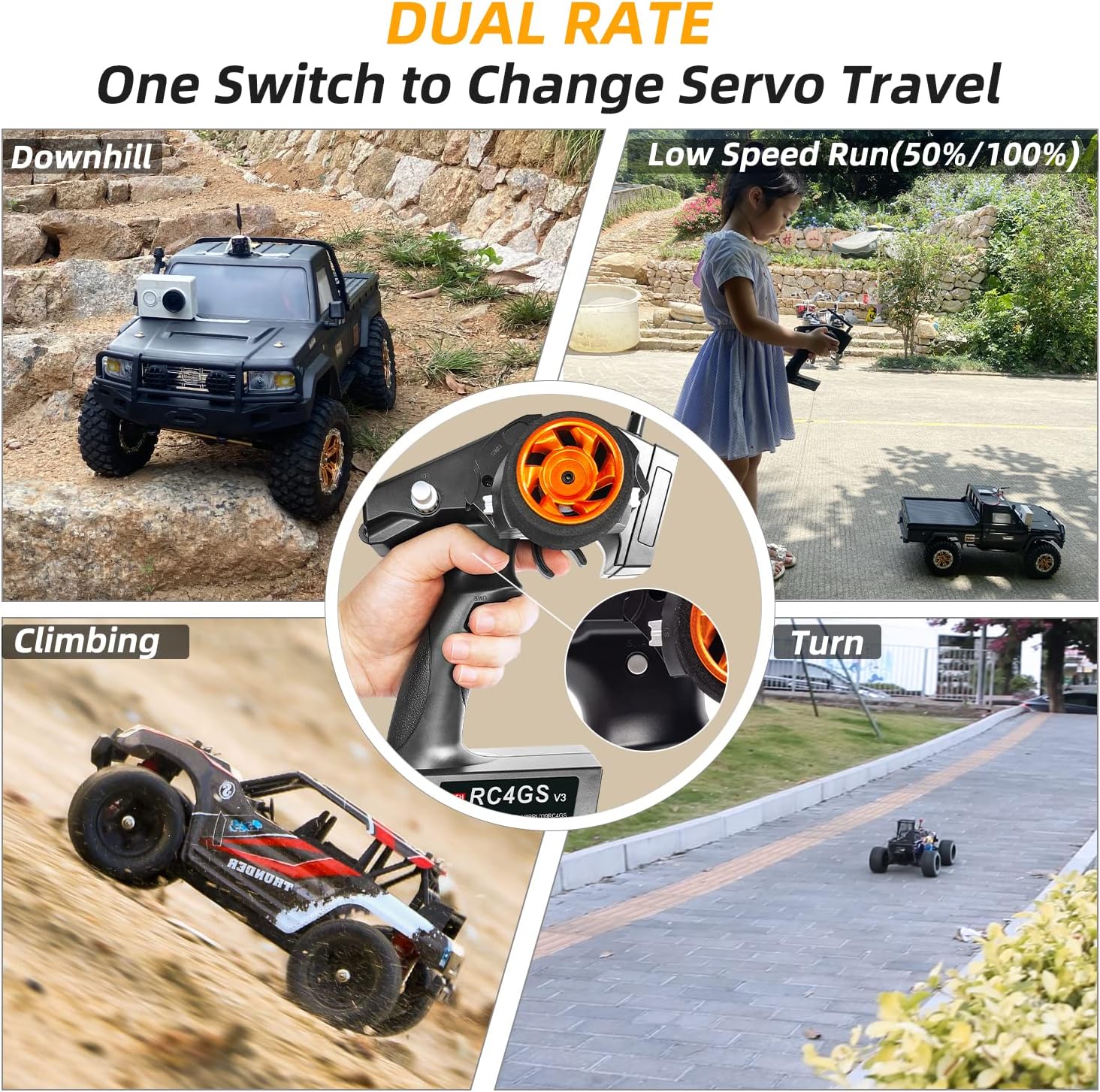
Figure 6: Dual Rate in action, allowing adjustment of servo travel for various driving scenarios.
To assign a switch to control Dual Rate:
- Hidupkan pemancar.
- Long press the "Exit" and "Enter" buttons simultaneously to access the setting page.
- Navigate to menu item 13, "D/R" (Dual Rate).
- Select "SW" (Switch) and choose a switch (e.g., LK-D) to control the dual rate.
- Adjust the travel amounts (ST for steering, TH for throttle, CH3-CH7 for auxiliary channels) for both the "UP" and "DOWN" positions of the assigned switch.
- Press the assigned switch to toggle between the configured travel amounts.
Video 2: This video demonstrates how to assign a switch to control the Dual Rate function on the Radiolink RC4GS V3 transmitter. It shows menu navigation, switch assignment, and adjustment of travel amounts for different channels.
5.3 Telemetry Function
The telemetry function provides real-time feedback from your vehicle to the transmitter screen, including battery voltage and signal strength (RSSI). This helps prevent over-discharge and potential damage to your vehicle's battery.
To utilize telemetry, ensure you are using a compatible receiver (R7FG/R8FG/R8FGH) and the telemetry cable is correctly connected as described in Section 4.2.

Figure 7: Transmitter screen showing real-time telemetry information.
Video 3: This video illustrates the real-time vehicle voltage telemetry feature of the Radiolink RC4GS V3. It shows the transmitter displaying the vehicle's battery voltage and signal strength while an RC car is being operated.
5.4 Model Memori
The RC4GS V3 can store settings for up to 30 different models. This allows you to quickly switch between various vehicles without reconfiguring settings each time.
- Access the model memory menu through the transmitter's settings.
- Select an empty slot or an existing model to edit.
- Configure all necessary parameters (e.g., EPA, D/R, sub-trim, channel mixing) for the specific model.
- Save the settings to the chosen model memory slot.

Figure 8: The RC4GS V3 supports 30 model memories for different RC vehicles.
5.5 Kawalan Pelayaran
The cruise control function allows the vehicle to maintain a set speed without continuous throttle input. This can be useful for long, steady runs or specific maneuvers.
- Activate cruise control via the assigned switch or menu option (refer to your transmitter's specific menu for details).
- Set the desired speed using the throttle trigger.
- Deactivate cruise control when no longer needed.
6. Penyelenggaraan
- Keep the transmitter and receivers clean and free from dust and moisture.
- Simpan unit di tempat yang kering dan sejuk, jauh daripada cahaya matahari langsung.
- Remove batteries if the transmitter will not be used for an extended period to prevent leakage.
- Periksa semua sambungan secara berkala untuk kesesuaian yang kukuh dan tanda-tanda haus.
- Avoid dropping or subjecting the transmitter to strong impacts.
7. Penyelesaian masalah
| Masalah | Kemungkinan Punca | Penyelesaian |
|---|---|---|
| Tiada kuasa untuk pemancar | Bateri mati atau tidak dipasang dengan betul. | Check battery polarity, replace with fresh batteries, or ensure LiPo battery is charged and connected. |
| No control over vehicle | Transmitter and receiver not bound; receiver not powered; incorrect connections. | Perform binding procedure; check receiver power supply; verify all servo and ESC connections. |
| Erratic control or signal loss | Interference; low transmitter/receiver battery; receiver antenna obstructed or damaged. | Move to an area with less interference; check and replace batteries; ensure receiver antenna is properly positioned and undamaged. |
| Telemetry data not displayed | Telemetry cable not connected or faulty; incompatible receiver. | Ensure telemetry cable is correctly connected to the receiver, battery, and ESC. Verify receiver model supports telemetry. |
8. Spesifikasi
- Dimensi Produk: 11.43 x 22.35 x 17.27 cm
- Berat Barang: 400 gram
- Nombor Model: AMZeu-RC4GS-2R
- Bilangan Pemain: 2 players (for RC operation)
- Perhimpunan Diperlukan: Tidak
- Bateri Diperlukan: ya
- Bateri Termasuk: Tidak
- Jenis Bateri: Lithium Polymer (LiPo) or AA
- Jenis Bahan: plastik
- Tarikh Pertama Tersedia: 9 Disember 2022
9. Waranti dan Sokongan
For warranty information, technical support, or further assistance, please refer to the official Radiolink webtapak atau hubungi peruncit anda. Simpan resit pembelian anda sebagai bukti pembelian.
Official Radiolink Store: Radiolink Official Store


