1. Pengenalan
Thank you for choosing the GLOBE Electric 64000012 30-inch 4-Light Track Lighting fixture. This manual provides essential information for the safe installation, operation, and maintenance of your new lighting system. Please read these instructions thoroughly before beginning installation and retain them for future reference.

Image 1.1: The GLOBE Electric 64000012 30-inch 4-Light Track Lighting fixture.
2. Maklumat Keselamatan Penting
Untuk mengurangkan risiko kebakaran, kejutan elektrik atau kecederaan diri, sentiasa ikuti langkah berjaga-jaga keselamatan asas ini:
- Baca semua arahan: Before installing or using this fixture.
- Keselamatan Elektrik: Semua sambungan elektrik mestilah mengikut kod tempatan, ordinan atau Kod Elektrik Kebangsaan (NEC). Rujuk juruelektrik bertauliah jika anda tidak biasa dengan sambungan pendawaian elektrik yang betul.
- Putuskan Kuasa: Sentiasa matikan kuasa pada pemutus litar utama atau kotak fius sebelum memulakan pemasangan atau melakukan sebarang penyelenggaraan.
- Pembumian: Pastikan lekapan dibumikan dengan betul untuk mengelakkan potensi kejutan elektrik.
- Keperluan mentol: Use only GU10/Twist and Click Base MR16 50W bulbs (sold separately). Do not exceed the maximum wattage.
- haba: Halogen bulbs can become very hot. Allow bulbs to cool before touching.
- Ciri Boleh Dimalapkan: If using a dimmer, ensure it is compatible with GU10 bulbs and installed by a qualified professional.
- Penggunaan Dalaman Sahaja: This fixture is designed for indoor use in dry locations.
3. Kandungan Pakej
Sahkan bahawa semua komponen hadir sebelum memulakan pemasangan:
- Track Light Fixture (1)
- Perkakasan Pemasangan (1 set)
- Instruction Sheet (1)

Imej 3.1: Cthample of product packaging, showing the track light fixture.
4. Spesifikasi Produk
| Ciri | Spesifikasi |
|---|---|
| Jenama | Globe Electric |
| Nama Model | Pratt |
| Nombor Bahagian | 64000012 |
| warna | Black, Pratt |
| bahan | logam |
| Dimensi Produk | 4.75"L x 30"W x 7.25"H (12cm L x 76.2cm W x 18.32cm H) |
| Sumber Kuasa | Berwayar keras |
| Jenis Pemasangan | Pemasangan Siling |
| Bilangan Sumber Cahaya | 4 |
| Pangkalan Mentol | GU10 |
| Max Wattage setiap Mentol | 50 Watt |
| Voltage | 120 Volt |
| Ciri Khas | Dimmable, Matte Black Finish, Pivoting Track Heads |
| Penggunaan Dalaman/Luar | Dalaman |

Image 4.1: Product dimensions for planning installation.
5. Persediaan dan Pemasangan
5.1. Sebelum Anda Bermula
- Pastikan kuasa DIMATIKAN pada pemutus litar.
- Kumpulkan peralatan yang diperlukan (pemutar skru, penanggal wayar, pita elektrik, tangga).
- Review all local electrical and building codes.
5.2. Langkah Pemasangan
- Sediakan Pendawaian: Carefully pull the electrical wires from the outlet box.
- Sambung wayar: Connect the fixture's wires to the house wires (black to black, white to white, ground to ground) using wire connectors. Secure with electrical tape.
- Lekapan Lekapan: Attach the mounting bracket to the outlet box. Secure the fixture base to the mounting bracket using the provided screws.
- Pasang Mentol: Insert four GU10/Twist and Click Base MR16 50W bulbs (sold separately) into each track head. A suction cup tool (often included with GU10 bulbs) can assist with installation.
- Pulihkan Kuasa: HIDUPKAN semula kuasa pada pemutus litar.

Image 5.1: The track lighting fixture installed in a living room setting.

Image 5.2: The track lighting fixture providing illumination over a desk area.
6. Operasi
6.1. Operasi Asas
Once installed and powered, the fixture operates via your wall switch. If connected to a compatible dimmer switch (sold separately), you can adjust the light intensity to create the desired atmosphere.
6.2. Adjusting Light Heads
The four cylindrical track heads are designed to pivot, allowing you to direct light precisely where needed. Gently grasp each light head and rotate or tilt it to your preferred angle. This feature is ideal for accent lighting or illuminating specific areas.

Image 6.1: Adjustable heads allow for directional lighting.

Image 6.2: The fixture is fully dimmable with a compatible dimmer switch.
7. Penyelenggaraan
7.1. Pembersihan
Always disconnect power before cleaning. Wipe the fixture with a soft, dry cloth. Do not use abrasive cleaners or solvents, as they may damage the finish.
7.2. Penggantian Mentol
Ensure power is OFF and bulbs have cooled completely before attempting replacement. This fixture uses GU10/Twist and Click Base MR16 50W bulbs. To replace, gently push the bulb into the socket and twist counter-clockwise to remove. Insert the new bulb by pushing it in and twisting clockwise until secure. A suction cup tool can be helpful for this process, especially if the bulbs are difficult to grip.
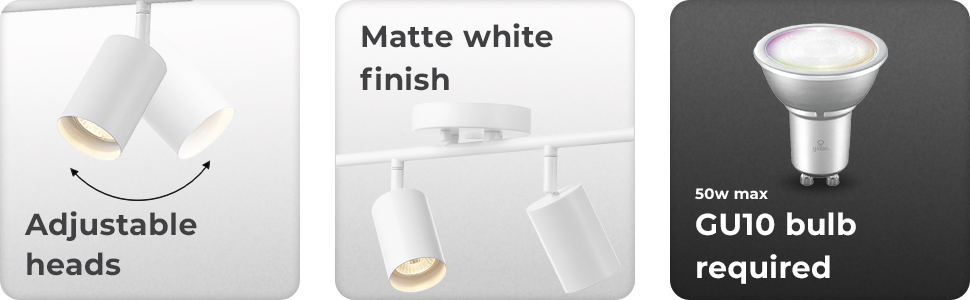
Image 7.1: Reminder of GU10 bulb requirement for the fixture.
8. Penyelesaian masalah
If you experience issues with your track lighting, refer to the table below for common problems and solutions:
| Masalah | Kemungkinan Punca | Penyelesaian |
|---|---|---|
| Lampu tidak menyala | Tiada kuasa pada lekapan; Pendawaian longgar; Mentol rosak | Periksa pemutus litar; Sahkan sambungan wayar; Gantikan mentol. |
| Lampu berkelip-kelip | Mentol longgar; Suis dimmer tidak serasi; Pendawaian longgar | Ensure bulbs are seated correctly; Use a compatible dimmer; Check wire connections. |
| Mentol cepat terbakar | wat mentol tak betultage; Poor ventilation; Voltage turun naik | Use correct 50W GU10 bulbs; Ensure proper air circulation; Consult an electrician for voltage isu. |
9. Waranti dan Sokongan
9.1. Maklumat Waranti
This product comes with no warranty. Please refer to your retailer's return policy for any issues upon purchase.
9.2. Sokongan Pelanggan
For further assistance or inquiries, please contact Globe Electric customer service through their official webtapak atau peruncit tempat produk itu dibeli.


