pengenalan
Thank you for choosing the Micool S03 Ear-Clip Bone Conduction Headphones. These headphones are designed to provide a comfortable, open-ear listening experience with advanced Bluetooth 5.3 technology, HiFi sound quality, and long battery life. This manual provides detailed instructions for setup, operation, maintenance, and troubleshooting to ensure optimal performance and longevity of your device.

Image: The Micool S03 Ear-Clip Bone Conduction Headphones, black, resting inside their open charging case. The earbuds feature a unique ear-clip design.
Kandungan Pakej
- Micool S03 Ear-Clip Bone Conduction Headphones (Left and Right)
- Sarung Pengecas Tanpa Wayar
- Manual Pengguna (dokumen ini)
Produk Selesaiview
The Micool S03 headphones utilize bone conduction technology, allowing for an open-ear design that does not block the ear canal. This design enhances comfort during extended wear and allows awareness of ambient sounds.

Image: A woman wearing the Micool S03 Ear-Clip Headphones, demonstrating their comfortable, open-ear fit.
Ciri-ciri Utama:
- Teknologi Pengaliran Tulang: Delivers sound through the cheekbones, leaving ear canals open.
- Bluetooth 5.3: Memastikan sambungan yang stabil dan penggunaan kuasa yang rendah.
- Painless Ear-Clip Design: Ergonomically designed for comfort during long periods of wear.
- HD Noise Elimination Call: Dual microphones with ENC for clear calls.
- IPX Waterproof: Tahan peluh dan percikan, sesuai untuk sukan.
- Kawalan Sentuhan Pintar: Intuitive control for music and calls.
- Hayat Bateri yang Panjang: Up to 6.5 hours on a single charge, 36 hours with charging case.
Persediaan dan Berpasangan
Charging the Headphones and Case:
- Place both earbuds into the charging case. Ensure they are correctly seated; indicator lights on the case will confirm charging.
- Connect the charging case to a USB power source using a compatible USB cable (not included).
- The charging case has a 350mAh capacity, providing multiple charges for the earbuds. A full charge for the earbuds takes approximately 2.17 hours.

Image: An illustration detailing the battery life of the Micool S03 headphones: 6.5 hours single listening time, 36 hours total listening time with the 350mAh charging compartment.
Gandingan Awal:
- Pastikan fon kepala dicas.
- Buka bekas pengecas. Fon telinga akan memasuki mod berpasangan secara automatik.
- Pada peranti anda (telefon pintar, tablet, komputer riba), dayakan Bluetooth.
- Cari untuk available Bluetooth devices and select "S03" from the list.
- Setelah disambungkan, gesaan suara akan mengesahkan gandingan yang berjaya.
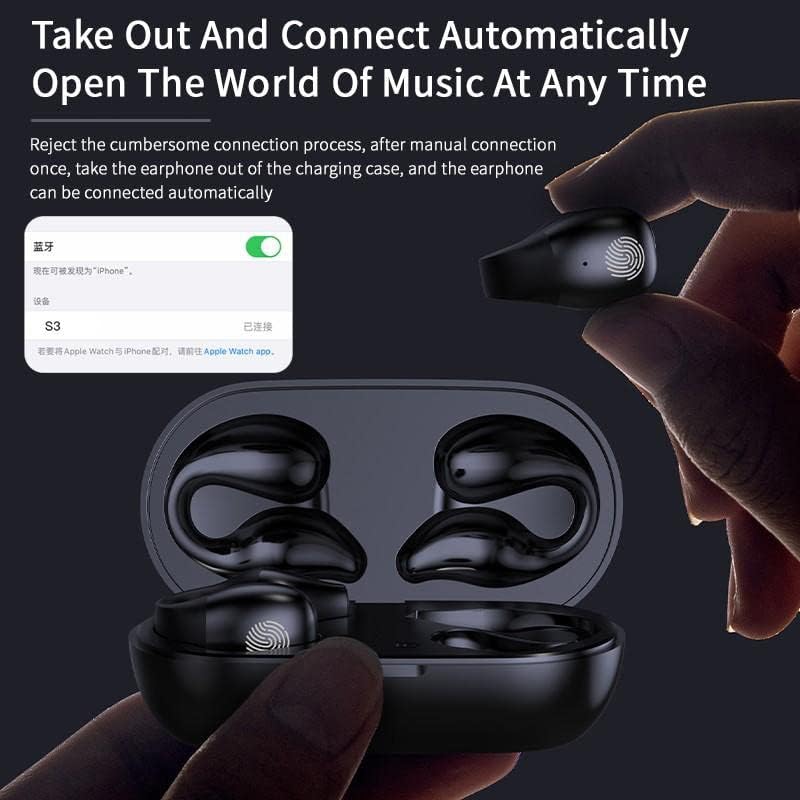
Image: A hand taking an earbud out of the charging case, with a phone screen showing "S03 Connected", illustrating the automatic connection feature.
The headphones support master-slave switching technology, allowing either earbud to be used independently.
Arahan Operasi
Memakai Fon Kepala:
Gently clip the headphones onto your ear, ensuring the bone conduction transducer rests comfortably near your temple, just in front of your ear canal. The design is intended to be painless and secure.
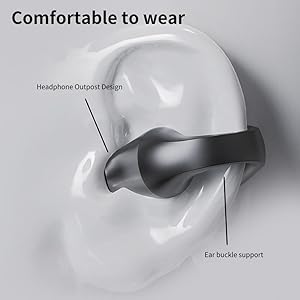
Image: A diagram illustrating the correct placement of the Micool S03 ear-clip headphone on the ear, highlighting the headphone outpost design and ear buckle support for comfortable wear.
Kawalan Sentuh:
The Micool S03 headphones feature intelligent touch controls on each earbud. The touch-sensitive area is typically located on the outer surface of the earbud.

Image: A diagram showing the smart fingerprint touch area on the Micool S03 earbud, indicating how gentle touches complete commands quickly.
| Tindakan | Fungsi |
|---|---|
| Ketik Tunggal (Kiri/Kanan) | Main/Jeda Muzik, Jawab/Tamatkan Panggilan |
| Ketik Dua Kali (Kanan) | Trek Seterusnya |
| Ketik Dua Kali (Kiri) | Trek Sebelumnya |
| Ketik Tiga Kali (Kiri/Kanan) | Aktifkan Pembantu Suara |
| Tekan lama (2 saat) | Tolak Panggilan |
| Tekan lama (3 saat) | Hidup/Mati Kuasa (jika tidak berlaku) |
Note: Volume control is typically managed via your connected device.
Penyelenggaraan dan Penjagaan
- Pembersihan: Gunakan kain lembut, kering dan tidak berbulu untuk membersihkan fon kepala dan bekas pengecas. Jangan gunakan pembersih atau pelarut yang kasar.
- Tahan Air: The headphones are waterproof and sweat-resistant (IPX rating). However, they are not designed for submersion. Avoid exposing them to strong jets of water or prolonged immersion. Dry them thoroughly after exposure to sweat or water.
- Storan: When not in use, store the headphones in their charging case to protect them and keep them charged. Store in a cool, dry place away from direct sunlight and extreme temperatures.
- Penjagaan Bateri: Untuk memanjangkan hayat bateri, elakkan daripada menyahcas sepenuhnya fon kepala dengan kerap. Mengecasnya dengan kerap, walaupun tidak digunakan untuk tempoh yang lama.
Menyelesaikan masalah
| Masalah | Penyelesaian yang Mungkin |
|---|---|
| Fon kepala tidak berpasangan |
|
| Tiada suara atau kelantangan rendah |
|
| Intermittent connection/skipping |
|
| Fon telinga tidak dicas dalam kes |
|
Spesifikasi
| Ciri | Perincian |
|---|---|
| Nama Model | S03 |
| Jenama | Micool |
| Teknologi Ketersambungan | Wayarles (Bluetooth 5.3) |
| Jenis Pemacu Audio | Pemacu Pengaliran Tulang |
| Penempatan Telinga | Open Ear (Ear-Clip) |
| Kawalan Bunyi | Pembatalan Bunyi Aktif (untuk panggilan) |
| Hayat Bateri (Caj Tunggal) | Sehingga 6.5 Jam |
| Jumlah Hayat Bateri (dengan Sarung) | Sehingga 36 Jam |
| Masa Mengecas | Approx. 2.17 Hours (earbuds in case) |
| Kapasiti Kes Pengecasan | 350mAh |
| Julat Bluetooth | 10 Meter |
| Tahap Ketahanan Air | Waterproof (Sweatproof) |
| Kaedah Kawalan | Sentuh |
| Peranti Serasi | Cellphones, Laptops, Tablets |
| bahan | plastik |
| Berat Barang | 0.08 Kilogram (lebih kurang 2.82 auns) |
| Dimensi Pakej | 5.12 x 3.07 x 1.38 inci |
Waranti dan Sokongan
Micool is committed to providing high-quality products and excellent customer service. For any inquiries, technical support, or warranty claims, please refer to the following:
- Perkhidmatan Selepas Jualan: Micool provides 24-hour after-sales service.
- VIP Service: Any item purchased is eligible for VIP service.
- Maklumat Hubungan: Please visit the official Micool website or refer to the contact details provided on your purchase receipt for direct support.
For more information about Micool and their products, you can visit the Micool Store on Amazon.


