1. Pengenalan
Terima kasih kerana membeliasing the Deeyaple LED Digital Alarm Clock. This manual provides detailed instructions for setting up, operating, and maintaining your new alarm clock. Please read this manual thoroughly before use to ensure proper functionality and to maximize your user experience. This clock features adjustable brightness, dual alarms, a snooze function, and a clear LED display showing both time and day.
2. Maklumat Keselamatan
- Jangan dedahkan peranti kepada suhu yang melampau, cahaya matahari langsung atau kelembapan yang tinggi.
- Jauhkan peranti daripada air dan cecair lain.
- Use only the provided USB cable for power. An AC adapter is not included.
- Jangan cuba membuka atau membaiki peranti sendiri. Hubungi sokongan pelanggan jika timbul masalah.
- Jauhkan daripada kanak-kanak.
3. Kandungan Pakej
- Deeyaple LED Digital Alarm Clock (Model: F-8816)
- USB Power Cable (Note: Power adapter not included)
- Manual Pengguna (Dokumen ini)

Figure 3.1: Back panel and side view of the alarm clock, showing control buttons and USB port.
4. Produk Lebihview
4.1 Paparan Depan
The front of the clock features a large LED display that shows the time, day of the week, and indicators for Alarm 1 and Alarm 2. The display uses vibrant, multi-colored digits for enhanced readability.

Rajah 4.1: Depan view of the alarm clock with time and day displayed.
4.2 Top Buttons
- SNOOZE/LIGHT Button: Located on the top. Press to activate snooze during an alarm or to adjust display brightness.
4.3 Back Controls
- Butang SET MASA: Digunakan untuk memasuki mod tetapan masa.
- Butang SET PENGGERA: Used to enter alarm setting mode.
- UP (+) Button: Increases values during setting or toggles functions.
- DOWN (-) Button: Decreases values during setting or toggles functions.
- Port 5V DC: USB power input.
- Butang TETAP SEMULA: Small button to reset the clock to factory settings.

Rajah 4.2: Belakang view of the alarm clock, highlighting the USB power input and control buttons.
5. Persediaan
5.1 Menguasakan Peranti
- Connect the provided USB power cable to the DC 5V port on the back of the alarm clock.
- Plug the other end of the USB cable into a standard USB power adapter (not included) or a powered USB port (e.g., computer, power bank).
- Paparan akan menyala, menandakan jam dihidupkan.

Figure 5.1: The alarm clock is powered via a USB cable, ensuring continuous display.
6. Arahan Operasi
6.1 Menetapkan Masa
- Tekan ke MASA DITETAPKAN button on the back of the clock. The hour digits will start flashing.
- Gunakan KE ATAS (+) or TURUN (-) butang untuk melaraskan jam.
- Tekan MASA DITETAPKAN sekali lagi untuk mengesahkan jam dan beralih ke tetapan minit. Digit minit akan berkelip.
- Gunakan KE ATAS (+) or TURUN (-) butang untuk melaraskan minit.
- Tekan MASA DITETAPKAN a third time to confirm the minutes and move to 12/24H format selection.
- Gunakan KE ATAS (+) or TURUN (-) buttons to select between 12-hour (with AM/PM indicator) or 24-hour format.
- Tekan MASA DITETAPKAN one last time to save the settings and exit time setting mode.
6.2 Menetapkan Penggera (Penggera Dwi)
The clock supports two independent alarms (Alarm 1 and Alarm 2).
- Tekan ke SET ALARM button. The Alarm 1 hour digits will start flashing, and the Alarm 1 icon will appear.
- Gunakan KE ATAS (+) or TURUN (-) buttons to adjust the Alarm 1 hour.
- Tekan SET ALARM again to confirm the hour and move to Alarm 1 minute setting. The minute digits will flash.
- Gunakan KE ATAS (+) or TURUN (-) buttons to adjust the Alarm 1 minutes.
- Tekan SET ALARM a third time to confirm minutes and move to Alarm 1 day setting.
- Gunakan KE ATAS (+) or TURUN (-) buttons to select the alarm days:
- 1-1: Penggera satu hari
- 1-5: Isnin hingga Jumaat
- 1-6: Isnin hingga Sabtu
- 1-7: Monday to Sunday (Every day)
- 6-7: Saturday to Sunday (Weekend)
- Tekan SET ALARM again to confirm Alarm 1 settings and proceed to Alarm 2 setting. Repeat steps 2-6 for Alarm 2.
- After setting Alarm 2, press SET ALARM one last time to save all alarm settings and exit.

Figure 6.1: Alarm days setting options for customized wake-up schedules.
6.3 Fungsi Tunda
Apabila penggera berbunyi, tekan butang besar SNOOZE / CAHAYA button on the top of the clock. The alarm will pause for 5 minutes and then sound again. You can repeat the snooze cycle multiple times.

Figure 6.2: Activating the snooze function by touching the top button for an additional 5 minutes of rest.
6.4 Melaraskan Kecerahan Paparan
The clock has 3 levels of brightness (Bright, Medium, Low) and an option to turn off the display.
- Tekan ke SNOOZE / CAHAYA button on the top of the clock (when no alarm is sounding) to cycle through the brightness levels: Bright > Medium > Low > Off > Bright.
- Select the brightness level that best suits your environment and preference.
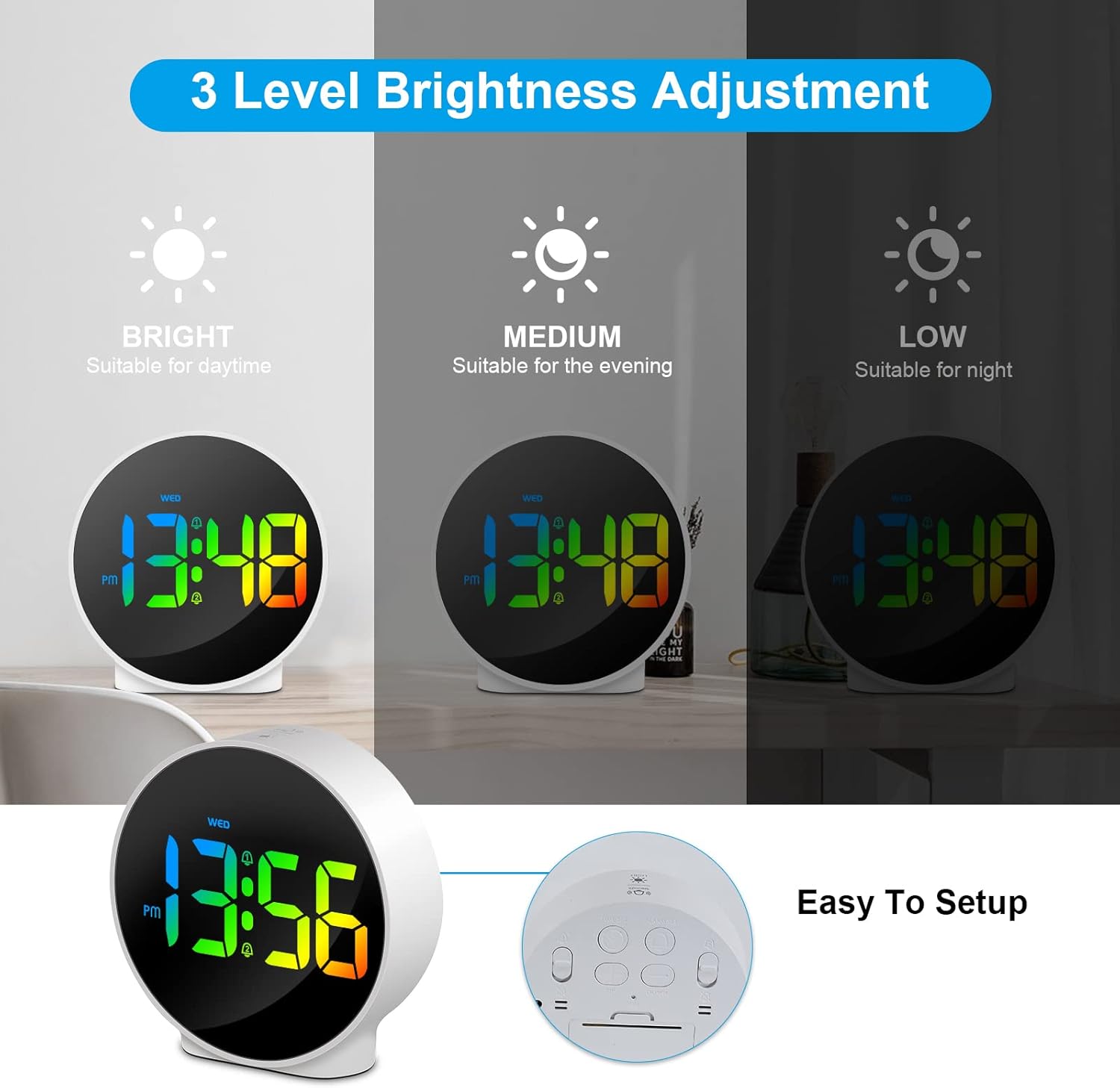
Figure 6.3: Three adjustable brightness levels for optimal viewdalam keadaan pencahayaan yang berbeza.
6.5 Week and Time Display
The clock simultaneously displays the current time and the day of the week on the same screen, eliminating the need to switch displays.

Figure 6.4: The clock displays both the time and the day of the week on a single screen for convenience.
7. Penyelenggaraan
- Pembersihan: Use a soft, dry cloth to clean the surface of the clock. Do not use abrasive cleaners or solvents.
- Storan: If storing the clock for an extended period, disconnect it from power and store it in a cool, dry place.
8. Penyelesaian masalah
| Masalah | Kemungkinan Punca | Penyelesaian |
|---|---|---|
| Paparan dimatikan atau malap. | Not powered, brightness set to off/low. | Ensure USB cable is securely connected to a power source. Press SNOOZE/LIGHT button to adjust brightness. |
| Penggera tidak berbunyi. | Alarm not set, alarm volume too low (not applicable for this model), incorrect alarm days. | Verify alarm time and ensure the alarm icon is displayed. Check alarm day settings. |
| Masa tidak betul. | Masa tidak ditetapkan dengan betul, gangguan bekalan elektrik. | Re-set the time following Section 6.1. Ensure continuous power supply. |
| Butang tidak bertindak balas. | Gangguan perisian sementara. | Unplug the USB cable, wait 10 seconds, then plug it back in. If issue persists, use the RESET button on the back (requires a thin object like a paperclip). |
9. Spesifikasi
- Jenama: Deeyaple
- Nombor Model: F-8816
- warna: White shell with multi-color display
- Dimensi (L x W x H): 10 x 3.81 x 10 cm (3.94 x 1.5 x 3.94 inci)
- Berat: 180 gram (0.4 lbs)
- ciri-ciri: Dual Alarm, Snooze, Adjustable Brightness (3 levels + off), 12/24H Display, Week Display, Corded Electric
- Sumber Kuasa: USB Cable (DC 5V)
- Jenis Paparan: LED digital
- Bahan: Akrilonitril Butadiena Stirena (ABS)

Figure 9.1: Dimensions of the Deeyaple LED Digital Alarm Clock.
10. Waranti dan Sokongan
Deeyaple products are designed for quality and reliability. For any questions, technical support, or warranty claims, please contact the seller or manufacturer directly through your purchase platform. Please retain your proof of purchase for warranty purposes.


