1. Produk Lebihview
The Nexxt Wireless Security Camera offers a robust solution for both indoor and outdoor surveillance. Designed for ease of use and versatility, these cameras provide high-definition video, motion detection, two-way audio, and night vision capabilities, all powered by a built-in rechargeable battery for wire-free operation.
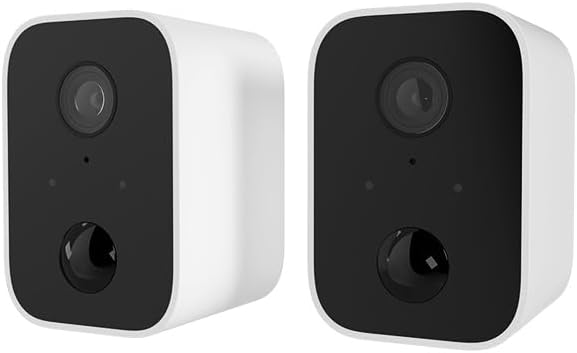
Image: Two Nexxt Wireless Security Cameras, showcasing their compact, white design with black camera faces.
Ciri-ciri Utama:
- 1080P HD Live Video: Crystal clear real-time video and playback.
- Bateri Terbina dalam: Wire-free design for flexible placement and continued operation during power outages.
- IP65 Kalis Cuaca: Durable construction suitable for outdoor use in various weather conditions.
- Pengesanan Pergerakan: Sends instant notifications to your smartphone upon detecting movement up to 26ft away.
- Audio Dua hala: Communicate directly through the camera using the built-in speaker and microphone.
- Penglihatan Malam: Equipped with IR LEDs for clear vision in low-light or dark conditions.
- Tempatan & Storan Awan: Supports micro-SD card (not included) for local storage and optional cloud storage (subscription required).
- Integrasi Rumah Pintar: Sesuai dengan Amazon Alexa dan Google Assistant untuk kawalan suara.

Image: A single Nexxt security camera surrounded by icons representing its features: Full 1080P HD, Motion detection, Two-way communication, Night vision, Voice activated, IP65 weatherproof, Micro-microSD™ slot, Wall mount bracket included, and Cloud ready.
2. Kandungan Pakej
Please verify that all items are present and in good condition upon opening the package. If any items are missing or damaged, please contact customer support.
- 2 x Nexxt Wireless Security Cameras
- 2 x Pendakap Pemasangan
- 2 x Kabel Pengecas USB
- 1 x Panduan Mula Pantas
- Skru Pemasangan dan Penambat Dinding

Image: The retail packaging for the Nexxt Smart Wi-Fi battery camera 2-pack, showing the cameras and key features on the box.
3. Panduan Persediaan
3.1 Mengecas Kamera
Before initial use, fully charge both cameras. Connect the provided USB charging cable to the camera's charging port and a standard USB power adapter (not included). The charging indicator light will show the charging status.
3.2 Downloading the Nexxt App
Cari untuk "Nexxt Home" in the Apple App Store or Google Play Store and download the application. Create an account or log in if you already have one.
3.3 Memasangkan Kamera
- Open the Nexxt Home app and tap the "+" icon to add a new device.
- Pilih "Kamera Keselamatan" daripada senarai peranti.
- Follow the on-screen instructions to put the camera into pairing mode (usually involves pressing a reset button until an indicator light flashes).
- Sambungkan telefon pintar anda ke rangkaian Wi-Fi 2.4GHz. Note: 5GHz networks are not supported.
- The app will display a QR code. Hold your camera approximately 6-8 inches (15-20 cm) in front of your phone's screen until you hear a prompt from the camera.
- Once paired, the camera will connect to your Wi-Fi network, and you can name your device within the app.
3.4 Memasang Kamera
The Nexxt Wireless Security Camera can be easily mounted indoors or outdoors. Choose a location that provides the desired viewing angle and is within range of your Wi-Fi network.

Image: A Nexxt security camera mounted on an exterior wall, demonstrating its weatherproof design and easy installation.
- Identify a suitable mounting surface.
- Gunakan pendakap pelekap yang disediakan sebagai templat untuk menandakan lubang gerudi.
- Drill pilot holes and insert wall anchors if mounting into drywall or masonry.
- Pasangkan pendakap pelekap pada permukaan menggunakan skru yang disediakan.
- Pasangkan kamera pada pendakap pelekap dan laraskan sudut mengikut keperluan.

Image: A Nexxt security camera detached from its mounting bracket, showing the connection point for easy installation and removal.
4. Operasi
4.1 Langsung View
Open the Nexxt Home app and select your camera from the device list to access the live video feed. You can view foo masa nyatatage dari mana-mana sahaja dengan sambungan internet.
4.2 Pengesanan Pergerakan
The camera's motion sensors detect movement up to 26 feet away. When motion is detected, the camera will record a short clip and send a notification to your smartphone. You can adjust motion sensitivity and set detection zones within the app settings.

Image: A dog and a child playing in a yard, with a 'Motion detection' icon overlay, illustrating the camera's ability to detect activity.
4.3 Audio Dua Hala
To use two-way audio, tap the microphone icon in the live view interface of the app. You can then speak through your phone, and your voice will be projected through the camera's speaker. Release the icon to listen.
4.4 Penglihatan Malam
The camera automatically switches to night vision mode in low-light conditions, providing clear black-and-white video footage. This feature ensures continuous surveillance 24/7.
4.5 Pilihan Storan
- Kad Micro-SD: Insert a micro-SD card (up to 128GB, not included) into the camera's slot for local storage of recordings.
- Storan Awan: Nexxt offers optional cloud storage plans for secure, off-site storage of your video recordings. Refer to the Nexxt Home app for subscription details.
4.6 Kawalan Suara
Integrate your Nexxt camera with Amazon Alexa or Google Assistant for convenient voice control. Follow the instructions in the Nexxt Home app to link your account with your preferred smart home platform. You can then use voice commands to view live feeds on compatible smart displays.
5. Penyelenggaraan
5.1 Pengurusan Bateri
To maximize battery life, ensure the camera is fully charged before deployment. The Nexxt Home app will notify you when the battery level is low. Regular charging is recommended, especially for cameras in high-traffic areas with frequent motion detection.
5.2 Membersihkan Kamera
Periodically clean the camera lens and housing with a soft, dry cloth to ensure clear image quality. Avoid using harsh chemicals or abrasive materials that could damage the camera.
5.3 Kemas Kini Perisian Tegar
Nexxt Solutions may release firmware updates to improve performance, add new features, or address security vulnerabilities. The Nexxt Home app will notify you of available updates. It is recommended to keep your camera's firmware up to date for optimal performance and security.
6. Penyelesaian masalah
| Masalah | Kemungkinan Punca | Penyelesaian |
|---|---|---|
| Camera won't turn on | Bateri lemah; Butang kuasa tidak ditekan dengan betul | Charge the camera fully; Press and hold the power button for a few seconds. |
| Tidak dapat menyambung ke Wi-Fi | Incorrect Wi-Fi password; Camera too far from router; Only 2.4GHz supported | Verify password; Move camera closer to router; Ensure you are connecting to a 2.4GHz network. |
| Pengesanan gerakan tidak berfungsi | Sensitivity too low; Detection zone not set; App notifications disabled | Adjust sensitivity in app; Configure detection zones; Enable notifications for Nexxt Home app. |
| Two-way audio not clear | Poor network connection; Obstruction near microphone/speaker | Check Wi-Fi signal strength; Ensure no obstructions; Reduce background noise. |
| Night vision is blurry | Dirty lens; IR LEDs obstructed | Clean the camera lens; Ensure nothing is blocking the IR LEDs. |
7. Spesifikasi Teknikal
| Ciri | Spesifikasi |
|---|---|
| Nama Model | Battery (Built-in Battery 2PK) |
| Resolusi Tangkapan Video | 1080p HD |
| Penggunaan Dalaman/Luar | Luaran, Dalaman |
| Sumber Kuasa | Dikuasakan Bateri |
| Protokol Ketersambungan | Wi-Fi (2.4GHz sahaja) |
| Jenis Pengawal | Amazon Alexa, Pembantu Google |
| Jenis Pemasangan | Lekap di dinding |
| Penilaian Perlindungan Antarabangsa | Kalis Cuaca IP65 |
| Jenis Makluman | Audio dan Pergerakan |
| Berat Barang | 1.52 pounds (for the pair) |
| Dimensi Pakej | 11.69 x 6.5 x 2.56 inci |
| UPC | 798302057661 |
8. Waranti dan Sokongan
8.1 Maklumat Waranti
Nexxt Solutions products typically come with a 2-year warranty from the date of purchase, covering defects in materials and workmanship. Please retain your proof of purchase for warranty claims. The warranty does not cover damage caused by misuse, accidents, unauthorized modifications, or natural disasters.
8.2 Sokongan Pelanggan
For technical assistance, troubleshooting, or warranty inquiries, please visit the official Nexxt Solutions webtapak atau hubungi pasukan sokongan pelanggan mereka. Anda selalunya boleh mencari Soalan Lazim, tutorial video dan maklumat hubungan pada halaman sokongan mereka.
Sokongan dalam talian: www.nexxtsolutions.com/support
Please have your product model number (Built-in Battery 2PK) and purchase date ready when contacting support.


