1. Pengenalan
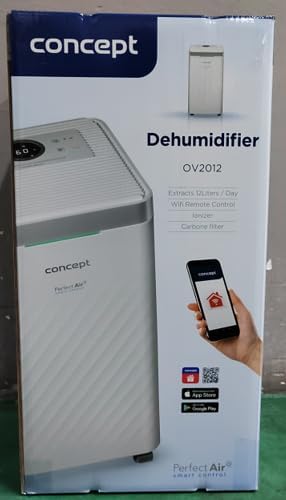
The Concept OV2012 is a versatile appliance designed to improve indoor air quality by combining dehumidification with air purification. This device effectively reduces excess humidity, which can contribute to mold growth and discomfort, while simultaneously filtering airborne pollutants. It features a triple filtration system, intuitive touch controls, and smart app connectivity for convenient operation.

Rajah 1: Depan view of the Concept OV2012 Dehumidifier.
2. Maklumat Keselamatan
Sila baca semua arahan keselamatan dengan teliti sebelum menggunakan perkakas. Kegagalan mematuhi arahan ini boleh mengakibatkan renjatan elektrik, kebakaran atau kecederaan serius.
- Pastikan bekalan kuasa voltage sepadan dengan label penilaian pada perkakas.
- Jangan kendalikan unit dengan kord kuasa atau palam yang rosak.
- Jauhkan perkakas daripada air dan cecair lain. Jangan rendamkannya.
- Jangan halang saluran masuk atau keluar udara. Pastikan ruang yang mencukupi di sekeliling unit untuk aliran udara yang betul.
- Unplug the unit before cleaning, maintenance, or when not in use for extended periods.
- Perkakas ini tidak dimaksudkan untuk digunakan oleh orang (termasuk kanak-kanak) yang kurang keupayaan fizikal, deria, atau mental, atau kurang pengalaman dan pengetahuan, melainkan mereka telah diberi pengawasan atau arahan.
- Do not use the appliance in areas where flammable gases or vapors are present.
3. Komponen Produk
Familiarize yourself with the main parts of your Concept OV2012 dehumidifier.
- Panel Kawalan: Touch-sensitive interface for setting modes and functions.
- Saluran Udara: Where processed air is released.
- Penutup Salur Masuk Udara/Penapis: Located at the rear, provides access to the air filters.
- Tangki Air: Mengumpul air pekat.
- Saluran Saliran Berterusan: Port for attaching a hose for continuous water drainage.
- 360° Rolling Wheels: Untuk memudahkan pergerakan unit.

Rajah 2: Belakang view of the dehumidifier, showing air intake and water tank.
4. Panel Kawalan dan Paparan
The OV2012 features an intuitive touch control panel with a digital display and LED indicators.
Rajah 3: Terperinci view daripada panel kawalan sentuh.
- Butang Kuasa: Menghidupkan atau mematikan unit.
- Pemilihan Mod: Cycles through operating modes (Automatic, Continuous, Laundry Drying, Fan).
- Humidity Slider/Buttons: Melaraskan tahap kelembapan yang diingini.
- Butang Pemasa: Sets the delayed on/off time (up to 24 hours).
- Kelajuan Kipas: Adjusts fan speed (usually two levels).
- Butang Pengion: Mengaktifkan atau menyahaktifkan fungsi pengion.
- Penunjuk Kelembapan LED: Changes color based on current room humidity:
- merah: High humidity (RH > 70%)
- hijau: Satisfactory humidity (70% ≥ RH ≥ 50%)
- Biru: Low humidity (RH < 50%)
5. Persediaan Awal
- Membongkar: Keluarkan dehumidifier dengan berhati-hati daripada pembungkusnya. Simpan pembungkusan untuk penyimpanan atau pengangkutan masa hadapan.
- penempatan: Place the unit on a firm, level surface. Ensure there is at least 20 cm of clear space around all sides for optimal airflow. The 360° rolling wheels allow for easy positioning.
- Sambungan Kuasa: Palamkan kord kuasa ke salur keluar elektrik yang dibumikan.
- Tangki Air: Pastikan tangki air dimasukkan dengan betul ke dalam unit.
6. Mod Operasi
The OV2012 offers four distinct operating modes to suit various needs:
- Mod Automatik: The dehumidifier automatically maintains the humidity level you select. The unit will cycle on and off to achieve and sustain the target humidity.
- Operasi Berterusan: Ideal for long-term drying of very wet areas. In this mode, the unit runs continuously regardless of the ambient humidity. It is recommended to use the continuous drainage hose in this mode.
- Mod Pengeringan Dobi: Accelerates the drying of laundry and helps prevent moisture buildup in the room, reducing the risk of mold.
- Fan Mode (Air Purification without Dehumidification): In this mode, the compressor is off, and only the fan and filtration system operate to purify the air without removing moisture.
Using the Concept Home Mobile Application
The OV2012 can be controlled remotely via the Concept Home mobile application, available for iOS and Android devices. This app allows you to:
- Hidupkan atau matikan unit.
- Select desired operating modes.
- Check the current air status in the room.
- Create a precise operating schedule for the dehumidifier.

Figure 4: The Concept Home mobile application for remote control.
7. Saliran Air
Saliran Tangki Air
When the 2.2-liter water tank is full, the unit will automatically shut off, and an indicator light will illuminate. Carefully remove the water tank, empty it, and reinsert it securely to resume operation.
Saliran Berterusan
For continuous operation without needing to empty the water tank, attach the included hose to the continuous drainage outlet. Direct the hose to a suitable drain, ensuring it is sloped downwards for proper water flow. This allows the unit to operate uninterrupted.
8. Penyelenggaraan dan Pembersihan
Penyelenggaraan tetap memastikan prestasi optimum dan jangka hayat dehumidifier anda.
Sistem penapis
The OV2012 features a triple filter system:
- Penapis Habuk: Captures coarse impurities like dust particles, hair, fur, and pollen. This filter should be cleaned regularly.
- Penapis Karbon Teraktif: Absorbs toxic, suffocating, and foul-smelling gases and vapors, such as formaldehyde, benzene, and cigarette smoke. This filter requires periodic replacement (Optional accessory: Carbon filter - 42394390).
- Pengion: Refreshes and purifies the air by increasing negatively charged ions, neutralizing odors and absorbing positively charged particles, viruses, and bacteria.
To clean the dust filter, remove the rear filter cover, gently remove the filter, and clean it with a vacuum cleaner or rinse it with water. Ensure it is completely dry before reinserting. Replace the activated carbon filter as recommended by the manufacturer or when you notice a decrease in odor removal effectiveness.

Figure 5: Illustration of the triple filtration system.
Membersihkan Tangki Air
Periodically clean the water tank with mild detergent and warm water to prevent mold and bacterial growth. Rinse thoroughly and dry before reinserting.
Pembersihan Luaran
Lap bahagian luar unit dengan lembut, damp kain. Jangan gunakan pembersih atau pelarut yang melelas.
9. Panduan Penyelesaian Masalah
Jika anda menghadapi masalah dengan penyahlembap anda, rujuk masalah dan penyelesaian biasa berikut:
| Masalah | Kemungkinan Punca | Penyelesaian |
|---|---|---|
| Unit tidak dihidupkan | No power supply; Water tank full or incorrectly inserted. | Check power cord connection; Empty and reinsert water tank correctly. |
| Tiada dehumidification | Room temperature too low; Air filters clogged; Humidity setting too high. | Ensure room temperature is above 5°C; Clean or replace filters; Lower the desired humidity setting. |
| Unit bising | Unit bukan pada permukaan yang rata; Penapis udara tersumbat. | Place unit on a flat, stable surface; Clean or replace air filters. |
| Water tank full indicator remains on after emptying | Water tank not fully inserted; Sensor malfunction. | Push the water tank firmly into place; If problem persists, contact customer support. |
Jika masalah berterusan selepas mencuba penyelesaian ini, sila hubungi sokongan pelanggan.
10. Spesifikasi Teknikal
| Ciri | Spesifikasi |
|---|---|
| Nombor Model | OV2012 |
| Dehumidification Performance (max) | 12 liters/day (at 30°C, 80% RH) |
| Isipadu Tangki Air | 2.2 liter |
| Penggunaan Kuasa | 210 W (Note: Product description also mentions 245W, refer to product label for exact value) |
| Tahap Kebisingan | ≤ 45 dB |
| Dimensi (W x D x H) | 250 x 250 x 460 mm (25 x 25 x 46 cm) |
| Berat Barang | 10.82 kg |
| Panjang Kabel | 1.8 m |
| Mod Pengendalian | 4 (Automatic, Continuous, Laundry Drying, Fan) |
| Sistem penapis | Dust filter, Activated Carbon filter, Ionizer |
| Kawalan | Touch control, Mobile App (Concept Home) |
| Ciri Khas | Automatic Shut-off, Timer, 360° wheels, LED Humidity Indicator |

Rajah 6: Dimensi produk.
11. Waranti dan Sokongan Pelanggan
For warranty information, please refer to the warranty card included with your product or contact your local Concept distributor. For technical support, spare parts, or service inquiries, please contact Concept customer service. Contact details may be found on the product packaging or the official Concept webtapak.
Example contact information from product packaging (may vary by region):
- CZ: Zavolejte nám +420 465 471 400, www.my-concept.cz
- SK: Zavolajte nám +421 326 583 465, www.my-concept.sk
- PL: Zadzwoń do nas +48 71 339 04 44, www.my-concept.pl