1. Pengenalan
The EMOS P5660SH 2-in-1 Socket Thermostat and Timer is designed for efficient control of heating and cooling appliances. This device combines thermostat and timer functionalities, allowing for precise temperature regulation and scheduled operation of various electrical systems. It is suitable for applications such as radiators, electric heaters, air conditioners, aquarium lighting, and terrarium heating, contributing to energy cost savings and enhanced comfort.
2. Maklumat Keselamatan
Please read and understand all safety instructions before using the device. Failure to follow these instructions may result in electric shock, fire, or personal injury.
- Ensure the device is correctly plugged into a grounded electrical outlet.
- Do not exceed the maximum load capacity of 16A / 3680W.
- Jangan rendam peranti di dalam air atau dedahkannya kepada kelembapan yang berlebihan.
- Jangan buka atau cuba membaiki peranti itu sendiri. Rujuk semua servis kepada kakitangan yang berkelayakan.
- Jauhkan daripada kanak-kanak.
- Unplug the device from the wall socket before cleaning.
3. Kandungan Pakej
Sahkan bahawa semua komponen terdapat dalam pakej:
- 1 x EMOS P5660SH 2-in-1 Socket Thermostat and Timer
- 1 x Manual Arahan (dokumen ini)
4. Produk Lebihview
The EMOS P5660SH features a clear digital display and intuitive buttons for easy operation and programming. Below are images illustrating the device and its key features.

Rajah 1: Depan view of the EMOS P5660SH, showing the digital display with current room temperature, program number, and time. Buttons for TIME, PROG, BOOST, MODE, and +/- are visible below the display, with the power socket at the bottom.

Gambar 2: Lebihview of key product features. This image highlights the temperature setting range (5-40°C), operating voltage (230V~), combined thermostat and timer functionality, and energy-saving capabilities.

Figure 3: Details of the multifunction socket. This image shows the maximum load capacity (16A, 3680W), heating and cooling modes, backlit display, and the inclusion of a 1x 3V CR2032 backup battery.
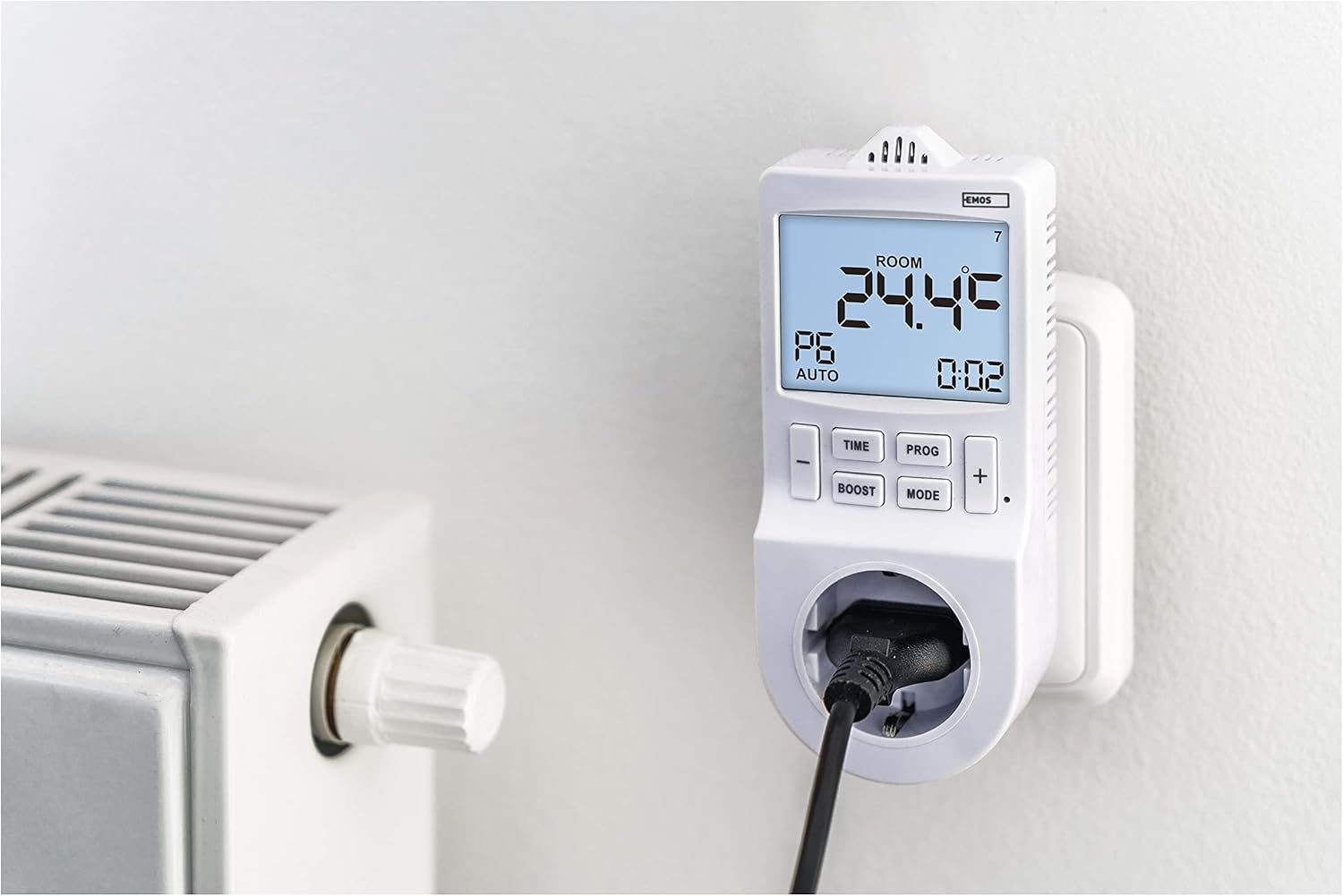
Figure 4: The EMOS P5660SH in use, plugged into a wall socket with an electric radiator connected. This demonstrates its application for controlling heating systems.
5. Persediaan
- Kuasa Permulaan: Plug the EMOS P5660SH into a standard 230V AC wall socket. The display will illuminate.
- Battery Installation (if not pre-installed): The device uses a CR2032 button cell battery for memory backup. If the display is blank or settings are lost after unplugging, install or replace the battery. Refer to the "Maintenance" section for details.
- Menetapkan Masa Semasa:
- Tekan dan tahan butang MASA butang sehingga digit jam berkelip.
- Gunakan + or - butang untuk melaraskan jam.
- Tekan MASA again to move to minutes, then adjust with + or -.
- Tekan MASA again to set the day of the week (1-7, Monday-Sunday).
- Tekan MASA once more to confirm and exit time setting.
6. Mod Operasi
The device offers two primary operating modes: Thermostat Mode and Timer Mode. Switch between modes using the MODE butang.
6.1. Mod Termostat
In Thermostat Mode, the device controls connected heating or cooling appliances based on the ambient temperature and your set temperature. It supports an adjustable temperature variance (hysteresis) for precise control.
- Fungsi Pemanasan: When the room temperature falls below the set temperature, the connected appliance (e.g., heater) will turn on.
- Fungsi penyejukan: When the room temperature rises above the set temperature, the connected appliance (e.g., air conditioner) will turn on.
- To set the desired temperature, press the + or - buttons. The display will show the set temperature briefly, then return to the current room temperature.
6.2. Mod Pemasa
In Timer Mode, the device functions as a programmable timer, switching the connected appliance on or off at specified times, independent of temperature. This is ideal for pool filtering, aquarium lighting, or holiday lighting.
- The timer function allows for up to 24 pre-programmed switching operations per day.
- Minimum switching duration is 1 minute.
7. Pengaturcaraan
The EMOS P5660SH allows for extensive programming to automate your climate control or appliance scheduling.
7.1. Setting Daily Programs (PROG)
The device supports up to 6 temperature changes per day (time programs) in Thermostat Mode, or 24 switching operations in Timer Mode.
- Tekan dan tahan butang PROG button to enter programming mode. The display will show "P1" (Program 1).
- guna + or - to select the program number (P1-P6 for thermostat, P1-P24 for timer).
- Tekan PROG to set the start time for the selected program (hour then minute). Adjust with + or -.
- Tekan PROG to set the desired temperature (Thermostat Mode) or ON/OFF state (Timer Mode) for this program.
- Repeat for all desired programs. Press PROG repeatedly to cycle through settings or exit programming mode.
7.2. Fungsi BOOST
The MENINGKATKAN function allows for a temporary override of the current program, providing a quick burst of heating or cooling for a set duration. Press the MENINGKATKAN button to activate and adjust its duration if applicable.
7.3. COUNTDOWN Function
The COUNTDOWN function enables you to set a specific time period after which the connected appliance will switch on or off. Consult the detailed manual for specific steps to set the countdown timer.
7.4. Summer Time Shift
The device includes a feature for adjusting to daylight saving time (summer time). Refer to the detailed manual for instructions on how to activate or deactivate this function.
8. Penyelenggaraan
The EMOS P5660SH requires minimal maintenance. The primary maintenance task is the replacement of the backup battery.
8.1. Backup Battery Replacement
The device uses one CR2032 button cell battery to retain programmed settings during power outages or when unplugged. If settings are frequently lost, the battery may need replacement.
- Unplug the device from the wall socket.
- Locate the battery compartment, usually on the back or side of the unit.
- Buka penutup petak.
- Keluarkan bateri CR2032 lama.
- Insert a new CR2032 battery with the correct polarity (+ side up).
- Tutup penutup petak bateri dengan selamat.
- Plug the device back into the wall socket. You may need to reset the current time and date.
Nota: Buang bateri lama secara bertanggungjawab mengikut peraturan tempatan.
9. Penyelesaian masalah
If you encounter issues with your EMOS P5660SH, refer to the following common problems and solutions:
| Masalah | Kemungkinan Punca | Penyelesaian |
|---|---|---|
| Device display is blank. | No power or faulty unit. | Ensure the device is securely plugged into a live wall socket. Check the wall socket with another appliance. If still blank, the unit may be faulty. |
| Settings are lost after unplugging or power outage. | Bateri sandaran mati atau hilang. | Replace the CR2032 backup battery. Refer to Section 8.1. |
| Connected appliance does not turn on/off as programmed. | Incorrect programming, wrong mode, or appliance issue. |
|
| Difficulty with configuration/programming. | Complexity of programming steps. | Carefully re-read Section 7 "Programming". Practice setting a simple program first. If issues persist, contact customer support. |
10. Spesifikasi
| Ciri | Perincian |
|---|---|
| Nombor Model | P5660SH |
| taip | 2-in-1 Socket Thermostat and Timer |
| Sumber Kuasa | Electrical (230V AC) |
| Voltage | 230 Volt |
| Maks. Menukar Arus | 16(4)A |
| Maks. Muatkan | 3680 W |
| Jenis Kawalan Suhu | digital |
| Julat Tetapan Suhu | 5-40°C |
| Tetapan Boleh Diprogram | Up to 6 temperature changes/day (thermostat), 24 switching operations/day (timer) |
| Minimum Switching Duration | 1 minit |
| Ciri Khas | Programmable, Temperature Display, Backlit Display, BOOST, COUNTDOWN, Summer Time Ready |
| Bateri Sandaran | 1 x CR2032 button cell (included) |
| warna | putih |
| Dimensi (Pakej) | 20.8 x 9.8 x 9cm; 280g |
| Penggunaan Khusus | Air conditioner, Electric baseboard heating, Infrared heating, Aquarium, Terrarium |
11. Waranti dan Sokongan
EMOS products are designed for reliability and performance. For warranty information, technical support, or service inquiries, please refer to the official EMOS website or contact your local EMOS distributor. Keep your purchase receipt as proof of purchase.


