
MasterPRO BGMP-9137
Masterpro by Carlo Cracco PastiAmo Pasta Machine BGMP-9137 User Manual
Model: BGMP-9137
pengenalan
Thank you for choosing the Masterpro by Carlo Cracco PastiAmo Automatic Pasta Machine. This appliance is designed to simplify homemade pasta preparation, offering convenience and versatility. Please read this manual carefully before using the machine to ensure safe and optimal operation. Keep this manual for future reference.

Image: The Masterpro PastiAmo pasta machine positioned on a kitchen counter, surrounded by fresh pasta ingredients like flour, eggs, and vegetables, highlighting its integration into a home cooking environment.
Arahan Keselamatan Penting
- Baca semua arahan sebelum digunakan.
- Jangan rendam unit motor dalam air atau cecair lain.
- Jauhkan perkakas daripada kanak-kanak.
- Sentiasa tanggalkan plag mesin dari soket kuasa sebelum membersihkan atau apabila tidak digunakan.
- Jangan kendalikan mesin dengan kord atau palam yang rosak.
- Elakkan sentuhan dengan bahagian yang bergerak semasa operasi.
- Gunakan hanya lampiran yang disyorkan pengilang.
- Perkakas ini adalah untuk kegunaan rumah sahaja.
Komponen Produk
Familiarize yourself with the parts of your PastiAmo pasta machine:
- Unit Utama: menempatkan motor dan panel kawalan.
- Mixing Chamber: Transparent container for ingredients.
- Tudung: Covers the mixing chamber.
- Panel Kawalan: With LED display and function buttons.
- Extrusion Head: Where pasta dies are attached.
- Pasta Dies: Various shapes for different pasta types.
- Water Measuring Cup: For precise liquid measurement.
- Flour Measuring Cup: For precise flour measurement.
- 2-in-1 Cutting and Cleaning Tool: For cutting pasta and cleaning dies.
- Pasta Drying Rack: For drying freshly made pasta.
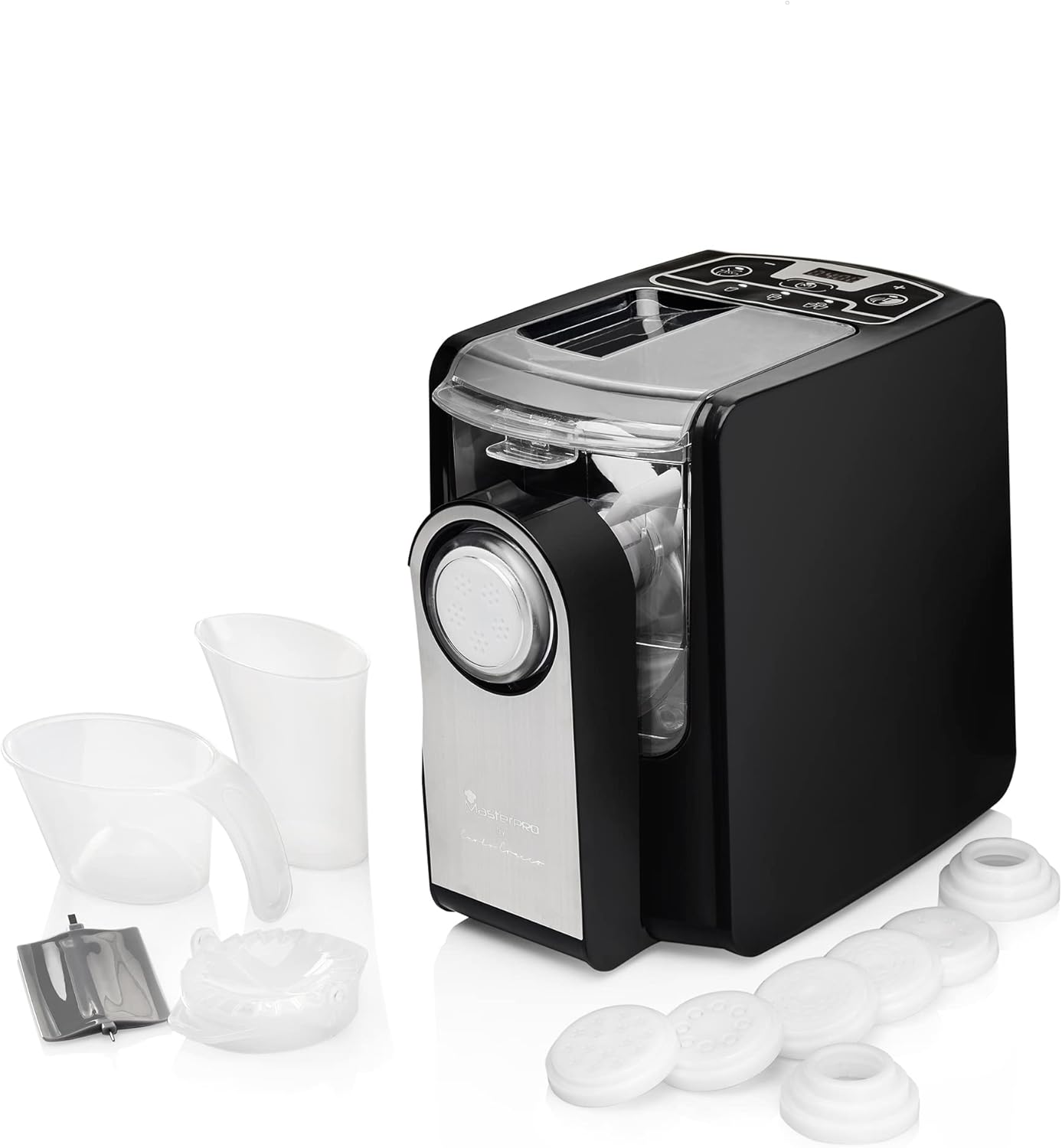
Image: The Masterpro PastiAmo pasta machine displayed alongside its complete set of accessories, including various pasta dies, measuring cups, and a cleaning tool, illustrating all included components.

Imej: A terperinci view of the Masterpro PastiAmo pasta machine's accessories, including the various pasta dies and measuring cups, highlighting their design and function.
Persediaan dan Penggunaan Pertama
Membongkar dan Pembersihan Awal
- Keluarkan semua bahan pembungkusan dengan berhati-hati.
- Wash all removable parts (mixing chamber, lid, pasta dies, measuring cups, cleaning tool) with warm, soapy water. Rinse thoroughly and dry completely.
- Lap unit utama dengan iklanamp kain. Jangan rendam unit utama dalam air.
Perhimpunan
- Letakkan unit utama di atas permukaan yang stabil dan rata.
- Masukkan ruang adunan ke dalam unit utama.
- Attach the desired pasta die to the extrusion head, then secure the extrusion head to the front of the mixing chamber.
- Place the lid onto the mixing chamber.
- Ensure all parts are correctly assembled and locked into place before plugging in the machine.
Arahan Operasi
Membuat Pasta
- Sediakan Bahan: Use the provided measuring cups for precise flour and liquid (water/egg) ratios. A common ratio is 250g flour to 90-100ml liquid. Adjust based on flour type and desired consistency.
- Add Flour: Pour the measured flour into the mixing chamber.
- Start Kneading: Close the lid. Select the automatic kneading function on the control panel. The machine will begin mixing the flour.
- Tambah Cecair: Slowly pour the liquid through the opening in the lid while the machine is kneading. This allows for gradual absorption and proper dough formation. The kneading process typically takes about 3 minutes. The dough should appear crumbly, like small peas.
- Penyemperitan: Once kneading is complete, the machine will automatically switch to extrusion mode. Pasta will begin to emerge from the die.
- Pasta Potong: Use the 2-in-1 cutting tool to cut the pasta to your desired length as it extrudes.
- Pasta Kering: Place the freshly cut pasta on the provided drying rack to prevent sticking.
- Cook Pasta: Cook fresh pasta immediately in boiling water.

Image: The Masterpro PastiAmo pasta machine actively extruding fresh pasta, which is collecting on a plate, with a pasta drying rack visible in the background, demonstrating the pasta making process.
Using Different Pasta Dies
The PastiAmo machine comes with various dies to create different pasta shapes:
- Fettuccine Disc
- Macaroni Disc
- Angel Hair Disc
- Pappardelle Disc
- Sheet Disc (for lasagna or ravioli)
- Linguine Disc
- Ravioli Mold (requires sheet pasta)
To change a die, ensure the machine is unplugged and cooled. Remove the extrusion head, replace the die, and reattach the head securely.
Note: The product title mentions a video tutorial. For detailed visual instructions on operation and specific recipes, please refer to the official Masterpro video tutorials available online.
Pembersihan dan Penyelenggaraan
Regular cleaning ensures the longevity and hygiene of your pasta machine.
Langkah Pembersihan
- Cabut plag: Sentiasa cabut plag mesin dari soket kuasa sebelum membersihkannya.
- Buka: Remove the lid, mixing chamber, extrusion head, and pasta die.
- Remove Dough Residue: Allow any remaining dough to dry slightly. This makes it easier to remove. Use the cleaning tool to scrape off dried dough from the mixing chamber, extrusion head, and especially the small holes in the pasta dies.
- Bahagian Basuh: Wash all removable parts (mixing chamber, lid, dies, measuring cups, cleaning tool) with warm, soapy water. Rinse thoroughly.
- Keringkan Sepenuhnya: Ensure all parts are completely dry before reassembling or storing to prevent mold or damage.
- Unit Utama Bersih: Lap unit utama dengan iklanamp kain. Jangan gunakan pembersih yang kasar atau rendamkannya di dalam air.
Important: The Masterpro PastiAmo Pasta Machine is NOT dishwasher safe. Hand wash all removable parts.
Penyimpanan
Store the clean and dry pasta machine and its accessories in a cool, dry place, away from direct sunlight and moisture.
Menyelesaikan masalah
| Masalah | Kemungkinan Punca | Penyelesaian |
|---|---|---|
| Mesin tidak bermula. | Not plugged in; lid not properly closed; parts not assembled correctly. | Ensure power cord is securely plugged in. Check that the lid is fully closed and all components are correctly assembled. |
| Dough is too wet or too dry. | Incorrect flour to liquid ratio. | Adjust liquid amount. For too wet, add a small amount of flour. For too dry, add a small amount of liquid. The dough should be crumbly, not sticky. |
| Pasta does not extrude or extrudes poorly. | Dough consistency is wrong; die is clogged; extrusion head not properly secured. | Check dough consistency (should be crumbly). Clean the pasta die thoroughly. Ensure the extrusion head is securely attached. |
| Mesin berhenti semasa operasi. | Overload protection activated; lid opened during operation. | Unplug the machine, wait a few minutes for it to cool down, then restart. Ensure the lid remains closed during operation. Reduce the amount of dough if consistently overloading. |
Spesifikasi
- Jenama: MasterPRO
- Nombor Model: BGMP-9137
- warna: Hitam
- Bahan: Keluli Aloi
- Mod Pengendalian: Automatik
- Kuasa: 260 W
- Bilangan Cakera: 6 (plus ravioli mold)
- Mesin basuh pinggan mangkuk selamat: Tidak
- Pengeluar: Bergner
Waranti dan Sokongan
For warranty information and customer support, please refer to the documentation provided at the time of purchase or contact MasterPRO customer service directly. Keep your proof of purchase for any warranty claims.
For additional assistance, including recipes and video tutorials, please visit the official MasterPRO webtapak atau hubungi saluran sokongan mereka.
Ask a question about this manual
Ask about setup, troubleshooting, compatibility, parts, safety, or missing instructions. Manuals+ will review the question and use this page’s manual context to help answer it.