1. Pengenalan
Thank you for choosing the FLEXISPOT Q8 55-inch Bamboo Standing Desk. This electric height-adjustable desk is designed to enhance your workspace with its durable bamboo tabletop, powerful dual motors, integrated wireless charging, and convenient storage drawer. This manual provides essential information for safe assembly, operation, maintenance, and troubleshooting to ensure optimal performance and longevity of your desk.
2. Maklumat Keselamatan Penting
- Kapasiti Berat: Do not exceed the maximum weight limit of 220 lbs (100 kg) on the desktop. Overloading can cause damage and pose a safety risk.
- Kestabilan: Ensure the desk is placed on a level surface. For taller heights, proper anchoring or counterweighting may be necessary to maintain stability.
- Perhimpunan: Follow all assembly instructions carefully. Incorrect assembly can lead to instability and potential injury. It is recommended that two people assemble this desk due to its weight.
- Kanak-kanak dan Haiwan Kesayangan: Jauhkan kanak-kanak dan haiwan peliharaan daripada meja semasa operasi untuk mengelakkan kemalangan.
- Cecair: Avoid spilling liquids on the control panel or electrical components. In case of spillage, immediately unplug the desk and allow it to dry completely before use.
- Kord Kuasa: Ensure the power cord is not pinched or damaged. Do not operate the desk with a damaged power cord.
- Movement Clearance: Pastikan tiada halangan di atas atau di bawah meja semasa melaraskan ketinggiannya.
3. Kandungan Pakej
Your FLEXISPOT Q8 desk is shipped in two separate boxes. Please verify that all components are present before beginning assembly.
- Bamboo Desktop with Integrated Drawer and Control Panel (Pre-assembled)
- Kaki Meja (2)
- Desk Feet (2)
- Dulang Pengurusan Kabel
- Penyesuai Kuasa dan Kabel
- Assembly Hardware and Tools (Screwdriver, Allen wrenches)
- Manual Arahan

This image illustrates the desk's dimensions (55.3 inches wide, 27.7 inches deep) and its robust 220 lbs weight capacity. It also highlights that the product ships in two separate packages.
4. Persediaan dan Pemasangan
The FLEXISPOT Q8 desk features a quick-install design, allowing for assembly in approximately 15 minutes. The tabletop and drawer come pre-assembled, simplifying the process.

The desk components are shown ready for assembly, emphasizing the quick 15-minute installation process with included tools and instructions.
Langkah Perhimpunan:
- Buka Pembungkusan Komponen: Carefully remove all parts from the packaging. Lay the desktop upside down on a soft, clean surface to prevent scratches.
- Pasang Kaki: Securely attach the two desk legs to the pre-drilled holes on the underside of the desktop using the provided hardware.
- Pasang Kaki: Connect the desk feet to the bottom of each leg column.
- Sambungkan Kabel: Connect the motor cables from the legs to the control box, and then connect the control panel cable to the control box. Ensure all connections are firm.
- Pasang Dulang Pengurusan Kabel: Attach the cable management tray to the designated area under the desk to organize wires.
- Flip Desk Upright: With assistance, carefully flip the assembled desk upright and move it to its desired location. Due to the desk's weight (approximately 85 lbs / 38.7 kg), two people are recommended for this step.
- Sambungkan Kuasa: Plug the power adapter into the control box, then connect the power cable to a wall outlet.
- Penentukuran Awal (jika perlu): Upon first power-on, the desk may perform a brief calibration cycle, moving to its lowest point and then slightly up. This is normal. If the desk does not respond, refer to the troubleshooting section for reset procedures.

A visual representation of the desk's main components, demonstrating the simplified assembly process.
5. Arahan Operasi
5.1 Smart Control Panel
The integrated control panel allows for easy height adjustment and includes memory presets for your preferred sitting and standing positions.

The smart control panel is detailed, showing buttons for height adjustment, four programmable memory presets, and integrated USB-A and USB-C charging ports.
- Butang Atas/Bawah (▲ / ▼): Tekan dan tahan untuk melaraskan ketinggian meja dengan lancar ke atas atau ke bawah. Lepaskan butang untuk berhenti pada ketinggian yang dikehendaki.
- Pratetap Memori (1, 2, 3, 4): These buttons allow you to save and recall up to four different height settings.
- Laraskan meja pada ketinggian yang diingini menggunakan butang Atas/Bawah.
- Press the 'M' button (or similar memory set button, if present, otherwise directly press the number).
- Within 3 seconds, press the desired number button (1, 2, 3, or 4) to save the current height. The display will show 'S-' followed by the number to confirm.
- To recall a saved height, simply press the corresponding number button (1, 2, 3, or 4). The desk will automatically move to that preset height.
5.2 Integrated Charging Features
The FLEXISPOT Q8 desk offers multiple charging options for your devices.
- Pengecasan Tanpa Wayar: A 10W wireless charging pad is discreetly integrated under the tabletop. Place your compatible smartphone or other Qi-enabled device directly on the designated area on the desktop (indicated by a subtle marking) to begin charging.
- Wired Charging Ports: The control panel includes a Type-A (18W) and a Type-C (45W) port for fast wired charging of smartphones, tablets, and laptops.
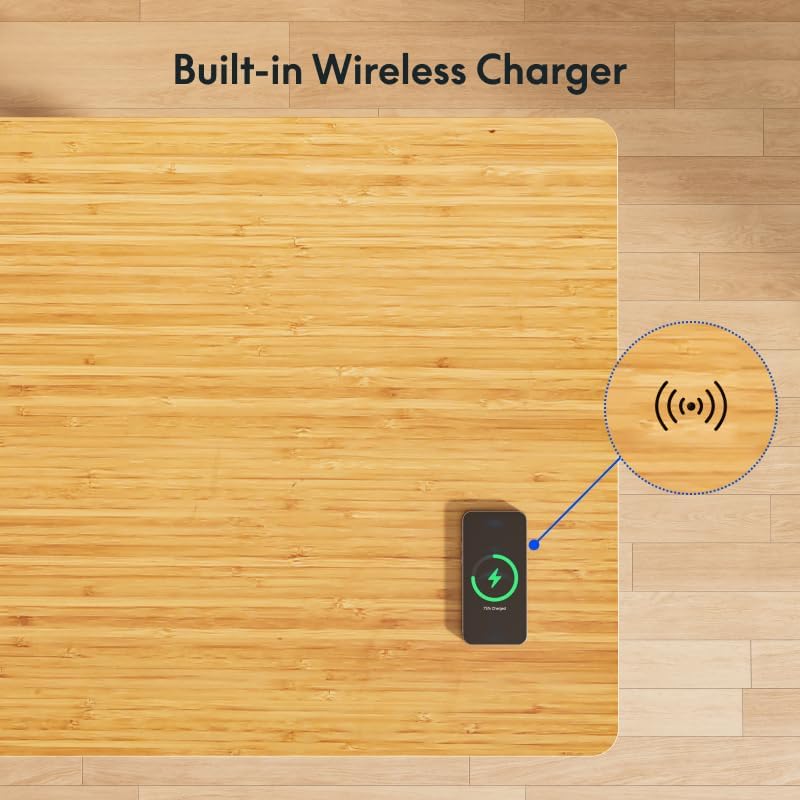
A smartphone is shown charging wirelessly on the desk's surface, illustrating the convenient built-in wireless charging feature.
5.3 Spacious Desk Drawer
The desk features an embedded drawer for convenient storage of your desktop essentials, helping to keep your workspace tidy.

The integrated drawer is displayed open, demonstrating its capacity for storing notebooks, pens, and other small office supplies.
6. Penyelenggaraan
- Membersihkan Desktop: Gunakan yang lembut, damp cloth to clean the bamboo surface. Avoid abrasive cleaners or harsh chemicals that could damage the finish. Wipe spills immediately.
- Pembersihan Bingkai: Wipe the metal frame with a soft, dry cloth.
- Pengurusan Kabel: Periodically check the cable management tray and ensure all cables are neatly organized and not pinched.
- Semakan Sambungan: Occasionally inspect all electrical connections to ensure they are secure.
7. Penyelesaian masalah
| Masalah | Kemungkinan Punca | Penyelesaian |
|---|---|---|
| Desk does not move / No power | Power cable disconnected; Outlet issue; Control box malfunction. | Check power cable connection to wall and control box. Test the outlet with another device. If still no power, contact support. |
| Desk moves unevenly or stops | Overload; Obstruction; Motor cable issue. | Reduce weight on desk. Check for obstructions. Ensure motor cables are securely connected. Perform a reset. |
| Kod ralat dipaparkan | Kerosakan khusus. | Refer to the full user manual for specific error code meanings and solutions, or perform a reset. |
| Pengecasan tanpa wayar tidak berfungsi | Device not Qi-compatible; Incorrect placement; Thick phone case. | Ensure device supports Qi wireless charging. Adjust device placement on the charging area. Remove thick phone cases. |
Prosedur Tetapan Semula:
If the desk encounters an issue or displays an error code, a reset may resolve the problem:
- Unplug the desk from the power outlet.
- Tunggu sekurang-kurangnya 10-15 saat.
- Plug the desk back into the power outlet.
- Press and hold the down (▼) button until the desk reaches its lowest position and then slightly rises. This indicates a successful reset.
8. Spesifikasi
| Ciri | Perincian |
|---|---|
| Jenama | FLEXISPOT |
| Nombor Model | EW8Q8 |
| Bahan Desktop | Buluh |
| Bahan Bingkai | Bamboo (Base) |
| Dimensi Produk (D x W x H) | 28" x 55" x 49.2" (71.1 cm x 139.7 cm x 125 cm) |
| Julat Ketinggian | 24" - 49.2" (61 sm - 125 sm) |
| Kapasiti Berat | 220 paun (100 kg) |
| Jenis Motor | Dual Motor, 3-Stage Kaki |
| Kelajuan Angkat | 1.5 inches/second (3.8 cm/second) |
| Tahap Kebisingan | Kira-kira 45dB |
| Output Pengecasan Tanpa Wayar | 10W |
| Wired Charging Ports | 1x Type-A (18W), 1x Type-C (45W) |
| Dimensi Laci (P x L x T) | 28.3" x 12.8" x 1.97" (71.9 cm x 32.5 cm x 5 cm) |
| Masa Perhimpunan | lebih kurang 15 minit |
| Berat Barang | 38.7 Kilogram (Lebih kurang 85 paun) |

This image highlights the desk's quiet operation, comparing its noise level (45dB) to common sounds like falling leaves (10dB) and normal voice (60dB).

This image focuses on the desk's genuine bamboo tabletop, emphasizing its eco-friendly nature, durability, and unique grain pattern.
9. Waranti dan Sokongan
9.1 Waranti Terhad
The FLEXISPOT Q8 55-inch Bamboo Standing Desk comes with a limited warranty. Please refer to the warranty card included with your product or visit the official FLEXISPOT weblaman web untuk terma dan syarat terperinci mengenai perlindungan, tempoh dan prosedur tuntutan.
9.2 Sokongan Pelanggan
For any questions, technical assistance, or warranty claims, please contact FLEXISPOT customer support. You can find contact information on the official FLEXISPOT webtapak atau melalui platform pembelian anda.
Lawati Kedai FLEXISPOT rasmi untuk maklumat lanjut: Kedai FLEXISPOT


