pengenalan
The SmallRig P108 RGB Video Light is a portable and versatile LED camera light designed for various content creation needs, including YouTube, vlogging, and photography. It features 108 high-quality lamp beads, offering 360° full-color adjustment, a wide color temperature range, and multiple special effects. Its compact size and long battery life make it an ideal companion for on-the-go shooting.

Image: The SmallRig P108 RGB Video Light, highlighting its compact design and vibrant RGB capabilities.
Apa yang ada dalam Kotak
- Lampu Video RGB
- Kabel Pengecasan USB Jenis-C
- Manual Pengguna (dokumen ini)

Image: Contents of the SmallRig P108 RGB Video Light package.
Persediaan
1. Mengecas Peranti
Before first use, fully charge the SmallRig P108 RGB Video Light. The device has a built-in 2500mAh lithium battery.
- Connect the included USB Type-C charging cable to the USB-C port on the light.
- Sambungkan hujung kabel yang satu lagi ke penyesuai kuasa USB yang serasi (tidak disertakan).
- The indicator lights will show charging progress. Four white lights indicate 100% power when fully charged.
- A full charge provides approximately 130 minutes of usage at maximum power.

Image: Charging the SmallRig P108 RGB Video Light.
2. Memasang Cahaya
The P108 offers multiple mounting options for versatile use.
- Standard 1/4"-20 Screw: Use the integrated 1/4"-20 screw mount at the bottom to attach the light to tripods, camera cages, or other accessories.
- Pemasangan Kasut Sejuk: The light features a built-in standard cold shoe interface at the bottom for direct attachment to cameras or mobile phone expansion frames. Additionally, there are three cold shoe seats on the sides for splicing multiple lights together or expanding with other accessories like microphones.

Image: Various mounting options for the SmallRig P108 RGB Video Light.
Arahan Operasi
1. Hidupkan/Mati Kuasa
- To turn on the light, press and hold the power button (located on the top left) for 2-3 seconds.
- To turn off the light, press and hold the power button for 2-3 seconds again.
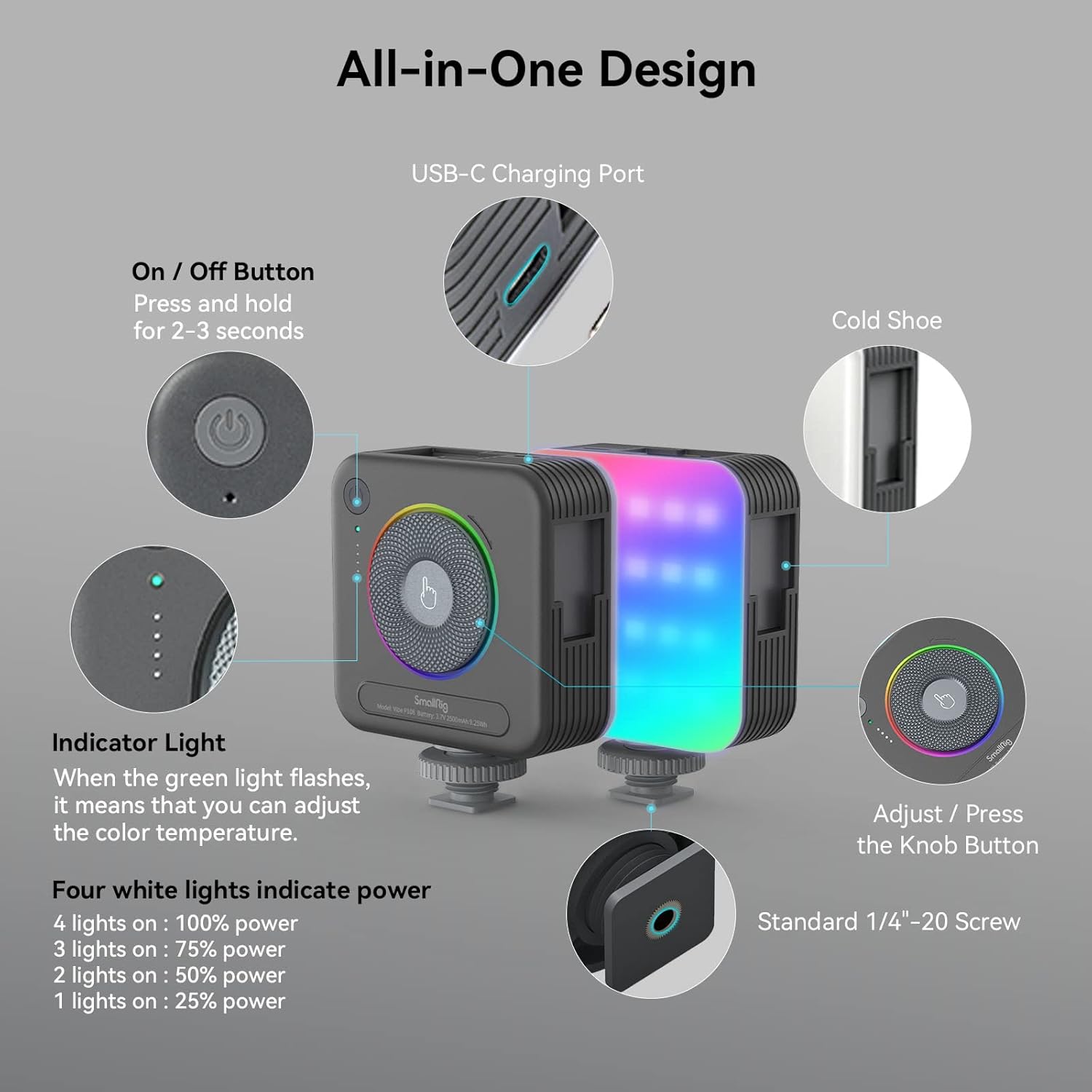
Imej: Selesaiview of the SmallRig P108 controls.
2. Adjusting Color Temperature (CCT Mode)
The P108 offers a color temperature range of 2700K (warm light) to 6500K (cold light).
- Ensure the light is in CCT mode (indicated by the green indicator light).
- Rotate the central knob clockwise to increase the color temperature (cooler light).
- Rotate the central knob counter-clockwise to decrease the color temperature (warmer light).

Image: Color temperature and full color range of the light.
3. Melaraskan Kecerahan
Brightness can be adjusted from 0% to 100% in both CCT and RGB modes.
- In CCT mode, the four white indicator lights show the current power level: 1 light (25%), 2 lights (50%), 3 lights (75%), 4 lights (100%).
- To adjust brightness, rotate the central knob.
- Press the power button briefly to cycle through preset brightness levels (25%, 50%, 75%, 100%).

Image: One-handed control via the step-less knob.
4. Special Effects (FX) Modes
The P108 includes 12 FX light effect modes for various photography needs.
- To enter FX mode, press the central knob. Continue pressing to cycle through the 12 effects.
- Rotate the central knob to adjust the brightness or speed of the selected effect.
- Examples of FX modes include Police Car, Fire Truck, RGB Slow Gradient, Pulsing, Lightning, TV, Candlelight, Firework, Breathing, Disco, Paparazzi, and Faulty Bulb.
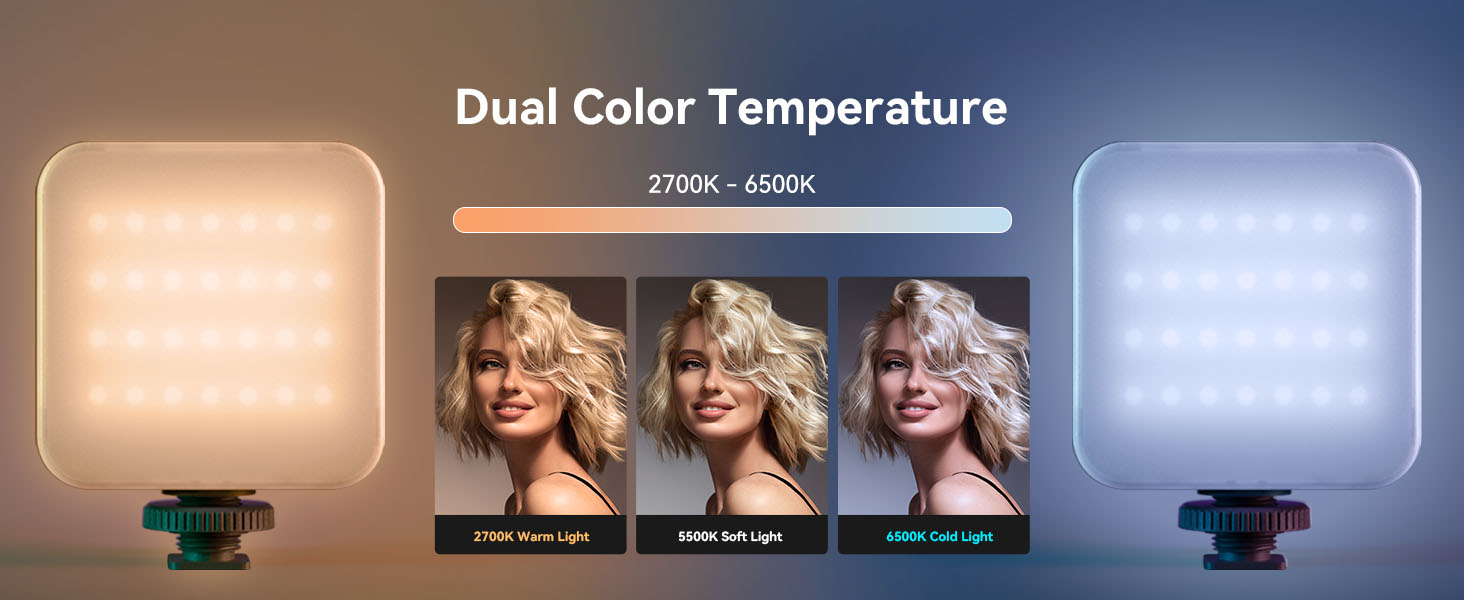
Image: Visual representation of various FX modes.
5. Mod RGB
The light features a 360° full-color design, allowing adjustment of hue and saturation.
- To enter RGB mode, press the central knob until the RGB indicator light is active.
- Rotate the central knob to cycle through 360° of colors.
- Press the power button briefly to adjust the brightness within the selected color.
Video Produk Rasmi: Cara Penggunaan
Video: A detailed guide on how to use the SmallRig P108 RGB Video Light, covering its features and modes.
Penyelenggaraan
- Pembersihan: Use a soft, dry cloth to clean the surface of the light. Do not use harsh chemicals or abrasive materials.
- Storan: Simpan peranti di tempat yang sejuk dan kering jauh dari cahaya matahari langsung dan suhu yang melampau.
- Penjagaan Bateri: Untuk memanjangkan hayat bateri, elakkan daripada menyahcas sepenuhnya bateri dengan kerap. Cas peranti dengan kerap, walaupun tidak digunakan, untuk mengekalkan kesihatan bateri.
- Pengendalian: Handle the light with care to prevent drops or impacts, which could damage internal components.
Menyelesaikan masalah
| Masalah | Kemungkinan Punca | Penyelesaian |
|---|---|---|
| Cahaya tidak menyala. | Bateri lemah; Butang kuasa tidak ditekan cukup lama. | Cas peranti sepenuhnya. Tekan dan tahan butang kuasa selama 2-3 saat. |
| Keluaran cahaya malap atau tidak konsisten. | Low battery; Incorrect brightness setting. | Recharge the light. Adjust brightness using the central knob or power button. |
| Tidak boleh menukar mod atau warna. | Incorrect button press; Device malfunction. | Ensure you are pressing the central knob to cycle modes. If issue persists, contact support. |
| Peranti tidak dicas. | Faulty cable or adapter; USB-C port issue. | Try a different USB-C cable and power adapter. Ensure the cable is fully inserted. |
Spesifikasi
| Ciri | Perincian |
|---|---|
| Dimensi Produk | 2.83 x 3.5 x 1.24 inci |
| Berat Barang | 5.9 auns |
| Manik Cahaya | 108 (28 RGB, 40+40 cold/warm) |
| CRI | ≥ 95 |
| Julat Suhu Warna | 2700K - 6500K |
| Mod Warna | 360° Full Color (RGB) |
| FX Light Effects | 12 modes (e.g., Police Car, Fire Truck, Lightning, TV) |
| Kapasiti Bateri | Bateri Litium 2500mAh |
| Battery Life (Max Power) | 130 minit |
| Port Pengecasan | USB Jenis-C |
| Pilihan Pemasangan | Standard 1/4"-20 Screw, 3 Cold Shoe Mounts |
Waranti dan Sokongan
Produk SmallRig direka bentuk untuk ketahanan dan prestasi. Untuk maklumat jaminan, sokongan teknikal atau pertanyaan perkhidmatan, sila rujuk laman web rasmi SmallRig. webtapak atau hubungi perkhidmatan pelanggan mereka secara langsung. Simpan resit pembelian anda untuk tuntutan waranti.
Sumber Dalam Talian:


