1. Pengenalan
This manual provides detailed instructions for the setup, operation, and maintenance of your Wings Phantom 850 Low Latency Wireless Earbuds. Please read this manual thoroughly before using the product to ensure optimal performance and longevity.

Image: The Wings Phantom 850 Wireless Earbuds shown inside their open charging case, highlighting their design and readiness for use.
2. Kandungan Pakej
Sahkan bahawa semua item terdapat dalam pembungkusan produk anda:
- Wings Phantom 850 Earbuds
- Sarung Pengecas Tanpa Wayar
- Kabel Pengecas USB
- Kusyen Telinga (pelbagai saiz)
- Manual Pengguna (dokumen ini)
3. Persediaan
3.1. Mengecas Fon Telinga dan Sarung
Sebelum penggunaan pertama, cas sepenuhnya fon telinga dan bekas pengecas.
- Letakkan fon telinga ke dalam bekas pengecas. Pastikan ia diletakkan dengan betul.
- Sambungkan kabel pengecas USB ke port pengecasan pada bekas dan ke sumber kuasa (cth., penyesuai dinding USB, port USB komputer).
- The LED indicators on the case will show the charging status. A full charge typically takes approximately 1-2 hours.

Image: The Wings Phantom 850 Earbuds in their charging case, illustrating the charging process with illuminated LED lights.
3.2. Berpasangan Bluetooth
Untuk menyambungkan fon telinga anda kepada peranti:
- Pastikan fon telinga dicas dan di dalam bekas pengecasan.
- Open the charging case. The earbuds will automatically enter pairing mode (indicated by flashing LED lights on the earbuds).
- Pada peranti anda (telefon pintar, tablet, komputer riba), dayakan Bluetooth dan cari peranti yang tersedia.
- Select "Wings Phantom 850" from the list of devices.
- Setelah disambungkan, LED fon telinga akan berhenti berkelip dan anda akan mendengar nada pengesahan.
Ciri fon telinga Open and On Tech™ for quick connection upon opening the case.
3.3. Wings Sync App Installation
Enhance your experience by installing the Wings Sync App. The app allows for custom controls, EQ modes, and locating misplaced earbuds.
- Download the "Wings Sync" app from your device's app store (App Store for iOS, Google Play Store for Android).
- Open the app and follow the on-screen instructions to connect your Phantom 850 earbuds.

Image: A visual representation of the Wings Sync App dashboard, showing options for touch controls, game mode, EQ modes, and locating earbuds.
Video: A demonstration of the Wings Sync App features, including custom touch controls, EQ modes, and the earbud locator function. This video illustrates how to personalize your earbud settings and find them if misplaced.
4. Arahan Operasi
4.1. Kawalan Sentuh
The Wings Phantom 850 earbuds feature intuitive touch controls. These can be customized via the Wings Sync App.
| Tindakan | Function (Default) |
|---|---|
| Ketik Tunggal (L/R) | Volume Up/Down (Customizable) |
| Ketik Dua Kali (L/R) | Play/Pause (Customizable) |
| Ketik Tiga Kali (L) | Previous Track (Customizable) |
| Ketik Tiga Kali (R) | Next Track (Customizable) |
| Long Press (L) | Voice Assistant (Customizable) |
| Long Press (R) | Game Mode ON/OFF (Customizable) |
| Incoming Call (Single Tap) | Jawab Panggilan |
| Incoming Call (Long Press) | Tolak Panggilan |
Note: Default functions may vary. Refer to the Wings Sync App for current settings and customization options.
4.2. Mod Permainan
Activate Gaming Mode for ultra-low latency audio (40ms) during gameplay. This mode is designed to synchronize audio with on-screen action, providing a competitive edge.
- Pengaktifan: Long press the right earbud (default setting) or activate via the Wings Sync App.
- Penyahaktifan: Repeat the activation step.

Imej: Tamatview of key features including the dedicated Gaming Mode with 40ms ultra-low latency, Bluetooth 5.3, IPX5 water resistance, and ENC Quad Mic technology.
4.3. Environmental Noise Cancellation (ENC)
The Quad ENC Mics reduce environmental noise during calls, ensuring clear communication.
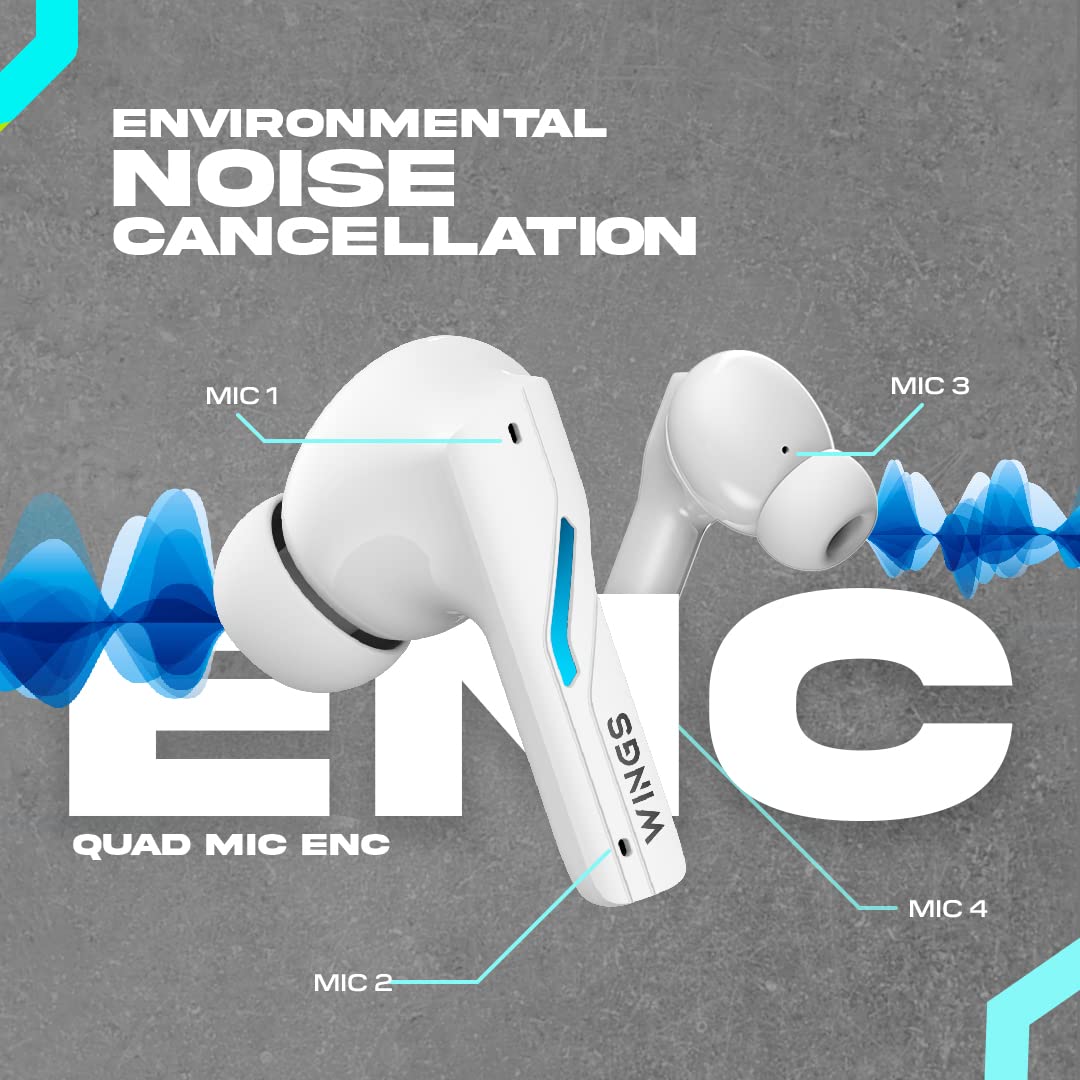
Image: A diagram illustrating the four Environmental Noise Cancellation (ENC) microphones on the Wings Phantom 850 earbuds, designed for clear call quality.
5. Penyelenggaraan
5.1. Pembersihan
Pembersihan berkala membantu mengekalkan kualiti dan kebersihan bunyi:
- Lap perlahan fon telinga dan bekas pengecas dengan kain lembut, kering dan tidak berbulu.
- Tanggalkan hujung telinga dan bersihkannya dengan sabun lembut dan air, kemudian keringkan dengan teliti sebelum disambungkan semula.
- Use a dry cotton swab to clean the charging contacts on both the earbuds and the case.
5.2. Tahan Air
The Wings Phantom 850 earbuds are rated IPX5 water resistant, meaning they can withstand splashes and sweat. They are not designed for submersion in water.
- Jangan dedahkan fon telinga kepada air yang mengalir atau pakainya semasa berenang atau mandi.
- Pastikan fon telinga kering sebelum meletakkannya semula ke dalam bekas pengecas untuk mengelakkan kerosakan.
6. Penyelesaian masalah
If you encounter issues with your Wings Phantom 850 earbuds, refer to the following common solutions:
- Tiada Masalah Bunyi/Kesambungan:
- Pastikan kedua-dua fon telinga dicas.
- Verify Bluetooth is enabled on your device and the earbuds are selected.
- Cuba nyahpasang dan pasangkan semula fon telinga dengan peranti anda.
- Mulakan semula peranti anda.
- Satu Earbud Tidak Berfungsi:
- Letakkan kedua-dua fon telinga kembali ke dalam bekas pengecas, tutup penutupnya, tunggu beberapa saat, kemudian buka dan cuba lagi.
- Bersihkan kenalan pengecas pada fon telinga dan dalam bekasnya.
- Masalah Pengecasan:
- Pastikan kabel pengecasan disambungkan dengan selamat.
- Try a different USB port or charging adapter.
- Bersihkan sesentuh pengecasan.
- Kelantangan Rendah/Kualiti Bunyi Teruk:
- Laraskan kelantangan pada kedua-dua peranti anda dan fon telinga.
- Ensure ear tips are properly sealed in your ear canal. Try different sized ear tips.
- Bersihkan sebarang serpihan daripada jaring pembesar suara fon telinga.
- Check EQ settings in the Wings Sync App.
Untuk bantuan lanjut, sila hubungi khidmat pelanggan.
7. Spesifikasi
| Ciri | Perincian |
|---|---|
| Nama Model | Hantu 850 |
| Teknologi Ketersambungan | Wayarles (Bluetooth 5.3) |
| Julat Bluetooth | 15 Meter |
| Jenis Pemacu Audio | Dynamic Driver (13mm Composite Drivers) |
| Hayat Bateri (Earbud) | Sehingga 10 Jam |
| Jumlah Masa Main (dengan Kes) | Sehingga 50 Jam |
| Teknologi Pengecasan | Bullet Charge™ (15 mins charge = 100 mins playtime) |
| Ciri Khas | ENC Quad Mic, Dedicated Gaming Mode (40ms Low Latency), App Support, Open and On Tech™ |
| Tahap Ketahanan Air | IPX5 (Tahan Peluh dan Air) |
| Kaedah Kawalan | Sentuh, Suara |
| Peranti Serasi | Telefon Bimbit, Komputer Desktop, Konsol Permainan, Komputer Riba, Tablet |
| Berat Barang | 150 Gram |
| Dimensi Produk | 10 x 10 x 4 cm |

Imej: Meletup view diagram illustrating the 13mm composite drivers responsible for high-fidelity audio output in the earbuds.

Image: Information detailing the battery life, showing 50 hours of total playtime with the charging case and 10 hours of playtime on the earbuds alone.
8. Waranti dan Sokongan
Your Wings Phantom 850 Wireless Earbuds come with a Waranti 1 Tahun dari tarikh pembelian.
For warranty claims, technical support, or any other inquiries, please refer to the contact information provided on the official Wings webtapak atau dokumentasi pembelian anda.


