1. Pengenalan
The Amazon Echo Show 8 (3rd Generation, 2023 Model) is a smart display designed to enhance your daily life with its 8-inch HD touchscreen, spatial audio, and integrated smart home hub. Powered by Alexa, it offers a wide range of functionalities including voice assistance, entertainment, communication, and smart home control.
2. Apa yang ada di dalam Kotak
- Echo Show 8 Device
- Ice White Power Adapter (30 W)
- Power Cable (1.5 m, white)
- Panduan Mula Pantas
3. Peranti Lebihview
Familiarize yourself with the key components of your Echo Show 8.

The Echo Show 8 features an 8-inch HD display, a front-facing camera, and integrated speakers. The image highlights its capabilities for video calls, smart home management, and entertainment.
3.1. Ciri-ciri Utama
- Skrin Sentuh HD 8 inci: For visual interactions, video calls, and content display.
- 13 MP Camera: Located at the top, used for video calls and monitoring.
- Camera Cover: A physical slider for privacy, located above the camera.
- Mikrofon: Integrated for voice commands and calls.
- Penceramah: Two 52mm full-range drivers with passive bass radiator for spatial audio.
- Pelabuhan Kuasa: Terletak di bahagian belakang untuk menyambungkan penyesuai kuasa.
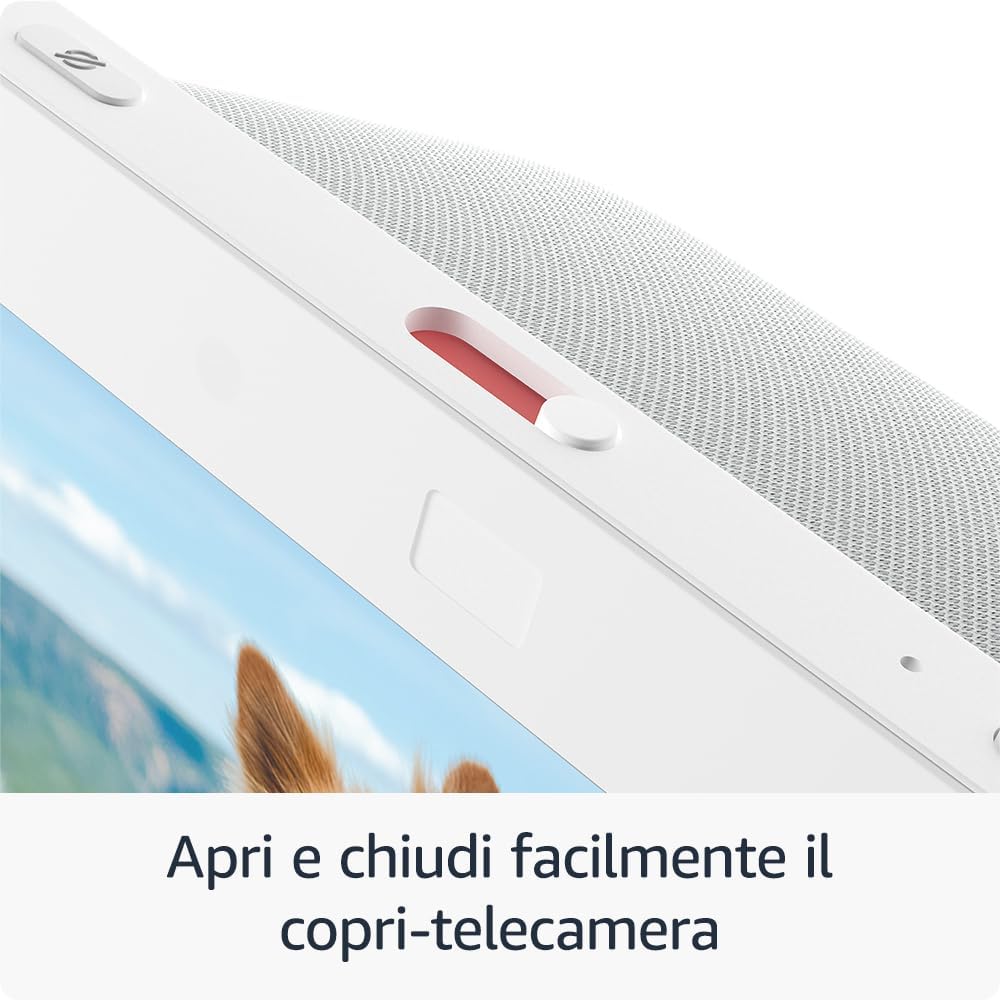
Satu jarak dekat view of the physical camera cover, which can be easily opened or closed to ensure privacy.
4. Persediaan
Ikuti langkah ini untuk menyediakan Echo Show 8 anda:
- Hidupkan kuasa: Sambungkan penyesuai kuasa ke Echo Show 8 anda dan pasangkannya ke soket dinding. Peranti akan dihidupkan secara automatik.
- On-Screen Instructions: Follow the on-screen prompts to select your language, connect to your Wi-Fi network, and log in with your Amazon account.
- Apl Alexa: Download the Alexa app on your Android or iOS device. The app is essential for managing settings, skills, and smart home devices.
- Persediaan Mudah: The Echo Show 8 supports Amazon's simple setup technology, allowing for easy connection of compatible smart home devices to your Wi-Fi network.
5. Arahan Operasi
Your Echo Show 8 offers various ways to interact and utilize its features.
5.1. Kawalan Suara dengan Alexa
Cukup sebut "Alexa" diikuti dengan arahan anda. Contohamples termasuk:
- "Alexa, set an alarm for 7 AM."
- "Alexa, add milk to my shopping list."
- "Alexa, what's on my calendar today?"
- "Alexa, show me the weather."
5.2. Hiburan
Enjoy music, videos, and more on your Echo Show 8.

The Echo Show 8 allows you to access popular streaming services such as Netflix and Prime Video directly on its HD screen.
- Penstriman Video: Stream content from Prime Video, Netflix, and other platforms. Say, "Alexa, open Prime Video" or "Alexa, play [show name] on Netflix."
- Main Balik Muzik: Listen to music from Amazon Music, Apple Music, Spotify, and more. Say, "Alexa, play music" or "Alexa, play [artist/song] on Spotify."

The device's screen displays album art and song information when playing music from services like Amazon Music.

Enjoy video content from Prime Video. A compatible stand (sold separately) can optimize viewsudut-sudut.
5.3. Kawalan Rumah Pintar
The integrated smart home hub simplifies managing compatible devices.

The Echo Show 8 serves as a central control panel for compatible smart home devices, allowing you to manage thermostats, lights, and smart plugs.
- Gandingan Peranti: Associate and control devices compatible with Zigbee, Matter, and Thread protocols without needing a separate hub.
- Kaedah Kawalan: Manage smart cameras, lights, and other devices using the touchscreen, voice commands, or by setting up routines activated by motion.
5.4. Komunikasi
Stay connected with friends and family.
- Panggilan Video: Initiate video calls using your voice. The 13 MP central camera features auto-framing and noise reduction for clearer conversations.
- Contacts Widget: Use the new Contacts widget for one-touch calls to contacts who have the Alexa App or an Echo device with a screen.
5.5. Foto
Transform your Echo Show 8 into a digital photo frame.

The Echo Show 8 can display your Amazon Photos, turning the device into a personalized digital photo frame that adapts to ambient light conditions.
- Foto Amazon: Link your Amazon Photos account to display your favorite memories on the home screen. Automatic color adjustment ensures photos look vibrant in any lighting condition.
6. Ciri Privasi
The Echo Show 8 is designed with multiple privacy controls:
- Activation Word: Alexa only starts listening after detecting the activation word.
- Transmission Indicators: Visual and audible indicators confirm when Alexa is recording your request.
- Butang Mati Mikrofon/Kamera: A dedicated button physically disconnects the microphones and camera.
- Integrated Camera Cover: A physical slider allows you to block the camera lens.
- Pengurusan Rakaman Suara: Anda mempunyai keupayaan untuk kembaliview dan padamkan rakaman suara anda.
For more details on how Alexa and Echo devices protect your privacy, refer to the Alexa Privacy Portal.
7. Penyelenggaraan
Untuk memastikan ketahanan dan prestasi optimum Echo Show 8 anda, ikuti garis panduan penyelenggaraan ini:
- Pembersihan: Use a soft, dry, lint-free cloth to clean the screen and exterior surfaces. Avoid using abrasive cleaners, solvents, or harsh chemicals. Do not spray cleaners directly onto the screen.
- penempatan: Place the device on a stable, flat surface away from direct sunlight, heat sources, and moisture. Ensure adequate ventilation around the device.
- Kuasa: Use only the provided power adapter. Unplug the device during electrical storms or when unused for extended periods.
8. Penyelesaian masalah
Jika anda menghadapi masalah dengan Echo Show 8 anda, cuba langkah berikut:
- Peranti Tidak Responsif: If the device is not responding, unplug the power adapter from the wall outlet, wait for 10 seconds, and then plug it back in.
- Isu Kesambungan Wi-Fi: Ensure your Wi-Fi router is working correctly and the Echo Show 8 is within range. Try restarting your router. You can also check Wi-Fi settings in the Alexa app.
- Voice Commands Not Recognized: Speak clearly and ensure you are within hearing range of the device. Check that the microphone is not muted (the light ring will be red).
- Isu Skrin: If the screen is frozen or unresponsive, try restarting the device.
- Kemas Kini Perisian: Ensure your device has the latest software updates. Updates are usually automatic when connected to Wi-Fi.
For persistent issues, consult the Alexa app's help section or contact Amazon Customer Support.
9. Spesifikasi
| Ciri | Perincian |
|---|---|
| Dimensi | 200 x 139 x 106 mm |
| Berat badan | 1034 gram (Saiz dan berat sebenar mungkin berbeza mengikut proses pembuatan) |
| Skrin | Skrin Sentuh HD 8 inci |
| Kamera | 13 MP central camera with integrated camera cover (Photo quality and size may vary) |
| Kesambungan Wi-Fi | Dual-band Wi-Fi compatible with 802.11 a/b/g/n/ac networks. Not compatible with ad-hoc (or peer-to-peer) Wi-Fi networks. |
| Hab Rumah Pintar | Zigbee, Matter, and Thread border router |
| Kesambungan Bluetooth | A2DP support for audio streaming to/from Echo Show 8. AVRCP for voice control of connected mobile devices. Not compatible with Mac OS X hands-free voice control or Bluetooth speakers requiring a PIN. |
| Audio | 2 x 52 mm (2”) full-range drivers with passive bass radiator |
| Pemproses | Octa-core SoC system with Amazon AZ2 neural network engine |
| Generasi | Echo Show 8 (3rd Gen), 2023 Model |
| Bahasa | Alexa speaks English, French, German, Italian, Spanish, and Dutch. |
10. Kebolehcapaian
The Echo Show 8 includes several accessibility features:
- Ketik untuk Alexa: Allows interaction with Alexa by touching the device, using on-screen icons or keyboard, instead of voice. You can also save preferred actions.
- Preferred Speaking Speed: Control the speed at which Alexa speaks.
- SuaraView Pembaca Skrin: Enables visually impaired users to access functionalities.
- Pembesar: Magnify and reduce image sizes and explore the screen.
- Kindle Reading Assistant: Alexa boleh membaca buku Kindle anda dengan kuat.
To activate these features, go to Tetapan → Kebolehcapaian pada peranti anda.
11. Waranti dan Sokongan
Your Amazon Echo Show 8 is covered by the following:
- Legal Warranty of Conformity: This covers defects of conformity that appear within 24 months from the delivery date of the product, as per EU Directive 1999/44/CE. You must report the defect within 2 months of its discovery.
- One-Year Limited Manufacturer's Warranty: This warranty is provided by the manufacturer, with terms and conditions detailed in the product's packaging and available in the Limited Warranty section.
For warranty claims or technical assistance, please contact Amazon Customer Support. The use of Amazon Echo Show 8 is also subject to the terms found on the Amazon webtapak.


