1. Produk Lebihview
The Woibugee 6.9 Inch Single Din Touchscreen Car Stereo is a versatile multimedia system designed to enhance your in-car entertainment and navigation experience. Featuring an Android 10 operating system, it supports wireless Apple CarPlay and wireless Android Auto, providing seamless smartphone integration. The unit includes built-in GPS, Bluetooth for hands-free calling and music streaming, WiFi connectivity, FM radio, and steering wheel control compatibility.
Its 1280x480 IPS touchscreen offers a wide 178° viewing angle for clear and vibrant display. This single DIN unit is designed for universal fit in most standard single-DIN dashboard openings, though users should verify compatibility with their specific vehicle.

Rajah 1: Depan view of the Woibugee 6.9 Inch Single Din Touchscreen Car Stereo.
2. Apa yang ada di dalam Kotak
Verify that all components are present in the package before beginning installation or setup:
- Single Din Touchscreen Car Stereo Unit
- Kabel Kuasa
- Antena GPS
- RCA kabel
- Kabel Input Video
- 4-pin USB Cable
- 6-pin USB Cable
- Mikrofon Luaran
- Installation Brackets (Set)

Figure 2: Contents of the product package, including the main unit and various cables and accessories.
3. Panduan Pemasangan
Nota Keselamatan Penting: Before starting installation, always disconnect the negative terminal of your vehicle's battery to prevent electrical shorts and damage. If you are installing this unit in a large truck (24V system), an additional DC24V to DC12V car voltagPengawal selia e diperlukan.
3.1 Pemasangan Fizikal
- Separate Sleeve: Carefully separate the short sleeve from the main radio body.
- Insert Sleeve: Insert the short sleeve into your car's radio installation window. Ensure it fits snugly.
- Secure Sleeve: Use mounting tools to press out the small tabs on the sleeve, securing it firmly to the car's dashboard.
- Sisipkan Radio: Gently push the main radio body into the secured short sleeve until it snaps into place.
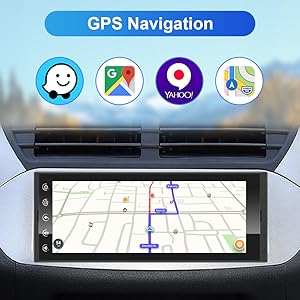
Figure 3: Visual guide for the physical installation process of the head unit.
3.2 Sambungan Pendawaian
Connect the provided cables to their respective ports on the car stereo and your vehicle's wiring harness. Refer to your vehicle's specific wiring diagram if necessary.
- Bekalan Kuasa: Connect the power cable to the vehicle's power source.
- Antena GPS: Connect the GPS antenna for navigation functionality. Position the antenna in a location with a clear view dari langit.
- Kabel USB: Connect the 4-pin and 6-pin USB cables for data transfer and device charging.
- Mikrofon Luaran: Sambungkan mikrofon luaran untuk kualiti panggilan yang lebih baik.
- RCA & Video Input Cables: Connect these for external audio/video sources, including backup cameras.

Rajah 4: Belakang view of the stereo showing connection points for power, GPS, USB, and audio/video inputs.
4. Operasi Asas
The unit features a responsive 6.9-inch IPS touchscreen for intuitive control. Key functions are accessible via the main interface.
4.1 Kuasa Hidup/Mati dan Kawalan Kelantangan
To power on the unit, ensure it is correctly wired and your vehicle's ignition is on. The unit will boot up automatically. To adjust volume, use the on-screen controls or compatible steering wheel controls. The volume control is touch-based, requiring a tap and hold on the top of the screen to reveal the volume bar, then dragging your finger up or down.
4.2 Navigasi Antara Muka Utama
The main screen provides access to various applications and settings. Swipe left or right to navigate between app pages. Tap on icons to launch applications such as Navigation, Music, Radio, Video, and Settings.
Video 1: Demonstration of the 6.9 Inch car stereo's main functions and interface navigation.
5. CarPlay Wayarles & Android Auto
This unit supports both wireless Apple CarPlay and wireless Android Auto, allowing for seamless integration of your smartphone's features directly onto the car stereo display.
5.1 Langkah Sambungan
- Dayakan Wi-Fi: Ensure your phone's Wi-Fi is turned on.
- Pairing Bluetooth: Cari untuk the stereo's Bluetooth device name (e.g., "CarKit_blink") on your phone and pair using the passcode "0000".
- Connect via TLink5: Once paired, open the "TLink5" application on the car stereo. Follow the on-screen prompts to connect to wireless CarPlay or Android Auto and accept the connection request on your phone.
Nota: If the TLink5 application is not installed, navigate to the file manager on the stereo, find the APK file, dan pasangnya.

Figure 5: Wireless Apple CarPlay in action, showing navigation and media playback.

Figure 6: Wireless Android Auto interface, demonstrating app integration and voice commands.
Video 2: Detailed steps for connecting your smartphone to the car stereo via wireless CarPlay.
6. Kesambungan Bluetooth
The unit features upgraded Bluetooth technology for fast and stable connections, enabling hands-free calling and high-quality music streaming.
6.1 Pairing Your Phone
- Dayakan Bluetooth: Pada telefon anda, hidupkan Bluetooth.
- Cari untuk Peranti: On your phone, search for Bluetooth devices. The stereo's device name is typically "carkit_blink".
- Enter Passcode: Input the password "0000" on your phone when prompted to pair.
- Main Muzik: After successful pairing, navigate to the "Bluetooth Music" app on the stereo to play audio from your phone.
Video 3: Guide on how to connect your phone via Bluetooth for music playback and hands-free calls.
7. Navigasi GPS
The car stereo includes built-in GPS and Wi-Fi, allowing you to use popular navigation applications like Waze and Google Maps. It supports voice search via Siri or Google Assistant, providing turn-by-turn directions, real-time traffic updates, and estimated arrival times.

Figure 7: GPS navigation interface showing map applications and route information.
8. Main Balik Multimedia
The Android 10 system allows you to download and use various multimedia applications such as Spotify, Pandora, YouTube, and Netflix. The unit supports multiple inputs for full multimedia access.
8.1 Main Balik Audio
Access your local music files or stream from online services. The unit supports various audio formats and offers sound customization options.
8.2 Main balik Video
Enjoy videos directly on the 6.9-inch IPS screen. The unit supports various video formats and can display content from connected devices via wireless mirroring.

Figure 8: Multimedia capabilities, showing video playback and available streaming apps.

Figure 9: Wireless mirroring feature, allowing content from your smartphone to be displayed on the stereo screen.
9. Pelarasan EQ
Customize your audio experience with the built-in 12-band equalizer. Adjust frequency levels to match your preferences and vehicle acoustics for optimal sound quality.

Figure 10: The 12-band equalizer interface for fine-tuning audio output.
10. Kawalan Roda Stereng (SWC)
The unit supports steering wheel controls, allowing you to manage audio playback, calls, and other functions without taking your hands off the wheel. This feature requires proper wiring and configuration, which may vary by vehicle model.

Figure 11: Steering wheel control integration for convenient operation.
11. Penyelesaian masalah
| Masalah | Kemungkinan Punca | Penyelesaian |
|---|---|---|
| Unit tidak dihidupkan. | pendawaian yang salah; Fius yang ditiup; Bekalan kuasa tidak mencukupi. | Check power connections (ACC, B+); Inspect vehicle fuses; Ensure 12V power supply (use voltage regulator for 24V systems). |
| Wireless CarPlay/Android Auto tidak bersambung. | Bluetooth not paired; Wi-Fi off; TLink5 app not running or installed. | Ensure phone Bluetooth is on and paired (passcode 0000); Verify phone Wi-Fi is active; Open TLink5 app on stereo; Install TLink5 APK if missing. |
| Tiada output audio. | Volume too low; Mute activated; Incorrect audio source selected; Speaker wiring issue. | Increase volume; Check mute setting; Select correct audio source; Verify speaker connections. |
| Screen unresponsive or frozen. | Gangguan perisian; Ralat sistem sementara. | Perform a soft reset (refer to manual for specific button combination or power cycle the unit by turning off the vehicle ignition and restarting). |
| Screen blocks air vent/buttons in some vehicles. | Vehicle specific dashboard design. | This is a known compatibility note for some vehicles due to the screen size. Verify fitment before purchase. |
12. Spesifikasi
- Nama Model: 6.9 inch single din
- Saiz Paparan: 6.9 Inci
- Resolusi Paparan: 1280x480 IPS
- Sistem pengendalian: Android 10
- Ketersambungan: USB, Bluetooth, Wi-Fi, Wireless CarPlay, Wireless Android Auto
- Mod Output Audio: Surround (2.1-CH RCA Audio Out for front L/R and subwoofer)
- Amplebih hidup: Max output 4*45W, RMS 4*25W
- Penyama: DSP + 12-band EQ
- Perintah Suara: Touchscreen interface, supports Siri/Google Assistant via connected phone
- Dimensi Produk: 7 x 5 x 4 inches (Length: 115mm, Width: 180mm, Height: 50mm)
- Berat Barang: 2.46 paun
- Negara Asal: China
13. Waranti dan Sokongan
The Woibugee 6.9 Inch Single Din Touchscreen Car Stereo comes with a Waranti 1 tahun from the date of purchase. This warranty covers manufacturing defects and malfunctions under normal use. For technical support, troubleshooting assistance, or warranty claims, please contact Woibugee customer service through the retailer's platform or the official Woibugee webtapak.
For additional resources, you may refer to the official User Guide (PDF) and Installation Manual (PDF) available online. Links to these documents can typically be found on the product's purchase page or the manufacturer's support section.
- Panduan Pengguna (PDF): Muat turun Panduan Pengguna
- Manual Pemasangan (PDF): Muat turun Manual Pemasangan


