1. Pengenalan
Thank you for choosing the Midea Fresh Dry 10 Dehumidifier. This manual provides essential information for the safe and efficient operation, maintenance, and troubleshooting of your appliance. Please read it thoroughly before use and retain it for future reference.

The Midea Fresh Dry 10 Dehumidifier offers multiple air improvement features, including air purification and effective dehumidification for spaces up to 16 square meters.
2. Maklumat Keselamatan
Untuk mengelakkan kecederaan kepada pengguna atau orang lain dan kerosakan harta benda, arahan berikut mesti dipatuhi. Operasi yang salah kerana mengabaikan arahan boleh menyebabkan bahaya atau kerosakan.
- Sentiasa pastikan perkakas diletakkan pada permukaan yang stabil dan rata.
- Jangan kendalikan unit dengan kord kuasa atau palam yang rosak.
- Jauhkan perkakas daripada sumber haba dan cahaya matahari langsung.
- Do not block the air inlet or outlet. Maintain at least 20 cm clearance from walls or other objects.
- Cabut plag unit sebelum membersihkan atau melakukan sebarang penyelenggaraan.
- Jangan gunakan perkakas ini di kawasan yang menyimpan gas atau cecair mudah terbakar.
- Perkakas ini tidak dimaksudkan untuk digunakan oleh orang (termasuk kanak-kanak) yang kurang keupayaan fizikal, deria atau mental, atau kurang pengalaman dan pengetahuan, melainkan mereka telah diberi pengawasan atau arahan mengenai penggunaan perkakas oleh orang yang bertanggungjawab untuk keselamatan mereka.
3. Ciri-ciri Produk
- Silent Dehumidification: Operates at a low noise level of 39 dB, with a daily dehumidification capacity of up to 10 liters, suitable for rooms up to 16 m².
- Berbilang Mod Pengendalian: Includes Set Mode, Smart Mode, Dry Mode, and Continuous Mode for versatile use.
- Kawalan Pintar: Compatible with WLAN, Alexa, and Google Assistant for convenient remote operation via smartphone.
- Pembersihan Udara: Features an integrated ion generator and a high-density HEPA filter for simultaneous dehumidification and air cleaning.
- Reka Bentuk Mesra Pengguna: Equipped with universal wheels for easy movement, an ambient light indicator for quick humidity status, and a child lock to prevent accidental changes.
- Penjimatan Tenaga: Includes a 24-hour timer and automatic shut-off function. Uses eco-friendly R290 refrigerant.
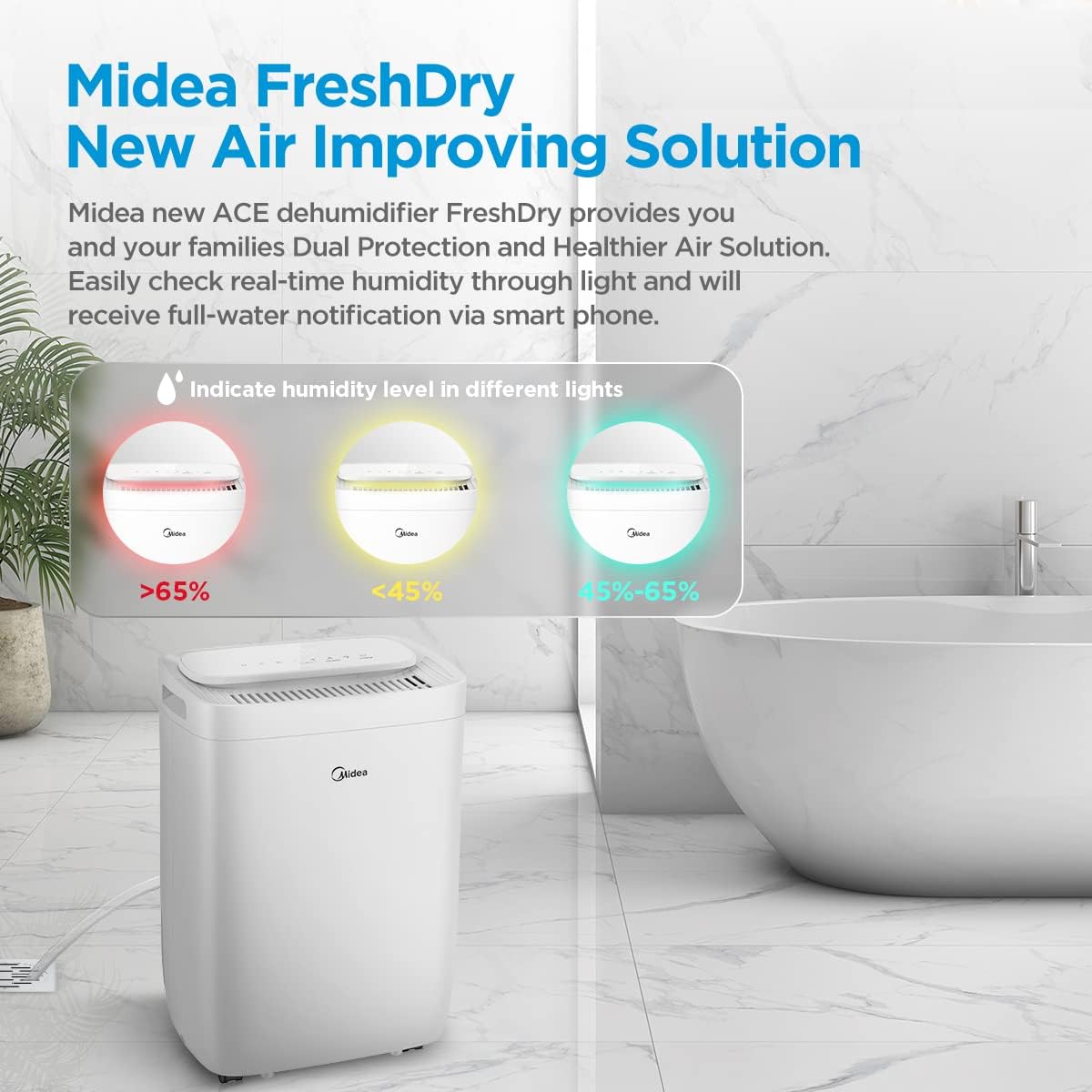
The ambient light indicates real-time humidity levels: Red (>65%), Yellow (<45%), and Green (45-65%).
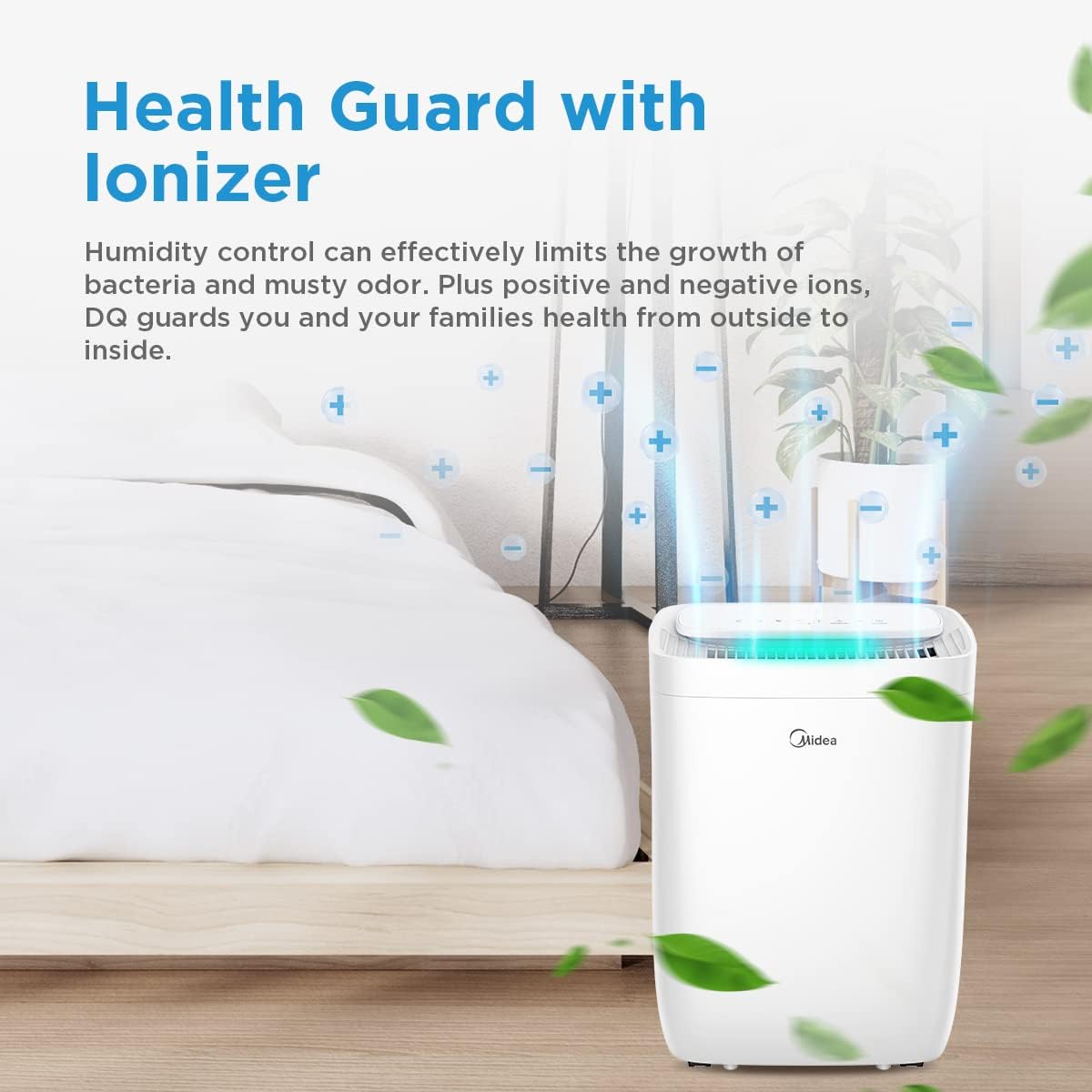
The built-in ionizer helps control humidity and reduce odors by releasing positive and negative ions.
4. Persediaan
- Membongkar: Keluarkan dehumidifier dengan berhati-hati daripada pembungkusnya. Simpan bahan pembungkusan untuk penyimpanan atau pengangkutan masa hadapan.
- penempatan: Place the unit on a firm, level surface in the desired location. Ensure there is at least 20 cm of space around the unit for proper airflow. Avoid placing it near heat sources or in direct sunlight.
- Sambungan Kuasa: Palamkan kord kuasa ke salur keluar elektrik yang dibumikan. Pastikan voltage sepadan dengan spesifikasi unit.
- Saliran Berterusan (Pilihan): For continuous operation without emptying the water tank, connect a drainage hose (not included) to the continuous drainage port at the back of the unit. Ensure the hose is sloped downwards to allow water to flow out by gravity.

The 360-degree wheels allow for easy movement of the dehumidifier to different rooms.
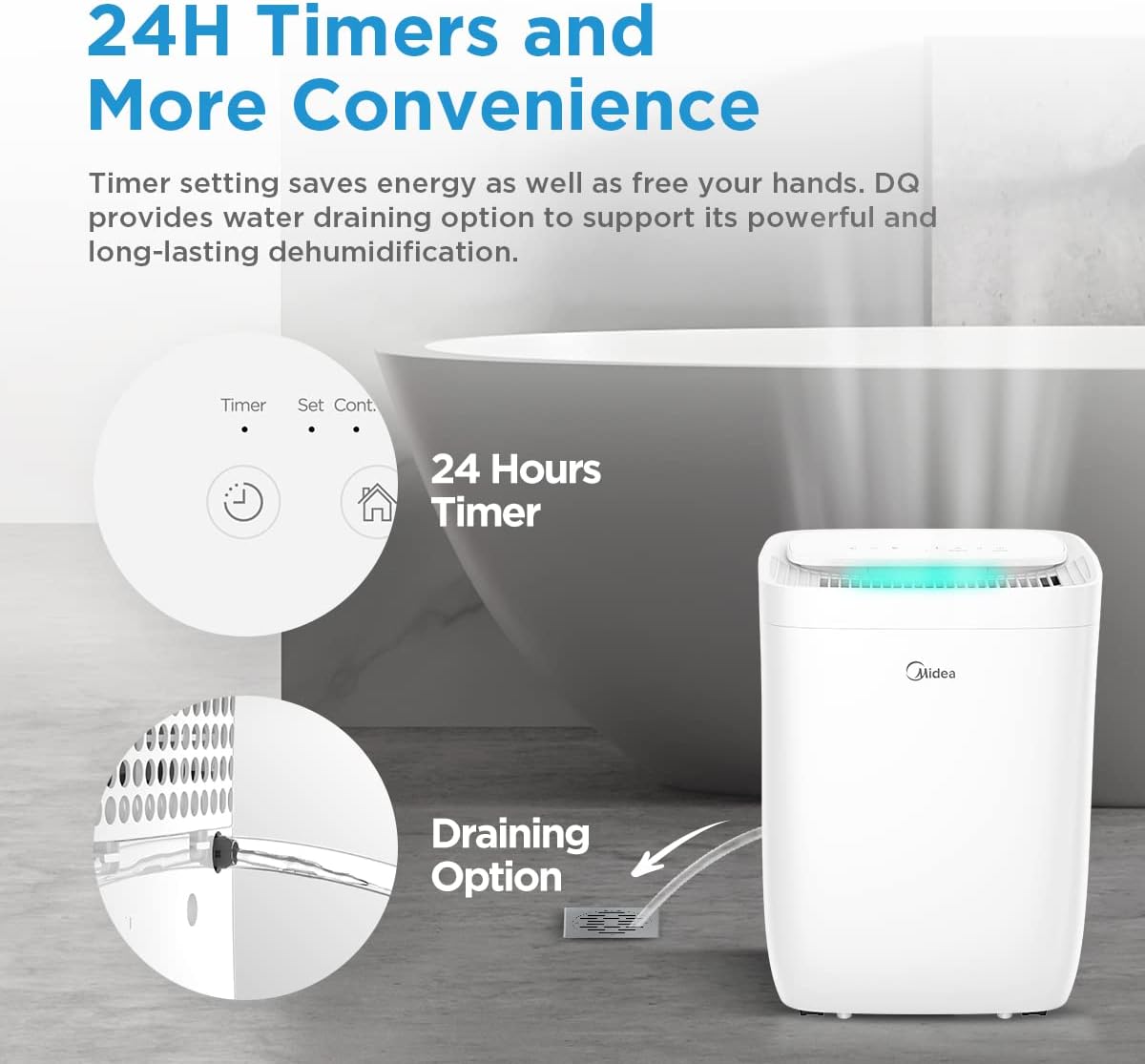
For continuous operation, connect a drainage hose to the designated port.
5. Arahan Operasi
5.1 Panel Kawalan Selesaiview

The control panel allows access to all functions of the dehumidifier.
- Butang Kuasa: HIDUPKAN atau MATI unit.
- Butang Mod: Cycles through available operating modes (Set, Smart, Dry, Continuous).
- Butang Tetapan Kelembapan (+/-): Melaraskan tahap kelembapan yang diingini.
- Butang Pemasa: Menetapkan pemasa 24 jam untuk mula atau berhenti tertangguh.
- Butang Kelajuan Kipas: Melaraskan kelajuan kipas (Rendah, Sederhana, Tinggi).
- Butang Cahaya: Controls the ambient light indicator.
- Butang Tetapan Semula Penapis: Resets the filter indicator after cleaning/replacement.
- Butang Sambung: Initiates Wi-Fi pairing mode.
5.2 Operasi Asas
- Hidupkan kuasa: Tekan butang Kuasa untuk menghidupkan dehumidifier.
- Pilih Mod: Press the Mode button to choose your desired operating mode.
- Tetapkan Kelembapan: In Set Mode, use the +/- buttons to set the target humidity level (e.g., 50%). The unit will operate until this level is reached.
- Tetapkan Pemasa: Press the Timer button to set a delay for the unit to turn on or off (up to 24 hours).
5.3 Smart Control (Wi-Fi, Alexa, Google Assistant)
The Midea Fresh Dry 10 can be controlled remotely via the Midea application and integrated with smart home systems.
- Muat turun Aplikasi: Download the Midea app from your smartphone's app store.
- Berpasangan: Follow the in-app instructions to connect your dehumidifier to your home Wi-Fi network. This typically involves pressing the 'Connect' button on the unit for 3 seconds.
- Integrasi Rumah Pintar: Once connected to the Midea app, you can link it to Amazon Alexa or Google Assistant by following the instructions in their respective apps.
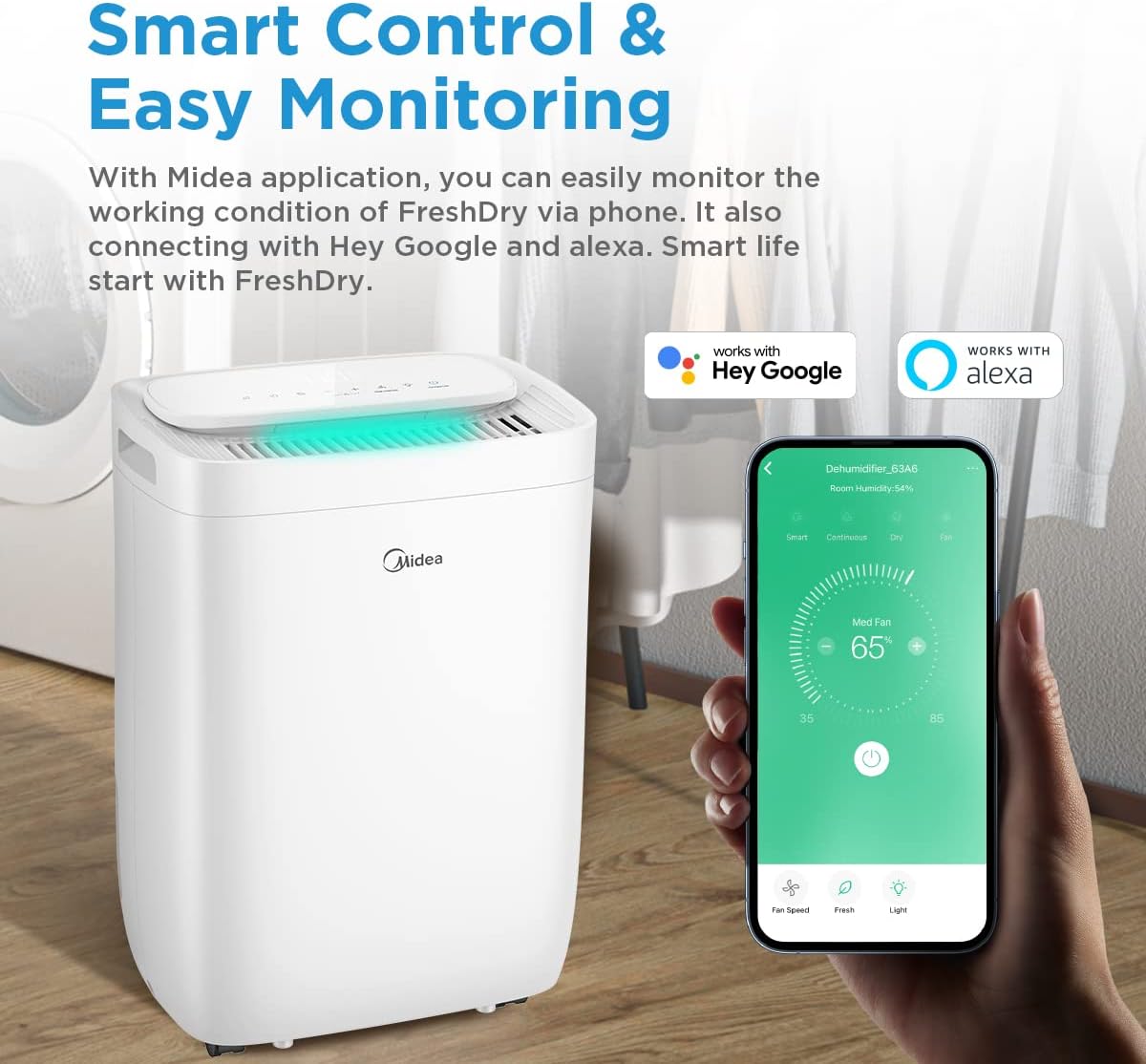
Control your dehumidifier remotely using the Midea app, compatible with Hey Google and Alexa.
6. Penyelenggaraan
Penyelenggaraan tetap memastikan prestasi optimum dan jangka hayat dehumidifier anda.
6.1 Mengosongkan Tangki Air
- When the water tank is full, the unit will automatically shut off and an indicator light will illuminate.
- Tarik keluar tangki air dari belakang unit dengan berhati-hati.
- Kosongkan air yang terkumpul.
- Slide the empty tank back into place until it clicks securely. The unit will resume operation.

The water tank is easily accessible from the rear of the unit for emptying.
6.2 Membersihkan Penapis Udara
The dehumidifier is equipped with a washable pre-filter and an H13 True HEPA filter.
- Matikan: Matikan dan cabut plag penyahlembap.
- Keluarkan Penapis: Locate the filter access panel (usually at the back or side) and remove the filter assembly.
- Pra-Penapis Bersih: The washable pre-filter can be cleaned with a vacuum cleaner or rinsed with warm water. Ensure it is completely dry before reinstallation.
- Penapis HEPA: The H13 True HEPA filter is not washable and should be replaced periodically (e.g., every 6-12 months, depending on usage and air quality). Do not wash the HEPA filter.
- Pasang semula: Place the clean/new filters back into the unit and close the access panel.
- Tetapkan Semula Penunjuk Penapis: Press and hold the 'Reset Filter' button on the control panel for 3 seconds to clear the filter cleaning reminder.

The H13 True HEPA filter and washable pre-filter work together to capture 99.9% of air pollutants.
7. Penyelesaian masalah
Before contacting customer service, please refer to the following troubleshooting guide.
| Masalah | Kemungkinan Punca | Penyelesaian |
|---|---|---|
| Unit tidak dihidupkan | No power supply; Power cord not plugged in; Water tank full or incorrectly placed. | Check power connection; Empty and re-seat water tank correctly. |
| Tiada dehumidification | Penapis udara tersumbat; Suhu bilik terlalu rendah; Tetapan kelembapan terlalu tinggi. | Clean or replace air filter; Ensure room temperature is above 5°C; Lower the target humidity setting. |
| Unit bising | Unit tidak berada di permukaan yang rata; Penapis udara tersumbat; Halangan pada kipas. | Letakkan di atas permukaan yang rata; Bersihkan penapis udara; Periksa dan tanggalkan sebarang halangan. |
| Sambungan Wi-Fi gagal | Kata laluan Wi-Fi salah; Penghala terlalu jauh; Apl tidak dikemas kini. | Verify Wi-Fi password; Move unit closer to router; Update Midea app. |
8. Spesifikasi
| Ciri | Spesifikasi |
|---|---|
| Nama Model | FRESH DRY 10 |
| Kapasiti Dehumidifikasi | 10 Liter/hari |
| Kawasan Berkenaan | 16 m² |
| Dimensi (D x W x H) | 22.4 x 33.4 x 44.1 cm |
| Berat badan | 10 kg |
| Tahap Kebisingan | 39 Desibel |
| Wattage | 380 watt |
| Bahan penyejuk | R290 (Mesra Alam) |
| Jenis Penapis | Washable Pre-filter, H13 True HEPA Filter |
| Ketersambungan | Wi-Fi, Alexa, Google Assistant |

Dimensi produk untuk perancangan penempatan.
9. Waranti dan Sokongan
Midea products are manufactured to the highest quality standards. For warranty information, please refer to the warranty card included with your purchase or visit the official Midea website. For technical support or service inquiries, please contact Midea customer service through their official channels.
Please have your model number (FRESH DRY 10) and purchase date ready when contacting support.


