1. Pengenalan
This manual provides essential information for the safe and efficient operation, installation, and maintenance of your Powerplus POWXG6305 Robot Lawn Mower. Please read these instructions carefully before using the product and retain them for future reference. Proper use and maintenance will ensure the longevity and optimal performance of your robot lawn mower.
2. Kandungan Pakej
Before beginning installation, verify that all components listed below are present in the packaging. If any items are missing or damaged, contact your retailer.
- Powerplus POWXG6305 Robot Lawn Mower
- Stesen Pengecasan
- Penyesuai Kuasa
- Kawat Sempadan
- Pegs for Boundary Wire
- Replacement Blades and Screws
- Manual Pengguna

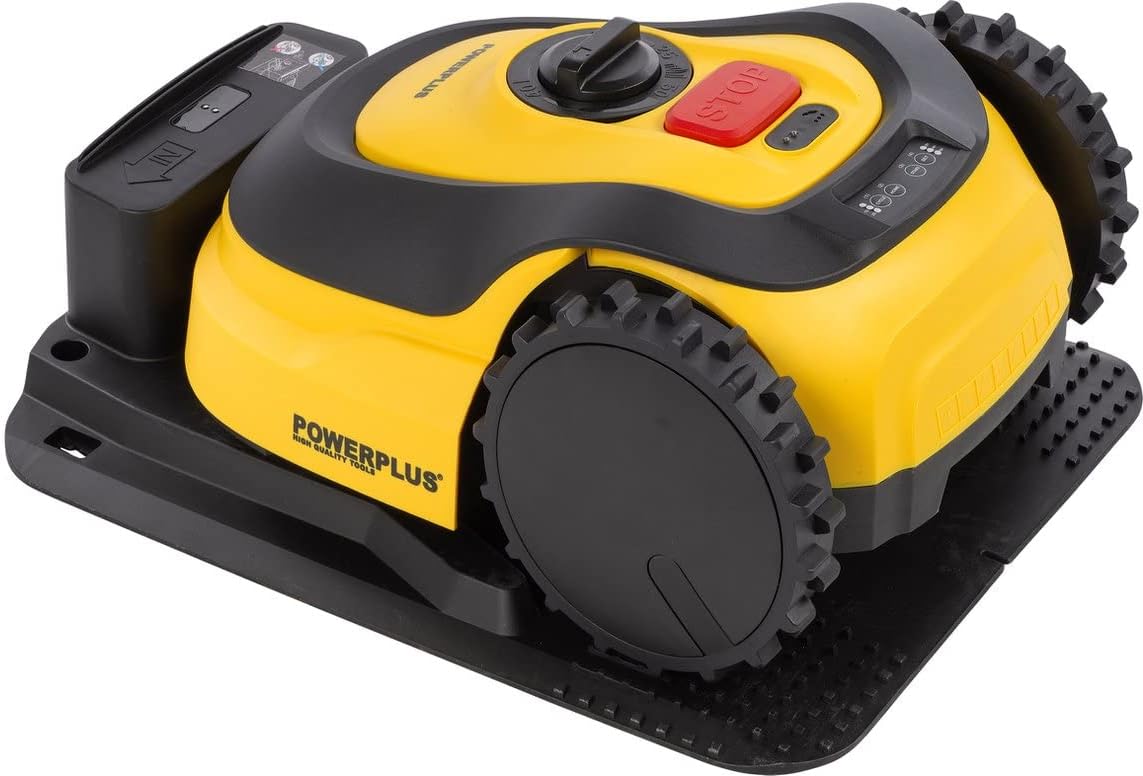
Rajah 2.1: The Powerplus POWXG6305 Robot Lawn Mower shown with its charging station, boundary wire, pegs, and replacement blades.
3. Persediaan
3.1 Penyediaan Tapak
The robot lawn mower is designed for lawns up to approximately 500m². Proper installation of the boundary wire is crucial for correct operation.
- Boundary Wire Installation: Lay the boundary wire around the perimeter of your lawn, ensuring it defines the mowing area. Secure the wire to the ground using the provided pegs. Maintain a minimum distance from obstacles as specified in the full installation guide.
- Penempatan Stesen Pengecasan: Position the charging station on a flat, level surface in an area with access to a power outlet. Ensure the charging station is within the boundary wire area and has clear space for the mower to approach and depart.

Rajah 3.1: The robot lawn mower is suitable for lawns up to 500m².
3.2 Pengecasan Awal
Before first use, ensure the robot lawn mower is fully charged. Place the mower onto the charging station. The charging indicator lights on the mower will illuminate, indicating that charging is in progress. A full charge may take several hours.

Rajah 3.2: The robot lawn mower correctly positioned on its charging station for recharging.
4. Arahan Operasi
4.1 Kawalan Ke Atasview
The robot lawn mower features intuitive controls for easy operation.

Rajah 4.1: Atas view of the mower, highlighting the main controls.
- Butang STOP: Press this large red button to immediately stop the mower's operation and blade rotation.
- Cutting Height Adjustment Dial: Rotate this dial to set the desired cutting height.
- Panel Kawalan: Features buttons for various functions such as 'SET', 'HOME', 'CYCLE', and status indicators.
Rajah 4.2: Terperinci view daripada butang panel kawalan.
4.2 Memulakan Mesin Pemotong
- Ensure the mower is charged and within the defined boundary area.
- Press the 'START' or 'ON' button (refer to specific button on control panel).
- The mower will begin its mowing cycle according to its programmed schedule or immediate command.
4.3 Melaraskan Ketinggian Potongan
The cutting height can be adjusted to suit your lawn's needs. Locate the cutting height adjustment dial on the top of the mower. Rotate the dial to select the desired cutting height. Refer to the markings on the dial for specific height settings.

Rajah 4.3: Adjusting the cutting height using the rotary dial.
4.4 Menghentikan Mesin Pemotong
To stop the mower at any time, press the large red 'STOP' button. This will immediately halt all operations, including blade rotation. To resume, you may need to re-enter a security code or press the start button again, depending on the model's settings.
5. Penyelenggaraan
Regular maintenance ensures the longevity and efficiency of your robot lawn mower.
5.1 Penggantian Bilah
The blades of your robot lawn mower are consumable parts and should be replaced regularly to ensure a clean cut. Dull or damaged blades can negatively impact mowing performance and increase energy consumption. Replacement blades are included with your purchase.
- Sentiasa pakai sarung tangan pelindung semasa mengendalikan bilah.
- Turn off the mower and remove the battery (if accessible) before replacing blades.
- Unscrew the old blades and replace them with new ones, ensuring the screws are tightened securely.
5.2 Pembersihan
Periodically clean the mower's chassis, wheels, and blade area to remove grass clippings, dirt, and debris. Use a soft brush or cloth. Avoid using high-pressure water jets directly on the mower.
5.3 Penyimpanan
During the off-season or extended periods of non-use, clean the mower thoroughly, fully charge the battery, and store it in a dry, frost-free location. Disconnect the charging station from the power supply.
6. Penyelesaian masalah
This section addresses common issues you might encounter with your robot lawn mower. For more detailed troubleshooting, refer to the full online manual.
- Mower not starting: Check if the battery is charged, the STOP button is released, and the boundary wire is correctly installed and connected.
- Mower getting stuck: Inspect the mowing area for obstacles or uneven terrain. Adjust boundary wire placement if necessary.
- Prestasi pemotongan yang lemah: Replace dull or damaged blades. Clean the blade area of accumulated grass.
- Mower not returning to charging station: Ensure the charging station is correctly placed and connected. Check for obstructions on the path to the station.
7. Spesifikasi
| Spesifikasi | Nilai |
|---|---|
| Nombor Model | POWXG6305 |
| Jenama | KUASA |
| Dimensi Produk | 45 x 35 x 22 cm |
| bahan | plastik |
| warna | kuning |
| Lebar Memotong | 180 milimeter |
| Kawasan Rumput yang disyorkan | Up to approx. 500m² |
| Tarikh Tersedia Pertama | 3 November 2022 |
| Kemas Kini Perisian Terjamin Sehingga | Tidak diketahui |
8. Waranti dan Sokongan
For detailed warranty information, technical support, and additional tips for installation and maintenance, please refer to the official Powerplus support resources.
You can find more information and support materials online:
Visit Powerplus Tips for POWXG6305

Rajah 8.1: Refer to the online resources for comprehensive installation and maintenance guides.


