1. Maklumat Keselamatan Penting
Sentiasa baca dan fahami semua amaran keselamatan, arahan, ilustrasi dan spesifikasi yang disediakan dengan alat kuasa ini. Kegagalan mematuhi semua arahan yang disenaraikan di bawah boleh mengakibatkan renjatan elektrik, kebakaran dan/atau kecederaan serius.
- Keselamatan Kawasan Kerja: Keep your work area clean and well-lit. Cluttered or dark areas invite accidents. Do not operate power tools in explosive atmospheres, such as in the presence of flammable liquids, gases, or dust. Power tools create sparks which may ignite the dust or fumes.
- Keselamatan Elektrik: Palam alat kuasa mesti sepadan dengan alur keluar. Jangan sekali-kali mengubah suai palam dalam apa jua cara. Jangan menyalahgunakan kord. Jangan sekali-kali menggunakan kord untuk membawa, menarik atau mencabut palam alat kuasa. Jauhkan kord daripada haba, minyak, tepi tajam atau bahagian yang bergerak.
- Keselamatan Diri: Stay alert, watch what you are doing, and use common sense when operating a power tool. Do not use a power tool while you are tired or under the influence of drugs, alcohol, or medication. Always wear eye protection. Use safety glasses, goggles, or a face shield.
- Penggunaan dan Penjagaan Alat: Jangan paksa alat kuasa. Gunakan alat kuasa yang betul untuk aplikasi anda. Alat kuasa yang betul akan melakukan kerja dengan lebih baik dan lebih selamat pada kadar yang direka bentuk. Putuskan sambungan palam daripada sumber kuasa dan/atau keluarkan pek bateri, jika boleh tanggal, daripada alat kuasa sebelum membuat sebarang pelarasan, menukar aksesori atau menyimpan alatan kuasa.
- Penggunaan dan Penjagaan Pek Bateri: Isi semula hanya dengan pengecas yang ditentukan oleh pengilang. Pengecas yang sesuai untuk satu jenis pek bateri boleh menimbulkan risiko kebakaran apabila digunakan dengan pek bateri yang lain. Gunakan alat kuasa hanya dengan pek bateri yang ditetapkan secara khusus.
2. Kandungan Pakej
Buang semua barang dengan berhati-hati dan pastikan anda telah menerima yang berikut:
- BATAVIA Cordless Drill (BT-CTD001)
- 20V MAX 2.0Ah Lithium-Ion Battery
- Pengecas Bateri 2.4A
- Manual Arahan

Image: The BATAVIA Cordless Drill, including the main unit, a 20V MAX 2.0Ah Lithium-Ion battery, and a 2.4A battery charger.
3. Produk Lebihview
Familiarize yourself with the components of your BATAVIA Cordless Drill:
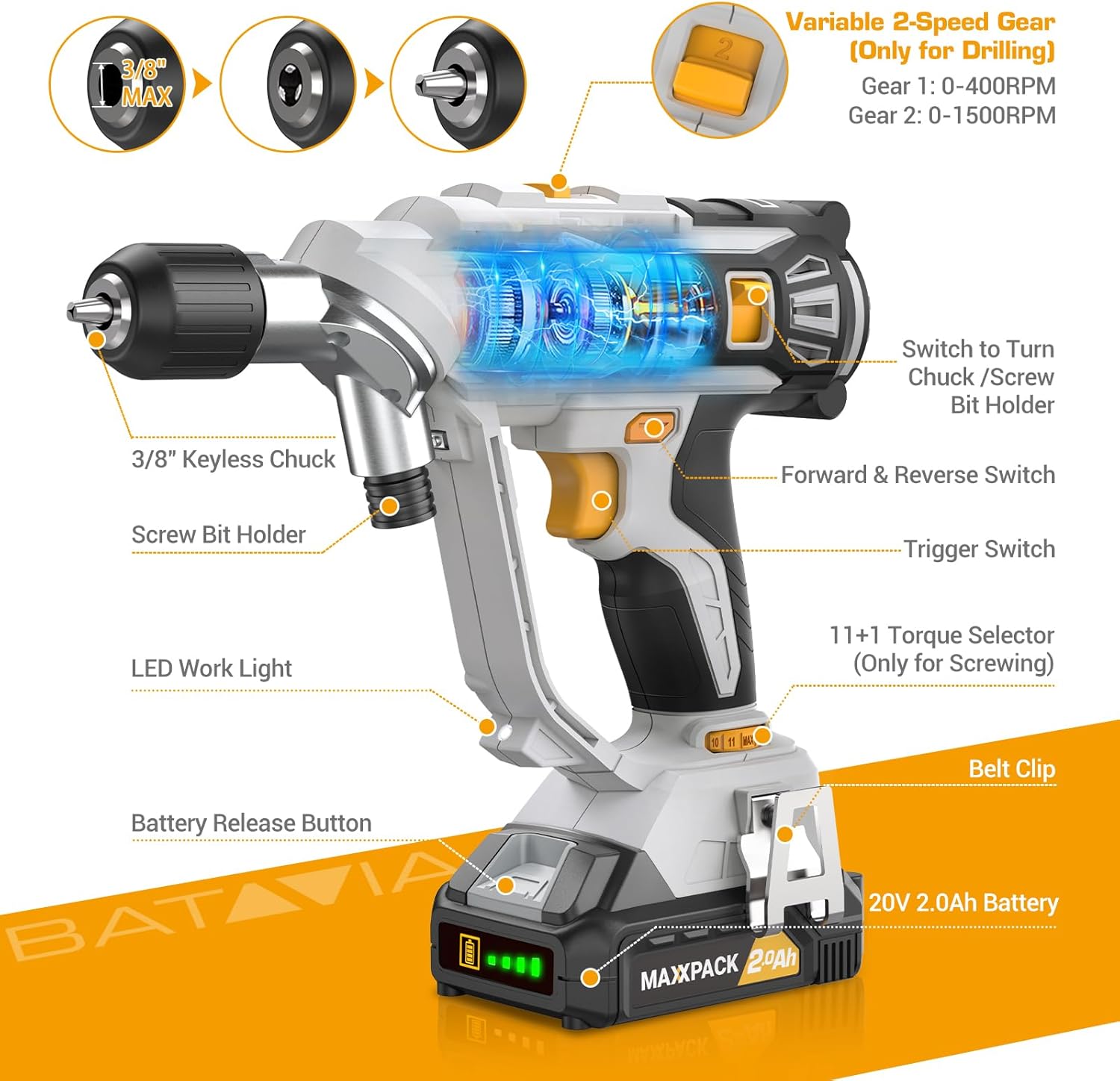
Image: A detailed diagram highlighting key components of the BATAVIA Cordless Drill, including the 3/8" Keyless Chuck, Screw Bit Holder, LED Work Light, Battery Release Button, 20V 2.0Ah Battery, Belt Clip, 11+1 Torque Selector, Trigger Switch, Forward & Reverse Switch, and Variable 2-Speed Gear switch.
- Dual Rotating Chucks: Features both a 3/8" keyless chuck for drilling and a 1/4" hex chuck for driving, allowing quick transitions between tasks.
- Tetapan Tork 11+1: Provides precise control for various applications and materials.
- 2 Kelajuan Boleh Ubah: Offers two speed ranges (0-400 RPM and 0-1500 RPM) for optimal performance in different drilling and driving scenarios.
- Automatic LED Work Light: Menerangi kawasan kerja untuk keterlihatan yang lebih baik dalam keadaan cahaya malap.
- Klip tali pinggang: Pasangkan gerudi pada tali pinggang anda dengan mudah untuk akses mudah.
4. Persediaan
4.1 Mengecas Bateri
- Ensure the battery is securely inserted into the 2.4A battery charger.
- Plug the charger into a standard 120V AC electrical outlet.
- The indicator lights on the charger will show the charging status. A full charge typically takes less time due to the 2.4A charger.
- Once fully charged, disconnect the charger from the outlet and remove the battery.
4.2 Memasang/Membuang Bateri
- To install: Align the battery with the base of the drill handle and slide it in until it clicks securely into place.
- To remove: Press the battery release button located on the front of the battery pack and slide the battery out.
4.3 Using the Dual Rotating Chucks
This drill features a unique dual rotating chuck system for quick changes between drilling and driving tasks.

Image: The BATAVIA Cordless Drill demonstrating its dual rotating chuck feature, allowing users to switch between a drill bit and a screwdriver bit by rotating the chuck assembly.
- For Drilling (3/8" Keyless Chuck): Rotate the front section of the drill head to expose the 3/8" keyless chuck. Insert the drill bit and tighten the chuck by hand until the bit is secure.
- For Driving (1/4" Hex Chuck): Rotate the front section of the drill head to expose the 1/4" hex chuck. Insert the screwdriver bit directly into the hex opening until it locks into place.
5. Arahan Operasi
5.1 Setting Torque (11+1 Settings)
The torque selector ring allows you to adjust the amount of rotational force the drill applies. This is crucial for preventing overtightening screws or damaging materials.

Image: The BATAVIA Cordless Drill highlighting its 11+1 torque settings, with recommendations for low settings for small screws/soft materials and high settings for large screws/hard materials.
- Rotate the torque selector ring to choose a setting from 1 to 11. Lower numbers are for smaller screws or softer materials, while higher numbers are for larger screws or harder materials.
- The 'Drill' symbol (often indicated as 'MAX' or a drill icon) bypasses the clutch for maximum torque, suitable for drilling applications.
5.2 Selecting Speed (2 Variable Speeds)
The drill features a 2-speed gearbox to match the speed to the application.

Image: The BATAVIA Cordless Drill showing its adjustable variable 2-speed gear selector. Gear 1 (0-400 RPM) is recommended for large diameter drilling, and Gear 2 (0-1500 RPM) for small diameter drilling.
- Gear 1 (0-400 RPM): Use for high-torque applications, such as driving large screws or drilling large holes in tough materials.
- Gear 2 (0-1500 RPM): Use for high-speed applications, such as drilling small holes or driving small screws quickly.
- The trigger switch provides variable speed control within the selected gear range. Pressing the trigger further increases the speed.
5.3 Suis Hadapan/Undur
The forward/reverse switch is located above the trigger. It controls the direction of rotation.
- Tolak suis ke kiri untuk putaran ke hadapan (untuk menggerudi dan memacu skru).
- Tolak suis ke kanan untuk putaran terbalik (untuk menanggalkan skru atau mengundurkan mata gerudi).
- Apabila suis berada di kedudukan tengah, picu dikunci, menghalang permulaan secara tidak sengaja.
5.4 Automatic LED Work Light
Lampu LED terbina dalam akan menyala secara automatik apabila picu ditekan, memberikan keterlihatan di kawasan kerja yang malap.
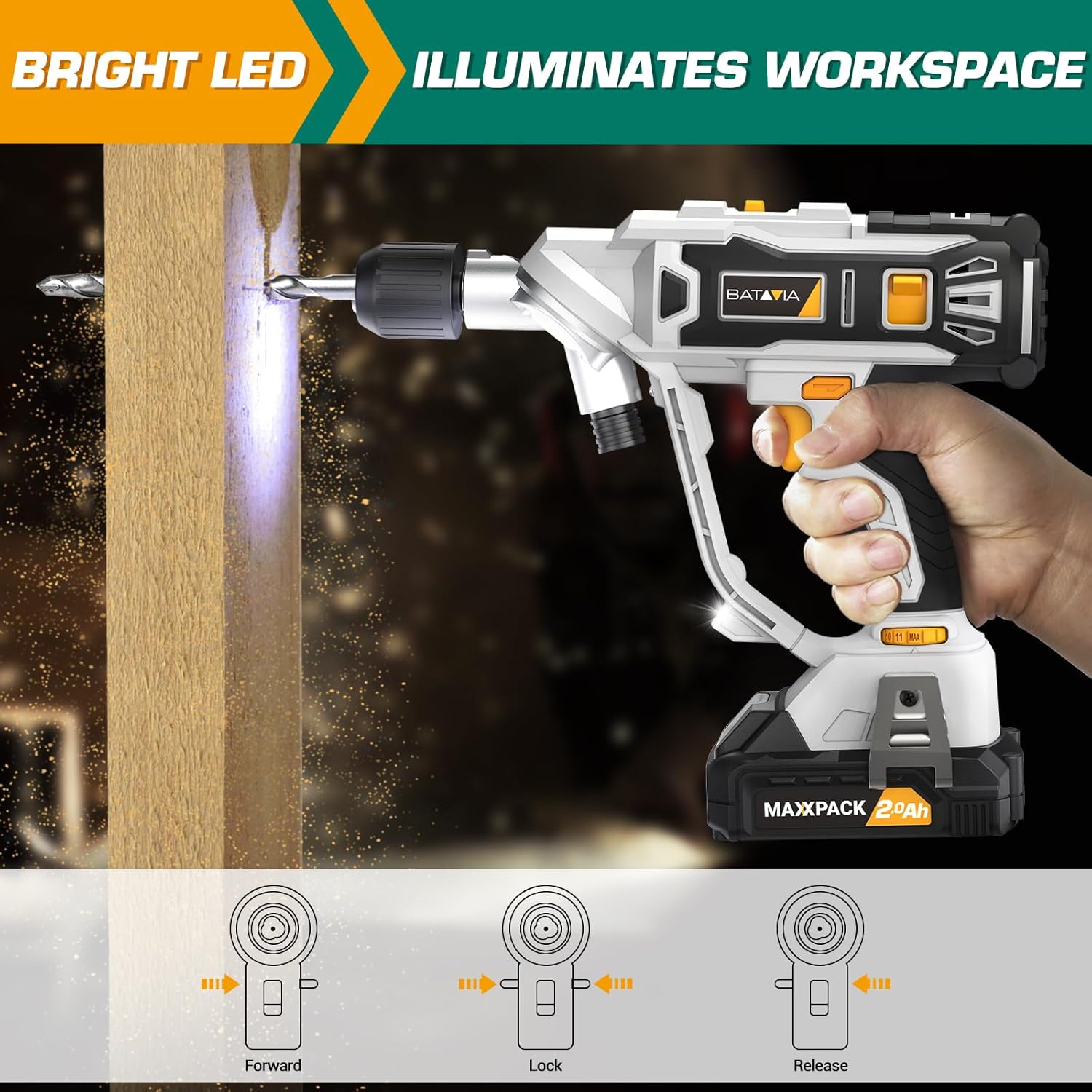
Image: The BATAVIA Cordless Drill in use, with its bright LED light illuminating the work surface, demonstrating its utility in dark or confined spaces.
6. Penyelenggaraan
Penyelenggaraan yang kerap memastikan jangka hayat dan prestasi optimum gerudi anda.
- Pembersihan: Selepas setiap penggunaan, lap gerudi dengan kain bersihamp cloth. Do not use harsh chemicals or abrasive cleaners. Keep the ventilation openings clear of dust and debris.
- Storan: Store the drill, battery, and charger in a cool, dry place, away from direct sunlight and extreme temperatures. Ensure the battery is removed from the drill before storage.
- Penjagaan Bateri: Do not store batteries in a discharged state. Recharge them periodically if not in use for extended periods.
7. Penyelesaian masalah
If you encounter issues with your BATAVIA Cordless Drill, refer to the following common problems and solutions:
| Masalah | Kemungkinan Punca | Penyelesaian |
|---|---|---|
| Gerudi tidak bermula. | Battery not charged or not properly inserted. Forward/Reverse switch in locked (center) position. | Ensure battery is fully charged and securely inserted. Move Forward/Reverse switch to forward or reverse position. |
| Bateri tidak dicas. | Pengecas tidak dipasang. Bateri atau pengecas rosak. | Check power outlet and charger connection. If problem persists, contact customer support. |
| Drill lacks power or stops during use. | Bateri lemah semasa dicas. Perlindungan beban lampau diaktifkan. | Recharge battery. Reduce pressure on the drill or use a lower speed setting for tough materials. |
| Chuck tidak memegang sedikit dengan selamat. | Bit not inserted deep enough. Chuck not tightened properly. | Ensure bit shank is fully inserted into the chuck. Tighten the keyless chuck firmly by hand. |
8. Spesifikasi
| Ciri | Spesifikasi |
|---|---|
| Nombor Model | BT-CTD001 |
| Jenama | Batavia |
| Sumber Kuasa | Dikuasakan Bateri |
| Jenis Bateri | 20V MAX 2.0Ah Lithium-Ion |
| Pengecas Amppemadam | 2.4 Amps |
| Kelajuan Putaran Maksimum | 1500 RPM |
| Bilangan Kelajuan | 2 (0-400 RPM & 0-1500 RPM) |
| Tetapan Tork | 11+1 |
| Saiz Chuck Maksimum | 3/8 Inches (Keyless Chuck) |
| bahan | PA6-GF30 |
| Dimensi Produk (L x W x H) | 8.07" x 3.34" x 14.5" |
| Berat Barang | 5.28 paun |
| Ciri Khas | Adjustable Torque, Built-In LED Working Light, Compact, Cordless, Variable Speed |
| Pensijilan | Diperakui ETL |
9. Waranti dan Sokongan
BATAVIA products are designed and manufactured to the highest quality standards. This product is ETL certified, ensuring product quality and safety.
For any questions, technical assistance, or warranty claims, please contact BATAVIA customer service:
- telefon: (+1) 866-272-5789
- Operating Hours (EDT): 10am - 7pm
- Operating Hours (PDT): 7am - 4pm
Please have your model number (BT-CTD001) and purchase information ready when contacting support.


