1. Pengenalan
Thank you for choosing the Gembird USB-C Gigabit Network Adapter with 3-Port USB 3.1 Hub. This device is designed to expand the connectivity of your USB-C enabled laptop, tablet, or computer, providing both high-speed Gigabit Ethernet and additional USB 3.1 ports. This manual provides essential information for setting up, operating, and maintaining your device.
2. Ciri-ciri Produk
- Kesambungan USB-C: Connects to your host device via a reversible USB-C port.
- Port Ethernet Gigabit: Provides a stable and fast wired network connection up to 1000 Mbps.
- 3-Port USB 3.1 Hub: Adds three USB 3.1 ports for connecting peripherals such as external hard drives, flash drives, keyboards, and mice.
- Pemindahan Data Berkelajuan Tinggi: USB 3.1 ports support data transfer rates up to 5 Gbps.
- Pasang dan Main: No driver installation required for most modern operating systems.
3. Kandungan Pakej
Please ensure the following items are included in your package:
- Gembird USB-C Gigabit Network Adapter with 3-Port USB 3.1 Hub (Model A-CMU3-LAN-01)
4. Produk Lebihview
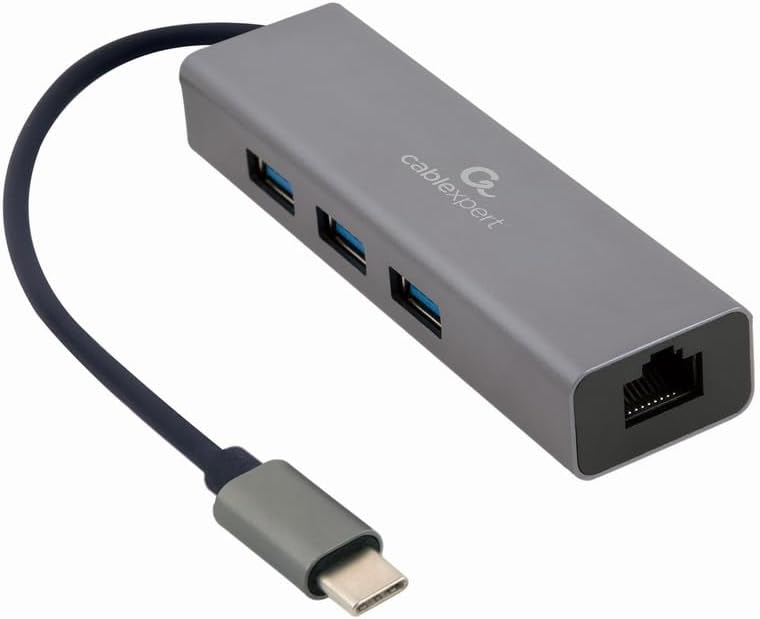
Rajah 1: Depan view of the Gembird USB-C Gigabit Network Adapter, showing the USB-C cable, three USB 3.1 ports, and the RJ45 Gigabit Ethernet port.

Rajah 2: Retail packaging for the Gembird USB-C Gigabit Network Adapter, highlighting key features like USB Type-C, USB 3.1 x 3, RJ45, Gigabit, 1000 Mbps, and Plug & Play.
5. Persediaan
Follow these steps to set up your Gembird USB-C Gigabit Network Adapter:
- Sambung ke Peranti Hos: Plug the USB-C connector of the adapter into an available USB-C port on your laptop, tablet, or computer.
- Sambungkan ke Rangkaian: Insert an Ethernet cable (RJ45) from your router or modem into the Gigabit Ethernet port on the adapter.
- Sambungkan Peranti USB: Plug your USB devices (e.g., flash drives, external hard drives, mouse, keyboard) into the three available USB 3.1 ports on the adapter.
- Pemasangan Pemandu: The adapter is typically plug-and-play. Your operating system (Windows, macOS, Linux, Chrome OS) should automatically detect and install the necessary drivers. If prompted, allow the system to install drivers.
6. Arahan Operasi
Once connected, the adapter functions automatically:
- Akses Rangkaian: Your host device should now have a wired network connection. You can verify this in your operating system's network settings.
- USB Device Access: Connected USB peripherals will be recognized by your host device and function as if directly connected.
7. Penyelesaian masalah
Jika anda menghadapi masalah, rujuk kepada masalah dan penyelesaian biasa berikut:
- Tiada Sambungan Rangkaian:
- Ensure the Ethernet cable is securely connected to both the adapter and your router/modem.
- Check your router/modem for proper operation.
- Sahkan tetapan rangkaian pada peranti hos anda.
- Cuba sambungkan penyesuai ke port USB-C lain pada peranti hos anda.
- Peranti USB Tidak Dikenali:
- Ensure USB devices are properly plugged into the adapter's USB 3.1 ports.
- Try connecting the USB device directly to your host computer to confirm it is functional.
- Some high-power USB devices may require an external power source if your host device's USB-C port does not provide sufficient power (this adapter does not have a dedicated power input).
- Kelajuan Rangkaian Perlahan:
- Ensure your Ethernet cable is rated for Gigabit speeds (Cat5e or higher).
- Verify your internet service provider's speed and your router's capabilities.
- Ensure your host device's USB-C port supports USB 3.0/3.1 speeds.
8. Spesifikasi
| Nombor Model | A-CMU3-LAN-01 |
| Antara Muka Perkakasan | USB-C (Host), USB 3.1 (Hub), RJ45 (Ethernet) |
| Jumlah Port USB | 3 (USB 3.1) |
| Pelabuhan Ethernet | 1 (Gigabit RJ45) |
| Data Transfer Rate (USB) | Sehingga 5 Gbps (USB 3.1) |
| Data Transfer Rate (Ethernet) | 10/100/1000 Mbps |
| Dimensi Produk | 10 x 2 x 2.7 inci |
| Berat Barang | 2.46 auns |
9. Penyelenggaraan
To ensure the longevity and optimal performance of your adapter:
- Pembersihan: Gunakan kain lembut dan kering untuk membersihkan bahagian luar peranti. Elakkan pembersih cecair atau pelarut.
- Storan: Simpan penyesuai di tempat yang sejuk dan kering jauh dari cahaya matahari langsung dan suhu yang melampau apabila tidak digunakan.
- Pengendalian: Avoid dropping or subjecting the device to strong impacts. Do not attempt to disassemble the adapter.
10. Waranti dan Sokongan
This Gembird product comes with a jaminan dua tahun terhadap kecacatan kilang. Sila simpan bukti pembelian anda untuk tuntutan waranti.
For technical support or warranty inquiries, please contact your retailer or visit the official Gembird webtapak untuk maklumat hubungan.


