1. Pengenalan
Thank you for choosing the LAMAX HighComfort ANC Wireless Headphones. This manual provides essential information for the proper use, setup, and maintenance of your headphones. Please read it carefully before use.
The LAMAX HighComfort headphones offer a premium audio experience with advanced features:
- aptX HD Bluetooth Codec: Delivers high-quality wireless audio with enhanced detail.
- Pembatalan Bunyi Aktif (ANC): Reduces ambient noise by up to 30 dB using hybrid technology with two microphones.
- Hayat Bateri yang Panjang: Up to 50 hours of playback on a single charge (25 hours with ANC activated).
- Ketersambungan Serbaguna: Bluetooth 5.1 for wireless connection up to 10 meters, or wired via a standard 3.5 mm audio jack.
- Reka bentuk yang selesa: Features soft ear pads and an ergonomic design for extended wear.
- Pembinaan Tahan Lama: Luxurious finish with titanium elements and high-quality workmanship.
2. Kandungan Pakej
Sila pastikan semua item ada dalam pakej anda:
- LAMAX HighComfort ANC Wireless Headphones
- Kabel Pengecas USB-C
- Kabel Audio 3.5mm
- Kes Perjalanan
- Manual Arahan
3. Produk Lebihview
Familiarize yourself with the various parts and controls of your LAMAX HighComfort headphones.

Imej: Selesaiview of headphone controls and ports.
Headphone Components and Controls:
- Active Noise Cancellation (ANC) On/Off Switch: Activates or deactivates the ANC function.
- ANC LED Indicator: Shows the status of the ANC function.
- 3.5mm Audio Cable Port: Untuk sambungan berwayar ke sumber audio.
- Headphone Power LED Indicator: Memaparkan kuasa dan status pasangan.
- mikrofon: Untuk panggilan dan arahan suara.
- Port Pengecasan USB-C: Untuk mengecas fon kepala.
- Track and Call Control Buttons: Used for volume adjustment, track skipping, and managing phone calls.

Imej: Meletup view highlighting key features like 40mm drivers, soft leather earpads, and titanium finish.
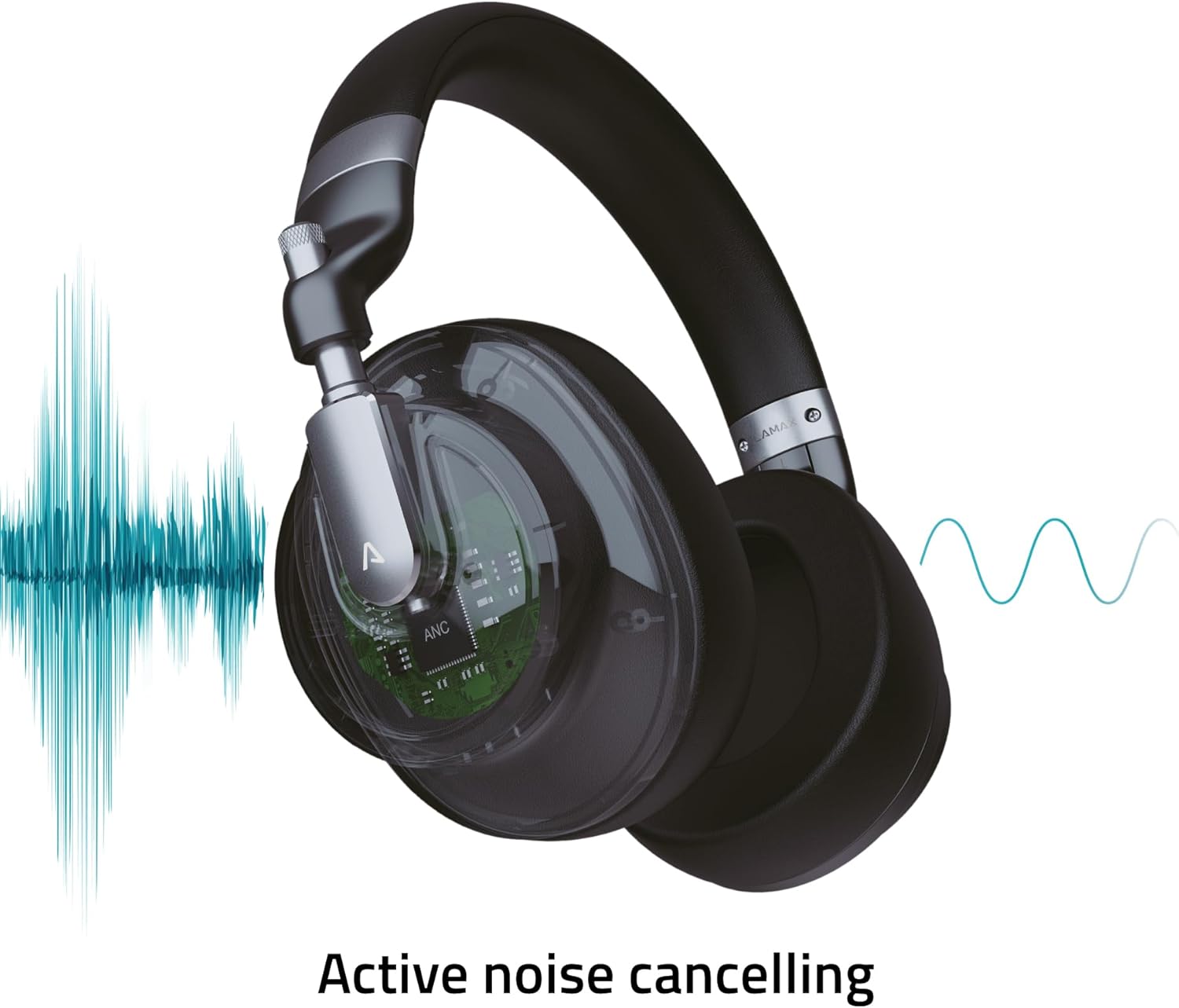
Image: Visual representation of the Active Noise Cancellation (ANC) process.
4. Persediaan
4.1 Mengecas Fon Kepala
Before first use, fully charge your headphones. Use the provided USB-C cable to connect the headphones to a USB power source (e.g., computer USB port, wall adapter).
- The LED indicator will show charging status (e.g., red for charging, off or blue for fully charged).
- A full charge provides up to 50 hours of playback, or 25 hours with ANC enabled.
4.2 Berpasangan Bluetooth
Untuk menyambungkan fon kepala anda secara wayarles ke peranti:
- Pastikan fon kepala dicas dan dimatikan.
- Tekan dan tahan butang Kuasa sehingga penunjuk LED berkelip biru dan merah, menunjukkan mod berpasangan.
- Pada peranti anda (telefon pintar, tablet, komputer riba), dayakan Bluetooth dan cari peranti yang tersedia.
- Select "LAMAX HighComfort" from the list of devices.
- Setelah disambungkan, penunjuk LED biasanya akan menunjukkan cahaya biru yang stabil atau berkelip perlahan-lahan.
4.3 Sambungan Berwayar
You can also use the headphones with a 3.5mm audio cable:
- Connect one end of the 3.5mm audio cable to the headphone's audio port.
- Sambungkan hujung yang satu lagi ke output audio 3.5mm peranti anda.
- The headphones will function as passive wired headphones, even if the battery is depleted.
5. Mengendalikan Fon Kepala
5.1 Hidupkan/Mati Kuasa
- Hidupkan kuasa: Press and hold the Power button for approximately 3 seconds. The LED indicator will light up.
- Matikan: Press and hold the Power button for approximately 3 seconds. The LED indicator will turn off.
5.2 Pembatalan Bising Aktif (ANC)
The ANC feature helps to reduce ambient noise, providing a more immersive listening experience.
- Aktifkan ANC: Slide the ANC switch to the 'On' position. The ANC LED indicator will illuminate.
- Nyahaktifkan ANC: Slide the ANC switch to the 'Off' position. The ANC LED indicator will turn off.
5.3 Main balik Muzik
Use the control buttons to manage your music:
- Main/Jeda: Press the Multi-function button (often the center button on the control cluster).
- Kelantangan: Tekan butang '+'.
- Perlahankan suara: Tekan butang '-'.
- Lagu Seterusnya: Tekan dan tahan butang '+'.
- Trek Sebelumnya: Tekan dan tahan butang '-'.
5.4 Pengurusan Panggilan
When connected via Bluetooth, you can manage phone calls:
- Jawab/Tamatkan Panggilan: Tekan butang Berbilang fungsi.
- Tolak Panggilan: Tekan dan tahan butang Berbilang fungsi.
- Aktifkan Pembantu Suara: Tekan dua kali butang Pelbagai fungsi (jika disokong oleh peranti anda).
6. Penjagaan dan Penyelenggaraan
Penjagaan yang betul memastikan jangka hayat dan prestasi fon kepala anda.
6.1 Pembersihan
- Lap fon kepala dengan kain lembut, kering dan tidak berbulu.
- Jangan gunakan pembersih yang kasar, pelarut atau semburan kimia.
- Keep moisture out of openings.
6.2 Penyimpanan
- When not in use, store the headphones in the provided travel case to protect them from scratches and damage.
- Simpan di tempat yang sejuk, kering, jauh dari suhu yang melampau dan cahaya matahari langsung.

Image: Headphones folded, demonstrating their portable design for storage in the travel case.
7. Penyelesaian masalah
Jika anda menghadapi masalah dengan fon kepala anda, rujuk kepada penyelesaian biasa berikut:
| Masalah | Kemungkinan Punca | Penyelesaian |
|---|---|---|
| Fon kepala tidak dihidupkan | Bateri lemah | Cas fon kepala sepenuhnya menggunakan kabel USB-C. |
| Tidak boleh berpasangan melalui Bluetooth | Fon kepala tidak dalam mod berpasangan; Bluetooth peranti dimatikan; terlalu jauh dari peranti | Ensure headphones are in pairing mode (flashing blue/red LED). Turn Bluetooth on your device. Move headphones closer to the device (within 10 meters). |
| Tiada suara atau kelantangan rendah | Kelantangan terlalu rendah; sumber audio salah; fon kepala tidak disambungkan | Increase volume on both headphones and connected device. Check if headphones are properly paired or if the 3.5mm cable is securely connected. Ensure the correct audio output is selected on your device. |
| ANC tidak berfungsi dengan berkesan | ANC not activated; environmental noise too high | Ensure the ANC switch is in the 'On' position. ANC is most effective against consistent low-frequency noise. |
| Kualiti panggilan yang lemah | Weak Bluetooth connection; microphone obstructed | Move closer to your device. Ensure the microphone is not covered. |
8. Spesifikasi
Technical details of the LAMAX HighComfort ANC Wireless Headphones:
| Ciri | Perincian |
|---|---|
| Nama Model | HighComfort |
| Teknologi Ketersambungan | Bluetooth 5.1, 3.5 mm Jack |
| Komunikasi Tanpa Wayar | Bluetooth |
| Kawalan Bunyi | Active Noise Cancellation (ANC) up to 30 dB |
| Penempatan Telinga | Atas Telinga |
| Faktor Bentuk | Atas Telinga |
| bahan | Titanium and Fabric |
| Hayat Bateri (Purata) | 50 Jam (25 Jam dengan ANC) |
| Port Pengecasan | USB Jenis-C |
| Ciri Khas | Microphone Included, Noise Cancellation, aptX HD |
| Dimensi Produk | 25.4 x 5.08 x 6.86 cm |
| Berat Barang | 750 g |
| Peranti Serasi | Laptops, Telephones, Tablets, Smart Speakers, Car Audio Systems, Gaming Consoles, Televisions, Desktops, Cellphones |
9. Sokongan dan Jaminan
For further assistance, troubleshooting not covered in this manual, or warranty information, please contact LAMAX customer support through their official weblaman web atau peruncit anda.
Sila simpan bukti pembelian anda untuk tuntutan waranti.


