pengenalan
This user manual provides comprehensive instructions for the setup, operation, maintenance, and troubleshooting of your Dracast X Series LED2000 Bi-Color LED 3 Light Kit. Please read this manual thoroughly before using the product to ensure safe and optimal performance.
The Dracast X Series LED2000 Bi-Color LED 3 Light Kit is designed for professional video and photography lighting, offering adjustable color temperature, high color accuracy, and versatile control options.
Persediaan
Membongkar Kit
Carefully unpack all components from the injection molded travel case. Verify that all items listed in the "What's in the Box" section are present.
- 3 x Dracast X Series LED2000 Bicolor LED Panel with Dual NP-F Battery Plate
- 3 x Dracast X Series LED2000 4 Way Barn Doors
- 3 x Carry Case
- 3 x AC Power Adapter with cord
- 3 x Light Stands
- 1 x Injection Molded Travel Case
- 3 x Diffusion Filter
- 3 x Manual Arahan

Gambar 1: Lebihview of the Dracast X Series LED2000 Bi-Color LED 3 Light Kit components, showing three light panels, three light stands, power adapters, barn doors, diffusion filters, and the robust travel case.
Assembling the Light Stands and Panels
- Extend the legs of the light stand to a stable position and secure them.
- Mount the LED2000 panel onto the 5/8" baby pin adapter on top of the light stand. Secure the panel using the locking knob on the yoke.
- Attach the 4-way barn doors to the front of the LED panel.
- Insert the pre-installed diffusion filter into the panel's front slot for soft, even lighting.

Figure 2: A Dracast X Series LED2000 light panel correctly mounted on a light stand, illustrating the adjustable yoke and secure attachment.

Figure 3: The Dracast X Series LED2000 light panel fully assembled on its stand, ready for use.
Powering the Lights
The Dracast X Series LED2000 panels offer both AC and DC power options.
Kuasa AC:
Connect the included AC/DC power adapter to the "DC 15V" input port on the back of the LED panel. Plug the adapter into a standard wall outlet.
DC (Battery) Power:
The lights feature a dual NP-F battery plate. Insert two compatible NP-F style batteries (sold separately) into the battery plate. Ensure the batteries are fully charged for optimal runtime.
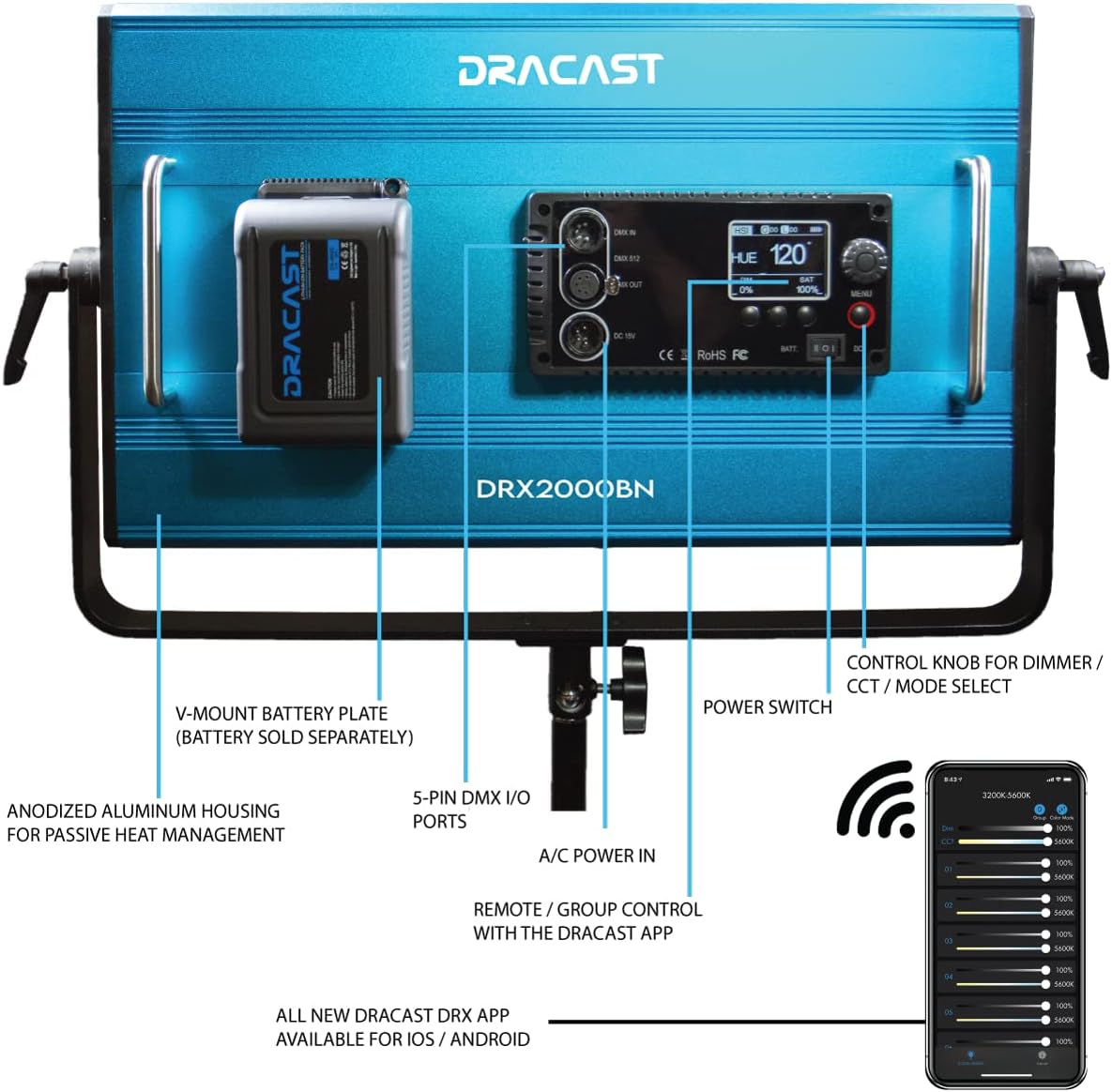
Rajah 4: Belakang view of the Dracast X Series LED2000 panel, showing the battery plate and power input options.
Arahan Operasi
Kawalan Manual
The X Series LED2000 features an advanced digital user interface for quick and easy manual control.
- Hidupkan/Mati Kuasa: Locate the power switch on the control panel and toggle it to turn the light on or off.
- Adjusting Brightness (Dimming): Use the control knob to adjust the light intensity from 0% to 100%.
- Melaraskan Suhu Warna (CCT): For Bi-Color models, rotate the control knob to change the color temperature between 2800K and 8000K. This allows matching various ambient lighting conditions.
- Pilih Mod: Press the control knob to cycle through different modes (e.g., CCT, HSI, Gel Presets, Special Effects).

Figure 5: The control panel of the Dracast X Series LED2000, illustrating the user interface for manual adjustments.

Gambar 6: Cthamples of color temperature adjustments (3200K, 4400K, 5600K) using the Dracast X Series LED2000.
Remote Control with Dracast DRX App
The Dracast DRX App (available for iOS and Android) allows wireless control of one or multiple lights from over 100 feet away via Bluetooth.
- Muat turun Apl: Cari untuk "Dracast DRX" in your device's app store and install it.
- Berpasangan: Ensure Bluetooth is enabled on your device. Open the Dracast DRX App and follow the on-screen instructions to discover and pair with your X Series lights.
- Kawalan Kumpulan: Assign lights to groups within the app for multi-light control.
- Pelarasan: Use HSI sliders or an RGB color wheel to control full spectrum RGB color (for RGB models), adjust dimming (0%-100%), select color gel presets, and activate special effects (e.g., Police Car, Fireworks, Candlelight, Strobe, TV Screen).
Video 1: Dracast X Series 2000 Video Light Panel Product Overview. This video demonstrates the features and capabilities of the light panel, including color temperature adjustments, RGB color control, and app integration.
Penyelenggaraan
Pembersihan
- Ensure the light is powered off and unplugged before cleaning.
- Use a soft, dry cloth to wipe down the aluminum housing and diffusion panel.
- Do not use abrasive cleaners or solvents, as they may damage the finish or optical components.
Penyimpanan
When not in use, store the light kit in its provided injection molded travel case. The case features a weatherproof seal and secure latches to protect the equipment from dust, moisture, and impact.

Figure 7: The Dracast X Series LED2000 Bi-Color LED 3 Light Kit with its durable injection molded travel case, designed for secure storage and transport.
Menyelesaikan masalah
| Masalah | Kemungkinan Punca | Penyelesaian |
|---|---|---|
| Cahaya tidak menyala. | No power supply; loose connection; depleted battery. | Check AC power adapter connection or ensure batteries are charged and properly inserted. Verify power switch is ON. |
| Keluaran cahaya malap atau tidak konsisten. | Low battery power; incorrect dimming setting; diffusion panel obstruction. | Recharge or replace batteries. Adjust dimming setting. Ensure diffusion panel is clean and correctly seated. |
| Cannot connect via Dracast DRX App. | Bluetooth off; light not in pairing mode; app issue. | Ensure Bluetooth is enabled on your device. Restart the light and the app. Try re-pairing the device. |
| Color temperature not changing. | Incorrect mode selected; control knob issue. | Ensure the light is in CCT mode. Try adjusting the knob again. |
Spesifikasi
| Ciri | Perincian |
|---|---|
| Nombor Model | DRX32000BNH |
| Dimensi Produk | 32 x 18 x 18 inches (Kit) |
| Berat Barang | 60 paun (Kit) |
| Suhu Warna (CCT) | 2800K – 8000K (Bi-Color) |
| Ketepatan Warna | 96+ CRI and TLCI |
| Penggunaan Kuasa | 120W (per panel) |
| Kawalan | Manual, Dracast DRX App (Bluetooth), 5-pin DMX I/O ports |
| Pilihan Kuasa | AC/DC Adapter, Dual NP-F Battery Plate (batteries sold separately) |
| Bahan Perumahan | Aluminium Anodized |
| Kes Perjalanan | Injection Molded, Weatherproof Seal, Wheels, Telescoping Handle |
Waranti dan Sokongan
Maklumat Waranti
For specific warranty details regarding your Dracast X Series LED2000 Bi-Color LED 3 Light Kit, please refer to the warranty card included with your product or visit the official Dracast webtapak. Syarat jaminan biasanya meliputi kecacatan pembuatan untuk tempoh tertentu dari tarikh pembelian.
Sokongan Pelanggan
If you encounter any issues or have questions not covered in this manual, please contact Dracast customer support. You can find contact information on the official Dracast webtapak atau melalui tempat pembelian anda.
Note: Protection plans are available for purchase separately. Refer to your retailer for details on extended protection options.


