pengenalan
This manual provides detailed instructions for the operation and maintenance of your Technical Pro 6000 Watts Professional Portable PA System. Please read this manual thoroughly before operating the unit to ensure proper use and to prevent damage.
Maklumat Keselamatan
Sentiasa patuhi langkah berjaga-jaga keselamatan asas berikut semasa menggunakan produk ini:
- Jangan dedahkan unit ini kepada hujan atau lembapan.
- Jangan tanggalkan penutup. Tiada bahagian yang boleh diservis pengguna di dalam. Rujuk servis kepada kakitangan yang berkelayakan.
- Pastikan pengudaraan yang betul. Jangan sekat bukaan pengudaraan.
- Connect only to a grounded power outlet.
- Lindungi kord kuasa daripada berjalan atau tersepit.
- Cabut palam unit semasa ribut petir atau apabila tidak digunakan untuk tempoh yang lama.
Produk Selesaiview
The Technical Pro TPPOWER60 is a 2-channel digital stereo power amplifier designed for professional audio applications. It features high-quality components and robust construction for reliable performance.
Panel Depan

Imej: Depan view of the Technical Pro TPPOWER60 amplifier, showing the power switch, channel volume controls, and LED meters.
- Suis kuasa: Menghidupkan atau mematikan unit.
- CH1/CH2 Volume Controls: Adjust the output level for each channel.
- Spectrum LED Display: Visualizes the audio signal levels for each channel.
- Indicators (CLIP, SIGNAL, PROTECT): Provide status feedback on the amplifier's operation.
Panel Belakang

Imej: Belakang view of the Technical Pro TPPOWER60 amplifier, showing input and output connections, and cooling fans.
- Audio Inputs (XLR, 1/4'', RCA): Connect audio sources to the amplebih hidup.
- Speaker Outputs (Banana binding post, Speakon, 1/4''): Sambungkan pembesar suara ke amplebih hidup.
- Kipas penyejuk: Ensure proper heat dissipation during operation.
- Saluran Kuasa: Menghubungkan amppenyambung kepada sumber kuasa AC.
Persediaan
Membongkar
Buang dengan berhati-hati amplifier from its packaging. Retain the original packaging materials for future transport or storage.
Penempatan
Letakkan amplifier on a stable, flat surface. Ensure adequate ventilation around the unit. Do not place it near heat sources or in direct sunlight. Allow sufficient space for the cooling fans to operate effectively.

Imej: The amplifier integrated into a home entertainment system, demonstrating typical placement.
Sambungan
- Sambungan Input Audio: Connect your audio source (mixer, pre-amplifier, etc.) to the amplifier's input jacks (XLR, 1/4'', or RCA) on the rear panel. Ensure secure connections for both channels.
- Sambungan Output Pembesar Suara: Connect your speakers to the appropriate output terminals (Banana binding post, Speakon, or 1/4'') on the rear panel. Observe correct polarity (+ to + and - to -) to prevent phase issues.
- Sambungan Kuasa: Memastikan amplifier's power switch is in the OFF position. Connect the supplied power cord to the power inlet on the rear panel and then to a suitable grounded AC power outlet.
Arahan Operasi
Hidupkan/Mati Kuasa
To power on the unit, press the POWER switch on the front panel. The LED display and indicators will illuminate. To power off, press the POWER switch again.
Kawalan Kelantangan
Adjust the CH1 and CH2 volume controls on the front panel to set the desired output level for each channel. Start with the volume controls at their minimum setting before powering on to avoid sudden loud sounds.
Pemilihan Input
The amplifier automatically detects the active input. Ensure only one type of input (XLR, 1/4'', or RCA) is connected per channel at a time to avoid signal conflicts.
Berpasangan Bluetooth
ini amplifier supports Bluetooth connectivity for wireless audio streaming. To pair a device:
- Memastikan amppenyambung dihidupkan.
- Aktifkan Bluetooth pada peranti mudah alih anda (telefon pintar, tablet, dll.).
- Cari untuk available Bluetooth devices and select "Technical Pro" or a similar identifier.
- Once paired, audio from your device will stream through the amplebih hidup.
Imej: Perwakilan visual bagi amplifier's Bluetooth compatibility, showing a smartphone icon next to the amplebih hidup.
Tafsiran Paparan LED
- Spectrum LED Display: Provides a visual representation of the audio signal strength. Higher bars indicate a stronger signal.
- SIGNAL Indicator: Menyala apabila isyarat audio hadir.
- Penunjuk Klip: Illuminates when the input signal is too strong, causing distortion. Reduce the input level or amplifier volume if this indicator lights up frequently.
- PROTECT Indicator: Menerangi jika amplifier enters protection mode due to overheating, short circuit, or other issues. Power off the unit, check connections, and allow it to cool before restarting.
Penyelenggaraan
Untuk memastikan jangka hayat dan prestasi optimum anda amplifier, ikut garis panduan penyelenggaraan ini:
- Pembersihan: Use a soft, dry cloth to wipe the exterior of the unit. Do not use liquid cleaners or solvents.
- Pengudaraan: Regularly check that the ventilation openings and cooling fans are free from dust and debris. Use compressed air to gently clear any blockages.
- Storan: If storing the unit for an extended period, disconnect it from power and store it in a cool, dry place, preferably in its original packaging.
Menyelesaikan masalah
| Masalah | Kemungkinan Punca | Penyelesaian |
|---|---|---|
| Tiada kuasa | Power cord not connected; Power outlet faulty; Power switch off. | Ensure power cord is securely connected; Test power outlet with another device; Press the POWER switch to ON. |
| Tiada keluaran bunyi | Input cables not connected; Speaker cables not connected; Volume controls too low; PROTECT indicator on. | Check all input and speaker connections; Increase volume controls; Refer to PROTECT indicator solution. |
| Distorted sound / CLIP indicator on | Input signal too high; Amplifier volume too high. | Reduce the output level from your audio source; Lower the ampkawalan kelantangan lifier. |
| PROTECT indicator on | Overheating; Short circuit in speaker wiring; Speaker impedance too low. | Turn off the unit, allow it to cool; Check speaker wiring for shorts; Ensure speaker impedance matches ampkeperluan penguat. |
| Isu berpasangan Bluetooth | Device too far; Bluetooth not enabled on device; Interference. | Alihkan peranti lebih dekat amplifier; Enable Bluetooth on your device; Reduce interference from other wireless devices. |
Spesifikasi
| Ciri | Perincian |
|---|---|
| Output Kuasa Puncak | 6000 Watt |
| Respons Kekerapan | 20Hz-20kHz ±1 dB |
| DampFaktor Pengambilan | >200 @ 8 ohm |
| Herotan Harmonik Keseluruhan | <0.02% |
| Nisbah Isyarat kepada Bunyi | -105 dB (unweighted 20Hz-20kHz) |
| Sensitiviti Input | .775V (0dBu) |
| Input | XLR, 1/4'', RCA |
| Keluaran | Banana binding post, Speakon, 1/4'' |
| Menyejukkan | Peminat kelajuan penyejukan dwi |
| Dimensi (D x W x H) | 11.14" x 19.02" x 3.94" |
| Berat badan | 13.92 paun |

Imej: Perwakilan visual bagi amplifier's dimensions, indicating 11.14 inches depth, 19.02 inches width, and 3.94 inches height.
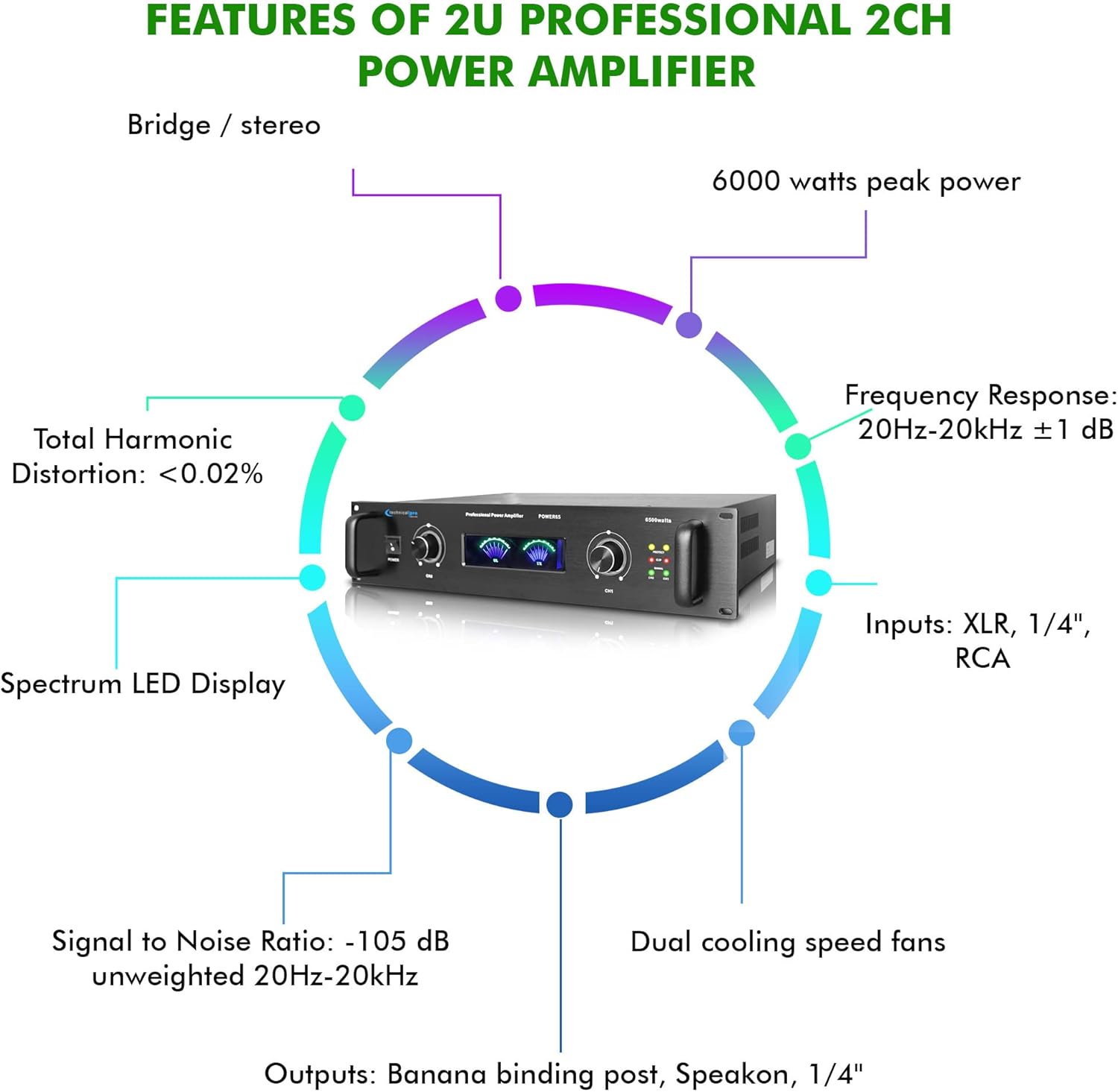
Image: A circular diagram highlighting key features such as 6000 watts peak power, frequency response, inputs, outputs, dual cooling fans, signal to noise ratio, total harmonic distortion, and spectrum LED display.
Apa yang ada dalam Kotak
Pakej termasuk:
- Technical Pro 6000 Watts Professional Portable PA System, 2 Channel Digital Stereo Power Amplifier with Dual Cooling Speed Fans
- Kord Kuasa
- Manual Pengguna (dokumen ini)
Waranti dan Sokongan
Technical Pro products are designed for reliability and performance. For warranty information and technical support, please refer to the official Technical Pro webtapak atau hubungi bahagian perkhidmatan pelanggan mereka. Simpan resit pembelian anda sebagai bukti pembelian untuk sebarang tuntutan waranti.
Untuk bantuan lanjut, lawati Technical Pro Store on Amazon.


