1. Pengenalan
Thank you for choosing the Speedlink BRIO Stereo Soundbar. This manual provides essential information for the proper setup, operation, and maintenance of your device. Please read it carefully to ensure optimal performance and longevity of your soundbar.
The BRIO Stereo Soundbar is designed to deliver clear audio for your computer, featuring a compact design that fits conveniently under most monitors. It includes an illuminated volume control, and front-facing ports for headphones and a microphone for easy access.
2. Maklumat Keselamatan
- Jangan dedahkan bar bunyi kepada air, lembapan atau suhu yang melampau.
- Elakkan meletakkan peranti berhampiran sumber haba atau di bawah cahaya matahari langsung.
- Use only the provided cables or compatible replacements.
- Jangan cuba membuka atau membaiki peranti sendiri. Rujuk semua servis kepada kakitangan yang berkelayakan.
- Jauhkan bar bunyi daripada medan magnet yang kuat.
3. Kandungan Pakej
Sila semak pakej untuk item berikut:
- Speedlink BRIO Stereo Soundbar
- USB-A power cable (integrated)
- Two 3.5mm jack audio cables (integrated)

Image: The Speedlink BRIO Stereo Soundbar, showing its front grille, volume knob, headphone and microphone jacks, and the integrated USB-A and 3.5mm audio cables extending from the back.
4. Persediaan
4.1 Penempatan
Position the Speedlink BRIO Stereo Soundbar on a stable, flat surface, ideally directly under your computer monitor. Its compact design is specifically engineered for this placement, optimizing desk space.

Image: The Speedlink BRIO Stereo Soundbar positioned neatly beneath a computer monitor, demonstrating its space-saving design on a desk next to a keyboard.
4.2 Sambungan
- Sambungan Kuasa: Connect the integrated USB-A cable from the soundbar to an available USB-A port on your computer or a compatible USB power adapter. This supplies power to the soundbar.
- Input Audio: Connect the two integrated 3.5mm jack plugs to the corresponding audio output ports on your computer (typically a green port for line-out). Ensure both plugs are securely inserted.
5. Arahan Operasi
5.1 Kuasa Hidup/Mati dan Kawalan Kelantangan
The large illuminated swivel control knob on the front right side of the soundbar serves as both the power switch and volume control.
- Untuk Menghidupkan/Mematikan: Rotate the knob clockwise from the 'off' position to turn the soundbar on. Continue rotating to increase volume. Rotate counter-clockwise until it clicks to turn off.
- Untuk Melaraskan Kelantangan: Rotate the knob clockwise to increase the volume and counter-clockwise to decrease it. The illumination around the knob indicates the power status and can change with volume adjustments.
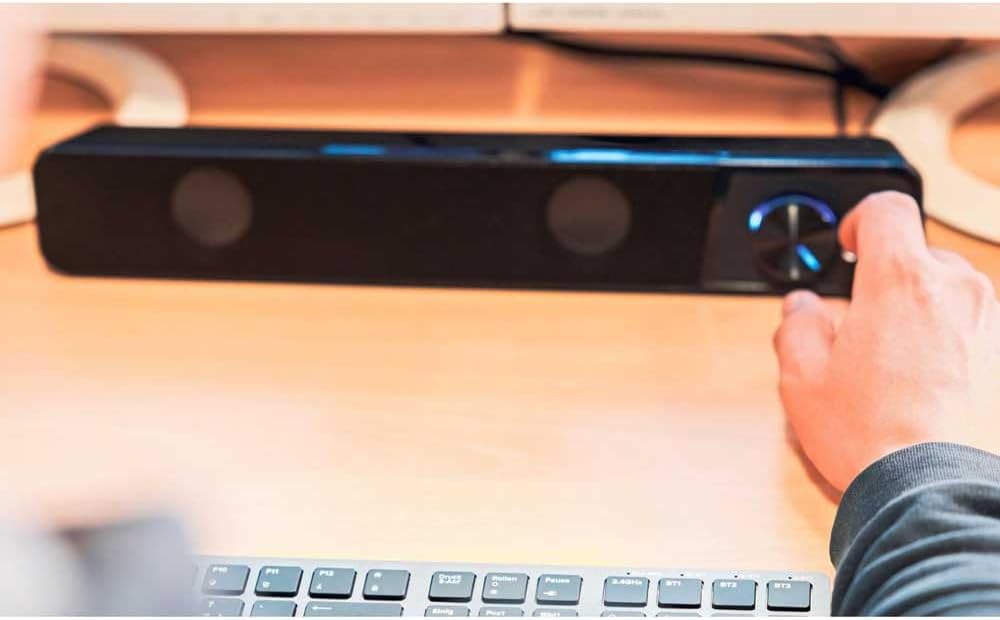
Image: A hand reaching to adjust the illuminated volume control knob on the Speedlink BRIO Stereo Soundbar, which is placed on a desk.
5.2 Headphone and Microphone Sockets
Two 3.5mm sockets are located on the front of the soundbar, next to the volume control, for convenient connection of headphones and a microphone.
- Soket fon kepala: Plug your headphones into the designated headphone jack. This will typically mute the soundbar's speakers and route audio to your headphones.
- Soket Mikrofon: Plug your microphone into the designated microphone jack for voice input.
6. Penyelenggaraan
6.1 Pembersihan
To clean the soundbar, gently wipe its surface with a soft, dry, or slightly damp cloth. Do not use abrasive cleaners, solvents, or strong chemicals, as these can damage the finish.
6.2 Penyimpanan
Apabila tidak digunakan untuk tempoh yang lama, simpan bar bunyi di tempat yang sejuk dan kering, jauh daripada cahaya matahari langsung dan suhu yang melampau.
7. Penyelesaian masalah
- Tiada Bunyi:
- Ensure the soundbar is powered on and the volume knob is turned up.
- Verify that the USB-A cable is securely connected for power.
- Check that the 3.5mm audio jack cables are fully inserted into both the soundbar and your computer's audio output.
- Confirm your computer's audio output settings are configured to send sound to the correct device.
- If headphones are plugged into the front port, unplug them to enable soundbar speakers.
- Kelantangan Rendah atau Bunyi Herot:
- Adjust the volume on both the soundbar and your computer.
- Ensure audio cables are not damaged and are securely connected.
- Test with different audio sources to rule out source issues.
- Mikrofon Tidak Berfungsi:
- Ensure the microphone is correctly plugged into the front microphone socket.
- Check your computer's sound settings to ensure the correct microphone input device is selected and its volume is not muted.
8. Spesifikasi
| Ciri | Perincian |
|---|---|
| Nama Model | BRIO |
| Nombor Model Item | SL-810200-BK |
| Jenis Pembesar Suara | Bar bunyi |
| Mod Keluaran Audio | Stereo |
| Konfigurasi Saluran Bunyi Sekeliling | 2.0 |
| Kuasa Output Maksimum Pembesar Suara | 12 Watt |
| Teknologi Ketersambungan | Auxiliary (3.5mm Jack), USB-A (for power) |
| Respons Kekerapan | 18 KHz |
| Impedans | 4 ohm |
| Dimensi Produk (D x W x H) | 2.72" x 15.04" x 2.36" (69 x 382 x 60 mm) |
| Berat Barang | 1.19 paun (540 Gram) |
| bahan | plastik |
| Sumber Kuasa | Corded Electric (USB-A) |
9. Waranti dan Sokongan
9.1 Waranti Terhad
The Speedlink BRIO Stereo Soundbar comes with a limited warranty. Please refer to the warranty card included with your purchase or visit the official Speedlink website for detailed terms and conditions. The EU spare part availability duration is 1 year.
9.2 Sokongan Pelanggan
For technical assistance, troubleshooting beyond this manual, or warranty claims, please contact Speedlink customer support through their official webtapak atau maklumat hubungan yang diberikan bersama dokumentasi produk anda.


