
MasterPRO BGMP-9307
MasterPro Rocket 360 Air Fryer User Manual
Model: BGMP-9307
1. Pengenalan
Thank you for choosing the MasterPro Rocket 360 Air Fryer. This appliance is designed to provide a healthier way to cook your favorite foods with little to no oil, utilizing advanced hot air circulation technology. Please read this manual thoroughly before operating the appliance to ensure safe and efficient use. Keep this manual for future reference.
Arahan Keselamatan Penting
- Baca semua arahan sebelum digunakan.
- Do not immerse the main unit, cord, or plug in water or other liquids to prevent electric shock.
- Pengawasan rapi diperlukan apabila sebarang perkakas digunakan oleh atau berhampiran kanak-kanak.
- Cabut plag dari soket apabila tidak digunakan dan sebelum membersihkan. Biarkan sejuk sebelum memakai atau menanggalkan bahagian.
- Jangan kendalikan sebarang perkakas dengan kord atau palam yang rosak, atau selepas perkakas tidak berfungsi atau rosak dalam apa jua cara.
- Jangan sekat sebarang bukaan pengudaraan.
- Jangan letakkan perkakas pada dinding atau perkakas lain. Tinggalkan sekurang-kurangnya 10 cm ruang kosong di bahagian belakang dan sisi dan 10 cm ruang kosong di atas perkakas.
- Jangan letakkan apa-apa di atas perkakas.
- Jangan gunakan perkakas untuk sebarang tujuan selain daripada yang diterangkan dalam manual ini.
- Berhati-hati yang melampau mesti digunakan apabila menggerakkan perkakas yang mengandungi minyak panas atau cecair panas lain.
2. Ciri-ciri Produk
The MasterPro Rocket 360 Air Fryer is designed for healthy and convenient cooking, offering a range of features to enhance your culinary experience:
- Memasak yang sihat: Cook foods with up to 90% less fat thanks to its 1500W power and 360° hot air circulation technology, delivering crispy, delicious, and healthy results.
- 6 Program Memasak: Features 6 different presets for various dishes including fries, ribs, wings, meat, fish, and a baking function.
- Skrin Sentuh LED Intuitif: Easily program temperature from 80°C to 200°C and set the timer up to 60 minutes manually, or select an automatic cooking program.
- Pembersihan Mudah: Equipped with a removable non-stick basket with a 3.6L capacity, making it simple to remove food residues and clean.
- Professional Choice: MasterPro is committed to continuous improvement through research and experience, bringing professional cooking capabilities to home kitchens.

Imej: Depan view of the MasterPro Rocket 360 Air Fryer, showcasing its sleek design and LED control panel.
3. Komponen
Familiarize yourself with the main components of your MasterPro Rocket 360 Air Fryer:
- Unit Utama: Menempatkan elemen pemanas, kipas dan panel kawalan.
- Bakul Tidak Tongkat: The primary cooking container where food is placed. It has a 3.6L capacity.
- Removable Tray/Crisper Plate: Sits at the bottom of the basket, allowing air to circulate around food and collecting excess oil.
- pemegang: Untuk menarik keluar dan memasukkan bakul dengan selamat.
- Skrin Sentuh LED: Digital display for setting temperature, time, and selecting programs.
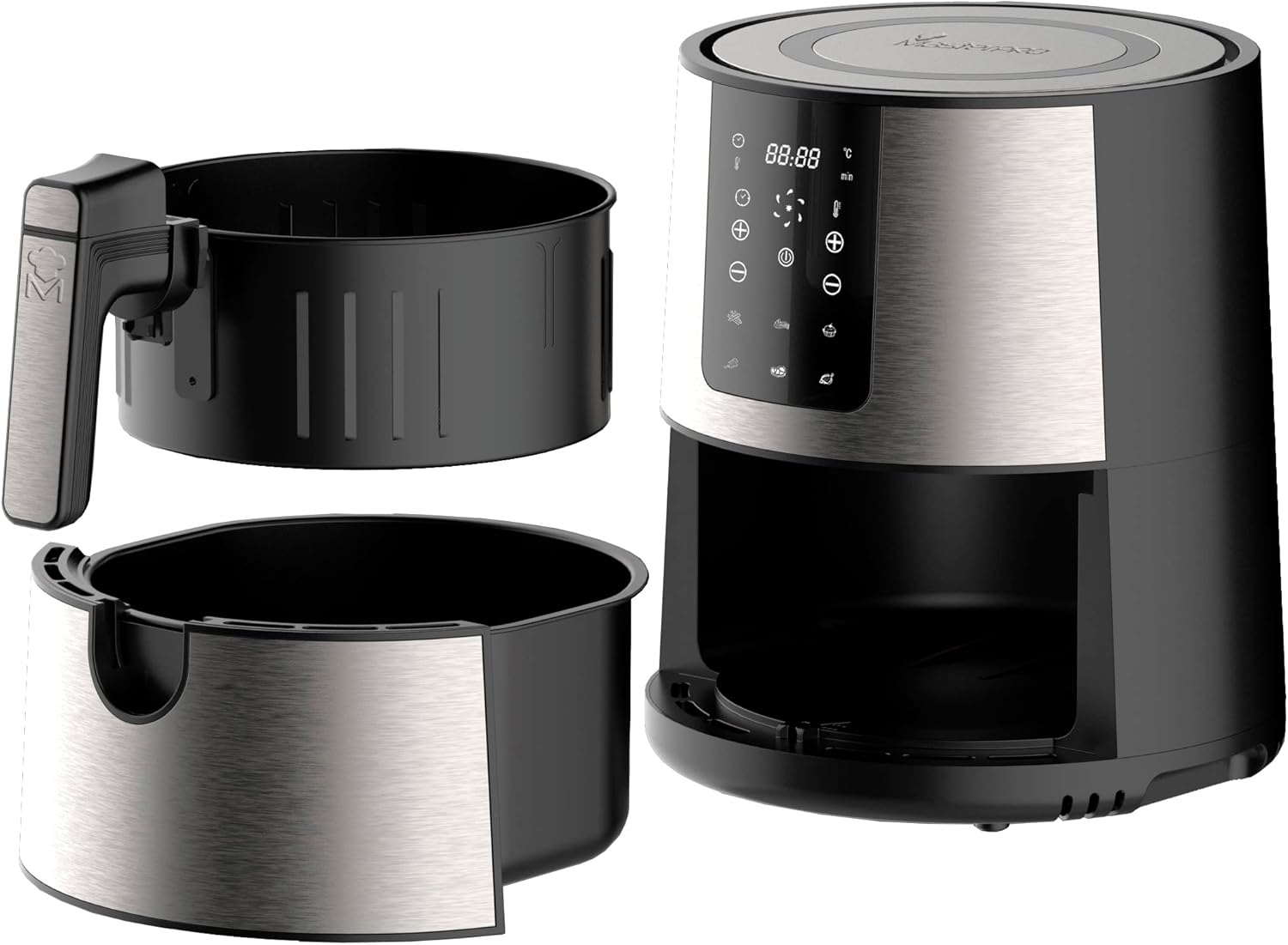
Image: The MasterPro Rocket 360 Air Fryer shown with its non-stick basket and removable crisper plate detached from the main unit.
4. Persediaan
Sebelum Penggunaan Pertama
- Keluarkan semua bahan pembungkusan, pelekat dan label daripada perkakas.
- Thoroughly clean the basket and crisper plate with hot water, dish soap, and a non-abrasive sponge.
- Lap bahagian dalam dan luar perkakas dengan iklanamp kain.
- Pastikan semua bahagian kering sepenuhnya sebelum digunakan.
Penempatan dan Sambungan Kuasa
- Letakkan perkakas pada permukaan yang stabil, mendatar dan tahan haba.
- Ensure there is adequate space around the air fryer for proper ventilation (at least 10 cm on all sides).
- Plug the power cord into a grounded wall outlet. Ensure the voltage indicated on the appliance matches your local voltage.
5. Arahan Operasi
Panel Kawalan Terlaluview
The MasterPro Rocket 360 features an intuitive LED touch screen for easy operation:

Imej: Terperinci view of the air fryer's LED touch screen, showing temperature, time, and program icons.
- Butang Kuasa: Menghidupkan/mematikan perkakas dan memulakan/menjeda proses memasak.
- Kawalan Suhu (+/-): Melaraskan suhu memasak (80°C - 200°C).
- Kawalan Masa (+/-): Melaraskan masa memasak (sehingga 60 minit).
- Ikon Program Pratetap: Pilih daripada 6 mod memasak yang telah diprogramkan.
Operasi Asas
- Menyediakan makanan: Place ingredients in the air fryer basket. Do not overfill.
- Masukkan Bakul: Luncurkan bakul kembali ke dalam unit utama sehingga ia berbunyi klik pada tempatnya.
- Hidupkan kuasa: Tekan butang Kuasa untuk menghidupkan paparan.
- Tetapkan Suhu dan Masa: Use the temperature and time control buttons to set your desired cooking parameters. Alternatively, select a preset program.
- Mula Memasak: Tekan butang Kuasa sekali lagi untuk memulakan proses memasak.
- Goncang Bakul (Pilihan): For even cooking, especially with fries or smaller items, pull out the basket halfway through the cooking time and shake it gently. The air fryer will pause automatically. Return the basket to resume cooking.
- Tamat Memasak: The air fryer will beep when the cooking time is complete. Carefully pull out the basket and transfer food to a serving plate.
Program yang telah ditetapkan
The Rocket 360 offers 6 convenient pre-set programs for common dishes:

Image: The air fryer's display illustrating the six pre-programmed cooking options: Fries, Ribs, Wings, Meat, Fish, and Bake.
| Program | Suhu yang Dicadangkan | Masa yang dicadangkan |
|---|---|---|
| kentang goreng | 180°C | 15-20 min |
| tulang rusuk | 170°C | 20-25 min |
| sayap | 190°C | 18-22 min |
| daging | 180°C | 10-15 min |
| ikan | 160°C | 12-18 min |
| bakar | 160°C | 20-30 min |
Note: Cooking times and temperatures are approximate and may vary based on food quantity, size, and desired crispiness. Always ensure food is cooked thoroughly.
Cooking Tips for Healthier Meals

Image: Burgers being cooked in the air fryer, demonstrating the appliance's ability to prepare meals with significantly less fat.
- For extra crispiness, lightly brush or spray food with a small amount of oil.
- Bahan yang lebih kecil biasanya memerlukan masa memasak yang sedikit lebih pendek daripada bahan yang lebih besar.
- For best results with frozen foods, follow package instructions.
6. Pembersihan dan Penyelenggaraan
Pembersihan berkala akan memastikan prestasi optimum dan memanjangkan jangka hayat penggoreng udara anda.
Cleaning the Basket and Tray

Image: A hand demonstrating the easy removal of the air fryer basket, simplifying the cleaning process.
- Sentiasa cabut plag penggoreng udara dan biarkan ia sejuk sepenuhnya sebelum dibersihkan.
- Remove the basket and crisper plate.
- Wash the basket and crisper plate with hot water, dish soap, and a non-abrasive sponge. The non-stick coating makes cleaning easy.
- For stubborn food residues, soak the basket and tray in hot water with some dish soap for about 10 minutes.
- Bilas dengan teliti dan keringkan sepenuhnya sebelum memasang semula atau menyimpan.
Membersihkan Unit Utama
- Lap bahagian luar penggoreng udara dengan iklanamp kain. Jangan gunakan pembersih yang melelas atau pad penyental.
- Bersihkan bahagian dalam dengan iklanamp kain dan detergen lembut jika perlu.
- Jangan sekali-kali merendam unit utama ke dalam air atau cecair lain.
Penyimpanan
Simpan perkakas di tempat yang sejuk dan kering apabila tidak digunakan. Pastikan semua bahagian bersih dan kering sebelum disimpan.
7. Penyelesaian masalah
If you encounter any issues with your MasterPro Rocket 360 Air Fryer, please refer to the table below for common problems and solutions:
| Masalah | Kemungkinan Punca | Penyelesaian |
|---|---|---|
| Penggoreng udara tidak dihidupkan. | Perkakas tidak dipasang. Salur keluar kuasa tidak berfungsi. | Pastikan kord kuasa dipasang dengan selamat ke soket yang berfungsi. Try plugging another appliance into the same outlet to check if it's functional. |
| Makanan tidak dimasak sekata. | Basket is overloaded. Makanan tidak digoncang semasa memasak. | Masak makanan dalam kelompok yang lebih kecil. Shake the basket halfway through cooking, especially for smaller items. |
| Makanan tidak rangup. | Minyak tidak mencukupi (jika berkenaan). Suhu terlalu rendah atau masa terlalu singkat. | Sapu atau semburkan makanan dengan sedikit minyak. Meningkatkan suhu atau masa memasak. |
| Asap putih datang dari perkakas. | Sisa gris dari penggunaan sebelumnya. High-fat food being cooked. | Bersihkan bakul dan pinggan pengisar dengan teliti selepas setiap penggunaan. For high-fat foods, drain excess fat from the basket during cooking. |
| Basket does not slide into the appliance properly. | Basket is overloaded. Crisper plate not positioned correctly. | Kurangkan jumlah makanan dalam bakul. Ensure the crisper plate is flat at the bottom of the basket. |
Jika masalah berterusan selepas mencuba penyelesaian ini, sila hubungi sokongan pelanggan.
8. Spesifikasi
Detailed technical specifications for the MasterPro Rocket 360 Air Fryer:
| Ciri | Nilai |
|---|---|
| Jenama | MasterPRO |
| Nombor Model | BGMP-9307 |
| warna | Pelbagai warna |
| Dimensi Produk (L x W x H) | 68.5 x 35.5 x 42 cm |
| Kapasiti | 3.6 Liter |
| kuasa | 1500 Watt |
| Voltage | 1500 Volt |
| bahan | Stainless Steel and PVC |
| Fungsi Tutup Automatik | ya |
| Ciri Khas | Adjustable Speed Control, Programmable |
| Berat Barang | 5.84 Kilogram |
| Penggunaan yang Disyorkan | Oil-free frying, grilling, dehydrating, baking |
9. Waranti dan Sokongan
Maklumat Waranti
The MasterPro Rocket 360 Air Fryer comes with a 3-year availability for spare parts, ensuring long-term support for your appliance.
Sokongan Pelanggan
For any questions, technical assistance, or warranty claims, please contact MasterPro customer support through the retailer where you purchased the product or visit the official MasterPro weblaman web untuk maklumat hubungan.
Ask a question about this manual
Ask about setup, troubleshooting, compatibility, parts, safety, or missing instructions. Manuals+ will review the question and use this page’s manual context to help answer it.