
1. Pengenalan
Thank you for choosing the MasterPro Airfryer Rocket 1100. This appliance is designed to provide a healthy and efficient way to cook a variety of foods using hot air circulation. Please read this manual thoroughly before operating the appliance and retain it for future reference.
The MasterPro Airfryer Rocket 1100 is an 11-liter, 1800W oil-free air fryer and oven, featuring an intuitive LED touch screen for easy operation and precise temperature control from 80°C to 200°C.
2. Arahan Keselamatan
Perlindungan Penting:
- Always place the appliance on a stable, heat-resistant surface, away from walls and other appliances to ensure proper ventilation.
- Jangan rendamkan perkakas, kord, atau palam ke dalam air atau sebarang cecair lain.
- Jauhkan kanak-kanak dan haiwan peliharaan dari perkakas semasa operasi. Permukaan luar boleh menjadi panas.
- Jangan sekat sebarang bukaan pengudaraan.
- Cabut plag perkakas daripada soket apabila tidak digunakan dan sebelum membersihkan. Biarkan ia sejuk sepenuhnya sebelum mengendalikannya.
- Jangan kendalikan perkakas dengan kord atau palam yang rosak, atau selepas perkakas tidak berfungsi atau rosak dalam apa jua cara.
- Gunakan hanya aksesori yang disyorkan oleh pengilang.
- Jangan gunakan perkakas untuk tujuan selain dari penggunaannya.
- Berhati-hati semasa mengeluarkan minyak panas atau cecair panas yang lain.
3. Produk Lebihview
The MasterPro Airfryer Rocket 1100 is designed for versatile cooking with minimal oil. It features a spacious interior and a user-friendly control panel.

Rajah 1: Depan view of the MasterPro Airfryer Rocket 1100.
Komponen:
- Main Unit with LED Touch Screen
- Rongga Dalam
- Bakul Tidak Melekat boleh tanggal
- Two Racks
- Dulang pembakar
- U-Handle
- Rotisserie Spit
- Bakul Berputar
- 10 Skewers with Stand
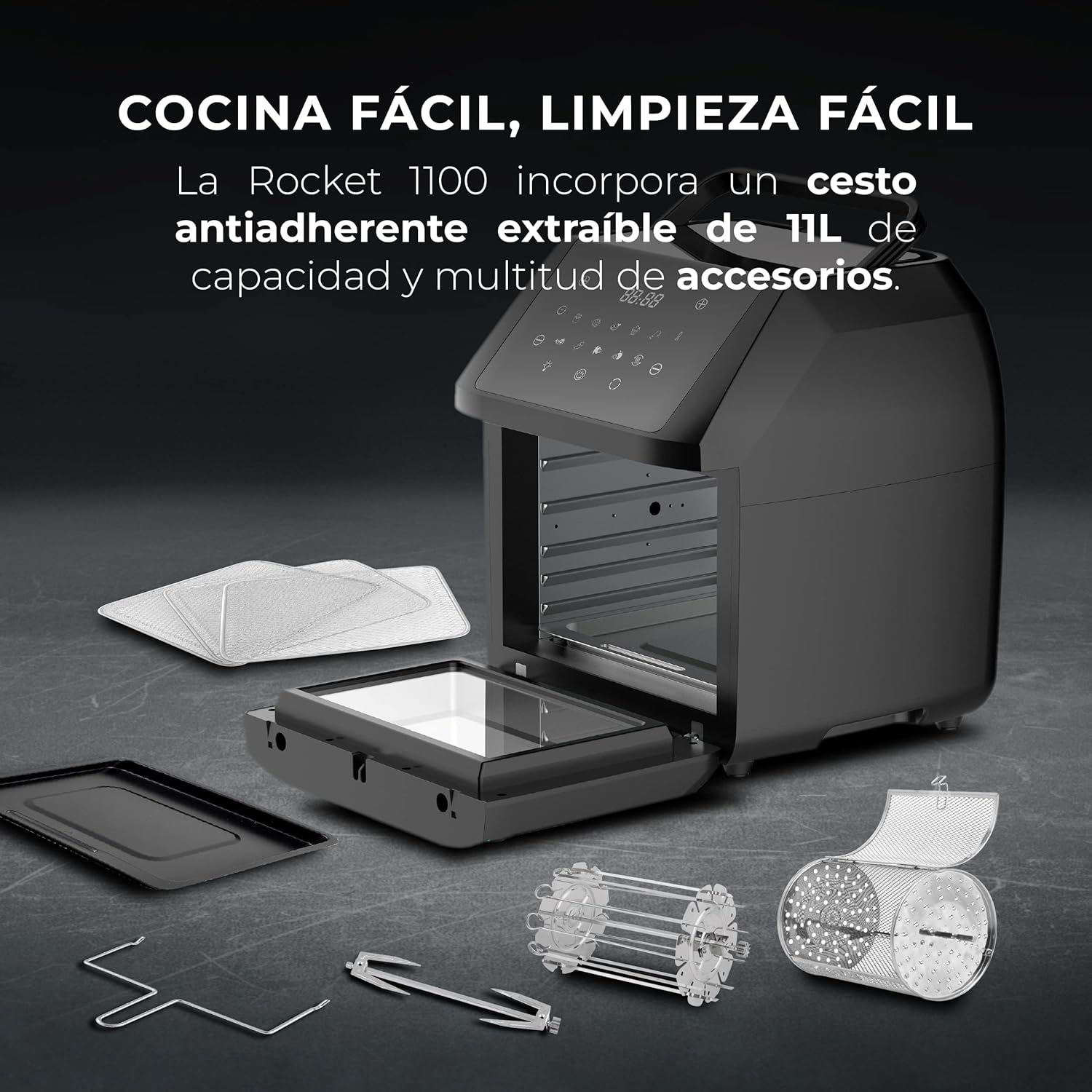
Figure 2: The air fryer with its various included accessories, such as racks, baking tray, U-handle, rotisserie spit, rotating basket, and skewers.
4. Persediaan
- Membongkar: Keluarkan semua bahan pembungkusan dan label promosi dengan berhati-hati daripada perkakas.
- Pembersihan Awal: Sebelum penggunaan pertama, lap unit utama dengan iklanamp cloth. Wash all removable accessories (racks, basket, tray, etc.) with warm soapy water, rinse thoroughly, and dry completely.
- penempatan: Letakkan penggoreng udara di atas permukaan yang stabil, rata dan tahan haba. Pastikan terdapat sekurang-kurangnya 10 cm (4 inci) ruang kosong di sekeliling bahagian belakang dan sisi perkakas untuk peredaran udara yang mencukupi.
- Sambungan Kuasa: Palamkan kord kuasa ke salur keluar elektrik yang dibumikan. Pastikan voltage matches the specifications of your appliance (220 Volts).
5. Arahan Operasi
The MasterPro Airfryer Rocket 1100 offers both preset programs and manual control for cooking.
5.1 Pemanasan awal
For best results, preheat the air fryer for 3-5 minutes before adding food. Select your desired temperature and time, then press the start button. The appliance will indicate when preheating is complete.
5.2 Menggunakan Program Pratetap
The appliance features 10 preset cooking programs for common dishes.

Figure 3: The LED touch screen displaying the 10 preset cooking programs and manual controls.
- Place your food inside the air fryer using the appropriate accessory (e.g., rotating basket for fries, racks for chicken wings).
- Press the 'Menu' button on the LED touch screen to cycle through the 10 preset programs.
- Once you select a program, the default time and temperature will be displayed.
- Tekan butang 'Mula/Jeda' untuk mula memasak.
- The appliance will automatically shut off when the program is complete.
5.3 Operasi Manual
Untuk memasak tersuai, anda boleh menetapkan suhu dan masa secara manual.
- Place your food inside the air fryer.
- Use the temperature control buttons (usually '+' and '-') to set the desired temperature between 80°C and 200°C.
- Use the time control buttons (usually '+' and '-') to set the desired cooking time up to 60 minutes.
- Tekan butang 'Mula/Jeda' untuk mula memasak.
- The appliance will automatically shut off when the timer reaches zero.

Figure 4: Illustration of the 360° hot air circulation technology inside the air fryer, ensuring even cooking.
5.4 Menggunakan Aksesori
- Bakul Berputar: Ideal for fries, nuts, or other small items that require constant tumbling for even cooking. Insert it into the rotisserie slots.
- Rotisserie Spit: Use for whole chickens or larger cuts of meat. Secure the food with the forks and insert the spit into the rotisserie slots.
- Rak: Use for multi-level cooking, such as dehydrating fruits or cooking multiple batches of food.
- Dulang pembakar: Suitable for baking cakes, pizzas, or catching drips from food cooked on racks.
- Pemegang U: Use this tool to safely remove hot accessories like the rotating basket or rotisserie spit from the appliance.
6. Penyelenggaraan dan Pembersihan
Pembersihan tetap memastikan prestasi optimum dan memanjangkan hayat penggoreng udara anda.
- Cabut dan Sejukkan: Sentiasa cabut plag perkakas dan biarkan ia sejuk sepenuhnya sebelum dibersihkan.
- Luaran: Lap bahagian luar penggoreng udara dengan iklanamp kain. Jangan gunakan pembersih yang kasar.
- Dalaman: Bersihkan rongga dalaman dengan iklanamp cloth and mild detergent. For stubborn food residue, use a non-abrasive sponge.
- Aksesori: All removable accessories (basket, racks, tray, spit, skewers) are dishwasher safe. Alternatively, wash them with warm soapy water, rinse, and dry thoroughly. The non-stick basket should be handled with care to preserve its coating.
- Storan: Pastikan semua bahagian bersih dan kering sebelum menyimpan perkakas di tempat yang sejuk dan kering.
7. Penyelesaian masalah
| Masalah | Kemungkinan Punca | Penyelesaian |
|---|---|---|
| Perkakas tidak dihidupkan | Not plugged in; Power outlet malfunction; Appliance not assembled correctly. | Ensure the power cord is securely plugged into a working outlet. Check if the main unit is properly closed. |
| Makanan tidak dimasak sama rata | Overcrowding; Incorrect temperature/time; Food not shaken/turned. | Do not overcrowd the basket/racks. Adjust temperature and time as needed. Shake or turn food halfway through cooking. |
| Asap putih datang dari perkakas | Grease residue from previous use; Cooking fatty foods. | Clean the appliance and accessories thoroughly after each use. For fatty foods, ensure proper ventilation and consider using less oil. |
| Makanan tidak rangup | Too much moisture; Not enough oil (for certain recipes); Overcrowding. | Pat food dry before cooking. Add a small amount of oil if desired. Cook in smaller batches. |
8. Spesifikasi
| Ciri | Spesifikasi |
|---|---|
| Jenama | MasterPRO |
| Nombor Model | BGMP-9310 |
| warna | Hitam |
| Dimensi (L x W x H) | 39 x 39 x 44.7 cm |
| Kapasiti | 11 Liter |
| kuasa | 1800 Watt |
| Voltage | 220 Volt |
| bahan | Stainless steel and PVC |
| Pemadaman Automatik | Tidak |
| Ciri-ciri | 10 preset functions, Timer, Easy cleaning, Touch screen |
| Berat Barang | 9 Kilogram |
| Penggunaan yang Disyorkan | Oil-free frying, baking, dehydrating, roasting |
9. Waranti dan Sokongan
This MasterPro Airfryer Rocket 1100 comes with a 2-year availability for spare parts. For warranty claims, technical support, or service inquiries, please contact your retailer or the MasterPRO customer service department. Please have your model number (BGMP-9310) and proof of purchase ready.