pengenalan
This instruction manual provides detailed information on the safe and efficient operation, maintenance, and troubleshooting of your Severin KA 4851 FILKA filter coffee machine with integrated grinder. Please read this manual thoroughly before first use and keep it for future reference.
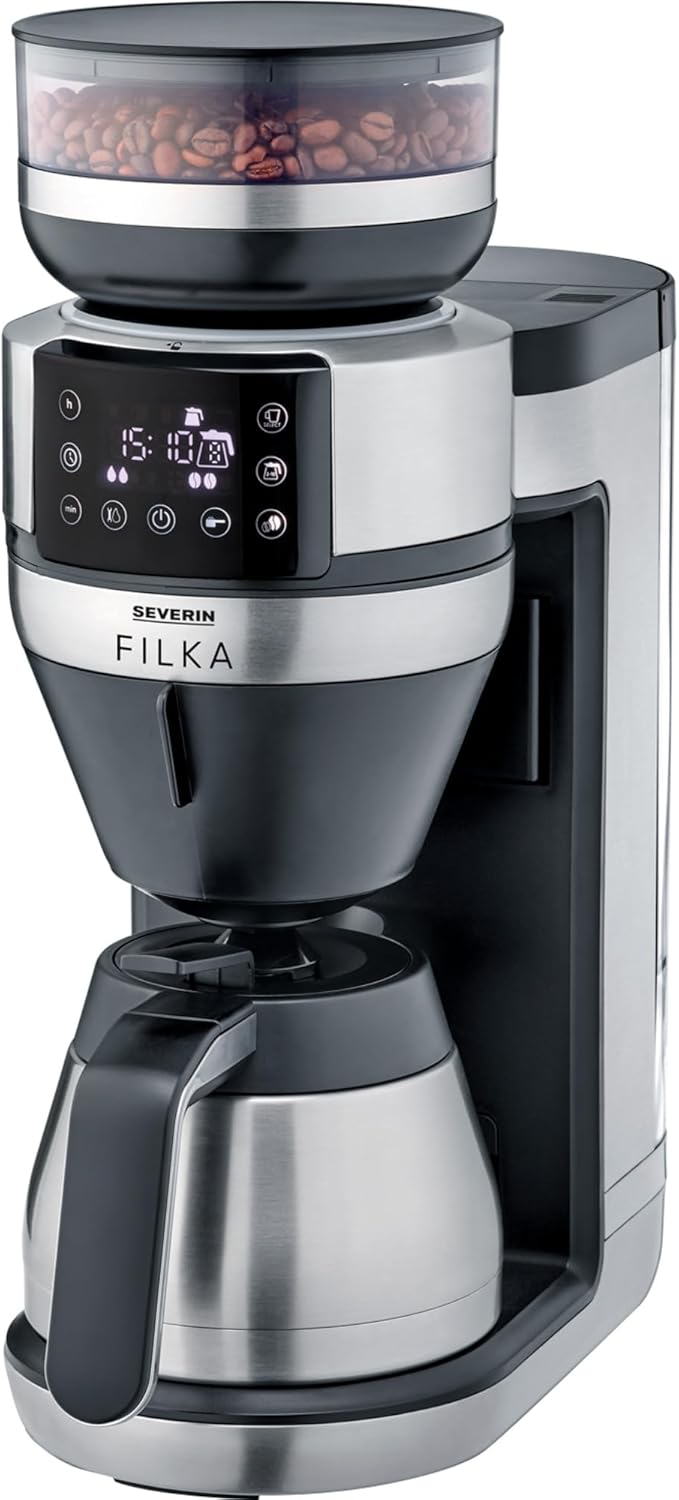
Image: The Severin KA 4851 FILKA coffee machine, featuring a sleek silver and black design with a bean hopper on top, a digital display, and a thermal carafe at the base.
Maklumat Keselamatan
Sentiasa patuhi langkah keselamatan berikut untuk mengelakkan kecederaan atau kerosakan pada perkakas:
- Pastikan voltage indicated on the rating plate matches your mains supply.
- Jangan rendam perkakas, kord, atau palam ke dalam air atau cecair lain.
- Jauhkan perkakas daripada kanak-kanak.
- Unplug the appliance from the mains socket when not in use, before cleaning, or in case of malfunction.
- Jangan kendalikan perkakas dengan kord atau palam yang rosak.
- Hanya gunakan aksesori asli dan alat ganti.
- Do not open the housing of the appliance. Repairs should only be carried out by authorized personnel.
- Perkakas ini bertujuan untuk kegunaan isi rumah sahaja.
- Avoid contact with hot surfaces, especially the brewing unit and hot water/coffee.
Produk Selesaiview
Familiarize yourself with the components of your Severin KA 4851 FILKA coffee machine:
- 1. Bean Hopper: For storing whole coffee beans.
- 2. Grinder: Integrated conical burr grinder for fresh grinding.
- 3. Tangki Air: Tangki boleh tanggal untuk mengisi dengan air tawar.
- 4. Panel Kawalan: Digital display and buttons for settings and operation.
- 5. Brewing Unit: Where coffee is brewed.
- 6. Permanent Gold Tone Filter: Penapis boleh guna semula untuk kopi yang dikisar.
- 7. Drip Stop: Mengelakkan menitis apabila botol dikeluarkan.
- 8. Thermal Carafe: Insulated carafe to keep coffee warm.
- 9. Cup Control Platform: Adjustable platform for various cup and carafe sizes.

Image: A user's hand interacting with the Severin KA 4851 FILKA coffee machine, highlighting its slim design and the thermal jug. The image also points out features like "Easy Clean" and "Super Silent".
Persediaan
- Membongkar: Carefully remove all packaging materials and check for any damage. Keep packaging for future transport if needed.
- Pembersihan Awal: Before first use, clean all removable parts (water tank, bean hopper, permanent filter, thermal carafe) with warm water and a mild detergent. Wipe the main unit with a damp kain.
- Kedudukan: Place the appliance on a stable, level, and heat-resistant surface, away from heat sources and direct sunlight. Ensure adequate ventilation.
- First Use (Rinsing Cycle):
- Fill the water tank with fresh cold water up to the MAX mark.
- Place the empty thermal carafe with its lid closed on the warming plate.
- Run a full brewing cycle without coffee beans or ground coffee to rinse the internal components. Discard the water. Repeat this process 2-3 times.
Arahan Operasi
Brewing Coffee from Whole Beans
- Isi Tangki Air: Fill the water tank with fresh, cold water according to the desired number of cups. The "Cup Control" feature automatically draws the necessary amount of water.
- Tambah Biji Kopi: Open the lid of the bean hopper and fill it with whole coffee beans. Close the lid securely.
- Sisipkan Penapis: Ensure the permanent gold tone filter is correctly inserted into the brewing unit. You may also use a traditional paper filter if preferred.
- Tempat Carafe/Cup: Place the thermal carafe on the warming plate for multiple cups, or adjust the Cup Control platform and place your single cup/travel mug for individual servings.
- Pilih Tetapan: Use the control panel to select the desired coffee strength and number of cups. The machine offers flexible options for various container sizes.
- Mulakan Pembuatan Bir: Press the start button. The machine will grind the beans, brew the coffee, and dispense it into your chosen container.
Membancuh Kopi dari Kopi Kisar
- Isi Tangki Air: Isi tangki air dengan air segar dan sejuk.
- Tambah Kopi Kisar: Open the brewing unit and add the desired amount of pre-ground coffee into the permanent gold tone filter (or paper filter).
- Tempat Carafe/Cup: Place the thermal carafe or your single cup/travel mug.
- Pilih Tetapan: Use the control panel to select the ground coffee mode and desired strength/cups.
- Mulakan Pembuatan Bir: Tekan butang mula.
Ciri Yang Boleh Diprogramkan
The Severin KA 4851 FILKA features a programmable timer. Refer to the control panel instructions on the display to set the desired brewing time for automatic start.

Image: An illustration highlighting key features of the Severin KA 4851 FILKA, including "Cup Control" for automatic water measurement, "Flexible & Individual" 5-in-1 compatibility for various containers, "Hot & Strong" brewing temperature up to 96°C, and the "Gold Tone Filter" as a reusable alternative to paper filters.
Penyelenggaraan dan Pembersihan
Pembersihan dan penyelenggaraan yang kerap memastikan prestasi optimum dan jangka hayat mesin kopi anda.
Pembersihan Harian
- Selepas setiap penggunaan, cabut plag perkakas dan biarkan ia sejuk.
- Remove and empty the permanent gold tone filter. Rinse it thoroughly under running water. It is dishwasher-safe.
- Empty and rinse the thermal carafe and its lid.
- Lap bahagian luar perkakas dengan iklanamp kain. Jangan gunakan pembersih yang kasar.
- Clean the drip tray and Cup Control platform.
Penyahkelasan
Depending on water hardness and frequency of use, descaling is necessary to prevent limescale buildup. The machine may indicate when descaling is required. Use a commercially available descaling agent suitable for coffee machines and follow the manufacturer's instructions. Always rinse the machine thoroughly with several cycles of fresh water after descaling.
Membersihkan Pengisar
Periodically clean the grinder to remove coffee oil residue and old grounds. Refer to the specific instructions in the appliance's digital display or a more detailed manual for grinder cleaning, as this may involve removing specific parts.
Menyelesaikan masalah
| Masalah | Kemungkinan Punca | Penyelesaian |
|---|---|---|
| Coffee does not brew or flows slowly. | Water tank empty; filter clogged; limescale buildup; carafe not correctly placed. | Fill water tank; clean filter; descale the machine; ensure carafe is properly seated. |
| Kopi terasa lemah atau terlalu kuat. | Incorrect coffee-to-water ratio; grind setting too coarse/fine; old coffee beans. | Adjust coffee quantity; adjust grind setting; use fresh coffee beans. |
| Pengisar bising atau tidak mengisar. | Bean hopper empty; foreign object in grinder; grinder clogged. | Fill bean hopper; check for and remove foreign objects; clean grinder. |
| Air bocor dari mesin. | Water tank not properly seated; internal component issue. | Ensure water tank is securely in place. If leaking persists, contact customer support. |
Spesifikasi
- Jenama: SEVERIN
- Nombor Model: KA 4851
- warna: Brushed, matte, black, silver-colored
- Dimensi (L x W x H): 17 x 38 x 46 cm
- Berat: 8.2 Kilogram
- kapasiti: 350 Milliliters (Note: This capacity seems low for a coffee machine, likely refers to a specific component or is a typo in source data. Typically coffee machines measure capacity in liters or cups for the carafe.)
- Voltage: 230 Volt
- Bahan: Keluli Tahan Karat
- Ciri Khas: Permanent filter, Programmable
- Jenis: Electric Filter Coffee Machine
Waranti dan Sokongan
For warranty information, technical support, or spare parts, please contact SEVERIN customer service directly. Refer to the official SEVERIN website or your purchase documentation for contact details and specific warranty terms applicable to your region.
You can visit the official SEVERIN store on Amazon for more information: SEVERIN Store


