1. Pengenalan
The ZGOOD JT-26B Lab Digital Double Impeller Dust Collector is designed for efficient dust extraction in laboratory environments. This unit is suitable for use with various equipment such as sandblasters, lathes, grinders, and workstations. It features a 550W bilobed wheel motor, providing strong power, high efficiency, and low noise operation. The device incorporates voltage stepless regulation and an automatic time system for carbon brush abradability, including a prewarning system to protect the motor and extend its service life.
2. Arahan Keselamatan
- Sentiasa pastikan bekalan kuasa sepadan dengan volumtage specified on the unit (220V/110V 50/60Hz).
- Do not operate the dust collector in wet conditions or near flammable liquids or gases.
- Keep hands, hair, and loose clothing away from moving parts and suction inlets during operation.
- Regularly inspect the power cord for damage. Do not use if the cord is damaged.
- Disconnect the power supply before performing any maintenance, cleaning, or when replacing parts.
- Pastikan pengudaraan yang betul di kawasan kerja.
- Perkakas ini tidak dimaksudkan untuk digunakan oleh orang (termasuk kanak-kanak) yang kurang keupayaan fizikal, deria atau mental, atau kurang pengalaman dan pengetahuan, melainkan mereka telah diberi pengawasan atau arahan mengenai penggunaan perkakas oleh orang yang bertanggungjawab untuk keselamatan mereka.
3. Bahagian Termasuk
Please check the package contents upon receipt to ensure all parts are present:
- Dust Collector Machine × 1
- Manual Pengguna × 1
- Kabel Kuasa × 1
- Fius × 2
- Dust Pipe × 1
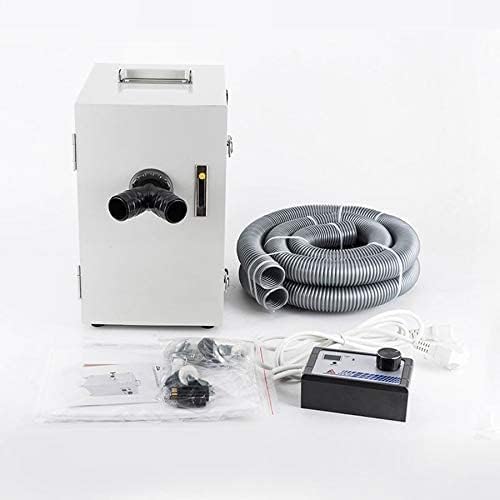
Figure 1: ZGOOD JT-26B Dust Collector with accessories.
4. Persediaan
4.1 Membongkar
Carefully remove the dust collector and all accessories from the packaging. Retain the packaging for future transport or storage.
4.2 Connecting the Dust Pipe
- Locate the dust pipe connection port(s) on the rear of the unit. The JT-26B features a "Y" type suction inlet, allowing for connection to two separate workstations simultaneously.
- Attach the provided dust pipe(s) securely to the inlet port(s).
- Connect the other end of the dust pipe(s) to your sandblaster, lathe, grinder, or workstation's dust extraction outlet.
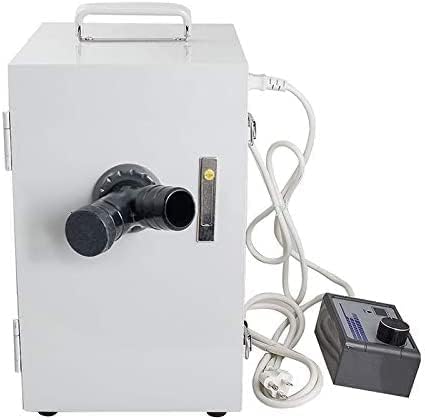
Rajah 2: Belakang view with Y-type suction inlet.
4.3 Sambungan Kuasa
- Ensure the dust collector's power switch is in the "OFF" position.
- Connect the power cord to the power inlet on the unit.
- Pasangkan kord kuasa ke soket elektrik yang dibumikan yang sepadan dengan volum yang ditentukantage (220V atau 110V).
5. Arahan Operasi
5.1 Menghidupkan/Mematikan
To power on the unit, flip the main power switch to the "ON" position. To power off, flip the switch to "OFF".
5.2 Melaraskan Kuasa Sedutan
The JT-26B features voltage stepless regulation. Use the control knob on the external control box to adjust the suction power as needed for your application. Turn the knob clockwise to increase suction and counter-clockwise to decrease it.
5.3 Carbon Brush Monitoring System
This dust collector is equipped with an automatic time system for carbon brush abradability and a prewarning system. When the carbon brush wear approaches a critical point, the system will automatically trigger an alarm and cut off the power supply. This feature protects the motor from damage and extends its operational lifespan. When the alarm sounds, it indicates that the carbon brushes require inspection and potential replacement.
5.4 Dual Workstation Use
The "Y" type suction inlet allows two users to work simultaneously, connecting two separate dust-generating devices to the single dust collector.
6. Penyelenggaraan
Regular maintenance ensures optimal performance and extends the life of your dust collector. Always disconnect the power before performing any maintenance.
6.1 Penggantian Beg Habuk
- Open the front door of the dust collector.
- Tanggalkan beg habuk yang penuh dengan berhati-hati.
- Install a new dust bag, ensuring it is properly seated and sealed within the compartment.
- Close the front door securely.
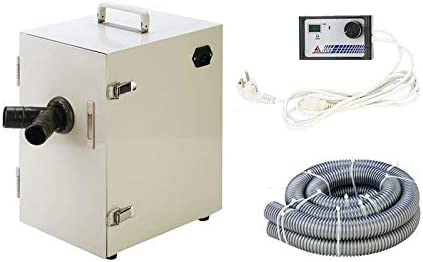
Rajah 3: Dalaman view with filter and dust bag.
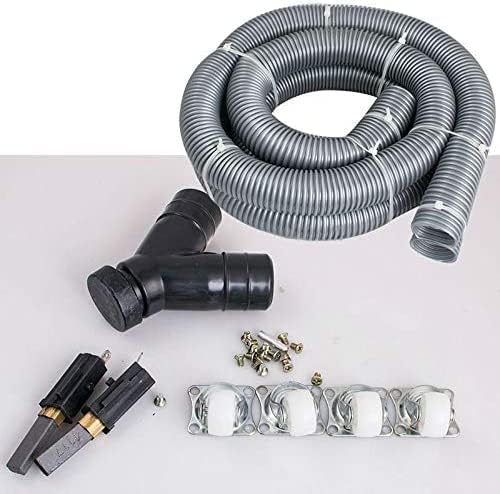
Figure 4: Replacement dust bag.
6.2 Pembersihan/Penggantian Penapis
The internal filter should be regularly inspected and cleaned to maintain optimal suction. Depending on usage, the filter may need to be replaced periodically. Refer to the filter manufacturer's guidelines for cleaning and replacement intervals.
6.3 Pemeriksaan/Penggantian Berus Karbon
When the prewarning system activates, it indicates that the carbon brushes are nearing the end of their service life. Disconnect power and consult a qualified technician or the manufacturer's support for carbon brush inspection and replacement to prevent motor damage.
6.4 Pembersihan Am
Lap bahagian luar unit dengan lembut, damp kain. Jangan gunakan pembersih atau pelarut yang melelas.
7. Penyelesaian masalah
| Masalah | Kemungkinan Punca | Penyelesaian |
|---|---|---|
| Unit tidak dihidupkan | Tiada bekalan kuasa Kord kuasa rosak Fius ditiup | Periksa salur keluar kuasa dan sambungan Inspect power cord, replace if damaged Replace fuse (refer to specifications for type) |
| Kuasa sedutan rendah | Beg habuk penuh Tapis tersumbat Dust pipe obstructed Suction power knob set too low | Ganti beg habuk Bersihkan atau ganti penapis Check and clear dust pipe Adjust suction power knob clockwise |
| Unit stops unexpectedly / Alarm sounds | Berus karbon sudah haus | Disconnect power. Inspect and replace carbon brushes. Contact support if unsure. |
| Kebisingan yang berlebihan | Foreign object in impeller Isu motor | Disconnect power and inspect for obstructions. If noise persists, contact support. |
8. Spesifikasi
| Ciri | Perincian |
|---|---|
| Model | JT-26B |
| Bekalan Kuasa | 220V/110V 50/60Hz |
| Penggunaan Kuasa | 550W |
| Maks. Tekanan | 26kPa |
| Maks. vakum | -16kPa |
| Maks. Bising | <50dB |
| Diameter of Dust Pipe | 4cm |
| Kadar Aliran Udara | 120m³/j |
| Berat Barang | 10 paun |
| Dimensi (Anggaran) | 3 x 3 x 3 inci (Saiz Pakej) |
| warna | Perak |
| Penggunaan yang Disyorkan | Dalaman |
9. Waranti dan Sokongan
For warranty information, technical support, or service inquiries, please contact your retailer or the manufacturer directly. Please have your model number (JT-26B) and purchase date available when contacting support.


