1. Pengenalan
Thank you for choosing coioc Bluetooth Sport Headphones, Model U89. These headphones are designed to provide a high-quality audio experience with advanced features such as Bluetooth 5.3 connectivity, HiFi stereo sound, long battery life, and IPX7 waterproofing, making them ideal for sports and active lifestyles. This manual will guide you through the setup, operation, and maintenance of your new headphones.
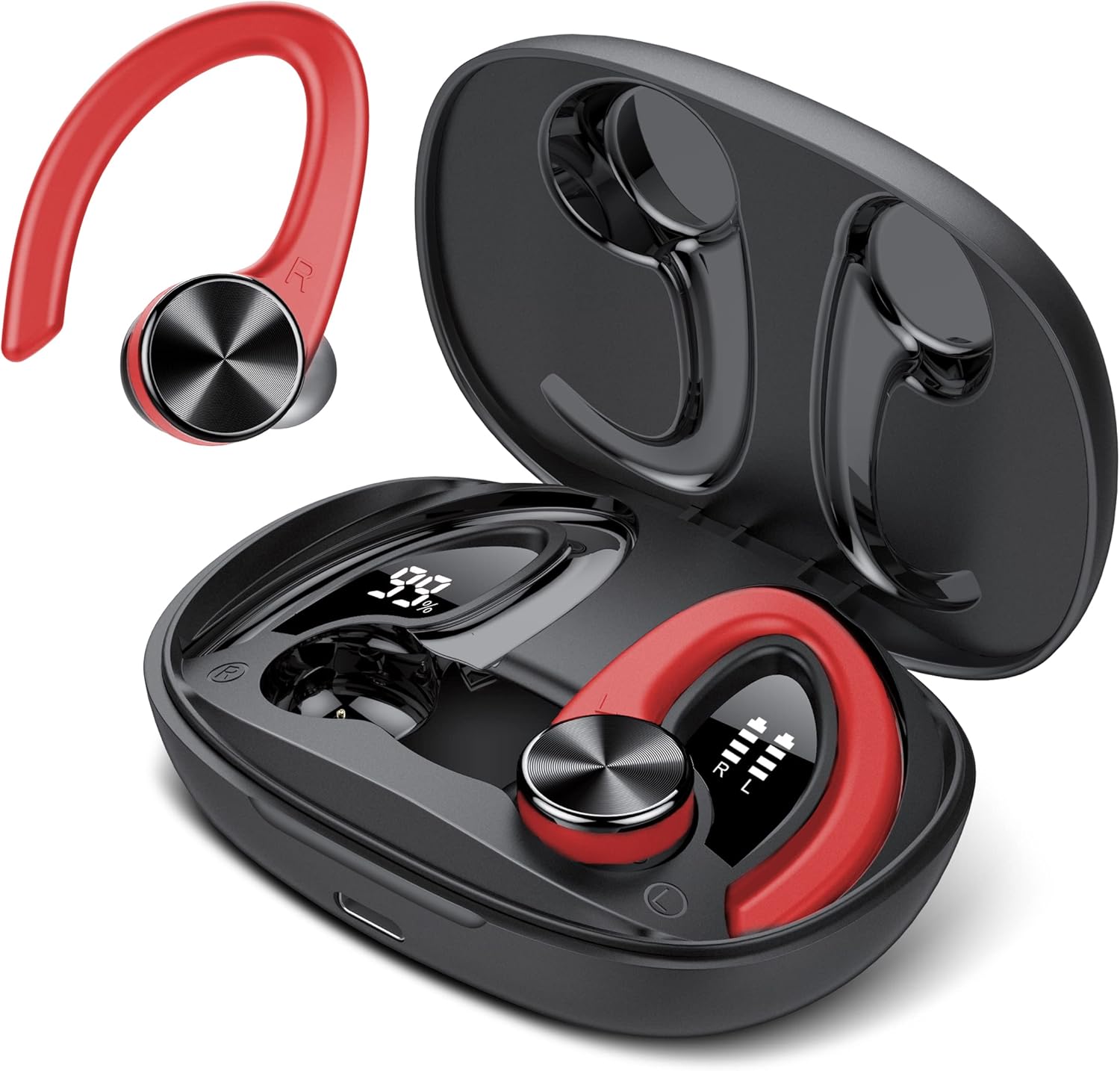
Image: The coioc U89 Bluetooth Sport Headphones, featuring a red and black design, shown alongside their open charging case. The earbuds have ear hooks for a secure fit during physical activity.
2. Kandungan Pakej
Sila semak pakej untuk item berikut:
- coioc U89 Bluetooth Sport Headphones (Left and Right)
- Kes Pengecasan
- Kabel Pengecas USB-C
- Ear Tips (Multiple Sizes: S, M, L)
- Manual Pengguna

Image: A visual representation of the package contents, including the headphones, charging case, USB-C cable, and ear tips.
3. Persediaan
3.1. Mengecas Fon Kepala dan Sarung
Before first use, fully charge the headphones and the charging case. Connect the provided USB-C cable to the charging port on the case and a power source. The LED display on the charging case will show the battery percentage of the case and individual battery levels for each earbud.
- A single charge provides up to 6 hours of playtime for the earbuds.
- The charging case provides multiple recharges, extending total playtime up to 45 hours.

Image: Illustration showing the 45-hour ultra-long playtime, with 6 hours from earbuds and additional charges from the case, highlighting Type-C fast charging.

Image: The charging case with its dual LED digital display, showing the charging case capacity (99%) and the individual earbud power levels (R and L).
3.2. Berpasangan dengan Peranti Anda
The coioc U89 headphones feature one-step pairing for convenience.
- Buka bekas pengecas dan keluarkan kedua-dua fon telinga. Ia akan memasuki mod berpasangan secara automatik.
- Pada peranti anda (telefon pintar, tablet, komputer riba), dayakan Bluetooth.
- Cari untuk "U89" in the list of available Bluetooth devices and select it to connect.
- Once connected, you will hear a confirmation tone, and the headphones will be ready for use.
The headphones are compatible with almost all Bluetooth-enabled devices, including iPhone, Samsung, Android, and iOS devices.

Image: A smartphone screen showing Bluetooth settings with "U89" available for connection, illustrating the one-step pairing process.

Image: Icons representing iOS, Android, tablet, and laptop, indicating the wide compatibility of the headphones with various devices.
3.3. Memakai Fon Kepala
Untuk kualiti dan keselesaan bunyi yang optimum, pastikan padanan yang betul.
- Choose the correct size of ear tips (S, M, L) that provide a snug seal in your ear canal.
- Place the earbud into your ear.
- Position the ear hook over your ear to secure the headphone in place. Adjust for comfort.
The bionic 3D ergonomic design ensures a stable and comfortable fit, especially during sports activities.

Image: A woman wearing the coioc U89 headphones during a workout, demonstrating the comfortable and unshakable fit.

Image: A step-by-step guide showing how to choose the right ear tip size, place the earbud, and adjust the ear hook for a secure and comfortable fit.
4. Arahan Operasi
The coioc U89 headphones feature smart touch controls on each earbud for easy operation.

Image: A detailed diagram illustrating the various touch controls on the earbud, including playback, volume, track skipping, call management, and voice assistant activation.
4.1. Main balik Muzik
- Main/Jeda: Double-tap either the Left (L) or Right (R) earbud.
- Kelantangan: Single-tap the Right (R) earbud.
- Perlahankan suara: Single-tap the Left (L) earbud.
- Lagu Seterusnya: Tekan lama fon telinga Kanan (R) selama 2 saat.
- Trek Sebelumnya: Tekan lama fon telinga Kiri (L) selama 2 saat.
4.2. Pengurusan Panggilan
- Jawab/Tamatkan Panggilan: Double-tap either the Left (L) or Right (R) earbud.
- Tolak Panggilan: Long press either the Left (L) or Right (R) earbud for 2 seconds.
4.3. Pembantu Suara
- Aktifkan Pembantu Suara: Triple-tap either the Left (L) or Right (R) earbud.
5. Penyelenggaraan dan Penjagaan
5.1. Pembersihan
Pembersihan tetap membantu mengekalkan prestasi dan kebersihan yang optimum.
- Lap fon telinga dan bekas pengecas dengan kain lembut, kering dan tidak berbulu.
- Tanggalkan hujung telinga dan bersihkannya dengan sabun lembut dan air. Pastikan ia benar-benar kering sebelum dipasang semula.
- Jangan gunakan pembersih yang melelas, alkohol atau pelarut kimia.
5.2. Rintangan Air (IPX7)
The coioc U89 headphones are rated IPX7 waterproof, meaning they can withstand immersion in water up to 1 meter for 30 minutes. This makes them suitable for workouts and protection against sweat and rain.
- Do not intentionally submerge the charging case in water, as it is not waterproof.
- Pastikan fon telinga kering sebelum meletakkannya semula ke dalam bekas pengecas untuk mengelakkan kerosakan.

Image: An earbud with water splashing around it, visually representing its IPX7 waterproof rating.
5.3. Penyimpanan
Apabila tidak digunakan, simpan fon kepala di dalam bekas pengecas untuk melindunginya daripada habuk dan kerosakan.
6. Penyelesaian masalah
If you encounter any issues with your coioc U89 headphones, please refer to the following common solutions:
| Masalah | Penyelesaian |
|---|---|
| Fon kepala tidak berpasangan |
|
| Tiada bunyi dari satu fon telinga |
|
| Isu pengecasan |
|
| Kualiti bunyi yang lemah |
|
7. Spesifikasi
| Ciri | Perincian |
|---|---|
| Jenama | coioc |
| Nombor Model | U89 |
| Teknologi Ketersambungan | Wayarles (Bluetooth 5.3) |
| Versi Bluetooth | 5.3 |
| Faktor Bentuk | Over-Ear (with ear hooks) |
| Penilaian Kalis Air | IPX7 |
| Masa Main Earbud | Sehingga 6 jam |
| Jumlah Masa Main (dengan kes) | Sehingga 45 jam |
| Mengecas Bateri Kes | 500 mAh |
| Port Pengecasan | USB-C |
| Dimensi Produk | 8.8 x 6.1 x 3.2 cm; 132 Gram |
| bahan | plastik |
| Peranti Serasi | iPhone, Samsung, Android, iOS |
8. Waranti dan Sokongan
coioc products are designed and manufactured to the highest quality standards. For any warranty claims or technical support, please contact coioc customer service through the retailer where you purchased the product or visit the official coioc brand store online. Please retain your proof of purchase for warranty purposes.
Untuk maklumat lanjut, lawati coioc Brand Store.


