1. Produk Lebihview
The GER DETECT Titan 1000 is a multi-system long-range metal detector designed for locating underground treasures and various metals. It integrates five distinct search systems into a single device, offering advanced capabilities for prospectors and explorers.
Ciri-ciri utama termasuk:
- Five integrated search systems for comprehensive detection.
- Detection depth up to 45 meters underground.
- Front range detection up to 2500 meters.
- Accurate discrimination and identification of target types.
- Digital smart screen for target direction and location.
- Ability to specify metal types (gold, silver, copper, etc.) and cavities.
- 3D imaging capabilities for visualizing underground layers and targets.

Figure 1: The GER DETECT Titan 1000 metal detector system, shown alongside a representation of detected treasures.
2. Persediaan dan Pemasangan
Before operating the Titan 1000, ensure all components are present and correctly assembled. Refer to the following steps for initial setup.
2.1 Membongkar dan Pengecaman Komponen
Carefully unpack all items from the packaging. Verify that all components listed in the packing list are present. The system typically includes the main control unit, search coils, sensor rods, power cables, and accessories.
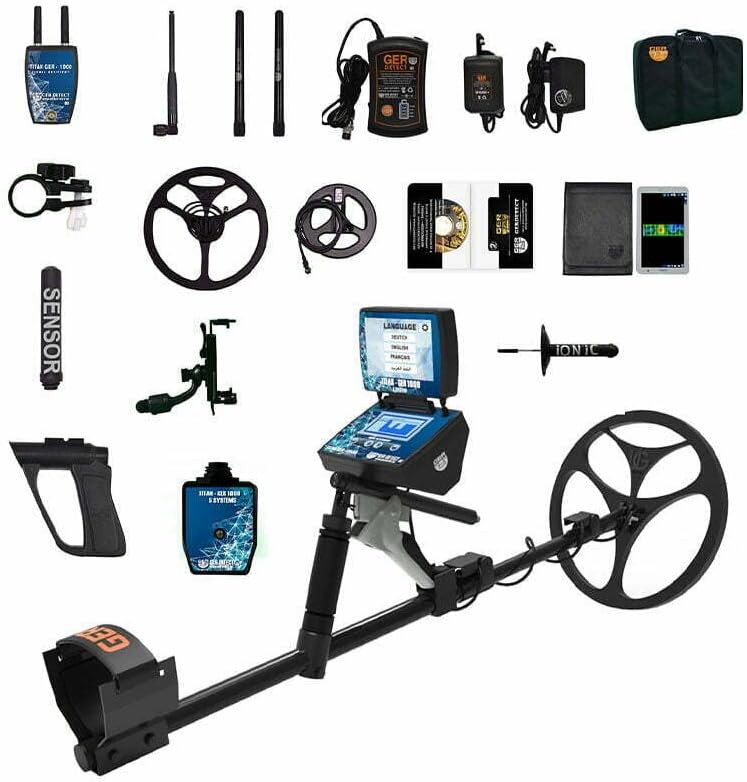
Rajah 2: Tamatview of all components included with the GER DETECT Titan 1000 system, including the main unit, search coils, sensors, and accessories.
2.2 Main Unit Assembly
- Attach the main control unit to the adjustable shaft. Ensure it is securely fastened using the provided clamps atau skru.
- Connect the search coil to the lower end of the shaft. Tighten the connection to prevent wobbling during use.
- If applicable, connect the handle and armrest to the shaft for comfortable operation.
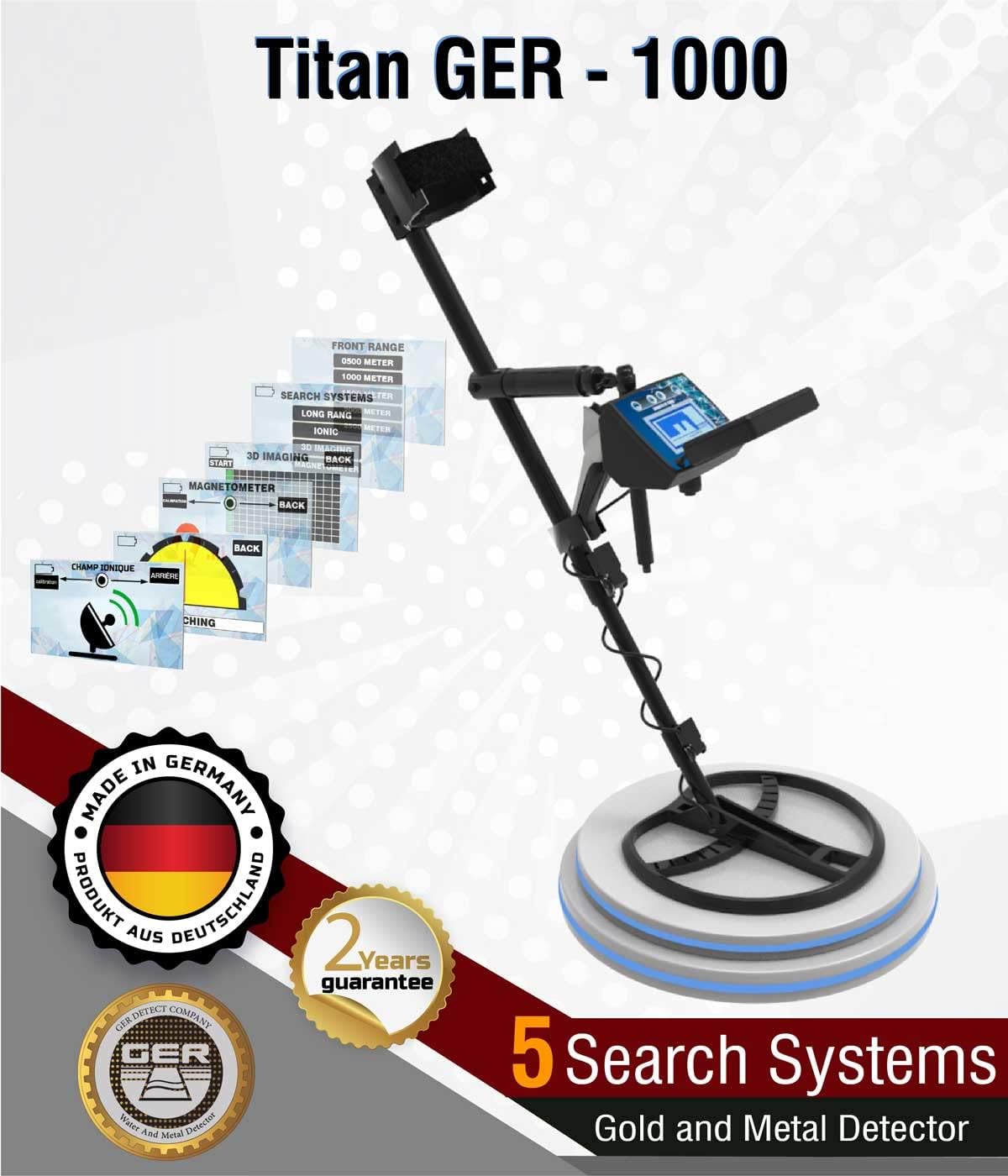
Figure 3: The GER DETECT Titan 1000 metal detector fully assembled, ready for use.
2.3 Sensor Rod Assembly (if applicable)
For specific search systems, the handheld sensor unit may be required. Assemble the sensor rods to the main handheld unit as shown in the diagram.
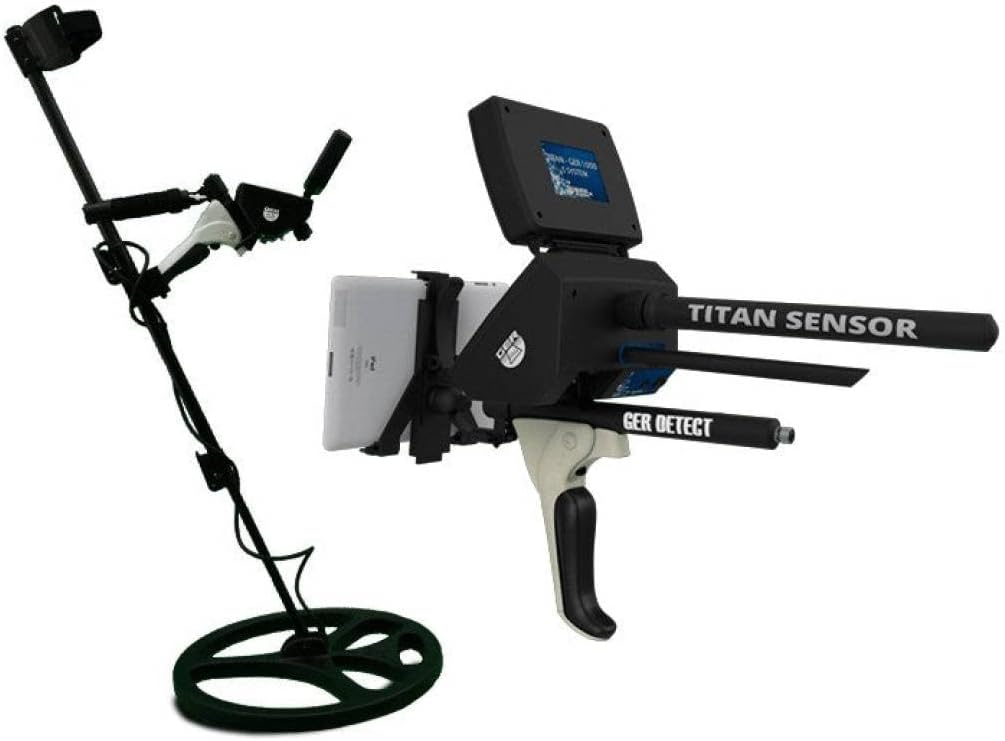
Figure 4: The handheld sensor unit, a component of the Titan 1000 system, designed for specific detection modes.
2.4 Menghidupkan
Ensure the device's battery is fully charged. Connect the battery to the main control unit. Press and hold the power button until the display illuminates. The device will typically perform a self-test upon startup.
3. Arahan Operasi
The Titan 1000 features five distinct search systems. Familiarize yourself with each system to optimize your detection efforts.
3.1 Menavigasi Antara Muka Pengguna
The device's digital smart screen provides access to all settings and displays detection information. Use the navigation buttons (up, down, left, right, select) to move through menus and confirm selections.

Figure 5: The main control unit of the Titan 1000, showing the digital display and control buttons for system navigation.
3.2 Selecting a Search System
From the main menu, select the desired search system. The Titan 1000 offers systems such as Long Range, Ionic, 3D Imaging, Magnetometer, and others. Each system is optimized for different detection scenarios.

Figure 6: A user operating the GER DETECT Titan 1000 in an open field, demonstrating typical usage.
3.3 Long Range System Operation
This system is designed for detecting targets at significant distances. Configure the front range (500m, 1000m, 1500m, 2000m, 2500m) and depth (up to 45m) settings via the menu. The device will guide you towards the detected target using directional indicators on the screen.
- Diskriminasi Sasaran: Select the specific metal type you wish to search for (e.g., gold, silver, copper, diamonds, cavities). The device will filter out other signals.
- Target Pinpointing: Once a target is detected, follow the on-screen guidance. The device will help narrow down the target area to approximately one square meter.
3.4 Ionic System Operation
The Ionic system detects ion fields emitted by buried metals and treasures. Activate this system, and point the device in various directions. Upon detecting an ion field, the device will emit an audible signal. Follow the signal to approach the target.

Figure 7: A user wearing headphones while operating the Titan 1000, which is essential for hearing subtle audio cues from the Ionic system.
3.5 3D Imaging System Operation
This system scans underground layers and presents the data as 3D images on the display. It visualizes detected targets such as gold, silver, other valuable metals, treasures, and cavities, indicating their depth.
- Prosedur Pengimbasan: Follow the on-screen instructions for performing a scan. This typically involves moving the search coil or sensor over the target area in a specific pattern.
- Analisis Data: Interpret the 3D images to identify potential targets and their estimated depth.
3.6 Magnetometer System Operation
The Magnetometer system detects variations in the Earth's magnetic field, which can indicate the presence of ferrous metals or disturbed ground associated with buried objects or structures.
3.7 Handheld Sensor Operation
Certain detection modes utilize the handheld sensor unit. Hold the unit steady and sweep it across the area of interest. The device will provide feedback on potential targets.

Figure 8: A user demonstrating the operation of the handheld sensor unit, which is used for specific detection tasks.
4. Penyelenggaraan dan Penjagaan
Proper maintenance ensures the longevity and optimal performance of your GER DETECT Titan 1000.
- Pembersihan: After each use, wipe down the device with a soft, damp cloth. Avoid abrasive cleaners or solvents. Ensure no dirt or debris accumulates in connectors or moving parts.
- Storan: Store the detector in a dry, cool place, away from direct sunlight and extreme temperatures. If storing for extended periods, remove the battery.
- Penjagaan Bateri: Recharge the battery regularly, even if not in use, to maintain its health. Avoid fully discharging the battery frequently.
- Pemeriksaan: Periodically inspect cables, connectors, and the search coil for any signs of wear or damage.
5. Penyelesaian masalah
This section addresses common issues you might encounter with your Titan 1000.
| Masalah | Kemungkinan Punca | Penyelesaian |
|---|---|---|
| Peranti tidak dihidupkan. | Battery discharged or improperly connected. | Ensure battery is charged and securely connected. Check power button functionality. |
| No detection or erratic signals. | Incorrect settings, environmental interference, or faulty coil/sensor connection. | Verify search system and discrimination settings. Move away from known electrical interference. Check all cable connections. |
| Paparan kosong atau beku. | Gangguan perisian atau isu kuasa. | Perform a hard reset (refer to specific instructions in the full manual if available). Ensure battery is charged. |
| Inaccurate target identification. | Improper calibration or environmental factors. | Recalibrate the device according to the operating instructions. Practice in known areas to improve familiarity with signals. |
If issues persist, contact GER DETECT customer support for further assistance.
6. Spesifikasi
| Ciri | Perincian |
|---|---|
| Model | Titan 1000 (gt1000) |
| Jenama | GER DETECT (LONG RANGE) |
| Sistem Pengesanan | 5 (Long Range, Ionic, 3D Imaging, Magnetometer, etc.) |
| Kedalaman Pengesanan Maksimum | 45 meter |
| Max. Front Range | 2500 meter |
| Sumber Kuasa | Dikuasakan Bateri (Bateri Diperlukan: Ya) |
| bahan | Suitable for Gold, Metal detection |
| warna | Perak |
| Berat Barang | 2 Paun (lebih kurang 0.91 kg) |
| Dimensi Produk | 28 x 21 x 13 inci (lebih kurang 71 x 53 x 33 cm) |
| Penilaian Perlindungan Antarabangsa | IP54 |
| UPC | 786724922360, 769947003696 |
7. Waranti dan Sokongan
The GER DETECT Titan 1000 comes with a manufacturer's warranty. For specific warranty terms and conditions, please refer to the documentation included with your purchase or contact GER DETECT directly.
For technical support, service, or inquiries regarding your device, please contact the manufacturer:
- Pengeluar: GER Detect
- Maklumat Hubungan: Refer to the official GER Detect website or the contact details provided in your product packaging for the most current support channels.
When contacting support, please have your model number (Titan 1000 or gt1000) and purchase date available.


