pengenalan
This manual provides detailed instructions for the proper use and maintenance of your Cellularline FINE Transparent TWS Wireless In-Ear Earbuds. Please read this manual thoroughly before using the product to ensure optimal performance and longevity.
The Cellularline FINE Transparent TWS Wireless In-Ear Earbuds feature a distinctive transparent design, showcasing the internal components of both the earbuds and their charging case. Designed for comfort and high-quality audio, these earbuds offer up to 3.5 hours of playtime per charge, extended to a total of 10 hours with the charging case. They include intuitive touch controls for managing calls and music, and an auto-pairing function for effortless connection. The Double Master function allows for independent use of either earbud.
Maklumat Keselamatan
- Jangan dedahkan fon telinga atau bekas pengecasan kepada suhu, kelembapan atau cecair yang melampau.
- Elakkan daripada menjatuhkan, menghentam atau membuka peranti. Ini boleh membatalkan jaminan.
- Jauhkan daripada kanak-kanak dan haiwan peliharaan.
- Gunakan hanya kabel pengecasan yang disediakan atau setara yang diperakui.
- Dengar pada tahap kelantangan sederhana untuk mengelakkan kerosakan pendengaran.
- Jangan gunakan fon telinga dalam situasi di mana ketidakupayaan untuk mendengar bunyi ambien boleh membahayakan (contohnya, memandu, berbasikal, berjalan kaki dalam lalu lintas).
Kandungan Pakej
Sila semak pakej untuk item berikut:
- Cellularline FINE Transparent TWS Wireless In-Ear Earbuds (Left and Right)
- Kes Pengecasan
- Kabel Pengecas USB
- Manual Pengguna
Produk Selesaiview
The Cellularline FINE earbuds are designed for ease of use and a distinctive aesthetic. Below is an overview daripada komponen utama.
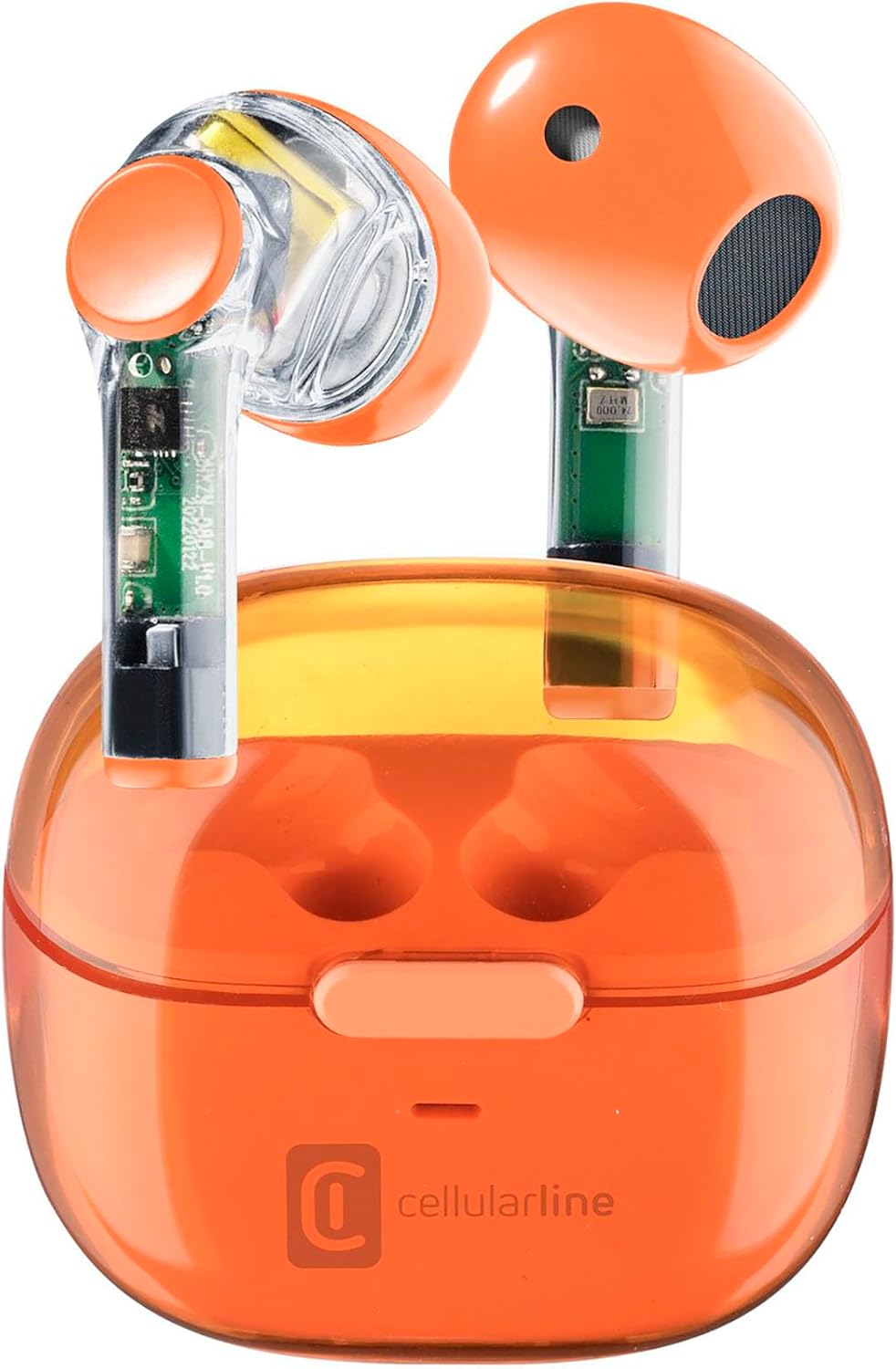
Image: Cellularline FINE Transparent TWS Wireless In-Ear Earbuds in their charging case. The earbuds and case feature a transparent orange design, revealing internal circuitry.

Imej: Jarak dekat view highlighting the transparent design of the Cellularline FINE earbuds, showing the internal components.
Komponen:
- Earbud: Left and Right, with touch control surfaces and microphones.
- Sarung Pengecasan: Houses and charges the earbuds, with a charging port and LED indicator.
- Kawasan Kawalan Sentuh: Terletak di permukaan luar setiap fon telinga untuk pelbagai fungsi.
- mikrofon: Integrated into each earbud for calls.
Persediaan
1. Mengecas Fon Telinga dan Sarung
Sebelum penggunaan pertama, cas sepenuhnya fon telinga dan bekas pengecas.
- Letakkan kedua-dua fon telinga ke dalam bekas pengecas. Pastikan ia diletakkan dengan betul.
- Connect the USB charging cable to the charging port on the case and to a compatible USB power source (e.g., computer, wall adapter).
- Penunjuk LED pada bekas pengecasan akan menunjukkan status pengecasan. Setelah dicas sepenuhnya, penunjuk akan berubah atau padam.
- A full charge provides approximately 3.5 hours of playtime for the earbuds, and the case can provide up to 4 additional charges, totaling 10 hours of playtime.

Image: Illustration showing the earbuds and charging case, indicating 3.5 hours of playtime per single charge and 10 hours of total playtime with the charging case.
2. Pairing with Your Device (Auto-Pairing)
The earbuds feature an auto-pairing function for quick and easy connection.
- Pastikan Bluetooth peranti anda dihidupkan.
- Buka bekas pengecasan dan keluarkan kedua-dua fon telinga. Mereka akan menghidupkan dan memasuki mod berpasangan secara automatik.
- On your device, search for Bluetooth devices and select "Cellularline FINE" (or similar name) from the list.
- Setelah disambungkan, anda akan mendengar pengesahan yang boleh didengar, dan fon telinga akan sedia untuk digunakan.
- Untuk kegunaan seterusnya, fon telinga akan bersambung secara automatik ke peranti pasangan terakhir apabila dialih keluar daripada sarung.

Image: A smartphone displaying a music player interface, with the Cellularline FINE earbuds and charging case nearby, illustrating the fast Bluetooth pairing process.
3. Memakai Earbud
Untuk kualiti dan keselesaan bunyi yang optimum, pastikan fon telinga diletakkan dengan betul di telinga anda.
- Masukkan setiap fon telinga ke dalam telinga yang sepadan dengan lembut (kiri untuk kiri, kanan untuk kanan).
- Laraskan fon telinga sehingga ia berasa selamat dan selesa.

Image: A woman smiling while wearing the Cellularline FINE earbuds, demonstrating comfort and stability during use.
Arahan Operasi
Kawalan Sentuh
The Cellularline FINE earbuds feature intuitive touch controls on each earbud. The specific functions may vary slightly depending on your device and operating system.
| Tindakan | Fungsi |
|---|---|
| Ketik Tunggal (Earbud Kiri atau Kanan) | Mainkan / Jeda muzik, Jawapan / Tamatkan panggilan |
| Ketik Dua Kali (Earbud Kanan) | Trek Seterusnya |
| Ketik Dua Kali (Earbud Kiri) | Trek Sebelumnya |
| Ketik Tiga Kali (Earbud Kiri atau Kanan) | Aktifkan Pembantu Suara |
| Tekan Panjang (Earbud Kanan) | Tingkatkan Kelantangan |
| Tekan Panjang (Earbud Kiri) | Kurangkan Kelantangan |
| Long Press (2 seconds) during incoming call | Tolak Panggilan |
Single Earbud Use (Double Master Function)
The Double Master function allows you to use either the left or right earbud independently. This is useful for calls or when you need to be aware of your surroundings.
- Simply remove one earbud from the charging case. It will automatically connect to your device.
- The other earbud can remain in the case or be used later.
- To switch back to stereo mode, simply remove the second earbud from the case.
Penyelenggaraan
Pembersihan
- Bersihkan fon telinga dan bekas pengecas dengan kerap menggunakan kain yang lembut, kering dan tidak berbulu.
- Jangan gunakan pembersih yang melelas, alkohol atau pelarut kimia.
- Tanggalkan kotoran telinga atau serpihan dari hujung fon telinga dan jaring pembesar suara dengan lembut menggunakan berus kecil yang lembut atau kapas.
- Ensure the charging contacts on both the earbuds and the case are clean and free of dust.
Penyimpanan
- Apabila tidak digunakan, sentiasa simpan fon telinga dalam bekas pengecasnya untuk melindunginya dan memastikan ia dicas.
- Simpan peranti di tempat yang sejuk dan kering, jauh dari cahaya matahari langsung dan suhu yang melampau.
Menyelesaikan masalah
If you encounter any issues with your Cellularline FINE earbuds, refer to the following common solutions:
| Masalah | Penyelesaian yang Mungkin |
|---|---|
| Fon telinga tidak berpasangan atau bersambung |
|
| Hanya satu fon telinga berfungsi |
|
| Kelantangan rendah atau kualiti bunyi yang lemah |
|
| Fon telinga tidak dicas |
|
Spesifikasi
| Ciri | Perincian |
|---|---|
| Jenama | Talian selular |
| Nombor Model | BTFINETWSO |
| warna | Jingga Lutsinar |
| Penempatan Telinga | Dalam Telinga |
| Faktor Bentuk | Dalam Telinga |
| Pengasingan Bunyi | Pengasingan Akustik |
| Teknologi Ketersambungan | Wayarles (Bluetooth) |
| Komponen yang Disertakan | fon telinga |
| Bateri boleh dicas semula | Yes (Lithium-ion) |
| Ciri Khas | Volume Control, Microphone Included |
| Kaedah Kawalan | Sentuh |
| Penggunaan yang Disyorkan | Music Listening, Phone Calls, Sports, Outdoor Leisure |
| Peranti Serasi | Laptops, Tablets, Mobile Phones, Music Production Equipment |
| bahan | plastik |
| Masa Main Earbud | Sehingga 3.5 jam |
| Jumlah Masa Main (dengan kes) | Sehingga 10 jam |
Waranti dan Sokongan
Cellularline products are designed and manufactured to the highest quality standards. For information regarding warranty coverage, technical support, or service, please refer to the official Cellularline webtapak atau hubungi perkhidmatan pelanggan mereka secara langsung. Simpan bukti pembelian anda untuk tuntutan waranti.
Untuk bantuan lanjut, sila layari: www.cellularline.com