pengenalan
Thank you for choosing the Admiral 50-inch Ultra HD LED Smart TV, model ADL50UWOSAC. This manual provides essential information for setting up, operating, maintaining, and troubleshooting your new television. Please read these instructions carefully before using the product to ensure proper operation and to maximize your viewpengalaman dalam.
This television features a 4K LED display, Dolby Sound System, WebOS, built-in Chromecast, Bluetooth, and Wi-Fi connectivity, offering a wide range of entertainment options.
1. Persediaan
1.1 Membongkar
Carefully remove the TV from its packaging. Ensure all accessories are present, including the remote control, power cable, and stand components. Retain the packaging for future transport or service needs.
1.2 Pemasangan Stand
Untuk memasang pendirian TV:
- Letakkan skrin TV ke bawah pada permukaan yang lembut dan rata untuk mengelakkan kerosakan.
- Sejajarkan tapak penyangga dengan slot yang sepadan di bahagian bawah TV.
- Selamatkan dirian menggunakan skru yang disediakan. Pastikan ia diketatkan dengan kuat.
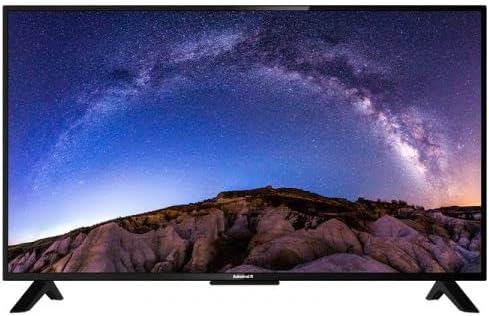
Imej: Depan view of the Admiral 50-inch Smart TV with its stand properly installed. This shows the display and the two support feet at the bottom.
1.3 Menyambung Peranti
Before connecting any devices, ensure the TV is unplugged from the power outlet.
- Kabel kuasa: Sambungkan kabel kuasa ke input kuasa TV dan kemudian ke saluran keluar dinding.
- Peranti HDMI: Use HDMI cables to connect external devices such as Blu-ray players, gaming consoles, or set-top boxes to the HDMI ports on the TV.
- Peranti USB: Masukkan pemacu USB untuk main balik media ke dalam port USB.
- Antena/Kabel: Connect an antenna or cable TV source to the RF input.

Imej: Belakang view of the Admiral 50-inch Smart TV, highlighting the location of various input ports including HDMI, USB, and power input.
1.4 Kuasa Awal Hidup dan Wizard Persediaan
After connecting all necessary cables, plug the TV into a power outlet. Press the power button on the remote control or on the TV itself. The TV will guide you through the initial setup wizard, which includes:
- Pemilihan bahasa.
- Sambungan rangkaian (Wi-Fi atau Ethernet).
- Pengimbasan saluran.
- Time zone settings.
2. Arahan Operasi
2.1 Fungsi Kawalan Jauh
Alat kawalan jauh yang disediakan membolehkan anda menavigasi ciri-ciri TV. Fungsi utama termasuk:
- Butang Kuasa: Menghidupkan atau mematikan TV.
- Input/Sumber: Selects the input source (HDMI 1, USB, TV, etc.).
- Kelantangan Naik/Turun: Melaraskan tahap bunyi.
- Saluran Atas/Bawah: Menukar saluran TV.
- Butang Navigasi (Kekunci Anak Panah, OK): Menavigasi menu dan mengesahkan pilihan.
- Butang rumah: Accesses the Smart TV home screen (WebOS).
- Butang Pintasan Apl: Direct access to popular streaming services like Netflix, YouTube, and Prime Video.
2.2 Ciri TV Pintar (WebOS)
Your Admiral Smart TV runs on WebOS, providing an intuitive user interface for accessing various applications and content.
- Papan Pemuka Laman Utama: Press the Home button to access the main dashboard, where you can find installed apps, input sources, and settings.
- App Store: Muat turun dan pasang aplikasi tambahan daripada gedung aplikasi bersepadu.
- Chromecast Terbina dalam: Cast content from compatible mobile devices or computers directly to your TV. Ensure your device and TV are on the same Wi-Fi network.
- Kesambungan Bluetooth: Connect Bluetooth-enabled devices such as headphones or soundbars wirelessly to the TV. Access Bluetooth settings in the TV menu.
- Kesambungan Wi-Fi: Connect to your home wireless network for internet access and smart features. Manage Wi-Fi settings in the TV's network menu.
2.3 Pemilihan Sumber Input
To switch between connected devices or TV channels, press the "Input" or "Source" button on your remote control. A menu will appear, allowing you to select the desired input (e.g., HDMI 1, HDMI 2, USB, TV).
3. Penyelenggaraan
3.1 Membersihkan TV
- Skrin: Lap skrin perlahan-lahan dengan kain lembut yang tidak berbulu. Untuk tanda degil, sedikit dampen kain dengan air atau pembersih skrin khusus. Jangan sembur cecair terus ke skrin.
- Badan: Gunakan kain lembut dan kering untuk membersihkan TVasing. Elakkan menggunakan pembersih atau pelarut yang kasar.
- Sentiasa cabut plag TV sebelum membersihkan.
3.2 Kemas Kini Perisian
Periodically check for software updates through the TV's settings menu. Updates can improve performance, add new features, and enhance security. Ensure the TV is connected to the internet during the update process.
4. Penyelesaian masalah
Jika anda menghadapi masalah dengan TV anda, rujuk kepada penyelesaian biasa berikut sebelum menghubungi sokongan.
| Masalah | Penyelesaian yang Mungkin |
|---|---|
| Tiada kuasa |
|
| Tiada gambar atau bunyi |
|
| Alat kawalan jauh tidak berfungsi |
|
| Tidak dapat menyambung ke Wi-Fi |
|
5. Spesifikasi
| Ciri | Perincian |
|---|---|
| Jenama | Laksamana |
| Nombor Model | ADL50UWOSAC |
| Saiz Skrin | 50 Inci |
| Teknologi Paparan | LED |
| Resolusi | 4K Ultra HD |
| Kadar Segar Semula | 60 Hz |
| Sistem Operasi | WebOS |
| Ciri Khas | Built-In Speaker, Dolby Sound System, Chromecast Built-in |
| Teknologi Ketersambungan | HDMI, USB, Wi-Fi, Bluetooth |
| Nisbah Aspek | 16:9 |
| Dimensi Produk (D x W x H) | 14D x 121W x 74H sentimeter |
| Berat Barang | 11.16 kg |
| Pengeluar | ADMIRAL TV |
6. Maklumat Waranti
This Admiral 50-inch Smart TV (Model ADL50UWOSAC) comes with a Waranti 2 tahun from the date of purchase. This warranty covers manufacturing defects and ensures peace of mind. Please retain your proof of purchase for warranty claims. For specific terms and conditions, refer to the warranty card included with your product or contact Admiral customer support.
7. Sokongan Pelanggan
If you require further assistance, have questions not covered in this manual, or need to report a technical issue, please contact Admiral customer support. Refer to the contact information provided on the product packaging or the official Admiral webtapak untuk mendapatkan butiran sokongan yang paling terkini.
When contacting support, please have your TV model number (ADL50UWOSAC) and serial number ready.


