1. Pengenalan
This manual provides detailed instructions for the installation, operation, and maintenance of your OOYCYOO MPPT 60A Solar Charge Controller. This device is designed to efficiently manage power flow from your solar panels to your battery bank, ensuring optimal charging and system protection. It supports automatic 12V/24V system voltage identification and is compatible with various battery types.
Key features include a backlit LCD display, a 4-stage battery charging algorithm, and comprehensive protection functions.
2. Arahan Keselamatan
- Always connect the battery first, then the solar panel, and finally the load. Disconnect in reverse order.
- Ensure all wiring is correctly polarized to prevent damage.
- Do not connect inverters or inductive loads directly to the controller's load terminals.
- Pasang pengawal di kawasan yang mempunyai pengudaraan yang baik, jauh daripada bahan mudah terbakar.
- The controller generates heat during operation; ensure adequate airflow. The integrated cooling fan activates when the temperature exceeds 45°C and turns off below 40°C.
- Use appropriate circuit breakers and fuses for all connections.
- This device is for indoor use only. Protect it from water and moisture.
3. Produk Lebihview
The OOYCYOO MPPT 60A Solar Charge Controller is designed for efficient solar power management. It features an LCD display for real-time data, multiple protection functions, and support for various battery types.
3.1 Kandungan Pakej
- 1 x OOYCYOO MPPT 60A Solar Charge Controller
- 1 x Penderia Suhu
- 1 x Manual Pengguna (Bahasa Inggeris)
3.2 Pengenalan Komponen

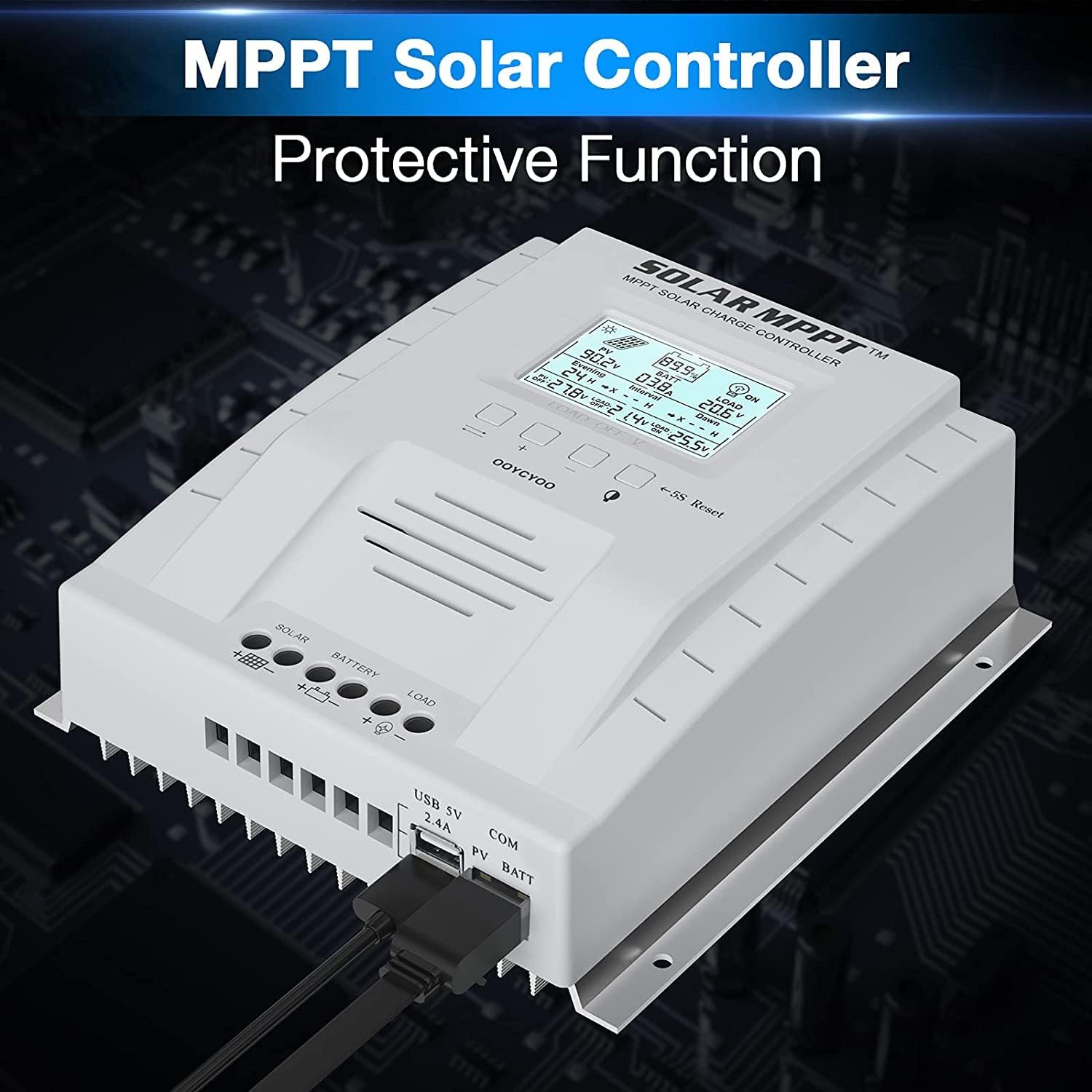
The controller features a clear LCD display on the front for monitoring system status. Below the display are control buttons for navigation and settings. Connection terminals for solar panels, battery, and load are located at the bottom. USB ports and an RS485 communication port are on the side.
4. Persediaan dan Pemasangan
Proper installation is crucial for the safe and efficient operation of your solar charge controller. Follow these steps carefully.
4.1 Memasang Pengawal
- Choose a dry, well-ventilated location, protected from direct sunlight, high temperatures, and water.
- Ensure there is sufficient space around the controller for heat dissipation.
- Mount the controller vertically on a wall or stable surface using the provided mounting holes.
4.2 Sambungan Pendawaian
Follow the connection order precisely to avoid damage to the controller or other components.
- Sambungkan Bateri: Connect the positive and negative terminals of the battery to the corresponding battery terminals on the controller. Ensure correct polarity. The controller will automatically detect the system voltage (12V atau 24V).
- Connect the Solar Panels: Connect the positive and negative leads from your solar panel array to the corresponding PV terminals on the controller. Ensure correct polarity. Do not exceed the maximum PV input voltage dari 100V DC.
- Sambungkan Beban (Pilihan): Connect your DC loads to the load terminals on the controller. Note that the load output is for DC loads only. Do not connect inverters or inductive loads directly to these terminals.
- Connect the Remote Temperature Sensor: Plug the temperature sensor into its dedicated port. This sensor helps the controller optimize charging based on battery temperature.

Nota Penting: Always connect the battery first and disconnect the solar panel last. Incorrect connection order can damage the controller.
5. Arahan Operasi
Once installed, the controller will begin operation automatically. The LCD display provides real-time system information.
5.1 Paparan LCD dan Butang

The backlit LCD displays critical system parameters such as PV voltage, bateri voltage, charging current, load current, and accumulated energy (KWH). The four buttons below the display are used for navigation and settings adjustment:
- Kunci Togol: Used to cycle through display screens or confirm selections.
- '+' (Plus) Key: Increases values or moves forward in menus.
- '-' (Minus) Key: Decreases values or moves backward in menus.
- Manual Switch Load Key: Toggles the load output on/off manually.
- 5S Reset: Tekan dan tahan selama 5 saat untuk memulihkan tetapan kilang.
5.2 Battery Charging Algorithm
The controller utilizes a 4-stage charging algorithm to optimize battery life and performance:
- Caj Pukal: Mengecas bateri pada arus maksimum sehingga volumtage mencapai vol rangsangantage.
- Caj Meningkatkan: Caj pada vol malartage for a set period to ensure full charge.
- Caj Terapung: Mengekalkan bateri pada volum yang lebih rendahtage to prevent self-discharge and overcharging.
- Equalization (for specific battery types): Mengecas bateri secara berlebihan secara berkala untuk mengimbangi volum seltagdan mencegah sulfasi.
5.3 Supported Battery Types
The controller is compatible with various battery types, including:
- Lead-Acid (Sealed, Gel, Flooded)
- Litium (LFP)
- User-defined parameters for other battery types.
Pre-set charging parameters are available for Sealed, Gel, Flooded, and LI (LFP) batteries. Users can customize parameters for other battery types as needed.
6. Fungsi Perlindungan
The OOYCYOO MPPT 60A Solar Charge Controller incorporates multiple protection mechanisms to ensure system safety and longevity:
- PV Overcurrent/Overpower Protection
- PV Short Circuit Protection
- Perlindungan Polariti Terbalik PV
- Reverse Charging at Night Protection
- Perlindungan Polariti Terbalik Bateri
- Bateri Overvoltage Perlindungan
- Battery Over-discharge Protection
- Battery Overtemperature Protection
- Controller Overtemperature Protection
- Lithium Battery Low Temperature Protection
- Perlindungan Litar pintas Beban
- Perlindungan Beban Beban
- TVS High Voltage Perlindungan Sementara
7. Penyelenggaraan
Regular maintenance ensures optimal performance and extends the lifespan of your solar charge controller.
- Semak Sambungan: Periodically inspect all wiring connections for tightness and corrosion. Tighten any loose connections.
- Bersihkan Pengawal: Keep the controller clean and free of dust. Use a dry cloth to wipe the exterior. Ensure ventilation openings are not obstructed.
- Periksa Kerosakan: Check for any signs of physical damage, overheating, or unusual odors.
- Pemeriksaan Bateri: Follow the manufacturer's maintenance guidelines for your specific battery type.
8. Penyelesaian masalah
Bahagian ini membincangkan isu biasa yang mungkin anda hadapi dengan pengawal cas solar anda.
| Masalah | Kemungkinan Punca | Penyelesaian |
|---|---|---|
| Controller not powering on / LCD blank | Tiada bateri yang disambungkan atau volum bateritage too low. Reverse polarity connection. | Ensure battery is connected first and has sufficient voltage. Check battery polarity. |
| Tiada pengecasan daripada panel solar | Solar panels not connected or reverse polarity. Insufficient sunlight. PV voltage terlalu rendah atau terlalu tinggi. | Check solar panel connections and polarity. Ensure adequate sunlight. Verify PV voltage is within operating range (e.g., 18V-96V for 12V system, 36V-96V for 24V system). |
| Beban tidak berfungsi | Load output disabled. Load short circuit or overload. Battery voltage terlalu rendah. | Check load output status on LCD. Disconnect load and check for short circuit. Ensure battery is sufficiently charged. |
| Pengawal terlalu panas | Poor ventilation. Excessive load or charging current. | Ensure adequate airflow around the controller. Reduce load or charging current if possible. |
| vol. tidak tepattage bacaan | Loose connections. Faulty temperature sensor. | Check all wiring connections. Ensure temperature sensor is properly connected. |
9. Spesifikasi
Technical specifications for the OOYCYOO MPPT 60A Solar Charge Controller.
| Parameter | Nilai |
|---|---|
| Kadar Caj Semasa | 60A |
| Sistem Voltage | 12V/24V Auto Identification |
| Maks. Litar Terbuka PV Voltage | 100V DC |
| Max. PV Input Power (12V System) | 750W |
| Max. PV Input Power (24V System) | 1500W |
| DC/DC Transfer Efficiency | Sehingga 98.7% |
| Suhu Operasi | -20 ℃ hingga + 55 ℃ |
| Saiz Terminal | 10 AWG |
| Dimensi (L*W*H) | 8.3 x 8.4 x 3.4 inci (21.2 x 20.8 x 8.4 cm) |
| Berat badan | 3 paun (1.28 kg) |
| Jenis Paparan | Lampu Latar LCD |
| UPC | 768461886785 |
| Nombor Model | P 60A |


10. Waranti dan Sokongan
For warranty information or technical support, please contact your retailer or the manufacturer directly. Refer to the product packaging or purchase documentation for specific contact details.


