1. Pengenalan
Terima kasih kerana membeliasing the Mediacom MCI SK22 Bluetooth Karaoke Speaker. This portable and rechargeable speaker system is designed to provide high-quality audio for music playback and karaoke performances. It comes equipped with two professional wireless microphones, offering a versatile entertainment experience for various occasions.
2. Maklumat Keselamatan
- Baca semua arahan dengan teliti sebelum menggunakan produk.
- Jauhkan pembesar suara daripada air, kelembapan dan suhu yang melampau.
- Jangan cuba membuka atau membaiki unit sendiri. Rujuk semua servis kepada kakitangan yang berkelayakan.
- Gunakan hanya penyesuai kuasa yang disediakan untuk mengecas.
- Elakkan meletakkan objek berat di atas pembesar suara.
- Pastikan pengudaraan yang betul di sekitar pembesar suara semasa penggunaan.
3. Kandungan Pakej
Sila tandai kotak untuk item berikut:
- Mediacom MCI SK22 Bluetooth Karaoke Speaker
- 2 x Mikrofon Tanpa Wayar
- Alat Kawalan Jauh
- Penyesuai Kuasa
- Manual Pengguna
4. Produk Lebihview
Familiarize yourself with the various parts and controls of your MCI SK22 speaker.
4.1 Depan View with Microphones

Imej: Depan view of the Mediacom MCI SK22 speaker, showcasing the main unit and the two accompanying wireless microphones.
4.2 Bahagian View

Imej: Sisi view of the Mediacom MCI SK22 speaker, highlighting its compact and portable design.
4.3 Belakang View dengan Pelabuhan

Imej: Belakang view of the Mediacom MCI SK22 speaker, displaying the various input and output ports for connectivity.
4.4 Dimensi Pembesar Suara
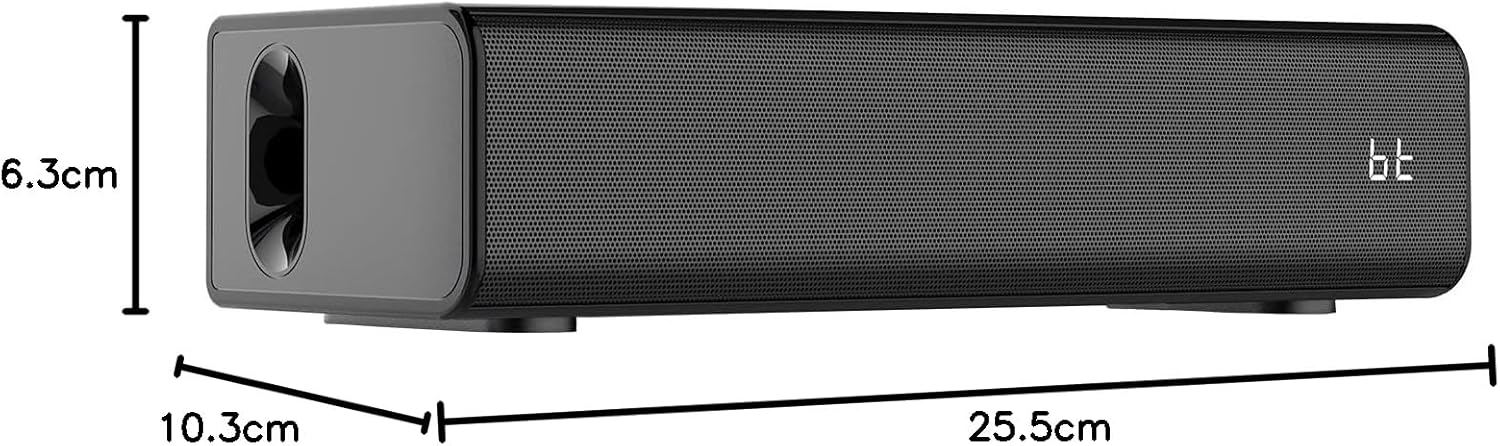
Image: A diagram illustrating the length, width, and height of the Mediacom MCI SK22 speaker.
5. Persediaan
5.1 Mengecas Speaker
- Sambungkan penyesuai kuasa yang disediakan ke port pengecasan pembesar suara.
- Palamkan penyesuai kuasa ke dalam salur keluar kuasa yang sesuai.
- The charging indicator light will illuminate. Allow the speaker to fully charge before first use (approximately X hours, refer to LED indicator for full charge).
5.2 Menghidupkan/Mematikan
- To power on, press and hold the Power button on the speaker or remote control until the display illuminates.
- Untuk mematikan kuasa, tekan dan tahan butang Kuasa sekali lagi.
5.3 Persediaan Mikrofon
- Ensure the wireless microphones have fresh batteries installed.
- Turn on the microphones using their respective power switches. They should automatically connect to the speaker.
6. Arahan Operasi
6.1 Berpasangan Bluetooth
- Turn on the speaker. The Bluetooth indicator will flash, indicating it is in pairing mode.
- Pada peranti anda (telefon pintar, tablet, dll.), dayakan Bluetooth dan cari peranti yang tersedia.
- Select "MCI SK22" from the list. Once paired, the Bluetooth indicator will stop flashing and remain solid.
6.2 Main Semula USB
- Masukkan pemacu kilat USB yang mengandungi audio MP3 files ke dalam port USB pada pembesar suara.
- The speaker will automatically switch to USB mode and begin playing music. Use the speaker's or remote's controls to navigate tracks.
6.3 Input AUX
- Connect an external audio device (e.g., TV, computer, music player) to the speaker's AUX input port using a 3.5mm audio cable (not included).
- The speaker will automatically switch to AUX mode. Adjust volume from both the speaker and the connected device.
6.4 Microphone Usage and Echo Effects
- Once connected, speak or sing into the wireless microphones.
- Use the dedicated controls on the speaker or remote to adjust microphone volume and apply echo effects for an enhanced karaoke experience.
6.5 Kawalan Kelantangan
- Adjust the main speaker volume using the volume controls on the speaker or the remote control.
- Individual microphone volume can be adjusted separately.
7. Penyelenggaraan
- Pembersihan: Gunakan kain lembut dan kering untuk membersihkan permukaan pembesar suara. Jangan gunakan pembersih atau pelarut yang melelas.
- Storan: Apabila tidak digunakan untuk tempoh yang lama, simpan pembesar suara di tempat yang sejuk dan kering, jauh dari cahaya matahari langsung dan suhu yang melampau.
- Penjagaan Bateri: To prolong battery life, fully charge the speaker before storing it for long periods and recharge it every few months.
8. Penyelesaian masalah
| Masalah | Kemungkinan Punca | Penyelesaian |
|---|---|---|
| Tiada kuasa | Battery is low or depleted. Power adapter not connected. | Charge the speaker using the provided power adapter. Ensure the power adapter is securely connected to both the speaker and the power outlet. |
| Tiada bunyi | Volume is too low. Incorrect input mode selected. Device not properly connected. | Increase the volume on the speaker and the connected device. Ensure the correct input mode (Bluetooth, USB, AUX) is selected. Check all cable connections. |
| Bluetooth tidak berpasangan | Speaker is not in pairing mode. Device's Bluetooth is off. Interference. | Ensure the speaker's Bluetooth indicator is flashing. Turn off and on your device's Bluetooth. Move closer to the speaker and away from other wireless devices. |
| Mikrofon tidak berfungsi | Microphone batteries are low. Microphones are not turned on. | Replace microphone batteries. Ensure microphones are switched on. |
9. Spesifikasi
| Ciri | Perincian |
|---|---|
| Jenama | Mediacom |
| Nombor Model | MCI SK22 |
| Teknologi Ketersambungan | Bluetooth, AUX, USB |
| Input Audio | Bluetooth, AUX, USB |
| Ciri Khas | Bass boost, USB port, Built-in microphone, Hi-Res Audio, Echo effects |
| Peranti Serasi | Mobile Phone, iPhone, Laptop, Smartphone, TV, Computer, Tablet, Music Player, DVD Player |
| Sumber Kuasa | Dikuasakan Bateri |
| bahan | plastik |
| warna | Hitam |
| Dimensi Item (L x W x H) | 10.3 x 25.5 x 6.3 cm |
| Berat Barang | 1.68 Kilogram |
| Pengeluar | China |
10. Waranti dan Sokongan
Mediacom products are designed for reliability and performance. For warranty information and technical support, please refer to the warranty card included in your package or visit the official Mediacom webtapak. Simpan resit pembelian anda sebagai bukti pembelian untuk sebarang tuntutan waranti.


