1. Pengenalan
Thank you for choosing the COSTWAY Electric Height Adjustable Desk. This desk is designed to provide a versatile and ergonomic workspace, allowing you to easily switch between sitting and standing positions. It features a smart control panel with memory presets and an anti-collision system for safe and convenient operation. Please read this manual thoroughly before assembly and use to ensure proper function and longevity of your desk.

Image 1.1: The COSTWAY Electric Height Adjustable Desk in a standing position, demonstrating its ergonomic design.
2. Maklumat Keselamatan
- Pastikan semua sambungan selamat sebelum mengendalikan meja.
- Jauhkan kanak-kanak dan haiwan peliharaan dari meja semasa operasi untuk mengelakkan kecederaan.
- Jangan letakkan objek yang lebih tinggi daripada ketinggian maksimum meja di bawahnya.
- Elakkan meletakkan cecair terus pada panel kawalan atau berhampiran komponen elektrik.
- Jangan bebankan meja melebihi kapasiti berat yang ditetapkan.
- If any unusual noise or movement occurs, discontinue use and consult the troubleshooting section or contact support.
3. Kandungan Pakej
The COSTWAY Electric Height Adjustable Desk is delivered in two separate packages. Please ensure you have received both boxes before beginning assembly.
- Kotak 1: Atas meja (x1)
- Kotak 2: Desk Frame (x1), Control Panel (x1), Accessories (all assembly tools and hardware)

Image 3.1: The desk components are shipped in two distinct packages.
4. Arahan Perhimpunan
Assembly of the electric standing desk is straightforward. An illustrated instruction manual is included in Box 2 to guide you through each step. All necessary assembly tools are provided.
- Unpack all components from both boxes and verify against the parts list in the instruction manual.
- Assemble the desk frame according to the provided diagrams.
- Pasangkan permukaan meja pada bingkai yang telah dipasang.
- Connect the control panel and motor cables as indicated in the manual.
- Ensure all screws are tightened securely before plugging in the desk.

Image 4.1: Key components of the desk frame and tabletop, including the cable management hole.
5. Arahan Operasi
5.1. Pelarasan Ketinggian
The desk's height can be adjusted between 28 inches (minimum) and 46 inches (maximum) to accommodate both sitting and standing postures. The powerful motor operates quietly (under 50dB) at a speed of 1 inch per second.
- Tekan ke UP button (▲) to raise the desk.
- Tekan ke TURUN button (▼) to lower the desk.
- Release the button at your desired height. The LED display will show the current height.

Image 5.1: Demonstrating the sit-to-stand functionality and height range.
5.2. Memory Positions
The control panel allows you to save up to four preferred height settings for quick adjustment.
- Laraskan meja ke ketinggian yang anda inginkan menggunakan butang ATAS/BAWAH.
- Press one of the memory buttons (1, 2, 3, atau 4) until the LED display flashes or indicates the position is saved.
- To recall a saved height, simply press the corresponding memory button. The desk will automatically move to that position.
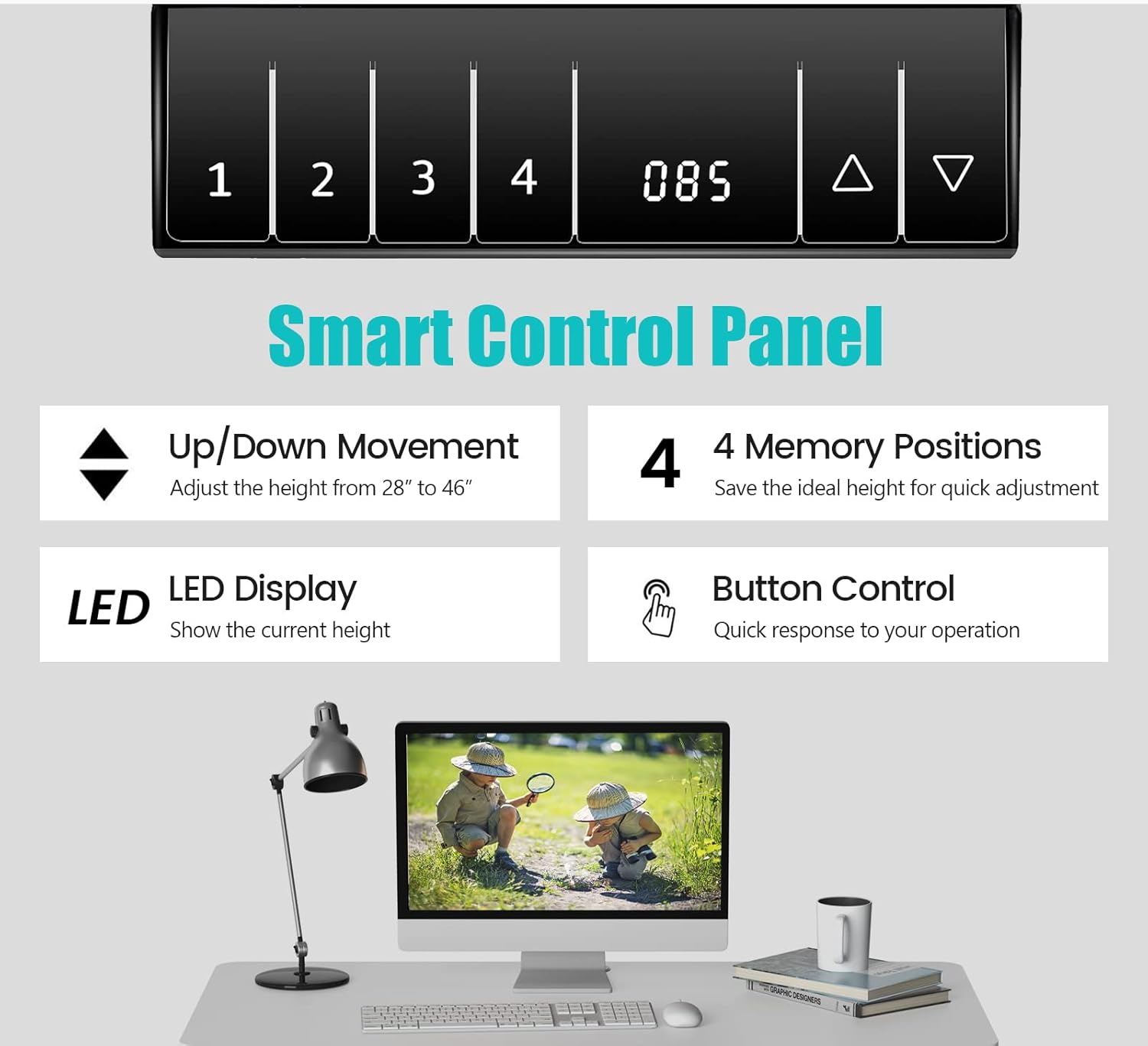
Image 5.2: The smart control panel for height adjustment and memory presets.
5.3. Anti-Collision Design
The desk is equipped with an anti-collision system that detects obstacles during height adjustment. If an obstruction is encountered, the desk will automatically stop and reverse slightly to prevent damage or injury.

Image 5.3: The anti-collision protection system in action.
6. Penyelenggaraan
- Pembersihan: Wipe the desk surface and frame with a dry, soft cloth. Avoid abrasive cleaners or harsh chemicals that may damage the finish.
- Pemeriksaan: Periksa semua skru dan sambungan secara berkala untuk memastikan ia kekal ketat.
- Pengurusan Kabel: Utilize the built-in cable hole to keep wires organized and prevent tangling, which can interfere with desk movement.

Image 6.1: The desk surface is designed for easy cleaning.
7. Penyelesaian masalah
- Meja Tidak Bergerak:
- Periksa sama ada kord kuasa dipasang dengan selamat pada kedua-dua meja dan salur keluar dinding.
- Ensure all motor and control panel cables are properly connected.
- If an error code appears on the LED display, refer to the full instruction manual for specific code meanings.
- Pergerakan atau Goyangan Tidak Sekata:
- Sahkan bahawa semua skru pemasangan telah diketatkan.
- Adjust the foot pads at the base of the desk to ensure stability on uneven floors.
- Memory Positions Not Saving/Recalling:
- Ensure you press and hold the memory button until the display confirms the setting is saved.
- If issues persist, try resetting the desk (refer to the full instruction manual for reset procedures).
8. Spesifikasi
| Jenama | COSTWAY |
| Nombor Model | 67581-CYWH |
| Dimensi Keseluruhan (L x W x H) | 48" x 24" x 28"-46" (120 cm x 60 cm x 72-116 cm) |
| Ketinggian Minimum | 28 Inci |
| Ketinggian Maksimum | 46 Inci |
| Kapasiti Berat | 155 paun (70 kg) |
| bahan | MDF, Keluli |
| Kelajuan Larian | 1"/s |
| Tahap Kebisingan | <50dB |
| warna | putih |

Image 8.1: Visual representation of the desk's dimensions and performance metrics.
9. Waranti dan Sokongan
This COSTWAY Electric Height Adjustable Desk comes with a limited warranty. For specific details regarding your warranty coverage, please refer to the documentation included with your purchase or contact COSTWAY customer service.
If you encounter any issues not covered in the troubleshooting section or require further assistance, please contact COSTWAY customer support. Have your model number (67581-CYWH) and purchase information ready when contacting support.
Maklumat Hubungan: Please refer to the official COSTWAY website or your purchase receipt for the most up-to-date customer service contact details.


